Cursor position reading function in the tool geometry offset screen Supplement to Manual Page 2
Supplement to Manual
2 / 2
Edit
Apprv
Desig
.
Sheet
Title
Draw
No.
Date
Desig
Description
Date
FANUC Series16
i
/18
i
/21
i
–TB
Cursor position reading function in the
tool geometry offet screen.
A-76508 EN
2002.11.22
ISOHATA
1. Outline
This function can read the offset number and the axis number of the location where
the cursor is set on the tool geometry offset screen to P-CODE variable # 8575 and #
8576.
2.
Specification
The offset number and the axis number in the part where the cursor has been
matched now can be known by reading # 8575 and # 8576 in the auxiliary macro
application the tool geometry offset screen displayed.
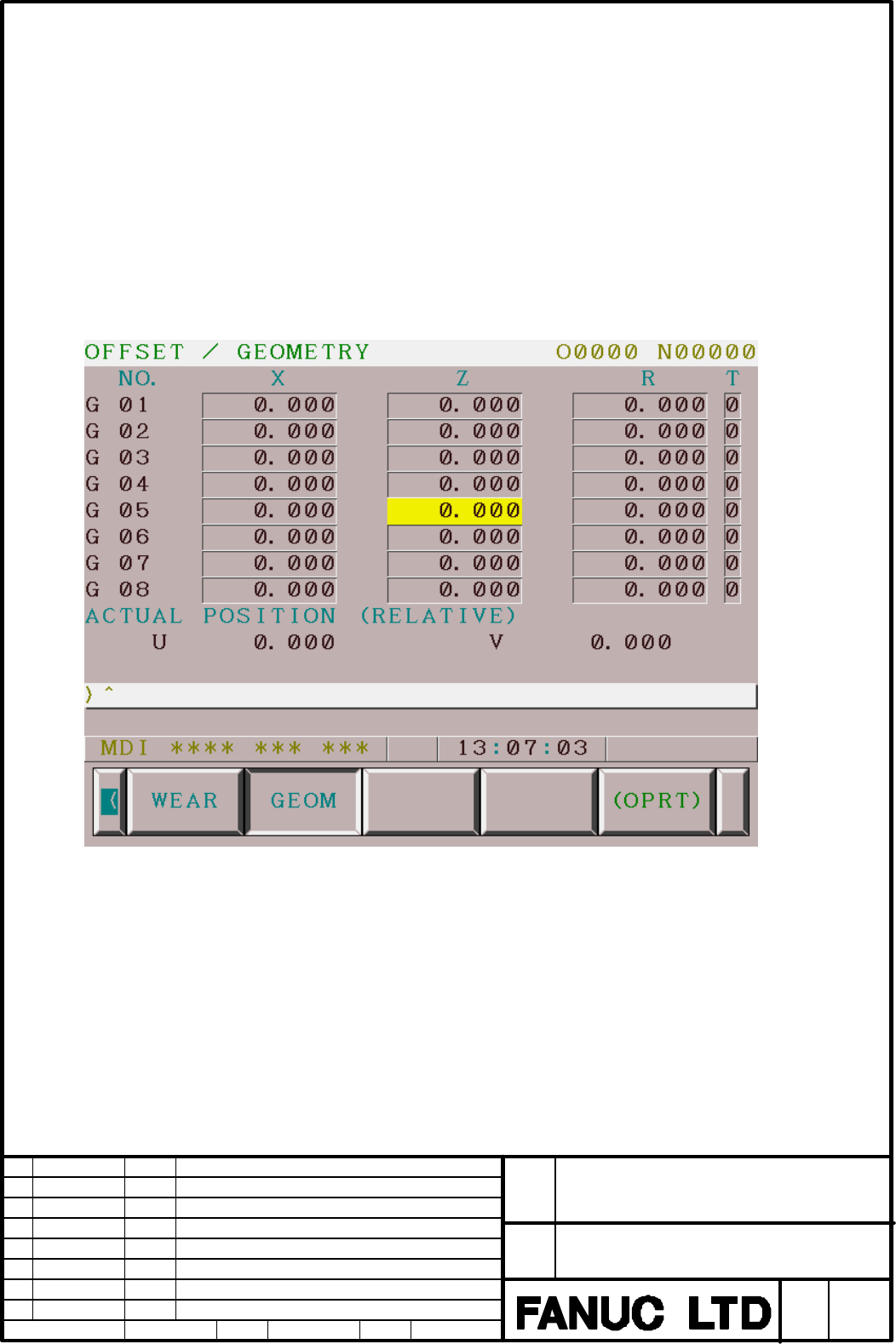
Example) When there is a cursor in the position like the figure below
# 8575 becomes 5.0000000 and # 8576 becomes 2.0000000 when they are read out in
this screen.
note) # 8575 and # 8576 become both =0 while displaying screens other than the tool
geometry offset screen.
Contents Summary of Cursor position reading function in the tool geometry offset screen Supplement to Manual
- Page 1FANUC Series 16 i /18 i/21 i - TB Specification Cursor position reading function in the tool geometry offset screen. Index 1. Outline 2 2. Specification 2 FANUC Series16i /18i/21i –TB Title Cursor position reading function in the tool geometry offet screen. Draw No. A-76508 EN Edit Date Desig Descri
- Page 21. Outline This function can read the offset number and the axis number of the location where the cursor is set on the tool geometry offset screen to P-CODE variable # 8575 and # 8576. 2. Specification The offset number and the axis number in the part where the cursor has been matched now can be kno