FANUC Series 30i/31i/32i-MODEL A Update the Validated Date of Certification Card, Operating Manual Additional Manual Page 4
Additional Manual
A-79965E/01
Title
Draw
No.
Ed. Date Design Description
Date Jan.26.’05 Design. Apprv.
4/4
page
FANUC Series 30i/31i/32i-MODEL A
Update the validated date of certification card
Operating manual
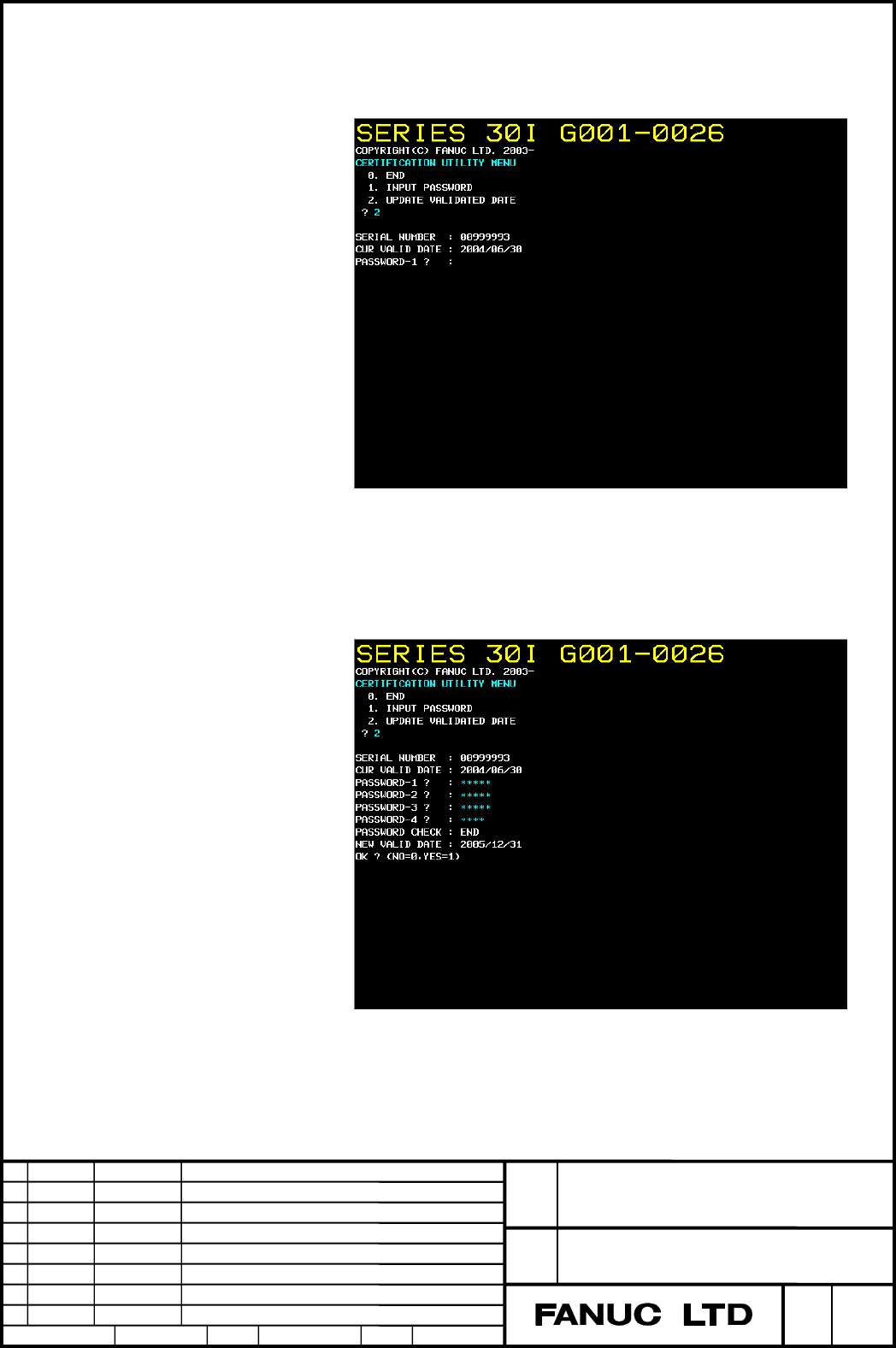
3) For displaying serial number and inputting the password for update
the validated date.
Input “2” ,and select “ 2.UPDATE VALIDATED DATE”
The serial number and validated date is displayed.
Press the reset key when discontinue the update.
4) Input the password in order of PASSWORD-1, 2, 3, and 4.
(As for the input of the password, "*" is displayed instead of the input
key. )
Contents Summary of FANUC Series 30i/31i/32i-MODEL A Update the Validated Date of Certification Card, Operating Manual Additional Manual
- Page 1FANUC Series 30i/31i/32i-MODEL A Update the validated date of certification card Operating manual FANUC Series 30i/31i/32i-MODEL A Title Update the validated date of certification card Operating manual Draw A-79965E/01 No. Ed. Date Design Description page 1/1 Date Jan.26.’05 Design. Apprv.
- Page 21.1 Update the validated date of certification card In case of update the validated date of the certification card, it is available to use the password for update the validated date. 1. Confirm the Serial Number. 2. Customers inform FANUC of the Serial number. 3. FANUC sends the password for FANUC u
- Page 35. Input the password for update the validated date of certification card. The password is set as follows. 1) Input “9”, and select “ 9. CERTIFICATION UTILITY” in IPL MENU screen. 2) CERTIFICATION UTILITY MENU is displayed. FANUC Series 30i/31i/32i-MODEL A Title Update the validated date of certific
- Page 43) For displaying serial number and inputting the password for update the validated date. Input “2” ,and select “ 2.UPDATE VALIDATED DATE” The serial number and validated date is displayed. Press the reset key when discontinue the update. 4) Input the password in order of PASSWORD-1, 2, 3, and 4. (A
- Page 56. The validated date is updated, and displayed the result. If inputted password is right data, new validated date is displayed. If stop the update, enter " 0". If execute the update, enter " 1". The validated date is updated, and displayed the result. CAUTION 1. Don’t power-off or detached the cert