Ethernet Re-recognition at start-up on Fanuc PANEL i Additional Manual Page 3
Additional Manual
Ed.
Recog.
Desi
g
.
2
/
3
Date Desi
g
. DESCRIPTION
DATE
Drawing No.
Title
Sheet
Ethernet Re-recognition at start-up
on FANUC PANEL i
A-83136E
4. CAUSE
EEPROM which is used in PANEL i master circuit board as MAC address storage was
discontinued. Therefore, we changed it to the new EEPROM.
When PANEL i with the master circuit board mounted the new EEPROM is start up with
connecting to the HDD which current OS image is pre-installed, OS recognizes that the different
EEPROM is mounted and OS requires re-installing of the new network driver for the new circuit.
5. COUNTERMEASURE
(1) When the phenomenon is appeared on the shipped PANEL i, we would like to make OS to
re-recognize correctly the installed Ethernet driver by the following way.
We can suggest two procedures for re-recognition. One way use the drivers disk CD-ROM
(A08B-0084-K790) and the other way does not use it.
A full keyboard or a mouse must be connected to a display unit for this operation.
Using the drivers disk CD-ROM
(Note) It is necessary to connect the CD-ROM drive to PANEL i before following operation.
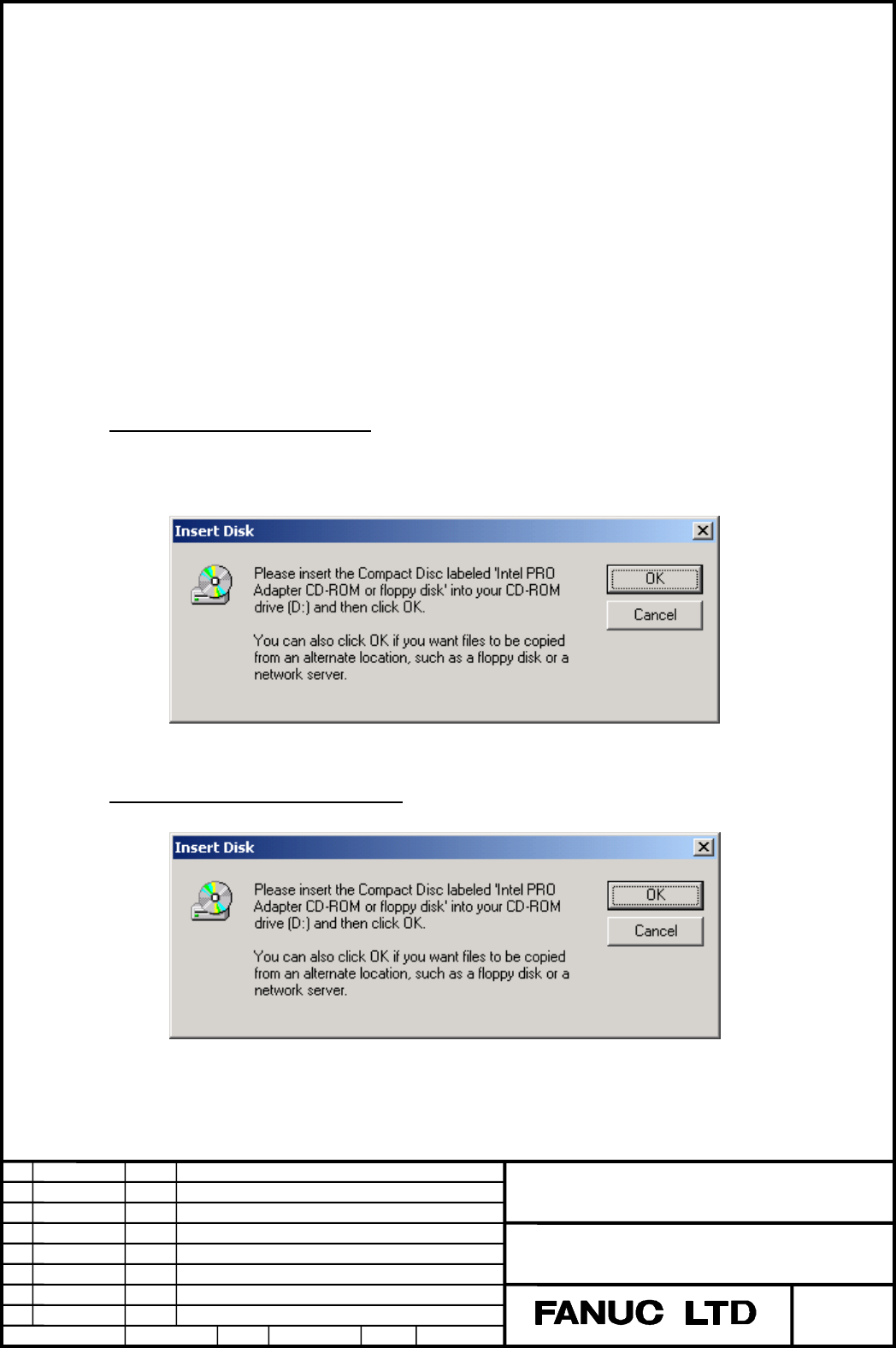
A) When the following message is appeared on the screen, insert the drivers disk
CD-ROM into the CD-ROM drive, and press [OK] button.
B) Necessary files are loaded automatically.
Not using the drivers disk CD-ROM
A) When the following message is appeared on the screen, press [OK] button.
Contents Summary of Ethernet Re-recognition at start-up on Fanuc PANEL i Additional Manual
- Page 1TECHNICAL REPORT No. TMN 04/002E Date . , 2004 General Manager of CNC Laboratory Ethernet Re-recognition at start-up on FANUC PANEL i 1. Communicate this report to: Your information O GE Fanuc-N, GE Fanuc-E FANUC Robotics CINCINNATI MILACRON O Machine tool builder Sales agency End user 2. Summary fo
- Page 2Ethernet Re-recognition at start-up on FANUC PANEL i 1. OUTLINE This document describes the phenomenon and countermeasure about Ethernet re-recognition on FANUC PANEL i with Celeron 733MHz / Pentium III 866MHz / Pentium III 1.26GHz CPU when Windows 2000 Professional (We call it “Windows 2000” after
- Page 34. CAUSE EEPROM which is used in PANEL i master circuit board as MAC address storage was discontinued. Therefore, we changed it to the new EEPROM. When PANEL i with the master circuit board mounted the new EEPROM is start up with connecting to the HDD which current OS image is pre-installed, OS reco
- Page 4B) When the following message is appeared on the screen, enter ‘C:\WINNT\system32\drivers’ on [Copy files from] box, then press [OK] button. C) When the following message is appeared on the screen, enter ‘C:\WINNT\system32’ on [Copy files from] box, then press [Retry] button. D) Wait until the follo