Backup-Guideline for Control Configurations within Automotive Programs Users manual Page 13
Users manual
2.3.2 FROM data to be saved (Display Unit)
For regular Backup procedure the application files stored in the FROM shall be saved. These are:
• PMC Ladder program (file: PMC-SB)
• Macro Executor File (file: PDx□□□□)
• C-Executor Files (file: CEX□□□□□)
• FANUC Picture Screens (file: CEX0FPDT)
Dependent on the application, not every CNC station uses C-Executor/Macro Executor files.
However, the PMC Ladder program can be found at all CNCs. This must be saved in any case.
Following Steps shall be performed:
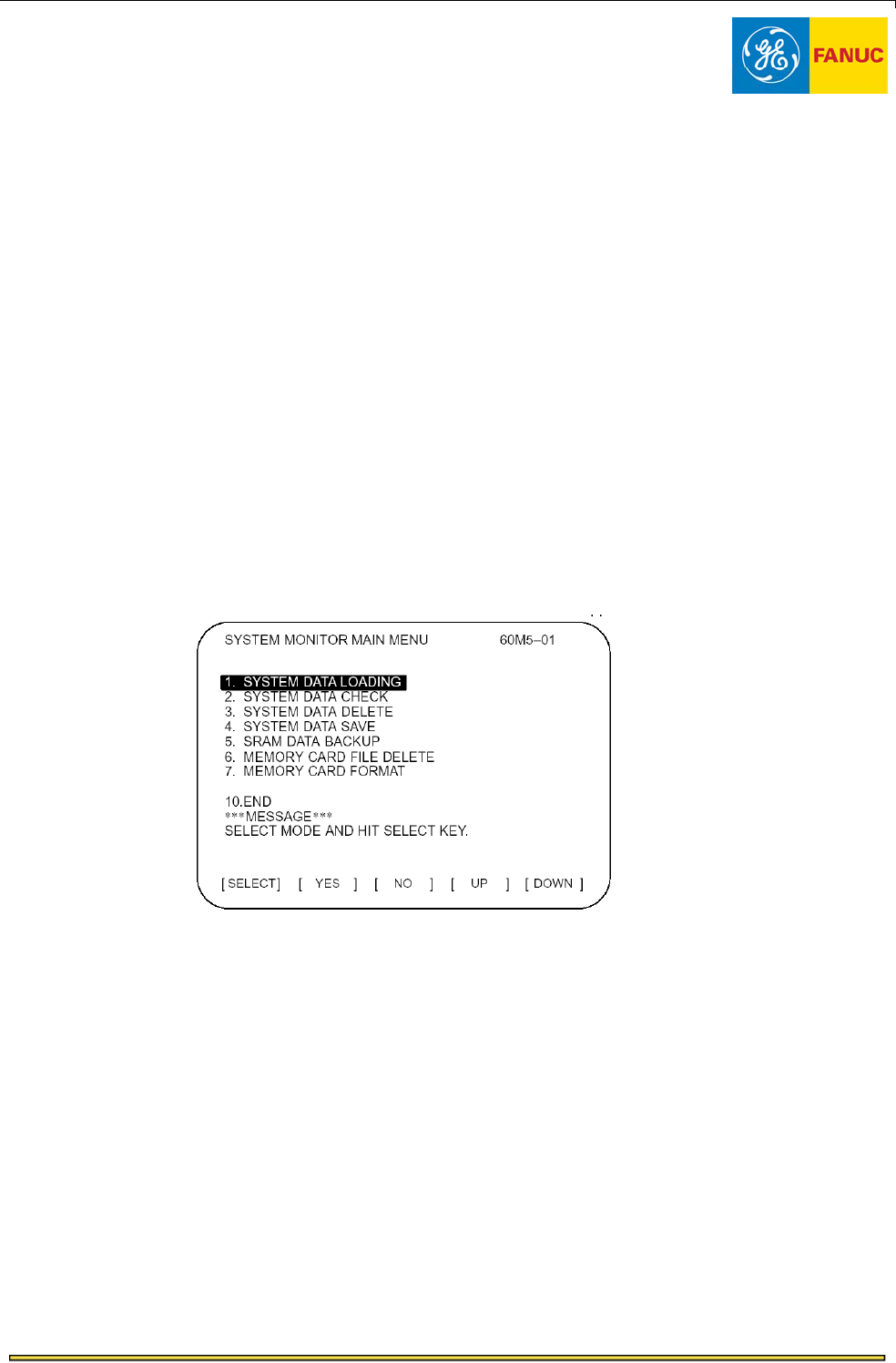
Figure 4: Standard Boot Menu
• Apply a Memory Card to PCMCIA Slot of the Display Unit.
• Start the Boot Menu by pressing two most-right soft keys during power up of the CNC.
• From the Main Menu select [SYSTEM DATA SAVE]
All the FROM files stored in the CNC are displayed.
• With the soft keys [UP] and [DOWN] search and select the file PMC-SB.
Note: One page of the Boot Menu can display up to 8 files. Press the most-right soft key on
the Display Unit to display the next page.
• Press the [SELECT] key
• Confirm the selection by pressing [YES]
File Name: Backup_Guidance_EN21.doc
Created by: Olaf Sklepik on 20-Apr-05
Approved by: n/a
Page 13 of 72
Contents Summary of Backup-Guideline for Control Configurations within Automotive Programs Users manual
- Page 1Backup-Guideline for Control Configurations within Automotive Programs Automation Solution Backup-Guideline File Name: Backup_Guidance_EN21.doc Page 1 of 72 Created by: Olaf Sklepik on 20-Apr-05 Approved by: n/a
- Page 2For latest version, questions, or assistance related to the GE Fanuc Program Book, please contact your local GE Fanuc Sales / Application Engineer. GE Fanuc Automation Contacts: GE Fanuc Automation CNC Europe S.A. GE Fanuc Automation CNC Europe S.A. Automotive Account Executive HQ Engineering Allaou
- Page 3Revision History Table - Revision Status lists the latest version and date for the various sections of the specification. Versions 0.X are pre–release draft versions. Versions 1.X to X.X are post release versions. The number to the left of the decimal in the version number indicates the major versio
- Page 4Table Of Contents Trademarks....................................................................................................................................... 7 1 Outline.............................................................................................................................
- Page 5List of Figures Figure 1: Memory of the CNC Unit .................................................................................................................... 9 Figure 2: CNC Configuration with Display Unit ......................................................................................
- Page 6Figure 44: Creating Network Boot Disks (2) .................................................................................................... 50 Figure 45: Creating Network Boot Disks (3) .................................................................................................... 51 Figure
- Page 7Trademarks Symantec, the Symantec logo, Symantec Ghost, Ghost Walker, Ghost Explorer, and GDisk are Trademarks of Symantec Corporation. Microsoft, MS-DOS, Windows, and Windows NT are registered trademarks of Microsoft Corporation. IBM, OS/2, and OS/2 Warp are registered trademarks of International B
- Page 82 CNC Backup Procedure The FANUC / GE Fanuc CNC comes with an own Boot Menu, which makes it easy to save or load system data, setting data and application programs. Two different procedures dependent on the CNC configuration must be considered. 1. The CNC is connected to a LCD-Display only The name
- Page 92.1 Recommended CNC Data to be saved on regular Basis Within the CNC Unit, there are three different kinds of memory. FROM max. 32MB CNC System Data Graphic Software Servo Software SRAM max. 3MB PMC System Software Profibus System All Setting Data and Software Ethernet System CNC Programs: Software
- Page 102.2 FROM File Naming Convention Data files registered in the CNC follow an own naming convention. Even they are loaded with a different name, the CNC displays these files according the convention in the Boot Menu. The naming is identical for both CNC configurations (Display Unit/Panel i) File Name C
- Page 112.3 CNC Backup when Display Unit is applied This chapter describes the Backup procedure for machines, where no PC is applied. These configurations can be found at transfer line stations. The CNC is connected over a fiber optic cable to a TFT-Display with PCMCIA card slot. With this, Backup/Restore p
- Page 122.3.1 Boot Menu (System Monitor) The Boot Menu is displayed by pressing two soft keys at the time the control is turned on. The soft key combination determines, whether the standard Boot Menu or the extended Boot Menu is started. For regular maintenance including Backup/Restore, the standard Boot Me
- Page 132.3.2 FROM data to be saved (Display Unit) For regular Backup procedure the application files stored in the FROM shall be saved. These are: • PMC Ladder program (file: PMC-SB) • Macro Executor File (file: PDx□□□□) • C-Executor Files (file: CEX□□□□□) • FANUC Picture Screens (file: CEX0FPDT) Dependent
- Page 14• The file PMC-SB is stored onto Memory Card. The message FILE SAVE COMPLETE shows proper operation. • Press [SELECT] key to make a new choice (i.e. CEX□□□□□ or PDx□□□□). • When all application files are saved select for the END item on the last page. • When END is marked press soft key [SELECT] to
- Page 152.3.3 Complete SRAM Backup (Display Unit) It is highly recommended to perform a SRAM Backup, whenever changes on the CNC settings have been performed. The SRAM Backup contains all NC part programs, NC parameters, Profibus and FL-Net settings, Offsets, PMC Parameters and variables. A SRAM Backup cons
- Page 16• Press the [SELECT] key • Confirm the selection by pressing [YES] • Dependent on SRAM size, up to six files are generated and stored onto memory card. Please wait until the message SRAM BACKUP COMPLETE is displayed. • Press [SELECT] key. • With soft keys [UP] and [DOWN] select END item and press so
- Page 172.3.4 Restoring FROM/SRAM data (Display Unit) For restoring the application files, following procedure shall be performed: • Prepare a memory card with the application files, which have to be loaded onto FROM of the CNC. Note: The name of the files can be arbitrary. The CNC detects the file type aut
- Page 18For restoring a SRAM Backup, following steps shall be performed: • Prepare a memory card with the SRAM Backup files. Note: Contrary to FROM files, the SRAM files must comply to the naming, which has been given by the CNC. The original file name must not be changed. In case of a SRAM Backup two examp
- Page 192.3.5 System Software Protection (Display Unit) Usually it is not required to save or delete system software like NC BASIC and others. Moreover, in standard mode, it is not possible to save a system software file onto a memory card or to delete a system software file by using the standard Boot Menu.
- Page 202.3.6 Check of System Software Versions (Display Unit) The system software version of loaded software can be displayed by selecting Boot Menu item SYSTEM DATA CHECK. However, the loaded software is also displayed in the standard CNC screens when the CNC has booted up. Figure 7: Verifying System Soft
- Page 212.4 CNC Backup using Panel i / Panel i for Automotive This chapter describes a Backup procedure of FANUC / GE Fanuc CNC Units, which are connected to Front-end PCs like the FANUC Panel i or Panel i for Automotive. This configuration is used within many Automotive projects. On those installations the
- Page 222.4.1 Pre-conditions for Backup/Restore Procedure (Panel i) To perform Backup and Restore functions, the CNC must be connected to the Panel i over HSSB optical cable. For maintaining the CNC system data and for Backup/Restore functions, a small PC application program ‘NCBOOT32.EXE running on the Pan
- Page 23Then the CNC must be turned on again and the Boot Menu appears on PC Display: Figure 11: NC Boot Menu (1) The Boot Menu shows the System Data, which is stored in the FROM. In the headline, the actual memory board of the CNC is shown. It is recommended to create a subfolder on the Panel i hard disk f
- Page 24As the first step the Backup path or drive must be selected. This can be achieved by pressing [SETTINGS..] button in the Boot Menu. A new window is opened. The operator can select the PCMCIA-Slot on the CNC-Unit or any drive, which is attached to the Panel i as backup path. Figure 13: Selecting a Ba
- Page 252.4.2 FROM data to be saved (Panel i) In the FROM area, the application programs shall be saved. This is at least the PMC Ladder program. However, if Macro Executor or C-Executor programs are used, also these shall be saved, because these are CNC station specific and created by the machine tool buil
- Page 26Note: Even if the name displayed in the Boot Menu for the controls family 160i/180i/210i/Model B controls is the same for the Basic System Software and for the Optional System Software (NC Basic, NCx OPTN), you must not apply wrong system software of another type of CNC Unit. For standard Automotive
- Page 272.4.3 Complete SRAM Backup It is highly recommended to perform a SRAM Backup, whenever changes on the CNC settings have been performed. The SRAM Backup contains all NC part programs, NC parameters, Profibus and FL-Net settings, Offsets, PMC Parameters and variables. From Boot Menu, the tab [SRAM] mu
- Page 28All saved files can be seen by pressing the [FILE]-tab from Boot Menu. Also here, the folder is displayed, which has been set as backup folder through the [SETTINGS] button: Figure 17: File Display in Boot Menu Note: All these files are binary files. The contents can not be edited. When a CNC Unit o
- Page 292.4.4 Restoring FROM/SRAM data (Panel i) FROM data like the PMC Ladder Program can be loaded into FROM by using [LOAD]-button in Boot Menu: Figure 18: Loading System Data By pressing [LOAD] the folder is displayed, which has been selected before over the [SETTINGS]- button. Select the file, which sh
- Page 302.4.5 System Software Protection (Panel i) Usually it is not required to save system software like NC BASIC and so on. Moreover, in standard mode, it is not possible to select a file of the system software and to press [SAVE] button of the Boot Menu. In this case a warning window will appear: Figure
- Page 31With this setting it is possible to [SAVE] and to [DELETE] system data. Moreover it is possible to erase whole FROM by pressing [INITIALIZE]. Figure 22: Boot Menu Service Mode (2) The Service Mode is disabled by opening the [About] window and by inputting character ‘S’ again. This setting is not kep
- Page 322.4.6 Check of System Software Versions (Panel i) With [CHECK] Button, the system software version of loaded software can be displayed. However, Screen Display Function provides also screens for verifying the loaded system software. Sample of Check-procedure through Boot Menu: Figure 23: Verifying S
- Page 332.4.7 Leaving the Boot Menu If the [CLOSE] button in the Boot Menu is pressed, the IPL Menu is started. In these screens, specific parts of SRAM memory or the whole SRAM memory can be cleared. For Backup/Restore procedures, there is no need to make any adjustments in this Menu. Figure 24: IPL Screen
- Page 343 PC Backup using Ghost In a first step only Backup procedure using Ethernet connection is described. This fits perfectly to all Panel i hardware. The PC-Backup can be performed using a Host-Computer over an Ethernet Network, or using a Maintenance Laptop and an Ethernet cross-cable. Standard Panel
- Page 353.1 Backup Method with Host PC over Ethernet Network 3.1.1 Tested Configurations • Client-side: 12.1” Panel i Industrial PC (A13B-0193-B042), Pentium III, 500Mhz, 128 MB RAM Windows 2000 Professional, English 3com Ethernet Card 10/100 XL PCI, GE Fanuc Ordering Code: LX08B-3C905C-TX-M Floppy Drive Un
- Page 36Here, Panel i client-computers with 3COM Ethernet card have been tested. Because the Server-side is running Windows, there is no matter of the used Ethernet card with this computer as long as Windows controls it. Following configurations have been tested: Standard Panel i (Ghost Client) Dell Worksta
- Page 37In case of using Panel i for Automotive, the embedded Ethernet Port has been used. Panel i for Automotive Dell Maintenance Laptop (Ghost Server) Front-End PC with embedded Ethernet port (Ghost Client) with embedded Ethernet and FDD Drive Unit or USB port for Boot-up sequence Ethernet Figure 29: Test
- Page 383.1.2 Symantec Ghost Software The Symantec Ghost Software package consists of 5 components. For the detailed system requirements please refer to Symantec documentation, which comes with the software package. Dependent on the version of Ghost, following requirements must be fulfilled with the compute
- Page 393.1.2.1 Best Fit solution: GhostCast Server Because of the supported network card in the Panel i and the unknown network card on the PC- Server-side, the GhostCast Server solution has been chosen. With this, the Server is still running Windows, where the network card is always supported. Only for th
- Page 403.1.2.2 Installing the Software Note: Both, the Symantec Ghost Version 7.5 and Version 8.0 have been tested. The screen shots below are of the Version 8 installation The Installation procedure and used functions are for both versions the same. Insert the Symantec Ghost CD-ROM into the CD-ROM drive a
- Page 41Dialogue screens during installation: Next Accept the License Mark the Agreement Acknowledgment Next Next Enter the User information Next Figure 32: Installation Dialogue (1) By pressing Next-Button the installation dialogue is continued. File Name: Backup_Guidance_EN21.doc Page 41 of 72 Created by:
- Page 42Next Next In the tests, all software components have been selected. For the tested procedure, at least the Ghost Boot Wizard and the GhostCast Server must be selected. The Screen for the Console Service Account Registration has been skipped by pressing Next- Button, because this functionality has no
- Page 43Next Next After the Installation has been performed, the user is asked to run the registration procedure. In a first test, no registration has been performed. It can be done later on. The unregistered software is operable for 30 days. By entering the Serial number through the installation procedure,
- Page 443.1.2.3 Registering the Ghost Software As mentioned before, the registration procedure can be performed later on. The Procedure is as follows: 1. Start the Ghost Console from the Windows Program Menu. A Window open informs, that the current version is not yet registered. However, the Software packag
- Page 453. Enter the Serial Number, which comes with the Ghost Software Package. When a wrong Serial number has been entered, the activation of the license will fail. In this case, the CLEAR OUTSTANDING REQUEST should be activated to run the procedure from the beginning. Figure 36: Registering Procedure (2)
- Page 46Figure 38: Location of the Registration file ‘GHOSTREG.DAT’ Figure 39: Contents of the Registration file ‘GHOSTREG.DAT’ File Name: Backup_Guidance_EN21.doc Page 46 of 72 Created by: Olaf Sklepik on 20-Apr-05 Approved by: n/a
- Page 47Symantec will send a Validation Key, which has to be entered in the Registration Menu of the Ghost Console Program: Figure 40: Symantec’s Response: Validation Key With the Validation Key in the responded email, the Software package can be registered. File Name: Backup_Guidance_EN21.doc Page 47 of 72
- Page 48For this, the REGISTER CONSOLE menu has to be opened from the Ghost Console program: Figure 41: Registering Procedure (4) The Validation Key has to be entered in the following screen. After that the product is registered properly and can be used without any limitations. Figure 42: Registering Proced
- Page 493.1.2.4 Creating Boot-disks for Client-Computer To be able to boot-up a client computer (Panel i) with specific network card driver, it is necessary to create Network Boot disk(s). Remark: With Symantec Ghost Version 8.0 a set of two boot disks is created. This is done by the Ghost Boot Wizard, whic
- Page 50By pressing [NEXT] Button, the Network Driver must be selected. GE Fanuc tested two Ethernet adapters: 1. Embedded port of Panel i for Automotive (Network Adapter INTEL PRO 100) 2. 3COM PCI Network Interface Card 3C905CX-TX-M (GE Fanuc catalogue No.: LX08B-3C905C-TX-M) The Ghost package comes with a
- Page 51Although the Backup procedure will utilize the Ghost Cast Server, for the Boot-diskette of the Client, the Symantec Ghost option has to be selected. The test has been performed using fixed IP-addresses. Figure 45: Creating Network Boot Disks (3) In the test, above IP address has been selected for th
- Page 52The dialogue menu is continued with the disk drive selection: Figure 46: Creating Network Boot Disks (4) File Name: Backup_Guidance_EN21.doc Page 52 of 72 Created by: Olaf Sklepik on 20-Apr-05 Approved by: n/a
- Page 53With Symantec Ghost 8.0, a set of two boot disks has to be created: Before data can be transferred, the Format-procedure must be performed: After this, Ghost is transferring necessary data of the first Network Boot Disk. Figure 47: Creating Network Boot Disks (5) File Name: Backup_Guidance_EN21.doc
- Page 54After the first disk has been created, the user is requested to insert a second disk, for which the same procedure including formatting process is applied: Figure 48: Creating Network Boot Disks (6) File Name: Backup_Guidance_EN21.doc Page 54 of 72 Created by: Olaf Sklepik on 20-Apr-05 Approved by:
- Page 553.1.2.5 Creating bootable USB-Memory Stick for Client-Computer To be able to boot-up a client computer (Panel i) over an USB memory stick with specific network card driver, it is necessary to follow the steps in the chapter below. 3.1.2.5.1 Prepare Memory Stick There are several methods to make a me
- Page 563. Apply a blank USB memory stick to the office PC and start the tool [i.e. HPUSBFW.EXE]. 4. Call the tool from START menu. The USB device will be automatically detected. If more than one USB stick is attached to the PC select the device that you want to format from the dropdown list Device. 5. To c
- Page 57Figure 51: USB Format Dialogue (2) 6. The USB Memory stick is now bootable. 7. Finally, copy all required files, like network drivers and Ghost.exe, to the memory stick and adjust config.sys and autoexec.bat to the requirements (see 5.4 Example). For this purpose, boot diskettes created by Ghost Boo
- Page 58Sample of an AUTOEXEC.BAT file: @echo off MSCDEX.EXE /D:banana /L:R prompt $p$g Goto %Config% :CL GOTO EXIT :GHOST SET TZ=GHO-01:00 \net\netbind.com MOUSE.COM echo Loading... CD GHOST GHOST.EXE GOTO EXIT :EXIT Sample of a CONFIG.SYS file: [menu] menuitem=CL, Command line menuitem=GHOST, Start Ghost
- Page 593.1.2.5.2 USB Boot: Preparation on Panel i The Panel i is not starting USB memory stick as first boot device in the BIOS. To prevent the PC from starting Windows, the BIOS must be adjusted as follows: Plug the memory-stick in one of the USB ports in one of the free USB ports of the Panel i and power
- Page 60Figure 53: BIOS Setup (2) With this, the PC reboots and starts from USB memory stick. The memory stick is mapped on drive C. By copying contents of Ghost Boot disks to USB memory stick, Symantec Ghost is started automatically (see previous chapter). Note: It is not possible to connect a second USB d
- Page 613.1.3 Backup Procedure using Ghost Cast Server 3.1.3.1 Back-up: Settings on Server-side To perform a backup of a disk of a client computer, the client has to be started up with the Network Boot diskette or the USB memory stick. In case of Floppy disk boot, a Floppy Drive Unit must be mounted. If thi
- Page 62In the main screen of the GhostCast Server following settings have to be entered: Figure 55: Backup Settings with GhostCast Server SESSION NAME: In the test: Imag8 This name can be freely defined. However, this setting is case-sensitive. If upper case is inputted on the server, upper case has to be
- Page 633.1.3.2 Backup: Settings on Client-side (Panel i) The Client-side (Panel i) shall be powered-up with the Network Boot Disk (Symantec Ghost Version 7.5), with a set of two Network Boot Disks (Symantec Ghost Version 8.0), or with the USB memory stick, which has been prepared before. In the following,
- Page 64Test-settings: GhostCast Session Name to Join Please ensure the GhostCast Server is ready to accept clients. Enter the session name, that was entered on the GhostCast Server Imag8 Discovery Method: Automatic 192.168.2.6 Server IP Address OK Cancel Figure 56: GhostCast Client Setting Screen Session n
- Page 65The system requests a last confirmation before proceeding with Image file creation is initiated. This can be observed on the server-side as follows: Figure 58: GhostCast Server: Image Creation Dependent on Network speed and transmitted data amount, a typical Image creation takes approx. 10-20 minute
- Page 66After the Image has been created, the Ghost software on Client-side and on Server-side informs, that the transfer is completed. In the test, 4,5GB have been transmitted within approx 20 minutes. Figure 60: GhostCast Server: After Image Transfer from Client With this screen above, the transfer is com
- Page 673.1.4 Restore Procedure using Ghost Cast Server With this procedure, Image files created with the GhostCast Server program can be send back to a client i.e. when the Hard disk drive has been exchanged on the client computer. The procedure is similar like the data backup and can be easily set-up. The
- Page 68IMAGE FILE: A location on the Server and the filename of the Ghost-Image to be transferred has to be selected. The Browse function can be used to specify a sub-folder. In the test, the whole drive has been backed-up. It is also possible to back-up a specific partition only. CLIENT COMMAND LINE OPTIO
- Page 693.1.4.2 Restore: Settings on Client-side (Panel i) The Client-side (Panel i) shall be powered-up with the Network Boot Disk or USB memory stick. During Boot-up procedure, the installation of the PC-DOS Network Driver can be observed. After this the Ghost program is started automatically and the ABOU
- Page 703.1.4.3 Starting Restore Process By pressing SEND-Button on the GhostCast Server, the transfer is started: Figure 63: Ghost Cast Server: Restore in progress When the image has been restored on the Panel i, the server-side displays a window information, that the transfer is completed. On the Panel i,
- Page 714 Tested 3rd Party Media FANUC has tested several Compact Flash Cards to be used with Series 16i/18i/21i / 160i/180i/210i-Model B for data I/O. These Cards can be used with FANUC Panel i and Panel i for Automotive as well. These cards are more cost-effective than ATA cards. Attached table shows comp
- Page 72During several tests, which are described in this manual, following components have been tested in addition; SanDisk SDCFB-128-A10 128MB, Lexar 16MB For FANUC Panel i and Panel i for Automotive the FANUC card Adapter A02B-0303-K150 is applicable. With this Card Adapter it is possible to close Front