FS 16i-160i-LA Tracing control function by the manual handle interruption interface Additional Manual Page 3
Additional Manual
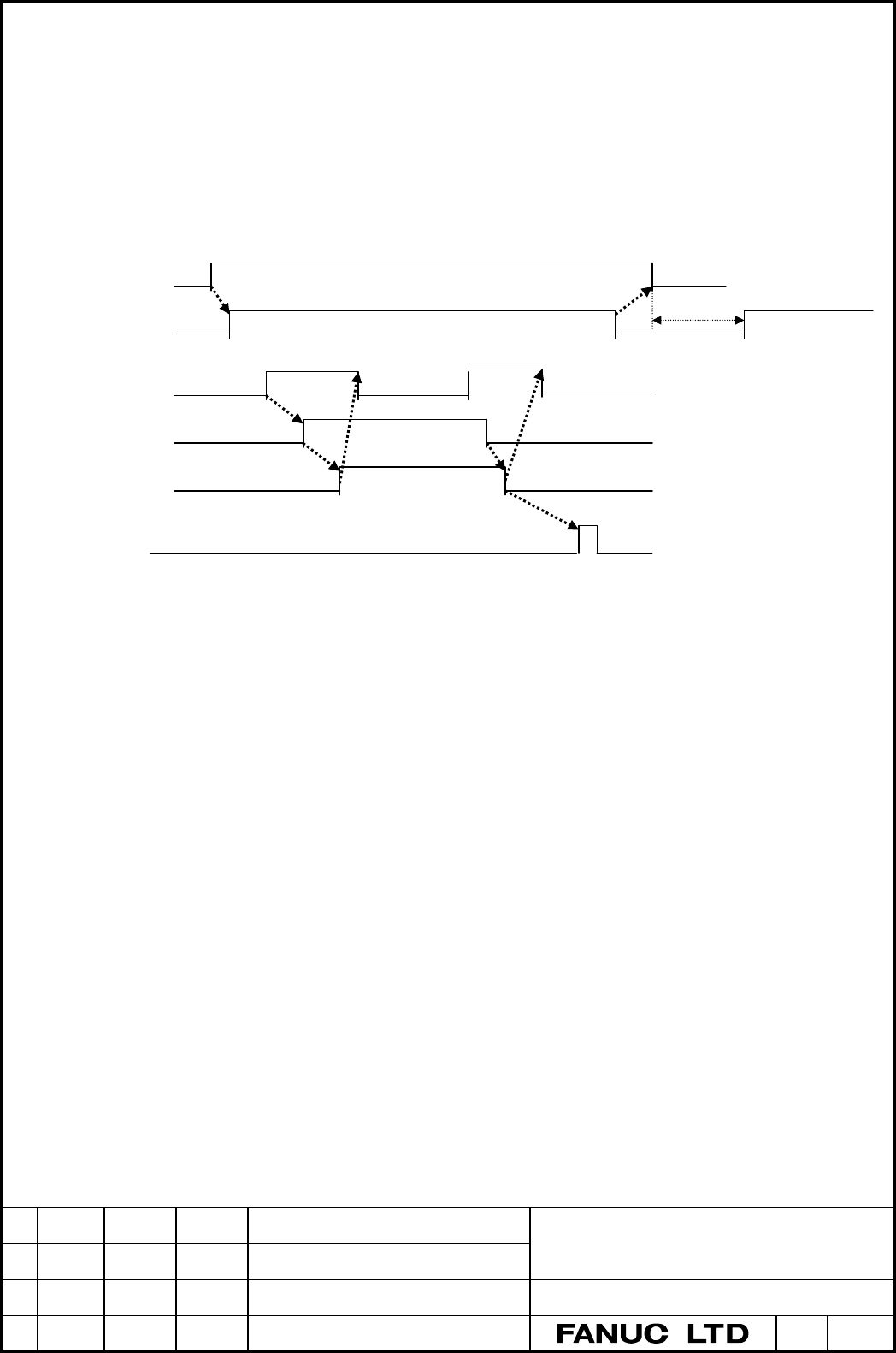
2-2 Starting of tracing control
The manual handle interruption axis selection signal corresponding to desired axis should
be set to 1 after the operation in above 2-1. And handle interruption tracing control
function starting signal HST1, HST2, and HST3 (G487#0, #1, #2) should be set to be 1 in
order to start the tracing control.
The timing of ON/OFF of each signal is shown as follows.
SHT*
HS1IA~
(Axis selection signal)
MF
HST*
HIT*
One shot Gcode
Work coordinate
system preset
Please take the interval of 8msec
or more after becoming 0 the
SHT signal in case of switching
to normal handle feed.
M code of starting the
tracing control
Wait
:
8msec or more
Wait : 8msec or more
M code of stopping the
tracing control
A
fter a
pp
roachin
g
Wait : 8msec or more
In case of moving the tracing axis manually with stopping the part program by feed-hold,
please stop the handle interruption tracing control mode after feed-hold operation, and
switch on the handle interruption tracing control function starting signal again after
moving the axis manually.
2-3 Difference of control status by signal status combination
CNC becomes following status by combination of handle interruption tracing control
starting signal HST (G487#0, #1, #2) and input switch signal SHT (G487#3, #4, #5).
In case of (HST*,SHT*)=(0,1)
Under such a condition, input pulses are neglected and the axis does not move.
In case of (HST*,SHT*)=(1,1)
Status that the handle interruption tracing control can be executed.
In case of (HST*,SHT*)=(1,0)、(0,0)
Status that the axis can be moved by the manual handle feeding and the
manual handle interruption function.
The handle interruption tracing control does not work.
01 01.10.19 Tokito Newly designed.
Drawing No.
A - 78541E
Tilte
FS-16i/160i-LA
Tracing control function by the manual handle
interruption interface -- Specifications --
Edit Date Design Recog. Contents Page 3 / 7
Contents Summary of FS 16i-160i-LA Tracing control function by the manual handle interruption interface Additional Manual
- Page 1FANUC Series 16i/160i-LA Tracing control function by the manual handle interruption interface Specifications • The specifications contain optional functions. • The specifications are subject to change without notice because of the improvement. Tilte FS-16i/160i-LA Tracing control function by the man
- Page 21.Outline This paper shows the tracing control function by manual handle interruption interface. The following 4 options are necessary to execute this function. Two laser oscillators control Manual handle interruption function Manual handle two or three control Work coordinate system preset The hard
- Page 32-2 Starting of tracing control The manual handle interruption axis selection signal corresponding to desired axis should be set to 1 after the operation in above 2-1. And handle interruption tracing control function starting signal HST1, HST2, and HST3 (G487#0, #1, #2) should be set to be 1 in orde
- Page 42-4 Checking on approach When the handle interruption tracing control beginning signal is switched on, the approach completion is started to check for the axis corresponding to each signal by comparing input pulses of the handle interruption tracing axis with a parameter value. When the input pulses
- Page 515572 Width of approach completion detection 1 15573 Width of approach completion detection 2 15574 Width of approach completion detection 3 Data type : Word Unit : 0.001mm Range : 0~32767 When the status that input pulses are equal to or less than this value continues equal to or more than a parame
- Page 64. Signals #7 #6 #5 #4 #3 #2 #1 #0 G487 SHT3 SHT2 SHT1 HST3 HST2 HST1 Name:meaning HST1 For the tracing control function by handle interruption, 0:The tracing control for axis 1 does not start. 1:The tracing control for axis 1 starts. HST2 For the tracing control function by handle interruption, 0:T
- Page 75. Limitations 1. Do not select the same axis with two handles or more. 2. Specify the M-code that operates the handle interruption tracing beginning signal to mask buffering. Tilte FS-16i/160i-LA Tracing control function by the manual handle interruption interface -- Specifications -- 01 01.10.19 T