FANUC CIMPLICITY i CELL, OPERATOR Supplement to Manual Page 8
Supplement to Manual
7/28
SHEET
DESCRIPTION
DESIGN
DATE
EDIT
01
FANUC LTD.
DRAW.NO.
Matsukura
Newl
y
re
g
istered
TITLE:
FANUC CIMPLICITY i CELL
OPERATOR’S MANUAL
06.01.25
B-75074EN/05-1
I.2 Installation of FANUC CIMPLICITY i CELL
Note
When you add Windows XP SP2 to the PC which has already
installed i CELL, it is not necessary to re-install i CELL.
So, the following explanation in this chapter is unnecessary.
After installing Windows XP SP2, please install CIMPLICITY HMI
SP4 according to the instruction in the "I.1 Installation of
CIMPLICITY HMI 6.1 Service Pack 4", then setup Firewall
according to the instruction in the "I.3 Firewall Setting of Windows
XP Service Pack 2"
In order to run i CELL on the Windows XP SP2, please install
CIMPLICITY HMI 6.1, and CIMPLICITY SP4, then install i CELL.
Please refer to the "II. INSTALATION" in the manual B-75074EN for the
details of installation procedure of i CELL.
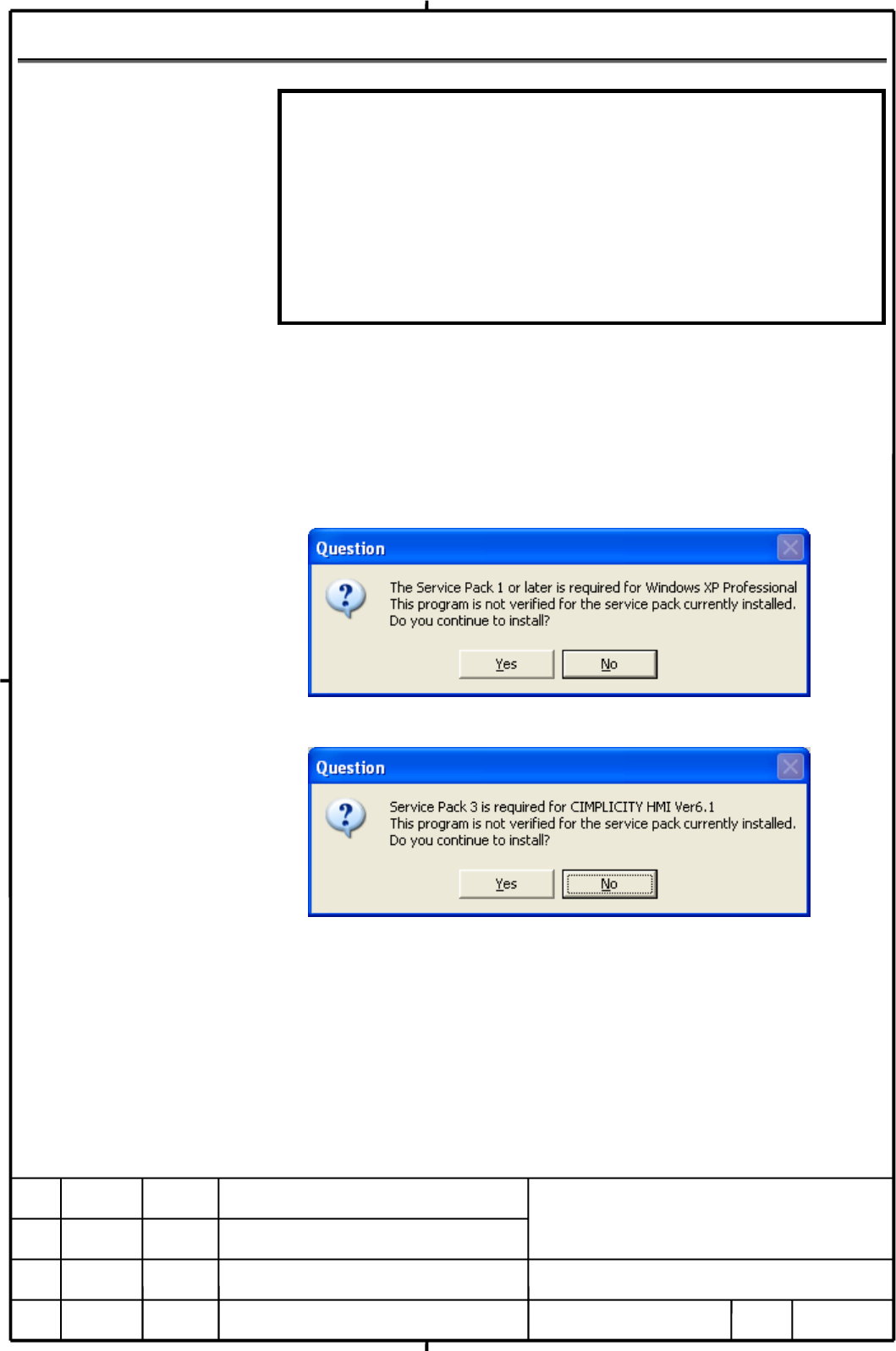
When you install i CELL, following two messages will be displayed.
(1) Message displayed when installer is activated
(2) Message displayed when i CELL server or viewer component is selected
We confirmed that i CELL is running with Windows XP SP2 and
CIMPLICITY HMI 6.1 SP4 environment, so click [Yes] button to these two
messages and continue installing procedures.
Contents Summary of FANUC CIMPLICITY i CELL, OPERATOR Supplement to Manual
- Page 1TECHNICAL REPORT (MANUAL) No.TMN 06/008E Date : Jan. 26, 2006 General Manager of Software Laboratory FANUC CIMPLICITY i CELL OPERATOR'S MANUAL Adding explanation for supporting to Windows XP Service Pack 2 1. Communicate this report to: O Your information O GE Fanuc-A, GE Fanuc-E FANUC Robotics Amer
- Page 2FANUC CIMPLICITY i CELL OPERATOR'S MANUAL Additional explanation about setting for Windows XP Service Pack 2 1.Type of applied technical documents Name FANUC CIMPLICITY i CELL OPERATOR'S MANUAL Spec.No./Ed. B-75074EN/05 2.Summary of Change New Add Applicable Group Name/Outline Correct Date Delete Ba
- Page 3FANUC CIMPLICITY i CELL OPERATOR'S MANUAL Add the following explanation after the section "APPENDIX" of "B-75074EN/05. Index I Setting for Windows XP Service Pack 2 .......................................................................................................................... 3 I.1 INSTAL
- Page 4I Setting for Windows XP Service Pack 2 This chapter explains setting procedure to operate FANUC CIMPLICITY i CELL (i CELL) on the PC which installed Windows XP Service Pack 2 (SP2). There are the following two kinds of procedure to operate i CELL by Windows XP SP2 environment. A. In case of the new
- Page 5I.1 Installation of CIMPLICITY HMI 6.1 Service Pack 4 It is necessary to install CIMPLICITY HMI 6.1 Service Pack 4 (SP4) and the Hotfix 072105_22989_6104 to use CIMPLICITY HMI 6.1 with Windows XP SP2. Please install each file after installing CIMPLICITY HMI 6.1. The following two files are required;
- Page 6client software are as follows. i. The following screen is displayed while installing SP4. < Procedure for installing of the iHistorian client software > ii Click [Next] button. iii Install it according to the instruction of the screen. < Procedure for canceling installation of the iHistorian client
- Page 7iv. Confirm the state of CIMPLICITY WebView/ThinView Service from the list of service. (It is not CIMPLICITY HMI Service. ) v. The setting is not necessary when the state is a blank. Advance to vii. vi. Select the line of CIMPLICITY WebView/ThinView Service beginning the state, right-click, and sele
- Page 8I.2 Installation of FANUC CIMPLICITY i CELL Note When you add Windows XP SP2 to the PC which has already installed i CELL, it is not necessary to re-install i CELL. So, the following explanation in this chapter is unnecessary. After installing Windows XP SP2, please install CIMPLICITY HMI SP4 accord
- Page 9I.3 Firewall Setting of Windows XP Service Pack 2 In order to run i CELL on Windows XP SP2, it is necessary to setup the Windows Firewall. Note 1 When SP2 is installed in Windows XP, CIMPLICITY HMI 6.1 and CIMPLICITY HMI 6.1 SP4 are necessary. Please refer to the "I.1 Installation of CIMPLICITY HMI
- Page 10(2) Using i CELL's program management to inputs/outputs programs in Data Server or an FTP Server on PC. This is the following operation; - i CELL is installed in the server PC. - Data Server is configured as an FTP server. An another FTP server on a PC might exist. - i CELLs program management scree
- Page 11(4) Monitoring by Webview This is the following operation; - i CELL is installed in the server PC. - The viewer PC displays i CELL's screens by Web browser. Please refer to the following sections; "I.3.1 Common setting" "I.3.4 Setting of Server PC" Example for equipment Server CNC CNC Viewer PC PC C
- Page 12I.3.1 Common setting The following setting are required to use i CELL. However, if you doesn't need to know of CNC's power supply on/off status by C4 server, the following setting is unnecessary. (1) Open the "Control panel", activate the "Security Center", and click the "Windows Firewall". (2) In "
- Page 13(3) Click "Exception" tab, and confirm "Display a notification when Windows Firewall blocks a program" is checked. Next, click [Add Program...] button. (4) Click [Browse...] button. TITLE: FANUC CIMPLICITY i CELL OPERATOR’S MANUAL 01 06.01.25 Matsukura Newly registered DRAW.NO. B-75074EN/05-1 EDIT D
- Page 14(5) Please display the "Bin" folder under the folder where you installed i CELL. Then select "C4Server.exe" and click [Open] button. (6) Select "C4Server.exe" then click [OK] button. TITLE: FANUC CIMPLICITY i CELL OPERATOR’S MANUAL 01 06.01.25 Matsukura Newly registered DRAW.NO. B-75074EN/05-1 EDIT
- Page 15(7) Confirm that the "C4 server.exe" was added to the "Programs and Services" as shown in the following figure. TITLE: FANUC CIMPLICITY i CELL OPERATOR’S MANUAL 01 06.01.25 Matsukura Newly registered DRAW.NO. B-75074EN/05-1 EDIT DATE DESIGN DESCRIPTION FANUC LTD. SHEET 14/28
- Page 16I.3.2 Setting for input/output program from Data Server by i CELL's program management menu i CELL setting dialog for communication test In the i CELL setting dialog, an FTP server communication test feature is provided. The following message will be displayed during the test. Please click [Unblock]
- Page 17When [Unblock] was clicked, "FethDgn" and "NcProg" are added to "Exception" tab of the Windows firewall. Do not delete these. TITLE: FANUC CIMPLICITY i CELL OPERATOR’S MANUAL 01 06.01.25 Matsukura Newly registered DRAW.NO. B-75074EN/05-1 EDIT DATE DESIGN DESCRIPTION FANUC LTD. SHEET 16/28
- Page 18I.3.3 Setting of Server PC for FTP Server (1) Open the "Control panel", activate the "Security Center", and click the "Windows Firewall". (2) Set common settings, please refer to the "I.3.1 Common setting" (3) Display "Exception" tab, and set parameters as the following figure, then click [OK] butto
- Page 19(5) Click "Advanced" tab, and click [Settings...] button of "Network Connection Settings" (6) Click "ICMP" tab, check the "Allow incoming echo request", then click [OK] button. TITLE: FANUC CIMPLICITY i CELL OPERATOR’S MANUAL 01 06.01.25 Matsukura Newly registered DRAW.NO. B-75074EN/05-1 EDIT DATE D
- Page 20I.3.4 Setting of Server PC for WebView (1) Open the "Control panel", activate the "Security Center", and click the "Windows Firewall". (2) Set common settings, please refer to the "I.3.1 Common setting" (3) Click "Exception" tab, check the "File and Printer Sharing" (4) If the "Share of the file and
- Page 21(5) Click [Add Port ...] in the "Exception" tab, and set parameters as the following figure, then click [OK] button. (6) Confirm that "CIMPLICIRT Webview Server" is added to "Programs and Services" as shown in the following figure. TITLE: FANUC CIMPLICITY i CELL OPERATOR’S MANUAL 01 06.01.25 Matsuku
- Page 22(7) Click [Add Port ...] in the "Exception" tab, and set parameters as the following figure, then click [OK] button. (8) Confirm "CIMPLICITY Webview Server" is added to "Programs and Services" as shown in the following figure. TITLE: FANUC CIMPLICITY i CELL OPERATOR’S MANUAL 01 06.01.25 Matsukura Ne
- Page 23I.3.5 Setting of Server PC for CIMPLICITY Viewer (1) Open the "Control panel", activate the "Security Center", and click the "Windows Firewall". (2) Set common settings, please refer to the "I.3.1 Common setting" (3) Click "Exception" tab, check the "File and Printer Sharing" (4) Click [Add Port ...
- Page 24(5) Confirm that the "CIMPLICITY Server-Viewer-Connection" " was added to the "Programs and Services" as shown in the following figure. (6) Click "Advanced" tab, and click [Settings...] button of "Network Connection Settings" TITLE: FANUC CIMPLICITY i CELL OPERATOR’S MANUAL 01 06.01.25 Matsukura New
- Page 25(7) Click "ICMP" tab, check the "Allow incoming echo request", then click [OK] button. TITLE: FANUC CIMPLICITY i CELL OPERATOR’S MANUAL 01 06.01.25 Matsukura Newly registered DRAW.NO. B-75074EN/05-1 EDIT DATE DESIGN DESCRIPTION FANUC LTD. SHEET 24/28
- Page 26I.3.6 Setting of Viewer PC for CIMPLICITY Viewer (1) Open the "Control panel", activate the "Security Center", and click the "Windows Firewall". (2) Set common settings, please refer to the "I.3.1 Common setting" (3) Click "Exception" tab, check the "File and Printer Sharing" (4) If the "Share of th
- Page 27(5) Click "Advanced" tab, and click [Settings...] button of "Network Connection Settings" (6) Click "ICMP" tab, check the "Allow incoming echo request", then click [OK] button. TITLE: FANUC CIMPLICITY i CELL OPERATOR’S MANUAL 01 06.01.25 Matsukura Newly registered DRAW.NO. B-75074EN/05-1 EDIT DATE D
- Page 28I.3.7 Setting of server PC for CIMPLICITY Viewer – Activating i CELL's main menu When i CELL 's main menu is activated on server PC, the following two messages will be displayed in server PC. Click [Unblock] button to the both of messages. The message will not be displayed from next time. Note that
- Page 29When [Unblock] was clicked, "CDA Maneger" and "Communication Maneger" are added to "Exception" tab of the Windows firewall. Do not delete these. TITLE: FANUC CIMPLICITY i CELL OPERATOR’S MANUAL 01 06.01.25 Matsukura Newly registered DRAW.NO. B-75074EN/05-1 EDIT DATE DESIGN DESCRIPTION FANUC LTD. SHE