FS30i/31i/32i-Model A, Machine Operation Menu Function, Specifications Additional Manual Page 8
Additional Manual
01 2003.08.06
2003.08.06
5. MACHINE OPERATION MENU SOFT KEY TRANSITION
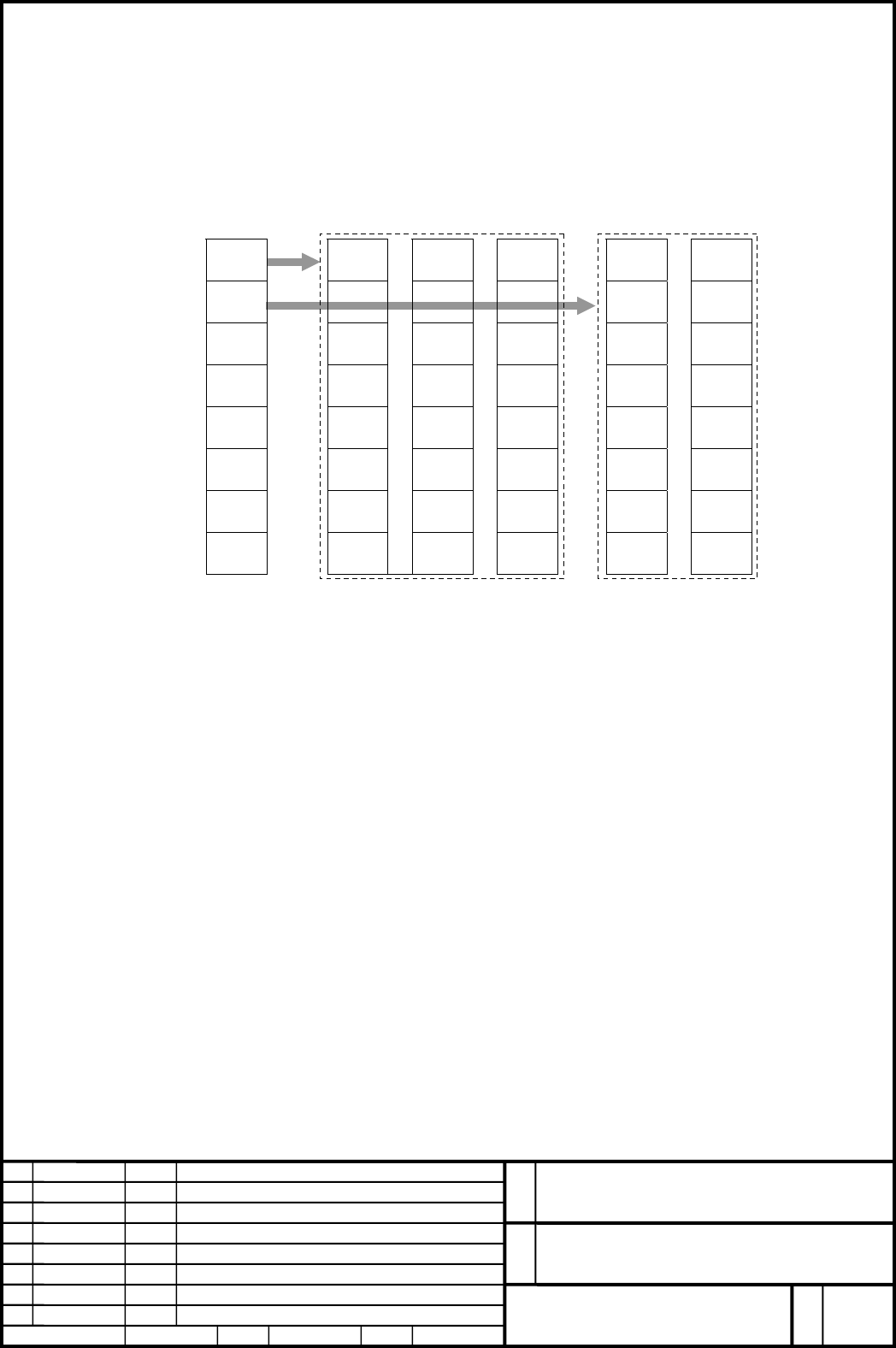
5.1 FOR VERTICAL SOFT KEYS
Main menu Sub menu
Menu number 10 11 12 13 14 15
00 10 20 30 40 50
01 11 21 31 41 51
02 12 22 32 42 52
Key number 03 13 23 33 43 53
04 14 24 34 44 54
05 15 25 35 45 55
06 16 26 36 46 56
07 17 27 37 47 57
① As shown above, a main menu and submenus are created.
Up to two main menu lines (for 14 soft keys) and up to 30 submenu lines (for 240 soft keys)
can be created.
② For each main menu key, a submenu group consisting of multiple lines of soft keys is
created.
③ By pressing a main menu key, a transition is made to the corresponding submenu. If there is
no corresponding submenu, the key can be used as an input key.
④ If a submenu consists of multiple lines, a transition is made between the submenu lines by
using the "NEXT PAGE" key defined as a soft key.
⑤ From a submenu, a transition to the main menu is made by pressing the "RETURN UPWARD"
key defined as a soft key.
ED
PAGE
8/15
DATE
COMMENTS
CREATE
FANUC Series30i/31i/32i-MODEL A
MACHINE OPERATION MENU
A−79176E/01
FANUC
Contents Summary of FS30i/31i/32i-Model A, Machine Operation Menu Function, Specifications Additional Manual
- Page 1FS30i/31i/32i-MODEL A MACHINE OPERATION MENU FUNCTION SPECIFICATIONS
1. Overview....................................................................................................................2 2. SOFT KEY CONTROL SWITCHING ............................................................. - Page 21. Overview The soft keys displayed on the standard CNC screen can be used as menu keys for machine operation. The soft keys can be customized easily by the machine tool builder. A menu can have a hierarchy, and the indication of each soft key can be specified. Customization data is created as a mac
- Page 32.2 FOR THE 10.4-INCH DISPLAY UNIT/HORIZONTAL SOFT KEYS Screen/operation select menu The machine operation menu display signal is used to select a menu. Machine operation menu (1) When the machine operation menu select signal EXSFT (input signal: G0295) is set to 1, the horizontal soft key portion o
- Page 42.3 FOR THE 15-INCH DISPLAY UNIT/HORIZONTAL SOFT KEYS Screen select menu The ninth vertical soft key is used for display switching (toggle Machine operation menu display). Instant menu Operation select menu The machine operation menu display signal is used to select a menu. Machine operation menu (1
- Page 53. MENUS DISPLAYED The table below indicates the display unit sizes, menus displayed, and vertical/horizontal soft key operations based on the machine operation menu display signal. Horizontal soft key (*3) Vertical/horizontal soft key (*3) Machine operation menu display signal Machine operation men
- Page 64. CUSTOMIZATION ITEMS A machine operator's panel menu definition file can be created using a special tool. The following items can be specified: ① Menu configuration ・Number of blocks : A number from 0 to 98 can be selected. ・Number of main menus Horizontal soft keys : 1 line (10 items) Vertical so
- Page 7Definition file Block 1 Main menu Sub menu ・ ・・・ ・ Block n Main menu Sub menu FANUC Series30i/31i/32i-MODEL A MACHINE OPERATION MENU A−79176E/01 01 2003.08.06 FANUC PAGE 7/15 ED DATE COMMENTS CREATE 2003.08.06
- Page 85. MACHINE OPERATION MENU SOFT KEY TRANSITION 5.1 FOR VERTICAL SOFT KEYS Main menu Sub menu Menu number 10 11 12 13 14 15 00 10 20 30 40 50 01 11 21 31 41 51 02 12 22 32 42 52 Key number 03 13 23 33 43 53 04 14 24 34 44 54 05 15 25 35 45 55 06 16 26 36 46 56 07 17 27 37 47 57 ① As shown above, a mai
- Page 95.2 FOR HORIZONTAL SOFT KEYS Menu number Key number (Main menu) 10 00 01 02 03 04 05 06 07 08 09 (Sub menu) 11 10 11 12 13 14 15 16 17 18 19 12 20 21 22 23 24 25 26 27 28 29 13 30 31 32 33 34 35 36 37 38 39 14 40 41 42 43 44 45 46 47 48 49 15 50 51 52 53 54 55 56 57 58 59 ① As shown above, a main me
- Page 106. MENU KEY SELECTION INTERFACE 6.1 MACHINE OPERATION MENU SELECT NUMBER NOTIFICATION SIGNAL ESFM1 TO ESFM8 (Output signal : F0317.0 to 7) The menu number (0 to 255) of the menu currently selected is posted as a binary code. If no menu operation menu is displayed, 0 is output. 6.2 SOFT KEY NUMBER SE
- Page 117. MACHINE OPERATION MENU DATA Machine operation menu data is created on the personal computer by using a menu creation tool. [System required for the menu creation tool] Microsoft Windows 2000 Japanese Version or Windows XP Japanese Version and Microsoft Excel 2000 Japanese Version 8. MACHINE OPERA
- Page 129. Parameter No. #7 #6 #5 #4 #3 #2 #1 #0 3207 EXS Data type : Bit system common type EXS Soft key extension of the machine operation menu function is: 0: Disabled. 1: Enabled. No. #7 #6 #5 #4 #3 #2 #1 #0 3208 NOS Data type : Bit system common type NOS An instant menu is: 0: Displayed. 1: Not display
- Page 13When using the 15-inch display unit, set 0 in parameter No. 3227, and set in parameter No. 3228 the block number of a machine operation menu to be displayed on the vertical soft keys. FANUC Series30i/31i/32i-MODEL A MACHINE OPERATION MENU A−79176E/01 01 2003.08.06 FANUC PAGE 13/15 ED DATE COMMENTS C
- Page 1410. Signal No. #7 #6 #5 #4 #3 #2 #1 #0 G0295 EXSFT Classification : Input signal EXSFT Machine operation menu screen select signal This signal is used to switch the display to the machine operation menu screen. When this signal is set to 1, a machine operation menu screen stored in the FROM is displ
- Page 1511. Limitation (1) This function operates independently of display path switching. (2) This function cannot be used with the 8.2-inch LCD display unit. (3) This function is disabled on the PMC screen, macro executor screen, and C language executor screen. (4) Two soft keys must not be pressed simult