Tool_management_function_for_Oversize_tool.pdf Additional Manual Page 4
Additional Manual
Ed.
Date
Design
Description
Name
Draw.
FANUC MANUAL GUIDE i
SPECIFICATION
A-90154
Page
FANUC LTD.
4/12
2005.7.21
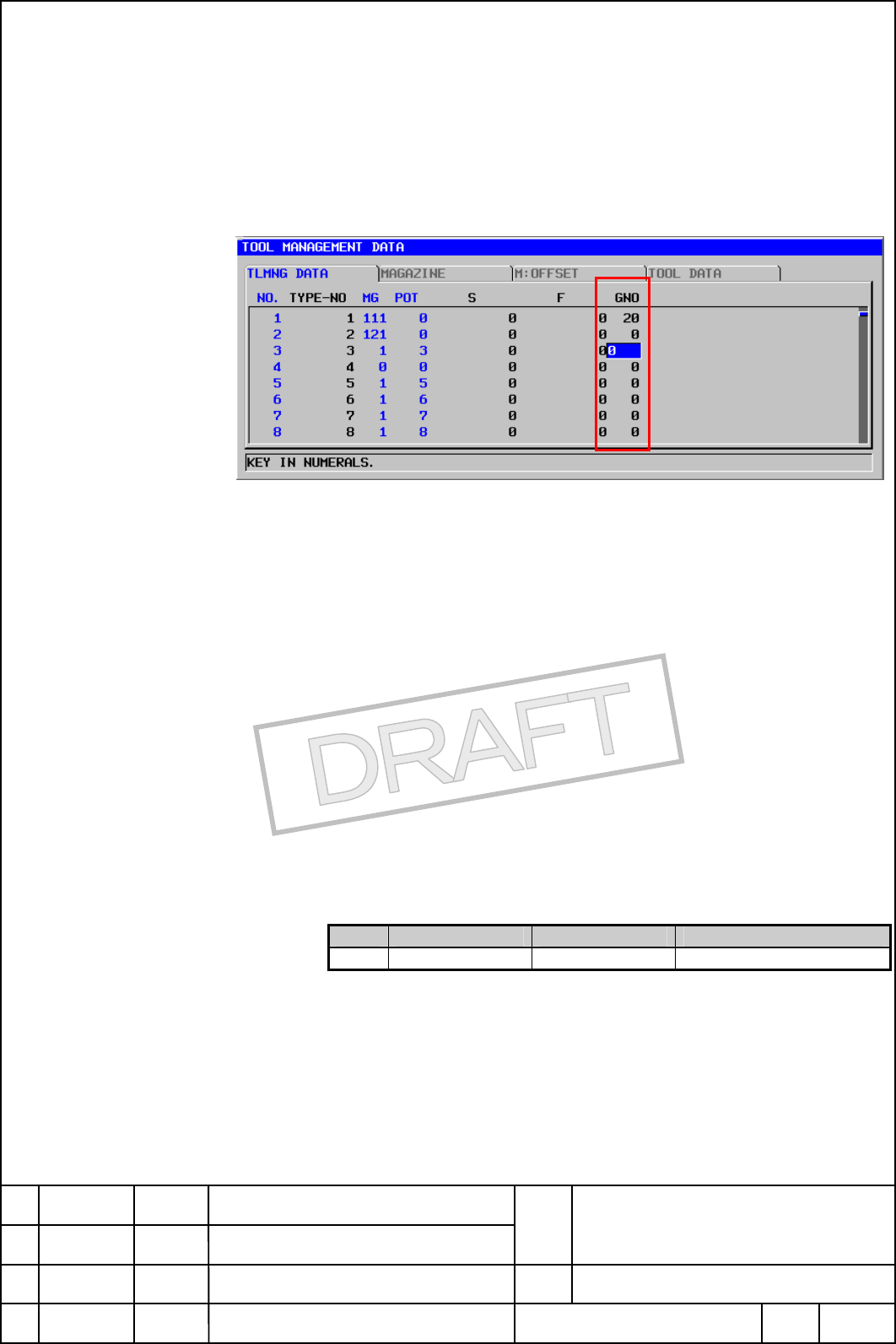
Display of tool figure number
“PAGE->” soft key is pushed in the tool management data tab, and
"Tool figure number" is displayed.
“ GNO” Tool figure number
- "Tool figure number" is displayed.
- The value of 0-20 can be set.
Appear the following messages when other tools with interfering the
tool of the stored in magazine by the change of the tool figure number.
“Tool interference check error : xxxx,xxxx”
xxxx : Number of interfered tool.
Customizing of tool figure number display
The change at the position and non-display where the tool figure
number is displayed can be selected as well as the data screen of
management of the tool (kind number, tool information, and main axis
number).
Please refer to "Tool management function specifications
A-78614EN" for details.
R item Display size Note
12 Tool diameter No.
3
Contents Summary of Tool_management_function_for_Oversize_tool.pdf Additional Manual
- Page 1FANUC MANUAL GUIDE i Tool Management Function for oversize tool Specifications FANUC MANUAL GUIDE i Name SPECIFICATION 2005.7.21 Draw. A-90154 Ed. Date Design Description FANUC LTD. Page 1/12
- Page 21 OUTLINE The management of the oversize tool is added to the tool management function. This function can be used only with FS30i/31i. NOTE The oversize tool option is necessary to use this function. FANUC MANUAL GUIDE i Name SPECIFICATION 2005.7.21 Draw. A-90154 Ed. Date Design Description FANUC LT
- Page 32 DETAIL 2.1 Tool management data screen "BIG" and "NORMAL" soft key appears on the tool management data screen. 2.1.1 Tool management data tab Indicate of Nomal tool or Oversize tool. Normal tool or Oversize tool indicator is shown in the "T- INFO" item. TOOL INFORMATION Normal tool or Oversize too
- Page 4Display of tool figure number “PAGE->” soft key is pushed in the tool management data tab, and "Tool figure number" is displayed. “ GNO” Tool figure number - "Tool figure number" is displayed. - The value of 0-20 can be set. Appear the following messages when other tools with interfering the tool of
- Page 52.1.2 Magazine information tab Display of occupation pot The pot occupied with the tool stored in other pots is displayed by "*". NO. : Tool management data number. The tool management data number is displayed. 0-(parameter No.13220) can be set. The same data number cannot be input to two or more po
- Page 6Search of empty pot for oversize tool (1) "E.SRH" soft key is displayed in the first page of the tool magazine information tab. (2) When the " E.SRH " soft key is pushed, the following windows are displayed. UP SEARCH : Searches for an empty pot for above. DOWN SEARCH : Searches for an empty pot for
- Page 7(3) The cursor moves to the searched empty pot when each soft key is pushed after the search tool figure number is input. Appear the following messages when there is no empty pot which can store the searched tool figure. “An empty pot is not found.” FANUC MANUAL GUIDE i Name SPECIFICATION 2005.7.21
- Page 82.1.3 Tool figure data tab The tool shape data is displayed. NO. : Tool figure number. The tool figure number is displayed. The value cannot be set. LEFT The pot occupied from a standard pot left side is displayed in the occupation area of the tool. The value of 0-4 can be set. A set value is four o
- Page 9When the figure data of the tool registered in the magazine is changed, the following messages are displayed. “Data cannot be input.” SOFT KEY (1) When the cursor points excluding "FIG.". Page1 Page2 (2) When the cursor points " FIG.". Page1 Page2 FANUC MANUAL GUIDE i Name SPECIFICATION 2005.7.21 Dr
- Page 102.2 Memory card I/O 2.2.1 Tool management data Tool management data I/O The tool figure number of the tool management data is input and output. I/O file name (permanent) : TOOL_MNG.TXT Tool management data format The tool management function and the oversize tool data format are the same as the exis
- Page 11(2) When "Output" or "Input" software key is pushed, the following screens are displayed. (3) When the "T-GEOM" soft key is pushed, and "Exec" soft key is pushed, the tool figure data is input and output to the memory card. When tool figure data does not exist on the memory card, the following NC al
- Page 123 PARAMETER The parameter which changes the position of the "Tool shape data" tab is added. A detailed specification is being designed. FANUC MANUAL GUIDE i Name SPECIFICATION 2005.7.21 Draw. A-90154 Ed. Date Design Description FANUC LTD. Page 12/12