Connecting manual for detachable LCD/MDI Type B Additional Manual Page 4
Additional Manual
EDIT
FANUC LTD
SHEE
DRAW. NO. CUST
.
TITLE
3/14
DESCRIPTIONDESIG.DATE
01
00.10.2 Akash
Newl
y
Detachable LCD/MDI Type B
A-80049E
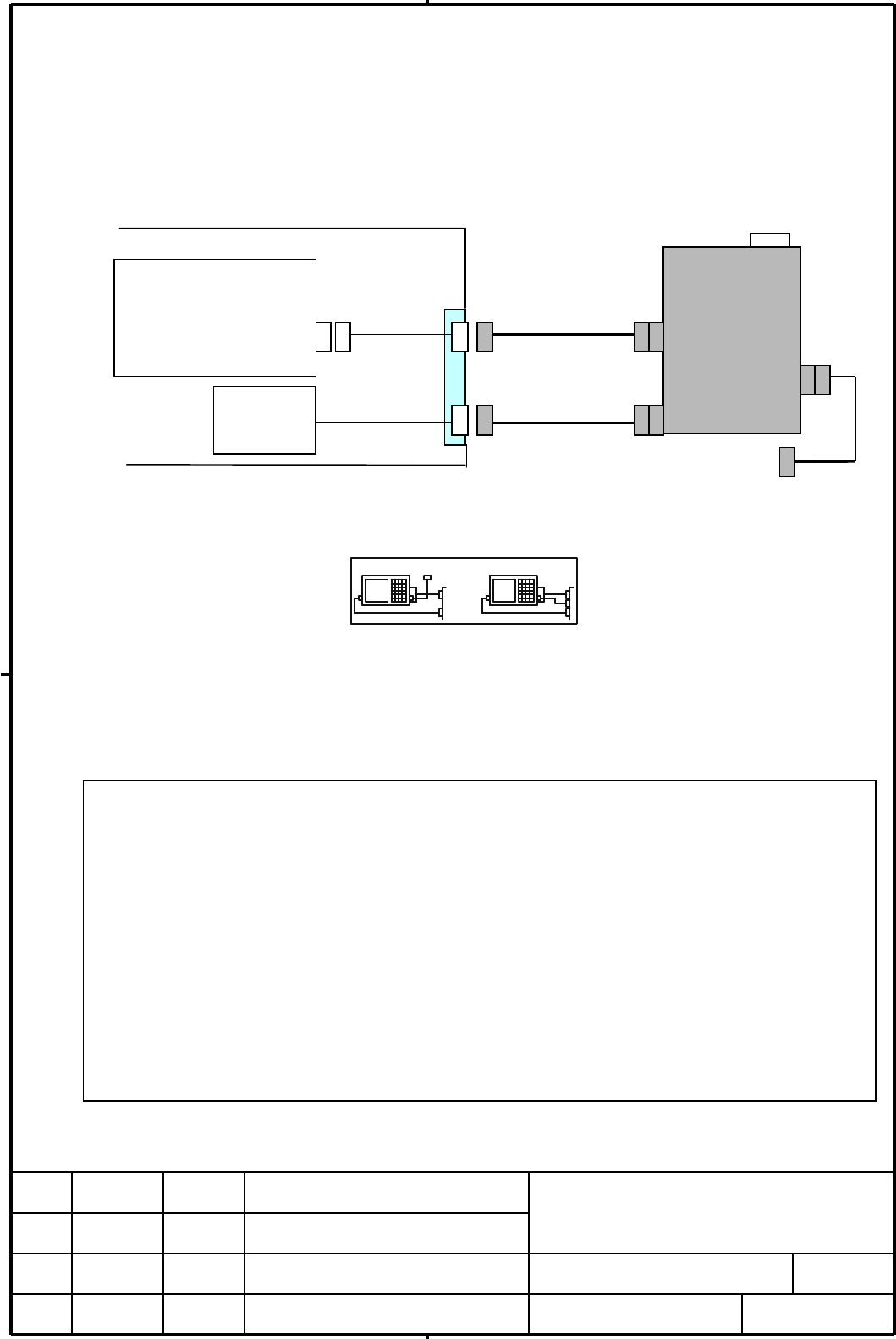
4. The connection method in case of Display link
In case of connecting to the detachable LCD/MDI via the Display link to Power Mate, 16i / 18i / 21i,
etc, refer to the following.
•
The cable J182 and J169 are connected to the detachable LCD/MDI previously.
•
The cable J183 and J168 are connected to the terminal panel. Cable J183 is a Display link cable.
Cable J168 is a power cable. The connector CA72 and CPA are prepared on the terminal panel.
The connection method
1.
The selection switch SW1 of the detachable LCD/MDI is changed to B.
The following seal is put near the selection switch SW1.
2.
The Display link cable J182 is connected to the connector CA72 on the terminal panel.
3.
The power supply cable J169 is connected to the connector CPA on the terminal panel.
The disconnection method
1. The power supply cable J169 is disconnected from the connector CPA on the terminal panel.
2. The Display link cable J182 is disconnected from the connector CA72 on the terminal panel.
Selection
switch
SW1
CNC
Display link interface
JD41/JD45/JD14
AC100V
to 240V
Cabinet
Detachable
LCD/MDI
CA61
CA62
CA63
J182
J183
J168
J169
CA72
CPA
Display link
Power supply
CA73
Terminal
panel
Note
1.
Please put the seal near the connector CA72 of the terminal panel. The seal is for showing the
position B of selection switch SW1. Refer to supplement B.
2.
The cable J171 is not connected to the terminal panel. Beforehand, please disconnect the cable
at the connector CA62 of the detachable LCD/MDI. Or the connector CA73 should not be
exposed to pollutant directly.
(The cable J171 may become antenna to pick up a noise in strong noise environment.)
3.
It is possible to operate selection switch SW1 after the cable is connected.
4.
In case of Power Mate-D, the terminal unit of CRT link is needed to the CNC.
5.
In case of special operation, for example memory all clear, please turn on the power supply of
CNC after this detachable LCD/MDI is connected.
6.
In case of connecting the cable to the connector JD41/JD45/JD14 of the CNC directly, please
prepare the enough space for the operation. In case of Power Mate-D especially, the space of
more than one hundred millimeters is needed under the unit, because the connector JD14 is
mounted the under part of the unit.
AB
SW
AB
SW1
J171
Contents Summary of Connecting manual for detachable LCD/MDI Type B Additional Manual
- Page 1TECHNICAL REPORT (MANUAL) No. TMN00/171E Date 2000.Nov.02 General Manager of Hardware Laboratory Detachable LCD/MDI Type B 1 Communicate this report to : ! Your information ! GE Fanuc-N, GE Fanuc-E FANUC Robotics MILACRON ! Machine tool builder Sales agency End user 2 Summary for Sales Documents Thi
- Page 2Connection material of Detachable LCD/MDI Type B 1. Outline The detachable LCD/MDI Type B is 8.4” LCD/MDI unit integrated in a portable box. The detachable LCD/MDI Type B has the following merits. • Compared to a usual detachable LCD/MDI, it is very thin and about half of weight. • It can be connect
- Page 32. Specifications Indicator 8.4” TFT 40 characters by ×16 lines External dimensions 445 (W) × 229 (H) × 122 (D) ; Not including connection cables Weight 3.5 kg ; excluding connection cables Power supply AC100V to 240V Electric capacity 0.5A (AC100V) 0.25A (AC200V) Interface Display link(CRT link) 1
- Page 44. The connection method in case of Display link In case of connecting to the detachable LCD/MDI via the Display link to Power Mate, 16i / 18i / 21i, etc, refer to the following. •The cable J182 and J169 are connected to the detachable LCD/MDI previously. •The cable J183 and J168 are connected to th
- Page 54.1 The details of the Display link cable J183 Terminal unit CA72 (DBM-25S) CNC JD41/JD45 1 FG 14 (PCR-EV20MDT) 2 (VDR) 15 0V 1 RXD 11 0V 3 (VDG) 16 (0V) 2 *RXD 12 0V 4 (VDB) 17 0V 3 TXD 13 RXTM1 J183 5 (VSYNC) 18 0V 4 *TXD 14 RXTM2 6 (HSYNC) 19 (0V) 5 15 TXTM1 7 20 (0V) 6 16 TXTM2 8 TXD 21 (0V) 7 1
- Page 64.2 The details of Display link cable J182 Detachable LCD/MDI CA72 Detachable LCD/MDI CA61 (DBM-25S) (DBM-25S-0001) 1 FG 14 1 FG 14 2 VDR 15 0V 2 VDR 15 0V 3 VDG 16 0V 3 VDG 16 0V J182 4 VDB 17 0V 4 VDB 17 0V 5 VSYNC 18 0V 5 VSYNC 18 0V 6 HSYNC 19 0V 6 HSYNC 19 0V 7 20 0V 7 20 0V 8 TXD 21 0V 8 TXD 2
- Page 74.3 The detail of power supply cable J168 1) In case of 100VAC Terminal CPA for 100VAC power 100VAC supply J168 Contact ground type 0.5A 2 pole 50Hz/60Hz 1-ph 15A 125V R R 100A 100A S S 100B 100B G G G G G 2) In case of 200VAC Terminal CPA for 200VAC power J168 200VAC supply Contact ground type 0.25
- Page 84.4 The detail of power supply cable J169 1) In case of AC100V Terminal panel Detachable LCD/MDI CPA CA63 (contact ground type (JL04V-2E10SL-3PE-B) 2pole 15A 125V) J169 R 100A R 100A S 100B S 100B G G G G R R 100A 100A S S 100B 100B G G G G 2) In case of AC200V Terminal panel Detachable LCD/MDI CPA
- Page 95. The connection method in case of Video signal / MDI signal In case of connection to the detachable LCD/MDI to CNC like FS16/18/21 via the interface of video signal/MDI signal, it is as following. •The cables J182, J171 and J169 are connected to the Detachable LCD/MDI beforehand. •The cables J185
- Page 105.1 Detail of video signal cable J185 Terminal unit CA72 CNC JA1 (DBM-25S) (PCR-EV20MDT) 1 FG 14 1 VDR 11 2 VDR 15 0V 2 0V 12 VSYNC 3 VDG 16 0V 3 VDG 13 J185 4 VDB 17 0V 4 0V 14 0V 5 VSYNC 18 0V 5 VDG 15 6 HSYNC 19 0V 6 0V 16 0V 7 20 0V 7 17 8 (TXD) 21 0V 8 18 HSYNC 9 (*TXD) 22 (RXD) 9 19 10 23 (*RX
- Page 115.2 The detail of MDI signal cable J170 CNC JA2 (PCR-EV20MDT) Terminal panel CA73 1 *SW0 11 *SW1 (MR-20RF) 2 *SW2 12 *SW3 1 8 *CM2 14 3 *SW4 13 *SW5 2 *CM0 9 *CM3 15 *CM5 4 *SW6 14 *SW7 3 *CM1 10 *SW7 16 *CM6 J170 5 *CM0 15 *CM1 4 *SW6 11 *SW5 17 *CM7 6 *CM2 16 *CM3 5 *SW4 12 *SW3 18 *CM4 7 *CM4 17
- Page 125.3 The details of MDI signal cable J171 Terminal panel CA73 Detachable LCD/MDI CA62 (MR-20RF) 04 03 02 01 1 8 *CM2 14 2 *CM0 9 *CM3 15 *CM5 *CM3 *CM2 *CM1 *CM0 J171 3 *CM1 10 *SW7 16 *CM6 10 09 08 07 06 05 4 *SW6 11 *SW5 17 *CM7 *SW2 *SW1 *SW0 FG 5 *SW4 12 *SW3 18 *CM4 6 *SW2 13 *SW1 19 *CM8 16 15
- Page 135.5 The detail of power supply cable J168 Please refer to subsection 4.3 5.6 The detail of power supply cable J169 Please refer to subsection 4.4 6. The note for cables 1) Please do not connect to the opening pins and pins with ( ). 2) Don’t change the object of the twist pair. Don’t change the obje
- Page 146) The setting of using small MDI may be necessary with kind of CNC. 7) The picture Display function is not available, when the detachable LCD/MDI Type B is used. 8) When the system alarm is occurred on the Power Mate, the display is not changed. 9) The brightness of LCD is fallen when room temperat
- Page 15Supplement A External picture 214 15 445 122 Supplement B Seal 1) In case of connection with video signal/MDI signal, please put the following seal near the terminal unit and the connector of the cable in the cabinet. It is for showing the position A of switch. SW1 : A A02B-0166-K030 (50 peace per o