Change of the DeviceNet board specification in FS16i/18i/21i/160i/180i/210i/160is/180is/210is-MODEL A/B and Power Mate i-MODEL D/H Additional Manual Page 5
Additional Manual
4. Setting of parameter
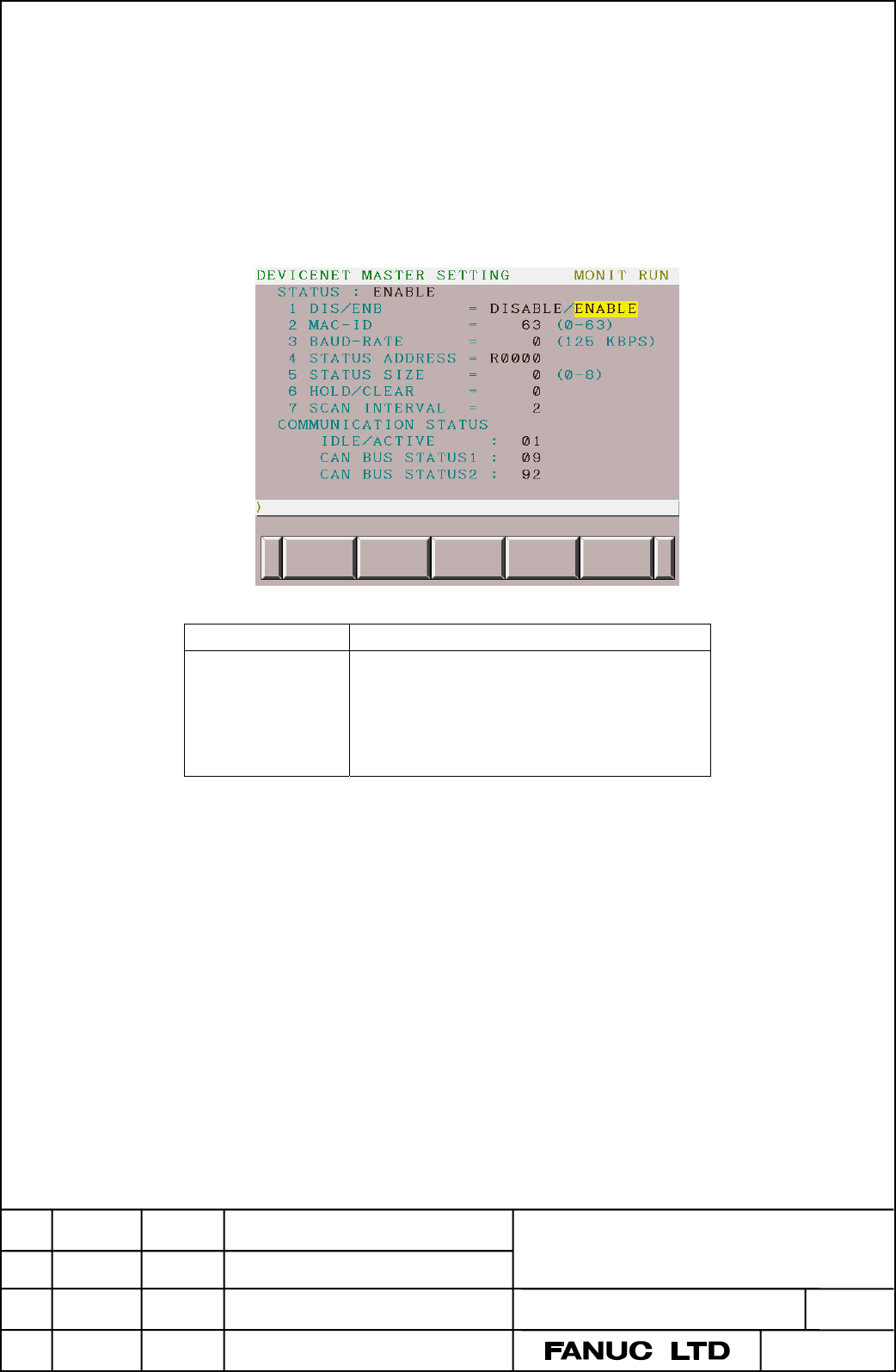
When the problem of excessive message traffic of the network occurs because new DeviceNet board
was used, this problem can be avoided by adjusting the scanning interval of network.
There is the item of “7 SCAN INTERVAL = “ on the DEVICENET MASTER SETTING screen to
adjust the scanning interval in the master function of DeviceNet Application software (since 04th
edition of A02B-0236-J553#6576).
Item Content
7 SCAN INTERVAL The scanning interval when all slaves connected with
the network are scanned is set.
Range of setting: 0-32767
Unit: msec
The default setting is 0.
When the set value is 0, networks are scanned fastest
in the connected network.
Usually, in the master function of DeviceNet , the communication is performed by the fastest scanning interval
in the connected network.
This scanning interval can be changed by setting the SCAN INTERVAL parameter.
However, if the SCAN INTERVAL parameter value is shorter than the minimum scan interval, the SCAN
INTERVAL parameter is ineffective.
The SCAN INTERVAL parameter is used when the scanning interval is slowed down to avoid excessive
message traffic in the network.
The equipment which checks a state of the network is necessary for checking the message traffic.
Please adjust the network interval to become normal network traffic during confirming the state of the network
with using the equipment.
Edit. DATE Design
Description
DRAW. NO.
A-77221EN
CUST.
01
03/06/05
New issued
AJIMA
TITLE
Change of the DeviceNet board in FS16i/18i/21i/
160i/180i/210i/160is/180is/210is-MODEL A/B and
Power Mate i-D/H
SHEET
4 / 4
Contents Summary of Change of the DeviceNet board specification in FS16i/18i/21i/160i/180i/210i/160is/180is/210is-MODEL A/B and Power Mate i-MODEL D/H Additional Manual
- Page 1TECHNICAL REPORT (MANUAL) NO. TMN03/051E Date 10 Jun, 2003 General Manager of CNC Laboratory Change of the DeviceNet board specification in FS16i/18i/21i/160i/180i/210i/160is/180is/210is-MODEL A/B and Power Mate i-MODEL D/H 1. Communicate this report to : ○ Your information ○ GE Fanuc-N, GE Fanuc-E
- Page 2Change of DeviceNet board Abstract In FS16i/18i/21i/160i/180i/210i/160is/180is/210is-MODEL A/B and Power Mate i-MODEL D/H, FANUC will apply the new DeviceNet board because parts on the board is stopped manufacturing. It is necessary to change the order specification and board number. Please pay atte
- Page 33. Order specification for board Only board and software are changed. Other item and remarks on the Order List are not changed. a) FS16i/18i/21i/160i/180i/210i/160is/180is/210is-MODEL A/B Table 1 Old order Item New order specification Specification DeviceNet board Refer to Table 2. Control software
- Page 4b) Power Mate i-MODEL D/H Table 3 Item Old order specification New order specification DeviceNet board Refer to Table 4. Control software A02B-0259-J554#6570 A02B-0259-J554#6571 (No changed) Application software A02B-0259-J553#6576 Since 04th edition. Master function A02B-0259-J860 (No changed) Slav
- Page 54. Setting of parameter When the problem of excessive message traffic of the network occurs because new DeviceNet board was used, this problem can be avoided by adjusting the scanning interval of network. There is the item of “7 SCAN INTERVAL = “ on the DEVICENET MASTER SETTING screen to adjust the