Small Machine Operators Panel (M/T) - Connection Manual Additional Manual Page 17
Additional Manual
EDIT DATE DESIG.
Small Machine operator’s panel
connection manual
TITLE
DESCRIPTION
DRAW.NO.
A-83122E
SHEET
CUST
17
/
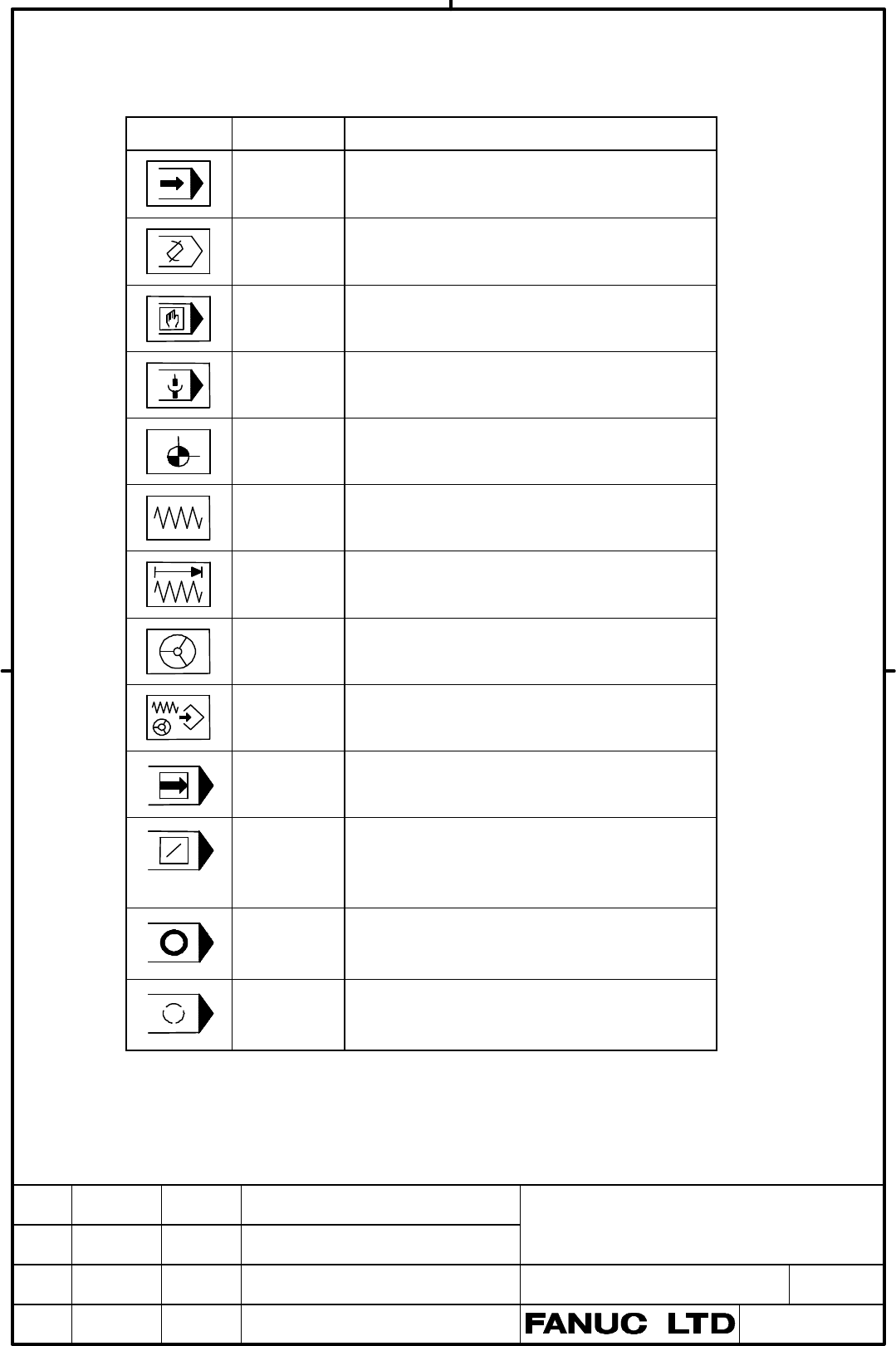
9 Key symbol indication on Small Machine Operator’s Panel
9.1 Meaning of key symbols
Symbol English Meaning of key
AUTO
AUTO mode selection signal; Sets automatic
operation mode.
EDIT
EDIT mode selection signal; Sets program edit
operation mode.
MDI
MDI mode selection; Sets MDI mode.
REMOTE
DNC operation mode; Sets DNC operation
mode.
REF
RETURN
Reference position return mode selection; Sets
reference position return mode.
JOG
JOG feed mode selection; Sets jog feed mode.
JOG
INC
Step feed mode selection; Sets step feed mode.
HANDLE
Manual handle feed mode selection; Sets
manual handle feed mode.
TEACH
Teach-in jog (reach-in handle) mode selection
signal; Sets teach-in jog (teach-in handle) mode.
SINGLE
BLOCK
Single block signal; Executes program one by
one. This key is used to check a program.
BLOCK
SKIP
Block Skip; Skips the execution of the blocks
starting with the first block prefixed with / and
ending with the end of block (;) when this button
is pressed during automatic operation.
PRG
STOP
Program stop(output only); Turns on the LED on
the button when automatic operation is stopped
by M00 specified in the program.
OPT
STOP
Optional stop; Stops automatic operation after
execution of the block of a program where M01
is specified in the program.
Contents Summary of Small Machine Operators Panel (M/T) - Connection Manual Additional Manual
- Page 1Small Machine Operator’s Panel Connection Manual -Item- 1. Overview 2. Overall connection diagram 3. Each connections 3.1 Pin assignment 3.2 Power connection 3.3 Emergency stop switch 3.4 I/O Link connection 3.5 Manual pulse generator connection 3.6 Cable length for manual pulse generator 3.7 Manual
- Page 21 Overview Small Machine operator's panel is connected with i series CNC by I/O Link, which is composed by some following operator’s panels. Small Machine Operator’s panel This operator’s panel has 30 keys. TITLE Small Machine operator’s panel connection manual DRAW.NO. CUST A-83122E SHEET EDIT DATE
- Page 32 Overall Connection Diagram CNC I/O UNIT JD1B I/O Link JD1A JD1B JD1A Small machine operator's panel (Keyboard) CE56 MPG JA3 MPG Small Machine Operator’s MPG panel CE57 +24 V power CPD1(IN) supply NOTE The MPG can be connected to this Small Machine Operator’s Panel only when the i series CNC is use
- Page 43 Each connections 3.1 Pin Assignment CPD1 (Power source) A3 A2 0V A1 +24V B3 B2 0V B1 +24V Recommended cable-side connector: A02B-0120-K324 (including the following connector housing and case) Housing: Japan AMP 1-178288-3 (3 pins type) Contact: Japan AMP 1-175218-5 JA3 (Manual pulse generator) 1 H
- Page 53.2 Power Connection Provide the CPD1 connector, shown below, with the power necessary for printed circuit board operation. CPD1 +24V Power 01 +24V supply 02 0V 03 NOTE Don’t turn off the +24V supply to the connector during operation. Turning off the +24V supply will case a CNC communication alarm.
- Page 63.4 I/O Link Connection Control Unit Small Machine Operator’s Panel JD1A JD1B (PCR-E20MDK-SL-A) (PCR-E20MDK-SL-A) JD1B JD1A 1 SIN 11 0V 1 SIN 11 0V 2 *SIN 12 0V 2 *SIN 12 0V 3 SOUT 13 0V 3 SOUT 13 0V Next slave 4 *SOUT 14 0V 4 *SOUT 14 0V unit 5 15 5 15 6 16 6 16 7 17 7 17 8 18 (+5V) 8 18 (+5V) 9 (+
- Page 73.5 Manual Pulse Generator Connection An example in which three manual pulse generators are connected to Small Machine Operator’s Panel is shown below. The manual pulse generator can be connected only for the i series CNC. Small Machine Operator’s Panel Manual pulse generators Manual pulse generator
- Page 83.6 Cable Length for Manual Pulse Generator Like a pulse coder, the manual generator operates on +5V DC. The supply voltage drop due to the cable resistance must be held below 0.2V (when those of the 0Volt and 5Volt wires are combined), as expressed in the following expression: 0.1 : MPG power suppl
- Page 93.7 Manual Pulse Generator Interface When using other manufacture’s manual pulse generators, ensure that the following specifications are satisfied. Pulse width The relationship between the HAn and HBn signals and the CNC pulses shall be as shown in Fig. 3.7 (a). Pulse cycle T1 shall be 200μsec or m
- Page 104 DI (Rotary switch connection) +24V Address number Pin number Bit CM65 (A04) D Rotary switch Xm+0.0 CM65 (B05) A (SA1) RV Xm+0.1 CM65 (A03) F RV Xm+0.2 CM65 (A05) B RV Xm+0.3 CM65 (B03) E RV Xm+0.4 CM65 (B04) C RV Xm+0.5 CM65 (B02) G RV CM66 (A04) D Rotary switch Xm+1.0 CM66 (B05) A (SA2) RV Xm+1.1
- Page 115 DI/DO address 5.1 Keyboard of Operator’s panel DI/DO address of Key switches and LED on the keyboard of Operator’s panel are as follows. BIT Key/LED 0 1 2 3 4 5 Xm+4/ A1 A2 A3 A4 A5 A6 Yn+0 Xm+5/ B4/ B5/ B6/ B1 B2 B3 Yn+1 No LED No LED No LED Xm+6/ C4/ C5/ C6/ C1 C2 C3 Yn+2 No LED No LED No LED Xm
- Page 125.2 Override signals Table of gray code input is as follows. Rotary switch (SA1) % 0 1 2 4 6 8 10 15 20 30 40 50 60 70 80 90 95 100 105 110 120 Xm+0.0 0 1 1 0 0 1 1 0 0 1 1 0 0 1 1 0 0 1 1 0 0 Xm+0.1 0 0 1 1 1 1 0 0 0 0 1 1 1 1 0 0 0 0 1 1 1 Xm+0.2 0 0 0 0 1 1 1 1 1 1 1 1 0 0 0 0 0 0 0 0 1 Xm+0.3 0
- Page 137 Outline 7.1 Outline of Small Machine Operator’s Panel and Panel cut drawing 7.1.1 M Series 02 4-M3 244 Unit =mm 184 190 02 250 TITLE Small Machine operator’s panel connection manual DRAW.NO. CUST 02 03.03.31 A,KOIKE CHANGE AT 02 A-83122E SHEET EDIT DATE DESIG. DESCRIPTION 13 /
- Page 147.1.2 T Series Unit =mm 02 4-M3 244 184 190 02 250 TITLE Small Machine operator’s panel connection manual DRAW.NO. CUST 02 03.03.31 A,KOIKE CHANGE AT 02 A-83122E SHEET EDIT DATE DESIG. DESCRIPTION 14 /
- Page 157.2 Connector locations of Small Machine Operator’s Panel 4−φ4 200 13 13 47 15 51 55 147 11 96 Unit: mm View from rear side TITLE Small Machine operator’s panel connection manual DRAW.NO. CUST A-83122E SHEET EDIT DATE DESIG. DESCRIPTION 15 /
- Page 168 Specifications 8.1 Environmental Requirement Temperature At operation 0°C~55°C Around a unit Storing or transporting -20°C~60°C Temperature Max. 1.1°C/min variance Humidity Normally 75% or less (Relative humidity) Short time(Within one month) 95% or less (Relative humidity) Vibration Operating 0.5
- Page 179 Key symbol indication on Small Machine Operator’s Panel 9.1 Meaning of key symbols Symbol English Meaning of key AUTO mode selection signal; Sets automatic AUTO operation mode. EDIT mode selection signal; Sets program edit EDIT operation mode. MDI mode selection; Sets MDI mode. MDI DNC operation m
- Page 18Symbol English Meaning of key Program restart; A program may be restart at a RESTART block by specifying the sequence number of the block, after automatic operation is stopped because of a broken tool or for holidays. DRY Dry run; Sets the axis feed rate to the jog feed RUN rate instead of a program
- Page 1910 Maintenance parts Exhaustion parts Name Ordering code Remarks Fuse A60L-0001-0290#LM10 Rated at 1A Repair parts Name Ordering code Remarks I/O board for Operator’s panel A20B-2002-0470 Small Machine Operator’s Panel A02B-0299-C150#M M Series Small Machine Operator’s Panel A02B-0299-C150#T T Serie
- Page 20Outline Outline and panel cut drawing 4 - φ4 Unit :m Weight 1.5kg panel cut
- Page 21Layout of keysheet M series T series
- Page 22Key symbol indication on Small Machine Operator’s Panel Meaning of key symbols Symbol English Meaning of key AUTO mode selection signal; Sets automatic AUTO operation mode. EDIT mode selection signal; Sets program edit EDIT operation mode. MDI mode selection; Sets MDI mode. MDI DNC operation mode; S
- Page 23Symbol English Meaning of key Program restart; A program may be restart at a RESTART block by specifying the sequence number of the block, after automatic operation is stopped because of a broken tool or for holidays. DRY Dry run; Sets the axis feed rate to the jog feed RUN rate instead of a program