Modification of Connecting and Maintenance Manual for LCD Unit for is Series CNC (Model A) Additional Manual Page 23
Additional Manual
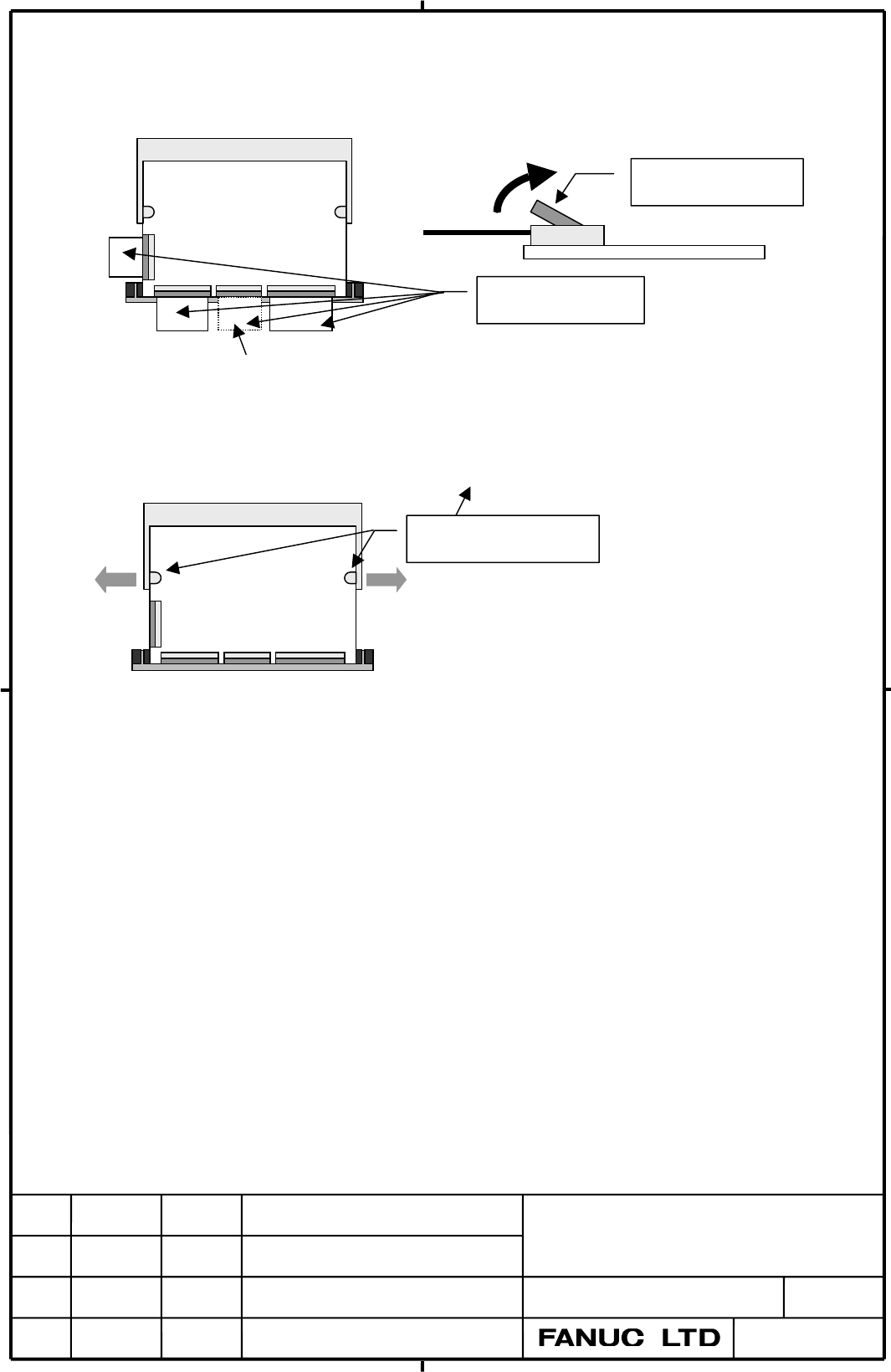
(2) Pull out 3 Flat Cables. Before pulling Flat Cables, the brown Flat Cable Stopper should
be lifted.(4 Flat Cables for ROBOSHOT.)
Flat Cable Stopper
CardEngin
For ROBOSHOT only
Flat Cables
(3) Expand the white CardEngine Stopper and take off the CardEngine. The CardEngine
jumps up by releasing CardEngine Stopper.
CardEngine Stopper
CardEngin
(4) Insert the new CardEngine into the CardEngine connector and fix it by the
CardEngine Stopper.
(5) Insert 3 Flat Cables as they were before. (4 Flat Cables for ROBOSHOT.) At this time,
make sure that all Flat Cables connected straight and fully inserted to the end of the
connectors. After that, fix them by the brown Flat Cable Stoppers.
(6) Put on the Metal Plate that holds the Flat Cable connectors.
EDIT
SHEET 22
CUST
DESCRIPTION
DESIG.
DATE
CONNECTION and MAINTENANCE
MANUAL for
LCD Unit for is Series CNC
A-80907E
TITLE
DRAW. NO.
Contents Summary of Modification of Connecting and Maintenance Manual for LCD Unit for is Series CNC (Model A) Additional Manual
- Page 1TECHNICAL REPORT (MANUAL) NO. TMN02/023E Date: General Manager of Hardware Laboratory Modification of CONNECTING and MAINTENANCE MANUAL for LCD Unit for is Series CNC (MODEL A) 1. Communicate this report to: O Your information only O GE Fanuc-N, GE Fanuc-E FANUC Robotics CINCINNATI MILACRON O Machin
- Page 2INTRODUCTION This manual describes the connecting information of the LCD Unit for is Series CNC (MODEL A). This manual also provides maintenance information (drawing numbers of printed circuit board (PCB), etc.). Use this manual together with the operator’s manual, the connection and maintenance man
- Page 3CONNECTION and MAINTENANCE MANUAL for LCD unit for is Series CNC INDEX Page I. CONNECTION 4 1.TOTAL CONNECTION 5 2. MOUNTING 6 2.1. Environment 6 2.2. Connector location 6 2.3. Mounting space and unit dimensions 7 3. CONNECTION TO PERIPHERALS 8 3.1. Main Power Input 8 3.2. Backup unit 9 3.3. Etherne
- Page 4Page II. MAINTENANCE 15 1. LIST OF THE PCBS, UNITS, MAINTENANCE SUPPLIES AND TOOLS 16 1.1. List of PCBs 16 1.2. List of units 16 1.3. List of Maintenance Supplies 16 2. CONNECTORS LOCATION 17 2.1. Unit connector 17 2.2. Main board connector 17 2.3. Connector name and function 18 3. ADJUSTMENT AND LE
- Page 5I. CONNECTION If an operation error or mishap occurs, the data on the Compact Flash Card may be lost, even if all the installation conditions are satisfied. Therefore, always maintain a backup copy of the data on the Compact Flash Card in case the stored data is lost or damaged. Especially turning o
- Page 61.TOTAL CONNECTION CNC Control Unit POWER SUPPLY HSSB I/F BOARD HSSB(COP7) THE OTHER PCB MDI MDI unit (CK1) Soft Key (CK2) Connect only in case of the unit with Soft Key. Intelligent Terminal is Power Supply(DC+24V) (Soft Key) HSSB (COP7) +24V (CP1) RS-232C I/O Serial Port (JD40) { Personal Computer
- Page 72. MOUNTING 2.1. Environment When LCD Unit for is Series CNC is used, the following environmental conditions must be ensured for the LCD Unit for is Series CNC unit installation. Ambient temperature Operating : +0°C +53°C Non-operating : - 20°C +60°C Change in temperature Up to 20 degrees/hour A
- Page 82.3. Mounting space and unit dimensions Mounting hold dimensions 8mm along the periphery on the rear surface of the installation panel is masked from paint. TITLE CONNECTION and MAINTENANCE MANUAL for LCD Unit for is Series CNC DRAW. NO. A-80907E CUST EDIT DATE DESIG. DESCRIPTION SHEET 7
- Page 93. CONNECTION TO PERIPHERALS 3.1. Main Power Input LCD Unit for is Series CNC CP1 1 +24V DC+24V Supply 2 0V 3 AMP 2-178288-3 (Housing) 1-175218-5 (Contact) ○ Cable wiring +24V 1 +24V 0V 2 0V Shield Ground Plate ○ Recommended wire Material Use wire of 30/1.8 (0.75mm2) or greater. Note 1) Please wire
- Page 103.2. Backup unit After turn off the CNC, the Backup unit supplies the power to the part of circuit for a fixed time. And it makes LCD Unit for is Series CNC possible to backup important data from the main memory to the Compact Flash Card automatically. LCD Unit for is Series CNC Backup unit CN9 CN9
- Page 11(i) Outline of Backup unit Connector 150 12 64 104 28 139 58 4-φ4.8 1.0 64 Installing hole 4-M4 139 (ii) Install of Backup unit Install the Backup unit on the MDI unit or in a pendant box to install a CNC. It uses the part that has the life, so install it at the place to be able to exchange easily.
- Page 123.3. Ethernet (10BASE-T) LCD Unit for is Series CNC HUB CD38 1 TX+ 1 TX+ 2 TX- 2 TX- 3 RX+ 3 RX+ 4 4 5 5 6 RX- 6 RX- 7 7 8 8 CD38 HUB LCD Unit for is Series CNC TX+ 1 1 TX+ 2 2 TX- TX- RX+ 3 3 RX+ RX- 6 6 RX- Shield Grand Plate Recommended connector: TM21CP-88P(03) (HIROSE) [Category 5] Twist pair c
- Page 133.4. Serial Port This interface is RS232C port for PC function. This port can be used as remote debugging port for the application development. Relay Connector LCD unit for is Series CNC (Example 1) D-SUB 25 Relay Connector JD40 1 FG (Example 2) PCR-E20MD Shield 14 2 SD 15 D-SUB 9 1 RD 11 SD 3 RD 2
- Page 14(ii) Connection (Example 2: Convert to D-SUB 9) Relay connector Relay connector JD40 D-SUB 9 JD40 D-SUB 9 SD 11 3 SD SD 11 3 SD RD 01 2 RD RD 01 2 RD RS 15 7 RS RS 15 7 RS CS 05 8 CS CS 05 8 CS corrected 6 DR 6 DR 4 ER 4 ER 1 CD CD 07 1 CD CD 07 9 RI 9 RI 5 SG 0V 02,12, 5 SG 0V 02,12, 04,14 04,14 Sh
- Page 153.5. High Speed Serial Bus (HSSB) HSSB Interface Board LCD Unit for is Series CNC Optical Fiber Cable COP7 COP7 1) Recommended cable (Optical Fiber Cable) A66L-6001-0026#L1R003 …… Cable Length = 1 m A66L-6001-0026#L3R003 …… Cable Length = 3 m A66L-6001-0026#L5R003 .….. Cable Length = 5 m A66L-6001-0
- Page 16Ⅱ.MAINTENANCE If an operation error or mishap occurs, the data on the Compact Flash Card may be lost, even if all the installation conditions are satisfied. Therefore, always maintain a backup copy of the data on the Compact Flash Card in case the stored data is lost or damaged. Especially turning o
- Page 171. LIST OF THE PCBS, UNITS, MAINTENANCE SUPPLIES AND TOOLS 1.1. List of PCBs Name Spec. Main board A20B-8100-0603 for ROBOSHOT A20B-8100-0600 Inverter PCB for 10.4” LCD type A20B-8001-0920 Backup unit PCB A20B-2100-0510 1.2. List of units Name Spec. Soft Key Touch Panel Basic unit 10.4” LCD O X A13B
- Page 182. CONNECTORS LOCATION 2.1. Unit connector View from backside. CFC1 COP7 CP1 JD40 CN9 CA60 CD38 (FUSE1) Main board Soft Key cable 2.2. Main board connector CN3 CN342 DIMM1 CN8 CN341 PCICIA2 CN12 TP1 Main board CN10 COP7 JD40 CP1 CN9 CFC1 CA60 (FUSE1) CD38 TITLE CONNECTION and MAINTENANCE MANUAL for
- Page 192.3. Connector name and function Name Function JD40 RS232C COP7 HSSB CN10 Do not use CA60 Do not use DIMM1 CardEngine CN342 CardEngine CN341 CardEngine CN12 CardEngine CP1 DC24V-input CD38 Ethernet(10BASE-T) TP1 Touch Panel CN9 Backup unit CFC1 Compact Flash Card CN3 Inverter CN8 LCD panel PCICIA2 P
- Page 203.2. LED 3.2.1. LED location Main board DG5 LEQ1 LEDA1 DG6 3.2.2. LED display Name Color Status LEDA1 GREEN LCD Unit for is Series CNC is running (including while the power comes from Backup unit ). LEQ1 GREEN Ethernet function is possible to action. DG5 GREEN CNC status is normal. DG6 RED HSSB is n
- Page 214. Exchange of PCB, unit, and Maintenance Supplies WARNING When opening the cabinet to remove the unit, be sure to turn off the machine. There are high-voltage circuits, if the machine is in the state turned on. 4.1. Exchange of main board (1) Put off the yellow cover. (2) Disconnect the connectors,
- Page 224.2. Exchange of CardEngine 4.2.1. CardEngine location Metal plate CardEngine Main board 4.2.2. Component of CardEngine unit Name Spec Quantity Remark CardEngine A15L-0001-0073#16AJ 1 (Choose from Japanese version A15L-0001-0073#16AE these) English version A15L-0001-0069#16CJ for ROBOSHOT Card Mount
- Page 23(2) Pull out 3 Flat Cables. Before pulling Flat Cables, the brown Flat Cable Stopper should be lifted.(4 Flat Cables for ROBOSHOT.) Flat Cable Stopper CardEngin Flat Cables For ROBOSHOT only (3) Expand the white CardEngine Stopper and take off the CardEngine. The CardEngine jumps up by releasing Car
- Page 244.3. Exchange of Compact Flash Card 4.3.1. Compact Flash Card location Main board Compact Flash Card Socket Compact Flash Card Stopper (A97L 0201 0926) 4.3.2. Consist of Compact Flash Card unit Name Spec Quantity Remark Compact Flash A87L-0001-0173#016MB 1(Choose 16MB Card A87L-0001-0173#032MB from.
- Page 254.4. Exchange of the Fuse (1) At first, Check the cause that the Fuse has been broken and remove the cause. (2) Prepare a new Fuse (A13B-0191-K101). (3) Make sure that LCD Unit for is Series CNC is turned off the power. (4) Enable to work from rear side of LCD Unit for is Series CNC by taking it out
- Page 264.5. Exchange of the Fan Motor (1) Make sure that LCD Unit for is Series CNC is turned off the power. (2) Disconnect the Fan Motor connector. The connector is latched, and need to release the latch with minus driver etc. (3) Remove the Fan Motor by releasing the latch that fixes the Fan Motor. (4) I
- Page 274.6. Exchange of the LCD Backlight (1) Make sure that LCD Unit for is Series CNC is turned off the power. (2) Prepare a new LCD Backlight(A02B-0236-K116). (3) Disconnect the connector PCICIA2. If unit has Touch Panel, disconnect the connector TP1 too. Loosen the screw at 5 points, and remove the fro
- Page 28(5) Unlock like the below figure, and pull out the case with the LCD Backlight, then exchange. Locked here CP1 Pull up her softly and pull out the Backlight (detail is below figure) Rear of LCD Lock Pull up here Do not pull the cable when pull out the Backlight. (6) Assemble the unit in a reverse or
- Page 294.7. Exchange of Touch Panel Protection Sheet LCD Unit for is Series CNC has a Touch Panel Protection Sheet on the face of Touch Panel to protect the Touch Panel. When the screen cannot be watched clearly because of some damages or stains, exchange the Touch Panel Protection Sheet. Unit Specificatio
- Page 30B) In case of A02B–0236–K130 (1) At first, remove the old Touch Panel Protection Sheet off. Tab for exchange (2) Clean the face of the LCD well. (3) Peel off the white film on the back (facing the LCD) of the new Touch Panel Protection Sheet. (4) Put the tub of exchange on the lower left side of the
- Page 315. Backup unit 5.1.Specification Name Specification Backup unit PCB A20B-2100-0510 Backup unit cable A660-2042-T196#L500R0 5.2. Connector location CN9 Top view Backupunit PCB Connector number Use CN9 Backup power supply (Main board interface) While LED “LEDA1” on the Main board is on-state, do not t