FS 16i/18i-TB, FS 16i/18i/21i-MB Machining Condition Selecting Function Additional Manual Page 7
Additional Manual
2002/03/11 T.Inagaki E.Genma
A-78708EN
FANUC Series 16i/18i –TB
FANUC Series 16i/18i/21i –MB
Machining condition selecting function
Title
Drawing No.
Page
Descri
p
tionDate Edit
6/31
02 020423 T.Inagaki Make an overall revision
The precision level selection
screen
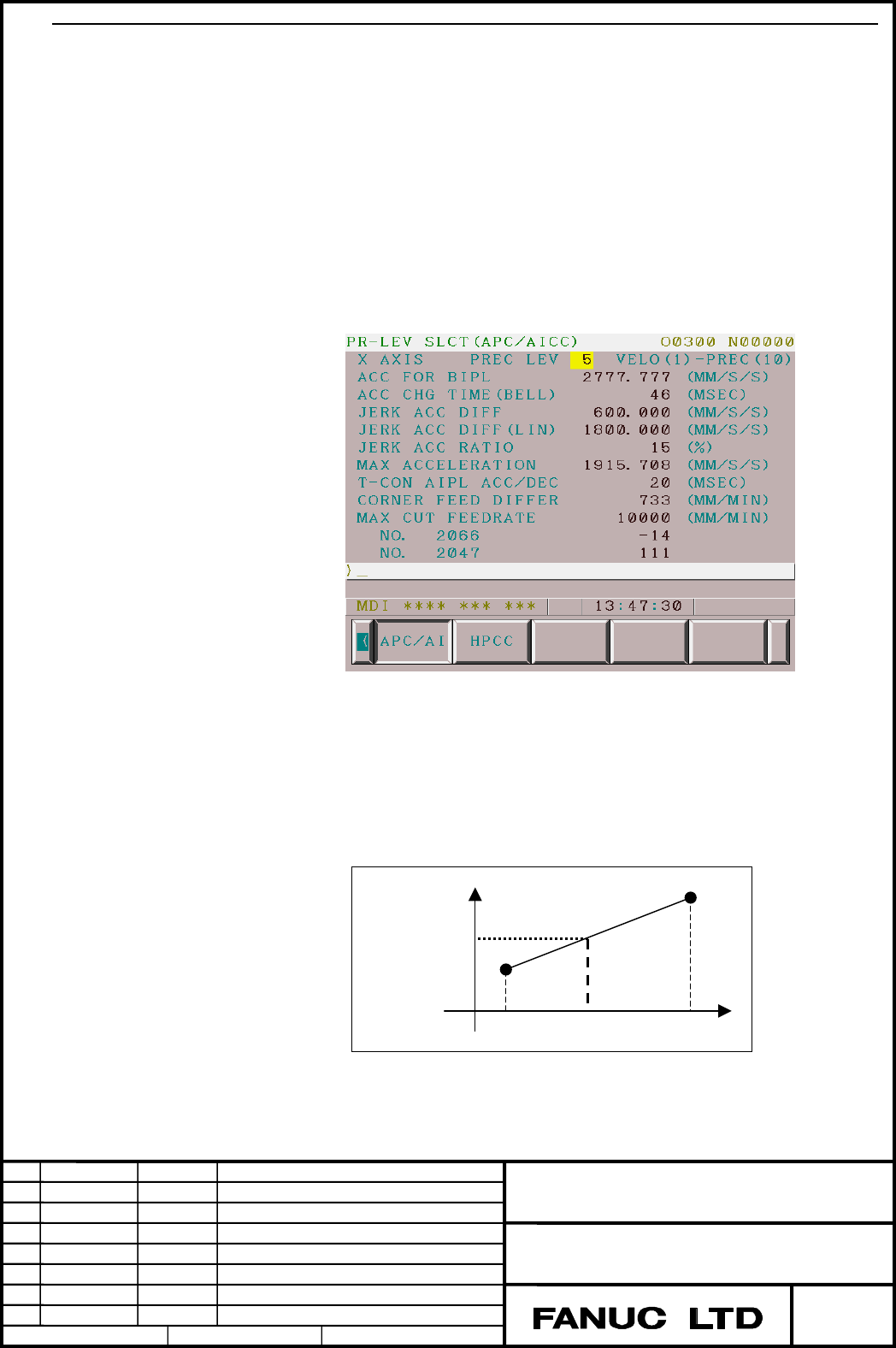
The precision level selection screen can be select level between LV1(the
highest priority to velocity) to LV10(the highest priority to precision). Each
items of value between LV1 and LV10 are in direct proportion like Fig.4, and
we can select the most suitable value.
This screen can be displayed by following operation.
Function key <OFFSET/SETTING>→soft key [>](for several times)
→soft key [PR-LEV]
The structure of level selection screen is as follows.
Fig.3 Precision level selection screen
The values of precision levels are maintained even if CNC is powered off.
(These are maintained on parameter No.13634 and No.13680.)
The initial value of level is '1'. The level can be changed even when
"PARAMETER WRITE(PWE)" in setting data is set to '0' or the machining
parameter setting screen is not displayed. (No.13601#0(CPR)=1)
Fig.4 PRECISION LEVEL
Value
Effect value
Contents Summary of FS 16i/18i-TB, FS 16i/18i/21i-MB Machining Condition Selecting Function Additional Manual
- Page 1TECHNICAL REPORT NO. TMN 02/042E Date: Apr. 24, 2002 General Manager of Software Development Center FANUC Series 16i/18i - TB , FANUC Series 16i/18i/21i - MB Machining condition selecting function 1. Communicate this report to: ○ Your information ○ GE Fanuc-N, GE Fanuc-E FANUC Robotics CINCINATI MIL
- Page 2FANUC Series 16i/18i-TB FANUC Series 16i/18i/21i-MB Machining condition selecting function Specifications 1.1 Outline................................................................................................................................................... 2 1.2 Specifications...............
- Page 31.1 Outline On high-speed high-precision machining functions, parameters on LV1(the highest priority to velocity) and LV10(the highest priority to precision) can be set, and the precision level can be selected according to the machining condition. As a result, proper parameters for the machining con
- Page 41.2 Specifications Outline This function contains two kinds of screens. The machining parameter setting screen. On each level (LV1 (the highest priority to velocity) and LV10 (the highest priority to precision)), following kinds of parameters can be set. - The acceleration for linear acceleration/de
- Page 5Caution 1. The acceleration change time for bell-shaped acc/dec before interpolation is available only when the optional function, bell-shaped acc/dec before interpolation, is available. 2. On APC mode, automatic velocity control considering acc/dec is not effective. Feedrate clamp by circular radiu
- Page 6On this screen, when softkey [INIT]→[EXEC] is pushed, the item selected by cursor (either LV1 or LV10) is changed to initial value prepared in CNC. When [G_INIT]→[EXEC] is pushed, whole items of cursor-selected axis (either LV1 or LV10 which is selected by cursor) are changed to initial values prepa
- Page 7The precision level selection screen The precision level selection screen can be select level between LV1(the highest priority to velocity) to LV10(the highest priority to precision). Each items of value between LV1 and LV10 are in direct proportion like Fig.4, and we can select the most suitable va
- Page 8The soft-key location of machining condintion selecting function ( the machining parameter setting screen and the precision level selection screen) The location of softkey, used on the machining condition selecting function, is as follows. SYS TEM | ├―[M-TUN ] | ├―[PRV/AI] :The machining parameter s
- Page 94. When the parameter equivalent to precision level is changed, the effected item value is changed as parameter is changed. (It may differ from the parameter calculated by level selection). 5. When [G_INIT]→[EXEC] is pushed, whole items of cursor-selected axis (either LV1 or LV10 which is selected b
- Page 10The explanation of each machining adjustment item The acceleration before cutting feed interpolation The acceleration for linear acceleration/deceleration before interpolation is set. (unit:1mm/sec2) [Valid data range] : 50.000-99999.999(mm/sec2) [Data size] : 2word(APC/AICC/AI-APC/AI-nano/HPCC) : 2
- Page 11Velocity Max acceleration No.1770 or No.8400 0 No.1771 or Time No.8401 or No.19510 Caution 1. On APC/AICC/AI-APC/AI-nano/HPCC,this item is common to all axis. 2. On AI-HPCC/AI-nano-HPCC, this item need to be set for each axis. The acceleration change time (bell-type) The acceleration change time for
- Page 12When this parameter is set from zero to non-zero, following parameters are also set. [APC/AICC/AI-APC/AI-nano] Prm.1603#7(BEL)=1 [HPCC/AI-HPCC/AI-nano HPCC] Prm.1603#3(SBL)=1, Prm.8402#1(NBL)=1, No.8402#7(BDO)=1 Caution 1. This item is not effective on APC mode. 2. Bell-shaped acc/dec on HPCC mode i
- Page 13Permissible acceleration change value for each axis in feedrate control based on acceleration changes for jerk control [Valid data range] Increment system IS-B IS-C Unit of data Data range 2 Millimeter machine 0.001 0.0001 mm/sec 0~99999999 Rotation axis 0.001 0.0001 deg/sec2 0~99999999 A permissibl
- Page 14Permissible acceleration change value for each axis in feedrate control based on acceleration changes for jerk control in continuously linear segments [Valid data range] Increment system IS-B IS-C Unit of data Data range 2 Millimeter machine 0.001 0.0001 mm/sec 0~99999999 Rotation axis 0.001 0.0001
- Page 15Ratio of the jerk change time in smooth bell-shaped acceleration/deceleration before interpolation [Unit of data] :% [Valid data range] : 0-50 [Data size] : Byte Specify the percent jerk change time with respect to the acceleration change time (Parameter No. 1772) in look-ahead smooth bell-shaped ac
- Page 16Max allowable acceleration The allowable acceleration is set. It is used when the feedrate is determined by acceleration. [Valid data range] :0-99999.999(Unit: 1mm/sec2) [Data size] :Dword axis On HPCC/AI-HPCC/AI-nano-HPCC mode, this item is applied for acc/dec during circular interpolation. On APC/
- Page 17Prm.1785 : Parameter for determining an allowable acceleration when the feedrate is set by acceleration. Prm.8470 : Parameter for determining allowable acceleration in velocity calculation considering acceleration. Prm.1432 : Maximum cutting feedrate on APC/AICC/AI-APC/AI-nano/HPCC/ AI-HPCC mode. (U
- Page 18Time constant for acc/dec after cutting feed interpolation The time-constant for acceleration/deceleration after cutting feed interpolation is set. (Unit: ms) The type of acc/dec (linear / bell-shaped) is selected by Prm.1602#3(BS2) or Prm.1602#6(LS2). Prm.1602 Acc/dec type LS2(#6) BS2(#3) 1 0 Linea
- Page 19Corner feedrate difference The allowable difference for the speed difference based on corner deceleration function is set. The system calculates the feedrate, whereby a change in the velocity element of each axis, does not exceed this parameter value at the corner. Then the machine decelerates using
- Page 20Maximum cutting feedrate Maximum cutting feedrate for each axis is set. [Valid data range] Increment Valid data range Unit system IS-B IS-C Millimeter machine 1mm/min 0~240000 0~100000 Rotation axis 1deg/min 0~240000 0~100000 [Data size] : Dword axis When this item is set, following parameters are c
- Page 21Arbitrary item. One or two arbitrary parameters can be set freely by customers. Each arbitrary parameter can be equivalent to CNC or servo parameters. The parameter number equivalent to arbitrary item is set by Prm.13629,13630 (APC/AICC/AI-APC/AI-nano),13674, and 13675 (HPCC/AI-HPCC/AI-nano-HPCC). T
- Page 221.3 Parameters #7 #6 #5 #4 #3 #2 #1 #0 13600 MCR [Data type] Bit MCR On the machining condition selecting function (the machining parameter setting screen and the precision level selection screen ), when "MAX ACCELERATION" is adjusted, parameter 1730, 1731(arc radius-based feedrate clamping paramete
- Page 2313660 The acceleration for linear acceleration/deceleration before interpolation(LV1,for HPCC/AI-HPCC/AI-nano-HPCC) 13661 The acceleration for linear acceleration/deceleration before interpolation(LV1,for HPCC/AI-HPCC/AI-nano-HPCC) [Data type] 2-word axis [Unit and range] Increment system Unit of da
- Page 2413662 The acceleration change time for bell-shaped acc/dec before interpolation (LV1,for HPCC/AI-HPCC/AI-nano HPCC) 13663 The acceleration change time for bell-shaped acc/dec before interpolation (LV10,for HPCC/AI-HPCC/AI-nano HPCC) [Data type] 2-word [Unit of data] ms [Valid data range] 0~200 On HP
- Page 2513664 Permissible acceleration change value for each axis in feedrate control based on acceleration changes for jerk control (LV1,for AI-HPCC/AI-nano HPCC) 13665 Permissible acceleration change value for each axis in feedrate control based on acceleration changes for jerk control (LV10,for AI-HPCC/A
- Page 2613666 Permissible acceleration change value for each axis in feedrate control based on acceleration changes for jerk control in continuously linear segments (LV1, for AI-HPCC/AI-nano HPCC) 13667 Permissible acceleration change value for each axis in feedrate control based on acceleration changes for
- Page 2713668 Ratio of the jerk change time in smooth bell-shaped acceleration/deceleration before interpolation (LV1, for AI-HPCC/AI-nano-HPCC) 13669 Ratio of the jerk change time in smooth bell-shaped acceleration/deceleration before interpolation (LV10, for AI-HPCC/AI-nano-HPCC) [Data type] Byte [Unit of
- Page 2813622 Time constant for acc/dec after cutting feed interpolation (LV1, for APC/AICC/AI-APC/AI-nano/HPCC/AI-HPCC/AI-nano HPCC) 13623 Time constant for acc/dec after cutting feed interpolation (LV10, for APC/AICC/AI-APC/AI-nano/HPCC/AI-HPCC/AI-nano HPCC) [Data type] Word axis [Unit of data] msec [Vali
- Page 2913672 Allowable difference for the speed difference based corner deceleration function (LV1, for HPCC/AI-HPCC/AI-nano HPCC) 13673 Allowable difference for the speed difference based corner deceleration function (LV10, for HPCC/AI-HPCC/AI-nano HPCC) [Data type] 2-word axis [Unit and range] Valid data
- Page 3013628 Parameter No. equivalent to arbitrary item 1 (for APC/AICC/AI-APC/AI-nano) 13629 Parameter No. equivalent to arbitrary item 2 (for APC/AICC/AI-APC/AI-nano) 13674 Prm. No. equivalent to arbitrary item 1 (for HPCC/AI-HPCC/AI-nano HPCC) 13675 Prm. No. equivalent to arbitrary item 2 (for HPCC/AI-H
- Page 3113630 LV1(the highest priority to velocity) value of arbitrary item 1 (for APC/AICC/AI-APC/AI-nano) 13631 LV1 value of arbitrary item 2 (for APC/AICC/AI-APC/AI-nano) 13632 LV10(the highest priority to velocity) value of arbitrary item 1 (for APC/AICC/AI-APC/AI-nano) 13633 LV10 value of arbitrary ite
- Page 321.4 Alarms and messages Number Message Description 5110 IMPROPER G-CODE (G05.1 When servo parameter is specified on Q1 MODE) a arbitrary item, it is impossible to command HPCC/AI-HPCC/AI-nano-HPCC mode during AICC/AI-APC/AI-nano mode. Title FANUC Series 16i/18i –TB FANUC Series 16i/18i/21i –MB Machi