Series 30i/31i/32i -MODEL A Additional Manual Page 13
Additional Manual
A-79353E
Title
Draw
No.
13/20
Sheet
Operation manual of FS30i/31i/32i-MODEL A
PC tool for Memory Card Program
Operation/Editing
Ed. Date Design Description
Date Desig. Apprv.
Feb 18.2004
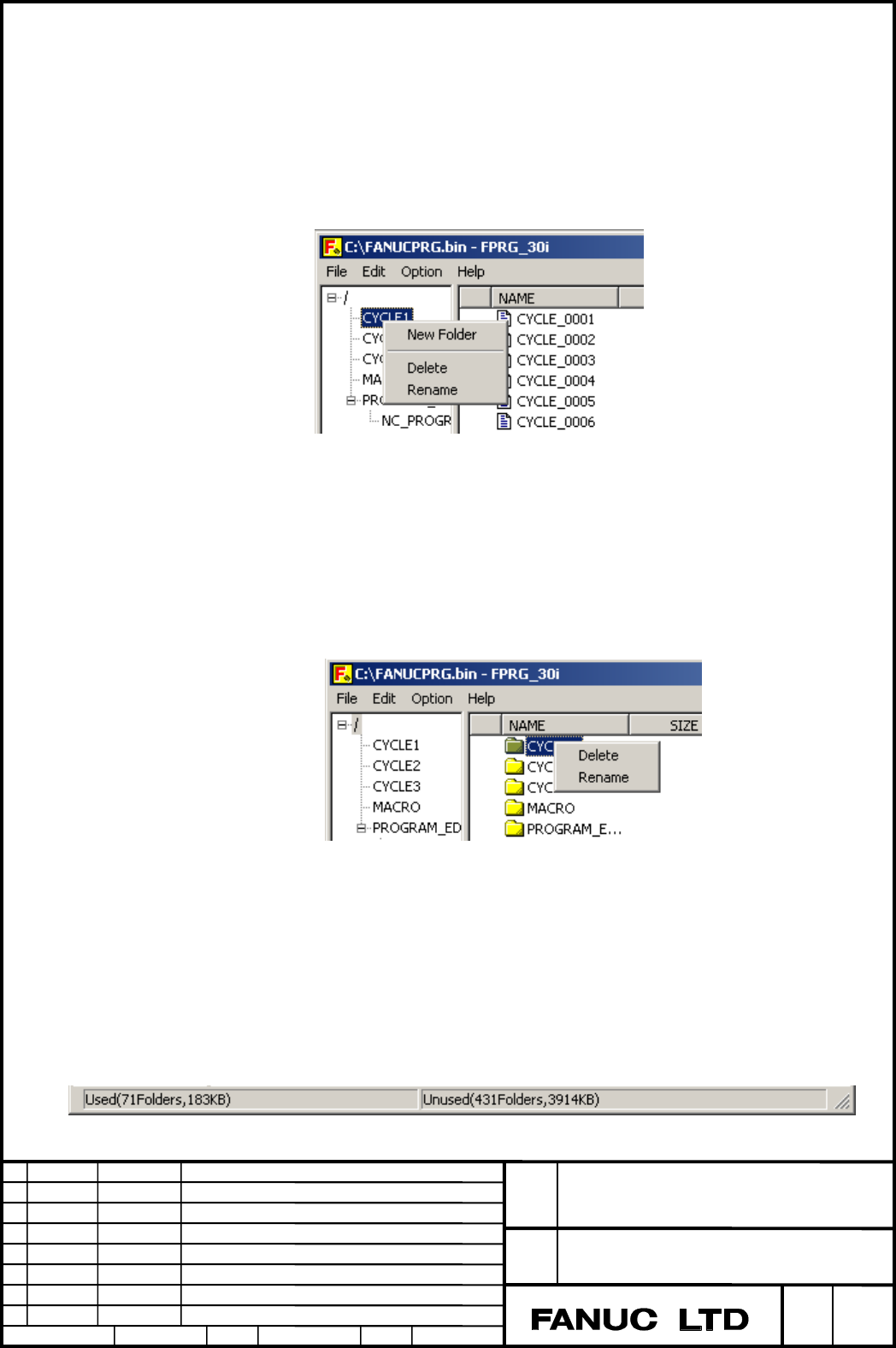
Pop-up menu
Pop-up menu is displayed by clicking the right mouse button.
- Focus on Tree view
Clicking "New Folder", a new folder is created on selected folder.
Clicking "Delete", the selected folder is deleted.
Clicking "Rename", the selected folder is renamed.
If clicking on root folder, "Delete" and "Rename" are not activated.
- Focus on List view
Clicking "Delete", the selected folder or program file is deleted.
Clicking "Rename", the selected folder or program file is renamed.
Display of free space on the memory card program file (“FANUCPRG.BIN”)
Number of used folder, size of used space, number of unused folder,
and size of free space are displayed on status bar in the lower portion of
the screen.
Contents Summary of Series 30i/31i/32i -MODEL A Additional Manual
- Page 1FANUC Series 30i/31i/32i -MODEL A Operation manual of PC tool for Memory Card Program Operation/Editing Operation manual of FS30i/31i/32i-MODEL A Title PC tool for Memory Card Program Operation/Editing Draw No. A-79353E Ed. Date Design Description Sheet 1/20 Date Feb 18.2004 Desig. Apprv.
- Page 21.1 PC tool for Memory Card Program Operation/Editing Outlines By using this PC tool, you can make the memory card program file ("FANUCPRG.BIN") which is needed for the function "Memory Card Program Operation/Editing". The maximum size of the memory card program file is 2048 Mbytes (2 Gbytes). The "
- Page 3Outline of screen 1) Menu bar : The menu of this PC tool is displayed. 2) Tree view : Browsing the folders of the memory card program file. 3) Column : Attributes of each file or folder in the memory card program file. 4) List view : Contents of selected folder are displayed. 5) Status bar : Used an
- Page 4Initial Option dialogue window When this PC tool starts up, the Option dialogue window is displayed. Please select "Open an existing file" or "Create a new file". When "Open an existing file" is selected After OK button pushed, "Open" dialogue window is displayed. Please select the existing memory c
- Page 5When "Create a new file" is selected After OK button pushed, "Save As" dialogue window is displayed. Please create a new memory card program file on the selected folder. When the new the memory card program file is created, the following items need to be selected: - Folder/Program Numbers - Program
- Page 6During creating of the memory card program file, the progress bar is being displayed. This progress bar is also displayed during executing of Drop-in and Drop-out. If you push [Cancel] button, the execution is stopped. Operation manual of FS30i Title PC tool for Memory Card Program Operation/Editing
- Page 7Menu File menu [New] Create a new memory card program file. [Open…] Open the existing memory card program file. [Exit] Terminate this PC tool. Edit menu [New Folder] Create new folder. It is available during Tree view selected. Up to seven hierarchical levels starting from the user root folder (/USE
- Page 8[Rename] Rename a folder or file. Note For naming folder and program file, characters which can be used are limited. Please refer to "Naming rules". Option menu [Hide Confirm Message] When the following operations are executed, the following Confirm Message is popped up before the memory card progra
- Page 9If the [OK] button is pushed, the operation advances. If the [Cancel] button is pushed, the operation is abandoned. When the [Hide Confirm Message] in menu bar is checked, the Confirm Message is not displayed and the operation advances at once. The default setting is the Confirm Message displayed. [
- Page 10If the [OK] button is pushed, the operation advances. If the [Cancel] button is pushed, the operation is abandoned. Warning 1 At this PC tool terminated, all files in the work folder are deleted. 2 During this PC tool executing, do not access the files in the work folder. If the access is done, ther
- Page 11- Drop-in from Explorer NC program can be added by dropping files including the NC files into the List view window of this PC tool from Explorer NC program name and update time is the same as the Dropped-in files. If "Oxxxxxxxx" or "
" exists at the top of files, These "Oxxxxxxxx" and " " - Page 12Example of Program Available for Drop-in Unavailable for Drop-in O1
% O1 G91 X10. Y10. G91 X10. Y10. O1 G91 X10. Y10. M30 M30 G91 X10. Y10. M30 M30 % O10 G91 X10. Y10. M30 Note 1 If the same named program file exists, another same named program file cannot be dropped in. 2 If free space on the - Page 13Pop-up menu Pop-up menu is displayed by clicking the right mouse button. - Focus on Tree view Clicking "New Folder", a new folder is created on selected folder. Clicking "Delete", the selected folder is deleted. Clicking "Rename", the selected folder is renamed. If clicking on root folder, "Delete"
- Page 14When a new memory card program file is created, two reserved folder are also created. Therefore, the number of used folder is two. However it does not show that number of unused folder is reduced. The display of status bar is renewed at creating or deleting a folder, dropping-in from Explorer, and d
- Page 151.2 Naming rules Outlines Naming rules of folder and program file are described as follows. Naming rules of Program file Here are Naming rules of Program file: - Program file name can have a maximum of 32 characters. - Program file name can have following characters. Alphabet(Upper and lower case le
- Page 16Naming rules of Folder Here are Naming rules of Folder: - Folder name can have a maximum of 32 characters. - Folder name can have following characters. Alphabet(Upper and lower case letter), numeric character, "-"(minus), "+"(plus), "_"(under bar), "." (dot) "." and ".." can not be used since these
- Page 171.3 Rules of characters in Program file Outlines Words in parentheses "( )" in Program file are treated as comments. The mark of comment start "(" is named "Control-out". The mark of comment end ")" is named "Control-in". "Control-out" and "Control-in" must make a pair. The order is 1st - "Control-o
- Page 183c < 55 U 71 q 3d = 56 V 72 r 3e > 57 W 73 s Note In the Control-in, "O", ":", and "<" can not be used at top of the line except for the 1st line. Usable characters in Control-out(characters in parentheses) List of ANSI(ASCII) codes of usable characters(hexadecimal form) Code Character Code Characte
- Page 191.4 Error message and Note Error may occur when using this application, hereafter explains the error messages and gives relative instructions. List of error message When an error occurred, the error message box is displayed as follows. Message Remarks Failed to open the file you specified. If failed
- Page 20Note Folder and Program Numbers Folder and Program Numbers can be selected among 63 / 500 / 1000. For selecting the Numbers of 500 or 1000, the option "Registered programs expan. On the memory card" is needed in CNC side. Operation manual of FS30i Title PC tool for Memory Card Program Operation/Edit