FANUC Series 30i /31i /32i, Temporary Detaching of Tool Attachment/Detachment Function Additional Manual Page 5
Additional Manual
Edit
Apprv.Desig.
Date
Design
Date
FANUC Series 30
i
/
31
i
/
32
i
-MODEL A
Temporary detaching of tool
attachment/detachiment
A
-90396E
2006.1.6
5/13
Sheet
Title
Draw
No.
Descri
p
tion
In case of 7.2/8.4 inch display unit
1.Display the magazine screen.
2.Press the soft key [(OPER)].
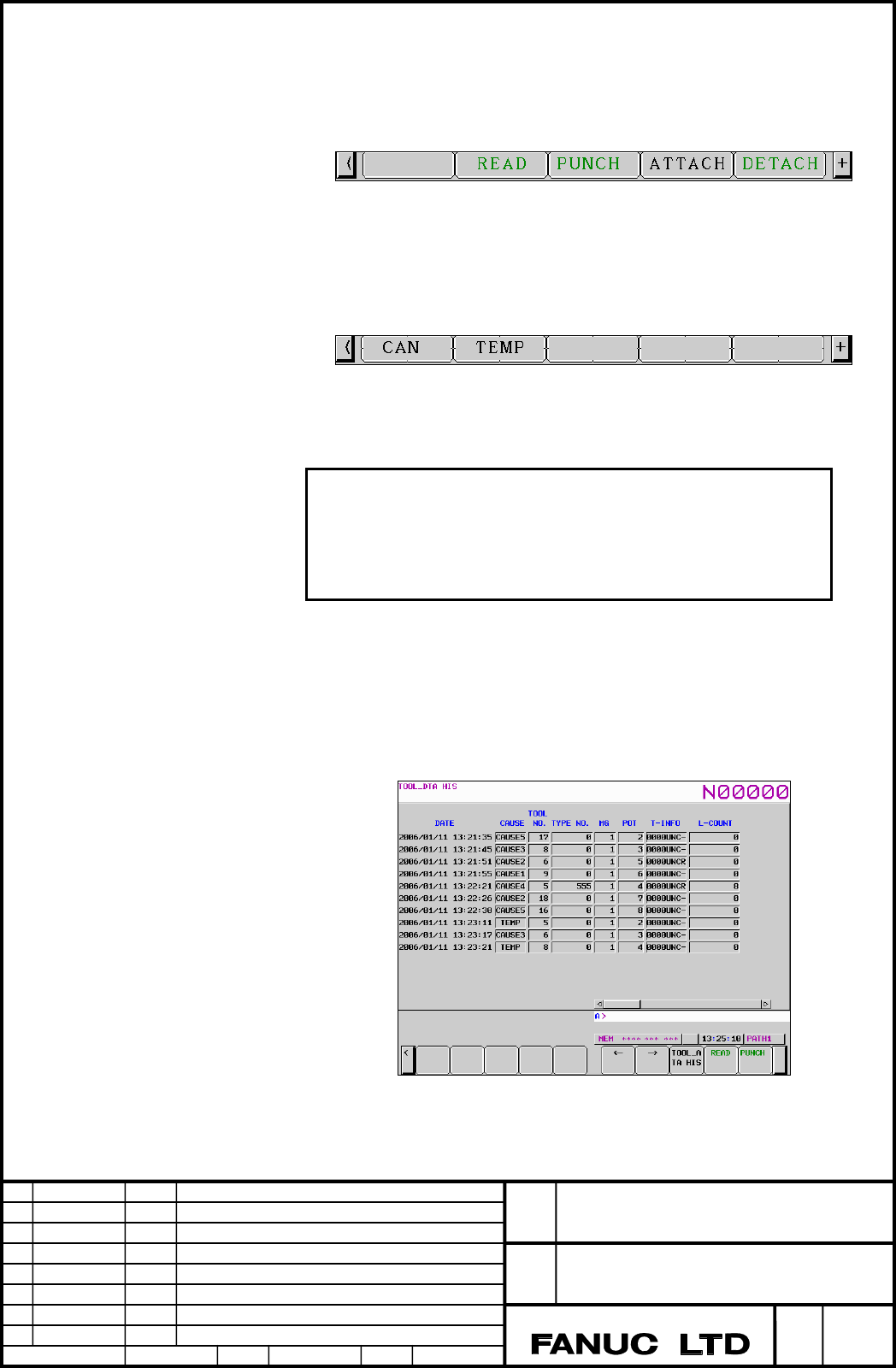
3.Press the menu key continuously until the soft key [DETACH] is displayed.
Fig. 1.1.(c) Soft key [DETACH](7.2/8.4 inch display unit)
4.Press the soft key [DETACH]
5.Press the soft key [TEMP] for temporary detaching.
図 1.1.(d) Soft key [TEMP](7.2/8.4 inch display unit)
6.Temporary detaching is performed.
Note
When temporary detaching is performed in automatic mode,
“TOOL_IN” is blinked at the right bottom on the magazine
management screen until the tool detachment finish signal TLFDTA
<G382#1>signal is set to “1”.
Tool detaching history screen
When temporary tool detaching is performed, history data is registered to the
detaching history data table.
“TEMP” is displayed on the item of “CAUSE”.
In this case, the cause number is “101”, when the detaching history data is output.
Fig. 1.1.(e) Tool detaching history screen
Contents Summary of FANUC Series 30i /31i /32i, Temporary Detaching of Tool Attachment/Detachment Function Additional Manual
- Page 1FANUC Series 30i /31i /32i Temporary detaching of Tool attachment/detachment function FANUC Series 30i/31i/32i -MODEL A Title Temporary detaching of tool attachment/detachiment Draw A-90396E No. Edit Date Design Description Sheet 1/13 Date 2006.1.6 Desig. Apprv.
- Page 2CONTENTS 1.1 TEMPORARY DETACHING OF TOOL ATTACHMENT/DETACHMENT FUNCTION ............ 3 1.1.1 GENERAL ..................................................................................................................................... 3 1.1.2 DETAILS .................................................
- Page 31.1 Temporary detaching of tool attachment/detachment function 1.1.1 General This function makes it possible to detaching tool with remaining tool data. Therefore, when the same tool is attached to the pod again, it is not necessary to input the tool data again. 1.1.2 Details When detaching is perfo
- Page 4Note The optional function of tool attachment/detachment management function is required for this function. 1.1.3 Temporary tool detaching A magazine number or a pot number is specified on the magazine screen, and then tool temporary detaching can be performed. The following table is a difference be
- Page 5In case of 7.2/8.4 inch display unit 1.Display the magazine screen. 2.Press the soft key [(OPER)]. 3.Press the menu key continuously until the soft key [DETACH] is displayed. Fig. 1.1.(c) Soft key [DETACH](7.2/8.4 inch display unit) 4.Press the soft key [DETACH] 5.Press the soft key [TEMP] for tempo
- Page 6Temporary detaching pod The pod that is detached temporarily is treated as “Temporary detaching pod”. “Temporary detaching pod” means the pot detached temporarily. It is the target of search for the empty pod. And it is not allowed to input the tool management number to a temporary detaching pod. Wh
- Page 71.1.4 Re-attaching of the tool The following point is different between attaching by ordinary tool attachment/detachment function and re-attaching by temporary attaching function. Table 1.1.(d) Difference between “Attaching” and “Re-attaching” Attaching Re-attaching Specifying pod Empty pod Temporar
- Page 8Note When re-attaching is performed in automatic mode, “TOOL_IN” is blinked at the right bottom on the magazine management screen until the tool attachment finish signal TLFATA
- Page 91.2 Signal Tool attachment signal TLATA
- Page 10Tool detachment error signal TLEDTA
- Page 11Signal address #7 #6 #5 #4 #3 #2 #1 #0 G382 TLEDTA TLEATA TLFDTA TLFATA #7 #6 #5 #4 #3 #2 #1 #0 F359 TLDTA TLATA #7 #6 #5 #4 #3 #2 #1 #0 F360 TLMZN07 TLMZN06 TLMZN05 TLMZN04 TLMZN03 TLMZN02 TLMZN01 TLMZN00 F361 TLMZN15 TLMZN14 TLMZN13 TLMZN12 TLMZN11 TLMZN10 TLMZN09 TLMZN08 F362 TLPOT07 TLPOT06 TLPO
- Page 121.3 Parameter #7 #6 #5 #4 #3 #2 #1 #0 13206 TDT [Input type] Parameter input [Data type] Bit system common #0 TDT Temporary detaching of tool attachment/detchment function is 0: Used 1: Not used Note Don’t set to this parameter to ‘0’ in the condition of exising the temporary detaching pod. #7 #6 #5
- Page 131.4 Alarm and Message Warning message Message Contents Temporary detaching pod Input of tool management number is performed for the temporary detaching pod. FANUC Series 30i/31i/32i -MODEL A Title Temporary detaching of tool attachment/detachiment Draw A-90396E No. Edit Date Design Description Sheet