FANUC PICTURE for Windows Operators manual Page 52
Operators manual
2.FANUC PICTURE (Windows) B-66244EN/03
- 42 -
Method of composite screen output
A method of composite screen output using Visual Basic (abbreviated
as VB) and Paint is described below.
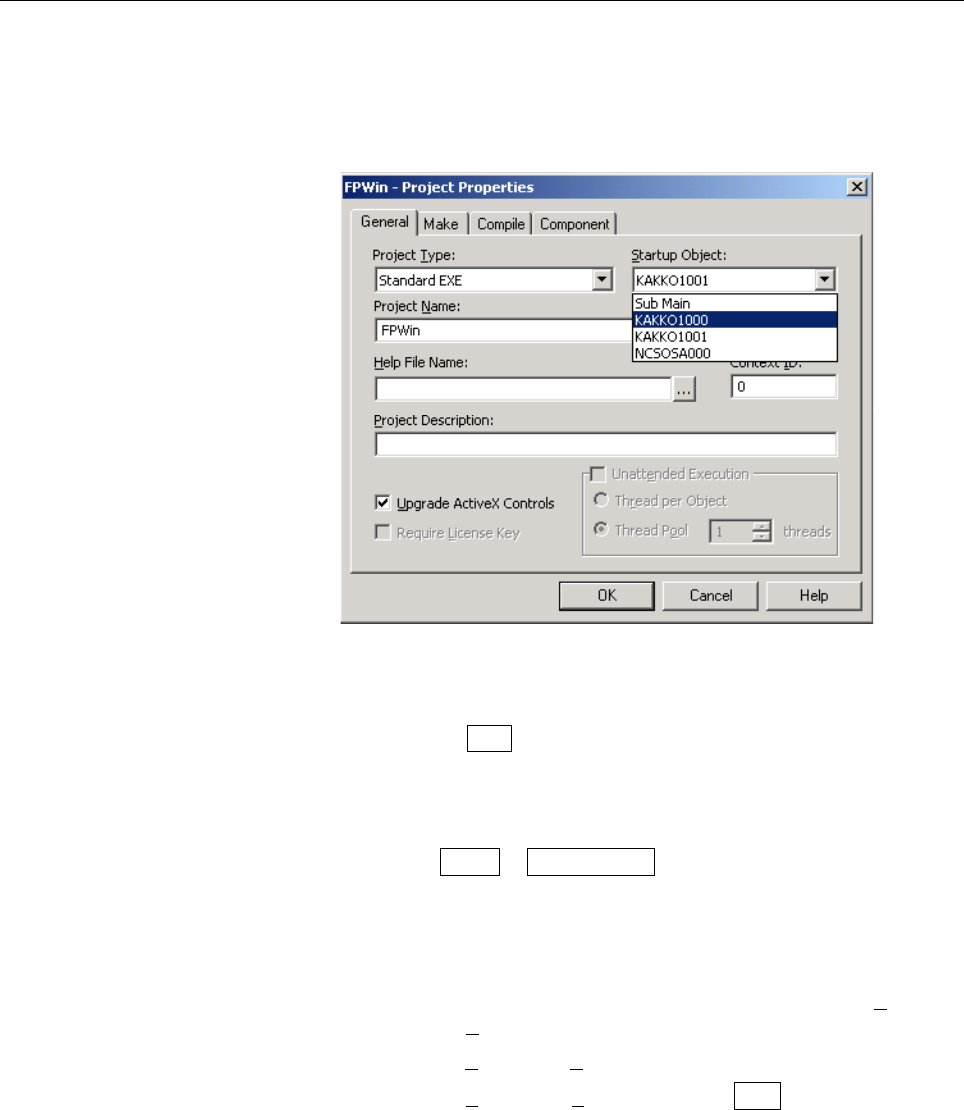
1. Choose [Project] then <FPWin Properties…> of VB. The dialog
box shown here is displayed.
From the [Startup Object] list box, select a desired screen, then
click the OK button.
2. Choose [Run] then <Start> of VB. After a while, the entire screen
selected appears. Adjust the window frame at the right edge and
bottom of this screen.
3. Press ALT + Print Screen on the keyboard to copy only the
active window to the Clipboard.
4. Activate Paint available with the Windows OS.
Note) When using the screen for a WORD document, open the
WORD document at this time. The screen can be
incorporated into the document by choosing [E
dit] then
<P
aste>.
5. Choose [E
dit] then <Paste> of Paint.
6. Choose [F
ile] then <Print>, then click OK in the dialog box to
print out the screen.
Contents Summary of FANUC PICTURE for Windows Operators manual
- Page 1For Windows OPERATOR’S MANUAL B-66244EN/03
- Page 2• No part of this manual may be reproduced in any form. • All specifications and designs are subject to change without notice. The export of this product is subject to the authorization of the government of the country from where the product is exported. In this manual we have tried as much as possi
- Page 3B-66244EN/03 SAFETY PRECAUTIONS SAFETY PRECAUTIONS This manual includes safety precautions for protecting the user and preventing damage to the machine. Precautions are classified into Warnings and Cautions according to their bearing on safety. Also, supplementary information is described as Notes.
- Page 4SAFETY PRECAUTIONS B-66244EN/03 WARNINGS AND NOTES RELATING TO FANUC PICTURE (Windows) Warnings and notes relating to FANUC PICTURE (Windows) are provided in this manual. Before using this software, read this manual thoroughly and read the Warnings, Cautions, and Notes in this manual carefully. In a
- Page 5B-66244EN/03 PREFACE PREFACE Thank you for purchasing FANUC FANUC PICTURE (Windows). This software, FANUC PICTURE (Windows), is designed to help the user to easily create CNC screens on a personal computer. FANUC PICTURE (Windows) runs on Microsoft® Windows95® Microsoft® Windows98®, Microsoft® Windo
- Page 6PREFACE B-66244EN/03 Features of FANUC PICTURE (Windows) FANUC PICTURE (Windows) has the following features: Features • This software allows you to use a personal computer for designing CNC screens with a touch panel. CNC screens are displayed on the personal computer as if they were displayed on th
- Page 7B-66244EN/03 PREFACE Checking the product package This product package consists of the following: • Floppy disks FANUC PICTURE (Windows) (A08B-9010-J512#ZZ07) • CD-ROM FANUC PICTURE (Windows) (A08B-9010-J514#ZZ11) NOTE Be sure to read the release note (READMEE.TXT) on the first disk of this product
- Page 8PREFACE B-66244EN/03 Notation conventions in this manual This manual is described according to the following notation conventions: • Notations and operations of keys Notation example Explanation [Enter] key Key names are indicated in brackets [ ]. [Alt] + [→] key When two or more keys are held down
- Page 9B-66244EN/03 TABLE OF CONTENTS TABLE OF CONTENTS SAFETY PRECAUTIONS .......................................................................... s-1 PREFACE.................................................................................................. p-1 1 SETUP ...................................
- Page 10TABLE OF CONTENTS B-66244EN/03 2.3.10 Numeral/Character String Indication Control ............................................ 157 2.3.11 Label Control.............................................................................................. 165 2.3.12 Image Display Control .....................
- Page 11B-66244EN/03 1.SETUP SETUP This chapter describes the operating environment of FANUC PICTURE (Windows). This chapter also describes how to set up FANUC PICTURE (Windows). -1-
- Page 121.SETUP B-66244EN/03 1.1 OPERATING ENVIRONMENT The following operating environment is required to use this tool: Personal computer operating environment Personal computer : Intel X86 CPU Basic software (OS) : Windows 95/98/Me or Windows NT4.0/2000 Application software : MS Visual Basic 5.0 or 6.0 Pe
- Page 13B-66244EN/03 1.SETUP Setting NC parameters on the CNC To activate touch panel screens on the NC, set the following parameters: 8661 = 59 S-RAM variable area size (59K bytes) 8662 = 4 S-RAM file area size (4K bytes) 8781 = D-RAM size to be allocated to the C executor among the main CPU custom softwar
- Page 141.SETUP B-66244EN/03 1.2 INSTALLING FANUC PICTURE (Windows) This section explains how to install FANUC PICTURE (Windows). In the following explanation, the Windows drive configuration is assumed as follows: A: Floppy disk drive C: Hard disk drive D: CD-ROM disk drive Procedure • Installation of FANU
- Page 15B-66244EN/03 1.SETUP 1.3 UNINSTALLING FANUC PICTURE (Windows) This section explains how to uninstall FANUC PICTURE (Windows). When FANUC PICTURE is reinstalled, it is recommended that uninstallation be performed before setup operation is performed again. • Select [Start] → [Settings] → [Control Pane
- Page 162.FANUC PICTURE (Windows) B-66244EN/03 FANUC PICTURE (Windows) This chapter describes the method of activating and terminating FANUC PICTURE (Windows) and the structure and function of each screen. -6-
- Page 17B-66244EN/03 2.FANUC PICTURE (Windows) 2.1 ACTIVATION AND TERMINATION This section describes the method of activating and terminating FANUC PICTURE (Windows). 2.1.1 Activating FANUC PICTURE (Windows) This subsection describes the method of activating FANUC PICTURE (Windows). To activate FANUC PICTUR
- Page 182.FANUC PICTURE (Windows) B-66244EN/03 2.1.2 Terminating FANUC PICTURE (Windows) This subsection describes the method of terminating FANUC PICTURE (Windows). Click the menu button EXIT or click in the title bar to terminate. -8-
- Page 19B-66244EN/03 2.FANUC PICTURE (Windows) 2.2 MENU CONFIGURATION AND FUNCTIONS 2.2.1 FANUC PICTURE Menu Screen This subsection describes the menu configuration and functions of FANUC PICTURE (Windows). When FANUC PICTURE (Windows) is activated, the following menu first appears on the screen: Explanatio
- Page 202.FANUC PICTURE (Windows) B-66244EN/03 Menu Function Allows the user to composite created screens such as a lamp section screen and button section screen into a screen used for actual display on the machine operator's Composite Forms panel and to check the layout on the personal computer. With the P
- Page 21B-66244EN/03 2.FANUC PICTURE (Windows) 2.2.2 New Project Create a new project by using the procedure below. Click New Project on the menu. The dialog box for entering a project name appears. Click … to display the Browse for Folder dialog box. Select a folder to create a project in, then click OK .
- Page 222.FANUC PICTURE (Windows) B-66244EN/03 2.2.3 Open Project The menu item Open Project is used to modify a machine operation screen project currently being created or a machine operation screen project already created or to select a folder containing a project. Click Open Project on the menu. When the
- Page 23B-66244EN/03 2.FANUC PICTURE (Windows) 2.2.4 Setting of Project Pressing the [Setting of project] button causes the following dialog box to appear. It lets you specify the configuration of the target CNC system before creating a custom screen. If the CNC system has a without touch panel display unit
- Page 242.FANUC PICTURE (Windows) B-66244EN/03 Display unit type Non-touch panel/Number of soft keys: Turn on this check box if the target CNC system has a non-touch panel display unit. If you turned it on, specify the number of soft keys to be used: 10 + 2 pieces: 5 + 2 pieces: Specify how many soft keys t
- Page 25B-66244EN/03 2.FANUC PICTURE (Windows) Specify the common focus color : If you want to use the following display colors for any focused control with input throughout the project in common, turn on this check box. If you turned it on, these color settings are used instead of the focus colors specifie
- Page 262.FANUC PICTURE (Windows) B-66244EN/03 2.2.5 Edit Project Clicking Edit Project on the menu activates Visual Basic. Registering the controls for FANUC PICTURE in the tool box From a list displayed by right-clicking in the blank area of the tool box, select and click Components . In the Components di
- Page 27B-66244EN/03 2.FANUC PICTURE (Windows) FPButton ActiveX Control module FPKey ActiveX Control module FpNDisp ActiveX Control module FPClock ActiveX Control module FPKyInBf ActiveX Control module FPPScrn ActiveX Control module FPFrame ActiveX Control module FPLabel ActiveX Control module TFPChgScrn Ac
- Page 282.FANUC PICTURE (Windows) B-66244EN/03 By adding new forms, create a touch panel screen. An example of screen for sample screen editing is given below. When a touch panel screen is created, the controls below can be used. - 18 -
- Page 29B-66244EN/03 2.FANUC PICTURE (Windows) Method of saving forms with aliases and adding forms When a project is first created, FPForm (FANUC.frm) exists as a pattern. Save the form with an alias according to the procedure described below. This method is also used to create a copy of an entire screen.
- Page 302.FANUC PICTURE (Windows) B-66244EN/03 A form can be added using the procedure below. When FANUC.frm is registered in a project, add the form after renaming it to a desired form name according to the method of saving a form with an alias. <1> Click [Project] then [Add Form] in the menu bar. <1> <2>
- Page 31B-66244EN/03 2.FANUC PICTURE (Windows) Method of placing controls on a form <2> <3> <1> 1. Click a desired control among the controls for FANUC PICTURE in the tool box of <1>. Only the controls provided by FANUC PICTURE can be used. 2. When the mouse pointer is moved onto the form, the shape of the
- Page 322.FANUC PICTURE (Windows) B-66244EN/03 Moving and resizing controls [Movement] To move the position of a control, move the mouse point onto the control then drag the mouse while holding down the left button. [Resizing] Select and click a desired control. At the four corners and the center of each si
- Page 33B-66244EN/03 2.FANUC PICTURE (Windows) 2.2.6 Make MEM This step converts data to display a created machine operation screen with FANUC PICTURE(Windows) on the CNC and creates an MEM file to be written to the F-ROM of the CNC. Using the procedure below, convert FANUC PICTURE screen data created using
- Page 342.FANUC PICTURE (Windows) B-66244EN/03 <5> In the Screen Number pull-down list box, specify a CNC screen to be replaced. For a screen number with the "C Executor" comment, the screen displayed on the CNC remains to be unchanged, and a free screen soft key is assigned. <6> In Key Caption, set a chara
- Page 35B-66244EN/03 2.FANUC PICTURE (Windows) - Switching between the CNC screen and custom screen Explained below are how a custom screen created using FANUC PICTURE is called from the CNC display unit and how switching occurs from the custom screen to a CNC-provided screen. The following two methods can
- Page 362.FANUC PICTURE (Windows) B-66244EN/03 Cautions Each CNC function key remembers a subscreen previously displayed with it. When a function key other than the currently active function key is pressed, the subscreen previously displayed with the pressed function key appears. A concrete example follows.
- Page 37B-66244EN/03 2.FANUC PICTURE (Windows) (2) Option function details setting Click the Detail button to display the following dialog box. This dialog box is used to specify the various settings for the function for automatically calling screens from the PMC and the function for reporting the number of
- Page 382.FANUC PICTURE (Windows) B-66244EN/03 Request Signal Address: Specify the address of the request signal. Request Signal Bit: Specify the bit position of the signal address above by using a number 0 to 7. Completion signal Area: Specify the type of the PMC address of the signal reporting the complet
- Page 39B-66244EN/03 2.FANUC PICTURE (Windows) The screen number notification is used: Check this check box to use the function by which the touch panel operator's panel reports the number of the currently displayed screen to the PMC. 0 is set in the notification area while displaying the CNC screen. Signal
- Page 402.FANUC PICTURE (Windows) B-66244EN/03 - Display Number Setting Using the function for automatically calling screens from the PMC or the function for reporting the number of the screen currently displayed on the touch panel operator's panel requires that screen numbers be allocated to automatically
- Page 41B-66244EN/03 2.FANUC PICTURE (Windows) - Each Display Setting This menu item allows you to specify whether to free memory for those screens that cannot be set using the screen structure definition control. It does not allow you to change the specification as to whether to free memory for those scree
- Page 422.FANUC PICTURE (Windows) B-66244EN/03 - Signal Display/OP ratio The signal display function displays signal information set in the button control (Only the one that the shortcut key is defined can be displayed for non-touch panel display unit) and the lamp control (The lamp cannot be displayed for
- Page 43B-66244EN/03 2.FANUC PICTURE (Windows) The signal display is used : Check this check box to use the function for Signal display. Change Signal Area: Specify the type of the PMC address of the change signal which displays pop-up window to display signal. Change Signal Address: Specify the address typ
- Page 442.FANUC PICTURE (Windows) B-66244EN/03 • Configuration of the interface area for operation ratio change #7 #6 #5 #4 #3 #2 #1 #0 Custom By using seven bits from #0 to #6, specify the operation time ratio between the display of screen ratio custom screens created with FANUC PICTURE and the processing
- Page 45B-66244EN/03 2.FANUC PICTURE (Windows) - Buzzer Signal Setting If a touch operation is performed while a custom screen created with FANUC PICTURE (Windows) is displayed, the touch operation can be output to the PMC signal area. With this output signal, for example, the external buzzer can be sounded
- Page 462.FANUC PICTURE (Windows) B-66244EN/03 (3) FP-PARAMETER SETTING screen When the operator's panel screen created in FANUC PICTURE(Windows) is displayed on the CNC, each type of control can operate in a different way. The operations can be controlled by setting the parameters on the [FP-PARAMETER SETT
- Page 47B-66244EN/03 2.FANUC PICTURE (Windows) Cancel button To clear the parameters specified on the [FP-PARAMETER SETTING] screen and then exit the screen, click the [Cancel] button. Explain button To display the [FP-PARAMETER Explain] dialog box for the parameter which the cursor points to, click the Exp
- Page 482.FANUC PICTURE (Windows) B-66244EN/03 2.2.7 Write to card Using the procedure described below, operator's panel screen data (such as CEX0FPDT.MEM) and the FP driver (INTFPCEX.MEM) are copied to the memory card. Clicking Write to card on the menu displays the Write to card dialog box. The file name
- Page 49B-66244EN/03 2.FANUC PICTURE (Windows) Download from the memory card to F-ROM of the CNC Operator's panel data (such as CEX0FPDT.MEM) or the FP driver (INTFPCEX.MEM) can be downloaded to the F-ROM of the CNC by using the boot function of the CNC. For the method of activating the boot function, refer
- Page 502.FANUC PICTURE (Windows) B-66244EN/03 2.2.8 Composite Forms On a personal computer, a base screen and sub screens created separately using VB (Visual Basic) are composited into an image to be displayed on the CNC. With the menu item Composite Forms, these partial screens can be composited so that t
- Page 51B-66244EN/03 2.FANUC PICTURE (Windows) Clicking the [Base Screen] pull-down list box displays a list of screens (base screens) that make up the machine operator's panel. The names of the screens created under the project are listed. In Sub Screen 1 through Sub Screen 5, the sub screens specified wit
- Page 522.FANUC PICTURE (Windows) B-66244EN/03 Method of composite screen output A method of composite screen output using Visual Basic (abbreviated as VB) and Paint is described below. 1. Choose [Project] then
of VB. The dialog box shown here is displayed. From the [Startup Object] list - Page 53B-66244EN/03 2.FANUC PICTURE (Windows) 2.2.9 List A component information summary list can be output for each machine operation screen currently being created. A summary list is displayed on the screen, and can be saved as a text file by using this function. Click List on the menu. A list of the for
- Page 542.FANUC PICTURE (Windows) B-66244EN/03 In this list, the settings of the typical properties of each of the following components are picked up and output. Push-button Lamp Clock MDI key Bar chart Key input buffer Numeral indication with key input Bit map indication Message indication Label indication
- Page 55B-66244EN/03 2.FANUC PICTURE (Windows) 2.2.10 HELP Clicking HELP on the menu displays simple help information about FANUC PICTURE (Windows). - 45 -
- Page 562.FANUC PICTURE (Windows) B-66244EN/03 2.3 CONTROLS (1) Description of general property setting items OK button This button validates property settings and quits the dialog box. Cancel button This button cancels the currently open property setting items (properties of General in the dialog box above
- Page 57B-66244EN/03 2.FANUC PICTURE (Windows) - Coordinate specification (0,0) A position on the screen is represented by two-dimensional coordinates (X,Y) with the upper-left corner of the screen set as the origin (0,0). (See the figure at left.) The following indicates the specifiable ranges: X coordinat
- Page 582.FANUC PICTURE (Windows) B-66244EN/03 - On Caption is copied onto to Off Caption The following controls, which have both On and Off captions, have a caption copy check box: Screen switch control Lamp control Button control Framed button control Checking this check box causes the On caption settings
- Page 59B-66244EN/03 2.FANUC PICTURE (Windows) Character type (width 12 soft keys 7 soft keys CAUTION: : height) Characters of double height and width ANK (half size) 8 : 16 dots 32 : 25 dots size and reduced characters have the Double width size 16 : 16 dots 32 : 25 dots same sizes, regardless of the numbe
- Page 602.FANUC PICTURE (Windows) B-66244EN/03 - Color specification Clicking a color button on the Image tab opens the Color dialog box. In this dialog box, select a desired color, then click OK to set a color property. On the touch panel on the NC, a color closest to a specified color is displayed. - 50 -
- Page 61B-66244EN/03 2.FANUC PICTURE (Windows) (2) Creating custom screens for non-touch panel display units Using FANUC PICTURE (Windows) lets you create custom screens used on non-touch panel display units. The following table lists the display unit types FANUC PICTURE supports. The display units must be
- Page 622.FANUC PICTURE (Windows) B-66244EN/03 CAUTION An MDI unit is necessary to use a non-touch panel display unit . Using the following controls in this configuration is meaningless; their existence within a custom screen does not do harm, however. - MDI key control - MDI keyboard control Term Explanati
- Page 63B-66244EN/03 2.FANUC PICTURE (Windows) - About focus indication and movement on a screen No focus is displayed when a customer screen appears for the first time. Pressing a cursor key searches through controls with input in the order “main screen → subscreen 1 → . . . → subscreen 5” and puts the foc
- Page 642.FANUC PICTURE (Windows) B-66244EN/03 (3) Continuous input function On a data setting custom screen on which there are two or more numeral indication controls with key input, numeral indication controls for calling a ten-key pad, and PMC area character string indication controls, using the continuo
- Page 65B-66244EN/03 2.FANUC PICTURE (Windows) (4) Explanations of additional property items - [ Setting of project] menu button Pressing the [Setting of project] button causes the following dialog box to appear. It lets you specify the configuration of the target CNC system before creating a custom screen.
- Page 662.FANUC PICTURE (Windows) B-66244EN/03 - shortcut key property A “Shortcut key” property has been added to the Action tab for the following button/switch controls. Screen Switch control Button Control Framed Button Control Shortcut key : If you want to execute an operation set up on the Action tab b
- Page 67B-66244EN/03 2.FANUC PICTURE (Windows) The figure below shows the soft key name and the position in case of 5+2 soft keys. LCD Display unit FL F1 F2 F3 F4 F5 FR The figure below shows the soft key name and the position in case of 10+2 soft keys. LCD Display unit FL F1 F2 F3 F4 F5 F6 F7 F8 F9 F10 FR
- Page 682.FANUC PICTURE (Windows) B-66244EN/03 - Control with additional focus-related properties A Focus tab has been added for the following button/switch controls. 1. Numeral Indication Control with Key Input 2. Numeral Indication Control for Calling a Ten-Key Pad 3. PMC Area Character String Indication
- Page 69B-66244EN/03 2.FANUC PICTURE (Windows) Use TabIndex property of VB for focusing index: Select this method if you want to use the TabIndex number property of VB to specify the order in which the focus is to move or index numbers indicating the order for continuous input. TabIndex numbers are regarded
- Page 702.FANUC PICTURE (Windows) B-66244EN/03 - About the TabIndex property of Visual Basic Explained below is the specification of the TabIndex number of Visual Basic 6.0. It is a method for assigning focusing index numbers. Before setting up a focusing index number based on the TabIndex number, be sure t
- Page 71B-66244EN/03 2.FANUC PICTURE (Windows) - Focus rule tab of Screen Set control Place a Screen Set control on a form (either on or out of a 640 × 480 virtual screen), and set up the property on the Focus rule tab. On this tab, it is possible to specify whether to enable or disable the common focus mov
- Page 722.FANUC PICTURE (Windows) B-66244EN/03 Common focus movement rule UP key, DOWN key, LEFT key, RIGHT key : Set up a common focus movement rule for controls with input placed on a screen. To be specific, specify index increment/decrement values to be added to the focusing index number for a control cu
- Page 73B-66244EN/03 2.FANUC PICTURE (Windows) - Focus Movement & Continuous Input setting example (Focus movement specification example 1): The screen has 5 rows × 4 columns of controls placed as shown at 1 6 11 16 the left. Pressing the ↓ cursor key moves the focus vertically and from the bottom row to th
- Page 742.FANUC PICTURE (Windows) B-66244EN/03 (Focus movement specification example 3): There are three groups for 1 to 9, 2 to 15, and 3 to 21. Continuous 1 4 5 6 input is disabled at the end (9, 15, or 21) of each group. (No 7 8 9 continuous input is performed over a group.) The ← cursor key causes the f
- Page 75B-66244EN/03 2.FANUC PICTURE (Windows) - Touch panel and MDI key operations for each control MDI key control Operating function Touch panel operation operation Delete one character at the end of CAN button CAN the buffer. Delete all characters from the DELETE key button DELETE Key-in buffer buffer.
- Page 762.FANUC PICTURE (Windows) B-66244EN/03 - Continuous input disabling procedure The following table lists the procedure for manually disabling continuous input. Control with input Continuous input disabling procedure <1> Input to a key-in buffer control Key-in buffer controls are usually in a continuo
- Page 77B-66244EN/03 2.FANUC PICTURE (Windows) 2.3.1 Screen Structure Definition Control The screen structure definition control provides two types of specification: setting of a combination of sub screens to make up a single screen (base screen) and definition of a popup screen. Only a single instance of t
- Page 782.FANUC PICTURE (Windows) B-66244EN/03 the "screen type" of the screen switch control. Clicking this screen switch button allows you to return to the screen from which the popup screen was called. A popup screen with up to two layers can be displayed. If a popup screen is displayed, only the screen
- Page 79B-66244EN/03 2.FANUC PICTURE (Windows)
- A data change has been made in the control with a change function. - The base screen that uses this change report area is displayed. - A change report control other than the change report control that has reported a change is b - Page 802.FANUC PICTURE (Windows) B-66244EN/03 Popup screen to be called from a base screen A popup screen may also have a change report area. If a popup screen does not use a change report area, it reports the data change state using the change report area of the base screen from which the popup screen was
- Page 81B-66244EN/03 2.FANUC PICTURE (Windows) Property Pages - General Object ID: Object ID managed in the form. This ID is automatically assigned. The user cannot change this ID. X, Y: 1. Definition of a base screen and sub screens Coordinates of the upper-left corner of the screen structure definition co
- Page 822.FANUC PICTURE (Windows) B-66244EN/03 - Base screen Screen Name: Set the name of the form file where this component is placed. Free Memory: For high-speed screen display, screen data once read is stored in the memory inside the touch panel. However, the memory space is limited. If you check this bo
- Page 83B-66244EN/03 2.FANUC PICTURE (Windows) - Sub screen The procedure for setting the properties below applies to sub screen 1 through sub screen 5. Use SubScreen n: Check this box when using the property settings for sub screen n. Save SubScreen n: When this base screen is selected and displayed on the
- Page 842.FANUC PICTURE (Windows) B-66244EN/03 - Options Use Signal of Update notification: Check this check box to use the function to notify the PMC that data is updated by the control change function, which was described earlier. The function is used when a change report control having a numeric value or
- Page 85B-66244EN/03 2.FANUC PICTURE (Windows) 2.3.2 Screen Switch Control This control is used to switch from one screen to another. Touching the screen switch control on the screen switches the screen display to the screen set as a property of this control. Three types of screen switch operations are avai
- Page 862.FANUC PICTURE (Windows) B-66244EN/03 (3) Interlocking-style indication The button style indication during input of the interlock signal helps the operator visually check the state of the button by displaying the style that indicates the interlocking state. Since both the interlocking style and on/
- Page 87B-66244EN/03 2.FANUC PICTURE (Windows) - Character Centering: Check this check box to center the caption display position automatically in the vertical and horizontal directions within the rectangle of the control. On caption is copied onto Off caption: Checking this check box causes the On caption
- Page 882.FANUC PICTURE (Windows) B-66244EN/03 Character Type: Specify the type of character used for a caption character string. 0: ANK (displays a mixture of half-size and 2x-size characters) 1: X2 (Half-size characters set for a caption are displayed as 2x characters.) 2: X4 (displays characters two time
- Page 89B-66244EN/03 2.FANUC PICTURE (Windows) Screen Name: Set the name of a screen (name of a form) to which screen display is to switch. This item need not be set in the case of switching to an NC screen. Key Code: In the case of switching to an NC screen, select the function key code of an MDI key. Spec
- Page 902.FANUC PICTURE (Windows) B-66244EN/03 Light PMC Address: Specify a light signal address. Light PMC Bit: Specify the bit position of the signal address above by using a number from 0 to 7. - 80 -
- Page 91B-66244EN/03 2.FANUC PICTURE (Windows) - Image Mask Image File: The FIG file holding the button figures to be used when the No Action check box in the Action tab is checked can be selected. Mask Style: Select a type of button figure registered in Mask Image File. Image File Name: The FIG file holdin
- Page 922.FANUC PICTURE (Windows) B-66244EN/03 - NoAction Image This tag is valid when [NoAction] on the [Action] tag is checked. NoAction Signal: Check this check box to use the embedded-plug-style indication by an invalid signal. This function disables the function of the screen switching control and disp
- Page 93B-66244EN/03 2.FANUC PICTURE (Windows) Preview: Check this check box to confirm the indication state on the form when the button control is in the invalid state. This property is valid for the form display on a PC. This property does not affect the screen display of the CNC - 83 -
- Page 942.FANUC PICTURE (Windows) B-66244EN/03 - Interlock Image This tag is valid when [Interlock] on the [Action] tag is checked. Display: Check this check box to change the style indication of an interlocked button. When [Interlock Signal] on the [Action] tag is set to ON, the function of the screen swit
- Page 95B-66244EN/03 2.FANUC PICTURE (Windows) 2.3.3 Lamp Control This control is used as a lamp whose light section color and caption change according to the state of an input signal from the PMC. Property Pages - General Object ID: Object ID managed in the form. This ID is automatically assigned. The user
- Page 962.FANUC PICTURE (Windows) B-66244EN/03 - Character Centering: Check this check box to center the caption display position automatically in the vertical and horizontal directions within the rectangle of the control. On caption is copied onto Off caption: Checking this check box causes the On caption
- Page 97B-66244EN/03 2.FANUC PICTURE (Windows) X, Y: Specify the display position of the caption by using relative coordinates within the rectangle of the control. Specify the coordinates of the upper-left corner of the character string to be displayed. If you have checked the check box for automatic center
- Page 982.FANUC PICTURE (Windows) B-66244EN/03 - Action No Action: Check this check box to disable the lamp control function. The control can be placed on the form, but can be disabled, in which case the display is embedded. Set the lamp image for no action set in the Image tab. Watch PMC Area: Specify a ty
- Page 99B-66244EN/03 2.FANUC PICTURE (Windows) - Image Mask Image File: The FIG file holding the lamp figures to be used when the No Action check box in the Action tab is checked can be selected. Mask Style: Select a type of lamp figure registered in Mask Image File. Image File Name: The FIG file holding th
- Page 1002.FANUC PICTURE (Windows) B-66244EN/03 - Option Use 7 Colors: Check this box to use seven colors as the background colors of the numeral indication section. Type: Specify how to switch seven colors. 0:PMC (bit) Allows you to switch the background color at the bit position of the PMC area specified w
- Page 101B-66244EN/03 2.FANUC PICTURE (Windows) Data Length: If specifying 1:PMC (big or small comparison) for Type, specify the data length of the PMC area specified with the signal area and the signal address. 0: 1 Byte (Signed) 1: 1 Byte (Unsigned) 2: 2 Byte (Signed) 3: 2 Byte (Unsigned) 4: 4 Byte (Signed
- Page 1022.FANUC PICTURE (Windows) B-66244EN/03 - NoAction Image This tag is valid when [NoAction] on the [Action] tag is checked. NoAction Signal: Check this check box to use the embedded-plug-style indication by an invalid signal. This function disables the function of the screen switching control and disp
- Page 103B-66244EN/03 2.FANUC PICTURE (Windows) Preview: Check this check box to confirm the indication state on the form when the button control is in the invalid state. This property is valid for the form display on a PC. This property does not affect the screen display of the CNC - 93 -
- Page 1042.FANUC PICTURE (Windows) B-66244EN/03 2.3.4 Button Control This control consists of a lamp section whose light section color and caption change according to the state of an input signal from the PMC, and a switch section that performs the following operations when the button section is pressed: <1>
- Page 105B-66244EN/03 2.FANUC PICTURE (Windows) (3) Interlocking-style indication The button style indication during input of the interlock signal helps the operator visually check the state of the button by displaying the style that indicates the interlocking state. Since both the interlocking style and on/
- Page 1062.FANUC PICTURE (Windows) B-66244EN/03 Property Pages - General Object ID: Object ID managed in the form. This ID is automatically assigned. The user cannot change this ID. X, Y: Set the coordinates of the upper-left corner of the button control. Width, Height: Set the width and height of the button
- Page 107B-66244EN/03 2.FANUC PICTURE (Windows) - Character Centering: Check this check box to center the caption display position automatically in the vertical and horizontal directions within the rectangle. On caption is copied onto Off caption: Checking this check box causes the On caption settings to be
- Page 1082.FANUC PICTURE (Windows) B-66244EN/03 X, Y: Specify the display position of the OFF caption by using relative coordinates within the rectangle of the control. Specify the coordinates of the upper-left corner of the character string to be displayed. If you have checked the check box for automatic ce
- Page 109B-66244EN/03 2.FANUC PICTURE (Windows) - Action NoAction: Check this check box to disable the button control function. The control can be placed on the form, but can be disabled, in which case the display is embedded. Set the lamp image for no action set in the Image tab. Switch Type: Select a switc
- Page 1102.FANUC PICTURE (Windows) B-66244EN/03 3. Edit key (CAN,INPUT,ALTER,INSERT,DELETE) 4. HELP key Watch: Choose whether to change the state of the light section (lamp section) according to switch state (automatically) or a signal from the PMC. [USER] Specify USER to change the state of the light sectio
- Page 111B-66244EN/03 2.FANUC PICTURE (Windows) Action Detail Properties Detail[Momentary]-[Bit Set] Specify which data to be output to which signal bit when the switch is on. PMC Area: Specify a type of address for a PMC signal to be output. The following areas can be specified: R, D, K, X, Y, G, F, E(PMC-S
- Page 1122.FANUC PICTURE (Windows) B-66244EN/03 Bit: Specify the bit position of the signal above by using a number from 0 to 7. Bit Pattern: [0:0] Outputs 0 (LOW) to a bit specified for output. [1:1] Outputs 1 (HIGH) to a bit specified for output. [2:Revers] Outputs a bit specified for output after reversio
- Page 113B-66244EN/03 2.FANUC PICTURE (Windows) Detail[Momentary]-[Function Call] Specify a function to be called when the switch is turned on. Function: Describe an FP function. For the method of description, see Chapter 3, "FP Functions." Detail[5:Alternate]-[Function Call] [ON Action], [OFF Action] Specif
- Page 1142.FANUC PICTURE (Windows) B-66244EN/03 Detail[Change Screen] Specify a screen to be called when the switch is turned on. Screen Name: Specify a screen name. For a screen name, enter the XXX portion of the project form file name XXX.FRM. - 104 -
- Page 115B-66244EN/03 2.FANUC PICTURE (Windows) - Image Mask Image File: The FIG file holding the button figures to be used when the No Action check box in the Action tab is checked can be selected. Style: Select a type of button figure registered in Mask Image File. Image File Name: The FIG file holding the
- Page 1162.FANUC PICTURE (Windows) B-66244EN/03 - NoAction Image This tag is valid when [NoAction] on the [Action] tag is checked. NoAction signal: Check this check box to use the embedded-plug-style indication by an invalid signal. This function disables the function of the button control and displays the e
- Page 117B-66244EN/03 2.FANUC PICTURE (Windows) Preview: Check this check box to confirm the indication state on the form when the button control is in the invalid state. This property is valid for the form display on a PC. This property does not affect the screen display of the CNC - 107 -
- Page 1182.FANUC PICTURE (Windows) B-66244EN/03 Interlock Image This tag is valid when [Interlock] on the [Action] tag is checked. Display: Check this check box to change the style indication of an interlocked button. When [Interlock Signal] on the [Action] tag is set to ON, the function of the button contro
- Page 119B-66244EN/03 2.FANUC PICTURE (Windows) 2.3.5 Framed Button Control This control consists of a lamp section whose light section color and caption change according to the state of an input signal from the PMC, a switch section that sets a specified PMC signal to on (1) when the button section is press
- Page 1202.FANUC PICTURE (Windows) B-66244EN/03 (3) Interlocking-style indication The button style indication during input of the interlock1 signal helps the operator visually check the state of the button by displaying the style that indicates the interlocking state. Since both the interlocking style and on
- Page 121B-66244EN/03 2.FANUC PICTURE (Windows) [3:Momentary(Use Lamp)] This type of switch is on while the button is held down, and is off when the button is released. Depending on the switch state, the on (1) or off (0) signal is output to an address. Display operation depends on the following: Switch stat
- Page 1222.FANUC PICTURE (Windows) B-66244EN/03 [5:Alternate] Each time this button is pressed, this switch toggles between on and off. If a number other than 0 is set as a group number, when the switch that is currently off is turned on, the other switches of the same group number are turned off. Up to nine
- Page 123B-66244EN/03 2.FANUC PICTURE (Windows) Property Pages - General Object ID: Object ID managed in the form. This ID is automatically assigned. The user cannot change this ID. X, Y: Set the coordinates of the upper-left corner of a framed button control. Width, Height: Set the width and height of a fra
- Page 1242.FANUC PICTURE (Windows) B-66244EN/03 - Character Centering: Check this check box to center the caption display position automatically in the vertical and horizontal directions within the rectangle of the control. On caption is copied onto Off caption: Checking this check box causes the On caption
- Page 125B-66244EN/03 2.FANUC PICTURE (Windows) OFF Caption: Set a character string to be output to the light section when the PMC light signal is off. Line continuation can be performed as with an ON caption. X, Y: Specify the display position of the caption by using relative coordinates within the rectangl
- Page 1262.FANUC PICTURE (Windows) B-66244EN/03 - Action No Action: Check this check box to disable the function of the framed button control. The control can be placed on the form, but can be disabled, in which case the display is embedded. Set the image for no action set in the Image tab. Keep State: This
- Page 127B-66244EN/03 2.FANUC PICTURE (Windows) Group No: A group number can be specified when the actuator button or alternate button is selected. A button with the same group number operates as a selector switch. In selector switch operation, only one switch operates in one group; if another switch is turn
- Page 1282.FANUC PICTURE (Windows) B-66244EN/03 Light PMC (Light PMC Area, Light PMC Address, Light PMC Bit): These items can be specified when the momentary button (with a lamp), actuator button, or alternate button is selected. Specify a signal for turning on the lamp section. Specify these items in the sa
- Page 129B-66244EN/03 2.FANUC PICTURE (Windows) - Image Mask Image File: The FIG file holding the button figures to be used when the No Action check box in the Action tab is checked can be selected. Mask Style: Select a type of button figure registered in Mask Image File. Image File Name: The FIG file holdin
- Page 1302.FANUC PICTURE (Windows) B-66244EN/03 On Preview: Check this check box to confirm the display state on the form when the button is turned on. When this check box is checked, the caption ON state can also be confirmed on the form. This property is valid for form display on the personal computer. Thi
- Page 131B-66244EN/03 2.FANUC PICTURE (Windows) - NoAction Image This tag is valid when [No Action] on the [Action] tag is checked. No Action Signal: Check this check box to use the embedded-plug-style indication by an invalid signal. This function disables the function of the bordered button control and dis
- Page 1322.FANUC PICTURE (Windows) B-66244EN/03 Address: Specify the PMC address of the invalid signal. Bit: Specify the bit position (between 0 and 7) of the above signal address. Preview: Check this check box to confirm the indication state on the form when the bordered button control is in the invalid sta
- Page 133B-66244EN/03 2.FANUC PICTURE (Windows) - Interlock Image This tag is valid when [Interlock1] on the [Action] tag is checked. Display: Check this check box to change the style indication of an interlocked button. When [Interlock Signal] on the [Action] tag is set to ON, the function of the bordered b
- Page 1342.FANUC PICTURE (Windows) B-66244EN/03 Preview: Check this check box to confirm the indication state on the form when the bordered button control is in the stopped state. This property is valid for the form display on a PC. This property does not affect the screen display of the CNC. - 124 -
- Page 135B-66244EN/03 2.FANUC PICTURE (Windows) 2.3.6 MDI Key Control This control can be used to create a button on the touch panel that performs the same function as an MDI unit key. A ten-key pad can be created by placing multiple such MDI keys. With a system that has no MDI unit attached, the screen disp
- Page 1362.FANUC PICTURE (Windows) B-66244EN/03 - Action Key Top: Specify a caption for the MDI key. A caption that cannot be completed on one line can be continued by inserting "\n" before continuing onto the additional line. Although no new line mark is indicated, new line operation is automatically perfor
- Page 137B-66244EN/03 2.FANUC PICTURE (Windows) Character Type: Specify the type of character used for a caption character string. 0: ANK (displays a mixture of half-size and 2x-size characters) 1: X2 (Half-size characters set for a caption are displayed as 2x characters.) 2: X4 (displays characters two time
- Page 1382.FANUC PICTURE (Windows) B-66244EN/03 - Image Image File Name: The FIG file holding MDI key figures can be selected. Style: Select a type of MDI key figure registered in Image File Name. On Color: Select a color to be used for the light section when the MDI key is pressed. Off Color: Select a color
- Page 139B-66244EN/03 2.FANUC PICTURE (Windows) 2.3.7 Key Input Buffer Control This control is a key input buffer for data input that temporarily stores key codes entered from the keys on the MDI unit and MDI key controls. One key input buffer can be placed on one screen. This control is used together with a
- Page 1402.FANUC PICTURE (Windows) B-66244EN/03 Property Pages - General Object ID: Object ID managed in the form. This ID is automatically assigned. The user cannot change this ID. X, Y: Set the coordinates of the upper-left corner of the key input buffer control. Width, Height: Set the width and height of
- Page 141B-66244EN/03 2.FANUC PICTURE (Windows) - Character Centering: Check this check box to center the caption display position automatically in the vertical and horizontal directions within the rectangle of the control. X, Y: Specify the display position of the caption by using relative coordinates withi
- Page 1422.FANUC PICTURE (Windows) B-66244EN/03 - Action Screen Interlock: Numeral input from an MDI key or MDI key control can be interlocked. This function is used to disable the setting of the numeral indication control with key input according to the machine state. PMC Area: Specify a type of address for
- Page 143B-66244EN/03 2.FANUC PICTURE (Windows) - Image Image File Name: The FIG file holding key input buffer control figures can be selected. Style: Select a type of key input buffer control figure registered in Image File Name. Back Color: Specify the background color of the key input buffer control. Bord
- Page 1442.FANUC PICTURE (Windows) B-66244EN/03 2.3.8 Numeral Indication Control with Key Input This control displays the value of a specified PMC area. Touching the numeral indication section changes the background color to the ON color (focused state), and allows numerals to be written from the key input b
- Page 145B-66244EN/03 2.FANUC PICTURE (Windows) - Character Centering: Check this check box to center the caption display position automatically in the vertical and horizontal directions within the rectangle of the control. X, Y: Specify the display position of the caption by using relative coordinates withi
- Page 1462.FANUC PICTURE (Windows) B-66244EN/03 - Action No Action: Check this check box to disable the function of the control. The control can be placed on the form, but can be disabled, in which case the display is embedded. Set the image for no action set in the Image tab. In/Out Target: Select a numeral
- Page 147B-66244EN/03 2.FANUC PICTURE (Windows) 6: RESERVE 7: Double/Floating-Point(Ex. COMMON var. P-code var.) In/Out Format: Specify a numeral I/O format and numeral indication format. Only decimal I/O is allowed. Use Decimal Point: Check this check box to provide a decimal point in numeral indication. Th
- Page 1482.FANUC PICTURE (Windows) B-66244EN/03 - Focus Focus index: For an individual screen (form), specify a focusing index number to be used to determine the order in which the focus moves through key controls with input and the order in which continuous inputs are performed, using either of the followin
- Page 149B-66244EN/03 2.FANUC PICTURE (Windows) Use TabIndex property of VB for focusing index: Select this method if you want to use the TabIndex number property of VB to specify the order in which the focus is to move or index numbers indicating the order for continuous input. TabIndex numbers are regarded
- Page 1502.FANUC PICTURE (Windows) B-66244EN/03 - Interlock Use Interlock: Numeral input can be disabled. This interlock function can be set for each control. PMC Area: Specify a type of PMC address for an interlock signal. The areas below can be specified. When the signal is on, the interlock function is ac
- Page 151B-66244EN/03 2.FANUC PICTURE (Windows) - Image MaskImageFile: The FIG file holding the embedded figures to be used when the NoAction check box in the Action tab is checked can be selected. MaskStyle: Select a type of figure registered in MaskImageFile. Image File Name: The FIG file holding the figur
- Page 1522.FANUC PICTURE (Windows) B-66244EN/03 2.3.9 Numeral Indication Control for Calling a Ten-Key Pad This control is used to input and display numeric data inside the PMC and NC. Touching the numeral indication section displays a ten-key pad for numeral input. Property Pages - General Object ID: Object
- Page 153B-66244EN/03 2.FANUC PICTURE (Windows) - Character Centering: Check this check box to center the caption display position automatically in the vertical and horizontal directions within the rectangle of the control. X, Y: Specify the numeral display position by using relative coordinates within the r
- Page 1542.FANUC PICTURE (Windows) B-66244EN/03 OFF Character Color: Specify a display character color to be used when the check function returns the value zero. Focus Caption: Specify a display character color when the control is focused. - 144 -
- Page 155B-66244EN/03 2.FANUC PICTURE (Windows) - Action No Action: Check this check box to disable the function of the numeral indication control for calling a ten-key pad. The control can be placed on the form, but can be disabled, in which case the display is embedded. Set the embedded image for no action
- Page 1562.FANUC PICTURE (Windows) B-66244EN/03 Read Function: Select a function for reading a numeral to be indicated. One of the following functions can be selected: rdpmacro[ ] rdpmc[ ] Note) For argument setting, see Chapter 3, "FP Functions." Write Function: Select a function for writing input data from
- Page 157B-66244EN/03 2.FANUC PICTURE (Windows) Left Align: A numeral indicated is left-justified. Non Zero suppress: In numeral indication, leading zeroes are added. Set max. and min. Values: Check this check box to set a valid numeral range for numeral input. If a range check finds that an input numeral is
- Page 1582.FANUC PICTURE (Windows) B-66244EN/03 Figure of tenkey1 or tenkey3. A decimal point key appears only when data type 7 (floating-point) is specified. CLEAR : Clears the display section of NEWDATA to zero. KEYCLR : Erases the pop-up ten-key pad. INPUT : Writes a value entered in NEWDATA to an area sp
- Page 159B-66244EN/03 2.FANUC PICTURE (Windows) - Action 2 Use Interlock: A numeral input disable function can be created. If the interlock signal is turned on, touching the numeral indication section does not cause the popup ten-key pad to appear. If the ten-key pad is displayed, turning the interlock signa
- Page 1602.FANUC PICTURE (Windows) B-66244EN/03 - Focus Focus index: For an individual screen (form), specify a focusing index number to be used to determine the order in which the focus moves through key controls with input and the order in which continuous inputs are performed, using either of the followin
- Page 161B-66244EN/03 2.FANUC PICTURE (Windows) Use TabIndex property of VB for focusing index: Select this method if you want to use the TabIndex number property of VB to specify the order in which the focus is to move or index numbers indicating the order for continuous input. TabIndex numbers are regarded
- Page 1622.FANUC PICTURE (Windows) B-66244EN/03 - Image Mask Image File: The FIG file holding the embedded figures to be used when the No Action check box in the Action tab is checked can be selected. Mask Style: Select a type of embedded figure registered in Mask Image File. Image File Name: The FIG file ho
- Page 163B-66244EN/03 2.FANUC PICTURE (Windows) Check Preview: Check this check box to confirm the display state of the control on the form when the control is touched to call a ten-key pad. When this check box is checked, numeral indication can also be confirmed on the form. This property is valid for form
- Page 1642.FANUC PICTURE (Windows) B-66244EN/03 - Option Use 7 Colors: Check this box to use seven colors as the background colors of the numeral indication section. Type: Specify how to switch seven colors. 0:PMC (bit) Allows you to switch the background color at the bit position of the PMC area specified w
- Page 165B-66244EN/03 2.FANUC PICTURE (Windows) Signal Address: Specify the address of the 7-background color selection signal for the numeral indication section. This signal requires one byte if 0 is specified for Type. As the background color, bit 0 takes precedence. If blink bit 7 turns on, blinking start
- Page 1662.FANUC PICTURE (Windows) B-66244EN/03 Change Beginning Value: Specify the value whose magnitude is to be compared with that of the value of the PMC area specified with the signal area and the signal address. If the value of the PMC area specified with the signal area and the signal address exceeds
- Page 167B-66244EN/03 2.FANUC PICTURE (Windows) 2.3.10 Numeral/Character String Indication Control This control is used to display character data or numerals in a PMC register or to call character data or numerals from the NC with an FP function for display. As a special application, a setting can be made wh
- Page 1682.FANUC PICTURE (Windows) B-66244EN/03 - Character Centering: Check this check box to center the caption display position automatically in the vertical and horizontal directions within the rectangle of the control. X, Y: Specify the numeral display position by using relative coordinates within the r
- Page 169B-66244EN/03 2.FANUC PICTURE (Windows) - Action No Action: Check this check box to disable the function of the numeral/character string indication control. The control can be placed on the form, but can be disabled, in which case the display is embedded. Set the embedded image for no action set in t
- Page 1702.FANUC PICTURE (Windows) B-66244EN/03 Display : When the Display check box is unchecked, the control does not display the return value of a function. This function can be used to execute a function without displaying the return value of the function. Data Type: Specify the data size and numeral att
- Page 171B-66244EN/03 2.FANUC PICTURE (Windows) - Image Mask Image File: The FIG file holding the embedded figures to be used when the No Action check box in the Action tab is checked can be selected. Mask Style: Select a type of embedded figure registered in Mask Image File. Image File Name: The FIG file ho
- Page 1722.FANUC PICTURE (Windows) B-66244EN/03 - Option Use 7 Colors: Check this box to use seven colors as the background colors of the numeral indication section. Type: Specify how to switch seven colors. 0:PMC (bit) Allows you to switch the background color at the bit position of the PMC area specified w
- Page 173B-66244EN/03 2.FANUC PICTURE (Windows) Signal Address: Specify the address of the 7-background color selection signal for the numeral indication section. This signal requires one byte if 0 is specified for Type. As the background color, bit 0 takes precedence. If blink bit 7 turns on, blinking start
- Page 1742.FANUC PICTURE (Windows) B-66244EN/03 Change Beginning Value: Specify the value whose magnitude is to be compared with that of the value of the PMC area specified with the signal area and the signal address. If the value of the PMC area specified with the signal area and the signal address exceeds
- Page 175B-66244EN/03 2.FANUC PICTURE (Windows) 2.3.11 Label Control This control is used to display a rectangular figure or a fixed character string on the screen. Property Pages - General Object ID: Object ID managed in the form. This ID is automatically assigned. The user cannot change this ID. X, Y: Set
- Page 1762.FANUC PICTURE (Windows) B-66244EN/03 - Character Caption: Enter a character string to be displayed. Centering: Check this check box to center the caption display position automatically in the vertical and horizontal directions within the rectangle of the control. X, Y: Specify the caption display
- Page 177B-66244EN/03 2.FANUC PICTURE (Windows) - Image Image File Name: The FIG file holding control figures can be selected. Style: Select a type of control figure registered in Image File Name. Back Color: Specify the background color of the control. Border Color 1: Select a frame color for the upper edge
- Page 1782.FANUC PICTURE (Windows) B-66244EN/03 2.3.12 Image Display Control This control is used to display an image on the CNC screen. The types of image files that can be displayed are bit map (BMP) files and JPEG files. When image data is displayed on the touch panel, the number of usable colors is decre
- Page 179B-66244EN/03 2.FANUC PICTURE (Windows) Image File Name: Specify a BMP file or JPEG file. Clicking the … button at the right edge displays a file dialog box, from which a desired file can also be selected. - 169 -
- Page 1802.FANUC PICTURE (Windows) B-66244EN/03 2.3.13 Clock Control This control is used to place a digital indication clock on the CNC screen. Only one piece can be specified in the form of the screen. The other clock display is made in the subscreen form at the layout of the division of the date and time.
- Page 181B-66244EN/03 2.FANUC PICTURE (Windows) - Character Display Type: Date and/or time data is displayed. Choose from the following: 0: TIME 1: DATE 2: DATE & TIME Character Type: Specify the type of character used for clock display. 0: ANK (displays a mixture of half-size and 2x-size characters) 1: X2 (
- Page 1822.FANUC PICTURE (Windows) B-66244EN/03 - Image Image File Name: The FIG file holding control figures can be selected. Style: Select a type of control figure registered in Image File Name. Back Color: Specify the background color of the control. Border Color 1: Select a frame color for the upper edge
- Page 183B-66244EN/03 2.FANUC PICTURE (Windows) 2.3.14 Meter Control This control reads the value of a PMC register, and provides a meter indication according to the setting of the properties. Display scale values and meter item names by using the label control. Property Pages - General Object ID: Object ID
- Page 1842.FANUC PICTURE (Windows) B-66244EN/03 - Setting Function: Specify a function for reading a meter indication. Example: rdpmc[9_100_1] This example reads two bytes from D100 as a meter indication. Max Value: Set a maximum value for a meter value specified in Function. In meter indication, this value
- Page 185B-66244EN/03 2.FANUC PICTURE (Windows) - Image Image File Name: The FIG file holding meter control figures can be selected. Style: Select a type of meter figure registered in Image File Name. Direction: For a circular meter figure, specify the direction of increase in the graph. 0 : Clockwise 1 : Co
- Page 1862.FANUC PICTURE (Windows) B-66244EN/03 2.3.15 Graph Control This control reads the value of a PMC register, and displays a bar graph according to the setting of the properties. Display scale values and graph item names by using the label control. Property Pages - General Object ID: Object ID managed
- Page 187B-66244EN/03 2.FANUC PICTURE (Windows) - Setting This property tab can be set when a graph is specified in the item of Style of the Image tab. When a coordinate axis (scale) is specified, this property tab cannot be specified. Function: Specify a function for reading a bar graph indication. Example:
- Page 1882.FANUC PICTURE (Windows) B-66244EN/03 - Image Image File Name: The FIG file holding graph control figures can be selected. Graph and Scale radio buttons: Check Graph to select a bar graph figure. Check Scale to select a coordinate axis (scale) figure to be used as the background of a bar graph. Sty
- Page 189B-66244EN/03 2.FANUC PICTURE (Windows) 2.3.16 Message Indication Control This control reads the value of one byte in the PMC area, and displays eight types of messages based on the on/off states of the bits. If multiple bits are on in a specified byte, a message is displayed with priority assigned t
- Page 1902.FANUC PICTURE (Windows) B-66244EN/03 - Character X, Y: Specify the display position of a message character string. Specify the upper-left corner of a start character string by using relative coordinates within the rectangle of the control. Character Type: Specify the type of character used for mes
- Page 191B-66244EN/03 2.FANUC PICTURE (Windows) ON, OFF: The operation performed when a bit is turned on or off is described. In the example above, when bit 0 is turned on, Character Color = black, and the message "EMG STOP" is displayed. When bit 0 is turned off, the message is cleared. - 181 -
- Page 1922.FANUC PICTURE (Windows) B-66244EN/03 - Edit dialog box The setting items enclosed in the ON frame specify operation to be performed when a specified bit is turned on. The setting items enclosed in the OFF frame specify operation to be performed when a specified bit is turned off. The setting items
- Page 193B-66244EN/03 2.FANUC PICTURE (Windows) - Action Watch PMC Area: Specify a type of PMC area address where a message is set. The following areas can be specified: R, D, K, X, Y, G, F, E(PMC-SB7) Watch Address: Specify a PMC address where a message is set. - 183 -
- Page 1942.FANUC PICTURE (Windows) B-66244EN/03 - Image Image File Name: The FIG file holding control figures can be selected. Style: Select a type of figure registered in Image File Name. Back Color: Specify the background color of the message display section. Border Color 1: Select a frame color for the up
- Page 195B-66244EN/03 2.FANUC PICTURE (Windows) 2.3.17 Screen Frame Control This control indicates a valid area on the CNC screen. This control is used for VB screen editing performed on a personal computer. This control does not affect the screen display on a CNC. Place all controls in this frame, unless ot
- Page 1962.FANUC PICTURE (Windows) B-66244EN/03 - Color Frame Color 1: Specify the color of the upper and lower lines of the bar indicating the screen frame boundary. Frame Color 2: Specify the color of the intermediate portion of the bar indicating the screen frame boundary. - 186 -
- Page 197B-66244EN/03 2.FANUC PICTURE (Windows) 2.3.18 PMC Area Character String Indication Control This control reads a character string from a specified PMC area and indicates it on the screen. The character string may include Japanese characters. The Japanese character code must be shift JIS code. On a po
- Page 1982.FANUC PICTURE (Windows) B-66244EN/03 - Character Centering: Check this box to center the display position of the PMC area character string automatically in the vertical and horizontal directions within the rectangle of the control. X,Y: Specify the character string display position by using relati
- Page 199B-66244EN/03 2.FANUC PICTURE (Windows) - Action PMC Message Area: Specify which area of the PMC the character string to be displayed is located. Usually, the area to be specified is "D" or "R" or "E" (PMC-SB7). PMC Message Address: Specify the start address of the character string in the area specif
- Page 2002.FANUC PICTURE (Windows) B-66244EN/03 Interlock: Check this check button to interlock the function for calling a base screen in which a keyboard for changing the character string in the PMC area is placed. Specify the following three options. Interlock PMC Area: Specify the signal area of the base
- Page 201B-66244EN/03 2.FANUC PICTURE (Windows) - Focus Focus index: For an individual screen (form), specify a focusing index number to be used to determine the order in which the focus moves through key controls with input and the order in which continuous inputs are performed, using either of the followin
- Page 2022.FANUC PICTURE (Windows) B-66244EN/03 Use TabIndex property of VB for focusing index: Select this method if you want to use the TabIndex number property of VB to specify the order in which the focus is to move or index numbers indicating the order for continuous input. TabIndex numbers are regarded
- Page 203B-66244EN/03 2.FANUC PICTURE (Windows) - Image Image File Name: A FIG file holding a control figure can be selected. Style: Select a type of control figure registered in the "Image File Name". Back Color: Specify the background color of the control. Border Color 1: Specify a frame color for the uppe
- Page 2042.FANUC PICTURE (Windows) B-66244EN/03 2.3.19 Text Character String Indication Control This control reads the text (character string) corresponding to the text number specified with a specified PMC area from F-ROM and indicates it. PMC text number specification PMC area signal No. 3 Touch panel scre
- Page 205B-66244EN/03 2.FANUC PICTURE (Windows) - Character X,Y: Specify the character string display position by using relative coordinates within the rectangle of the control. With the upper-left corner of the rectangle of the control used as the reference, specify the coordinates of the upper-left corner
- Page 2062.FANUC PICTURE (Windows) B-66244EN/03 - Action Bit Interface: (Currently not specifiable) Select this option to use a PMC signal bit for the specification of the text message to be displayed. Search Start Area:(Currently not specifiable) Search Start Address:(Currently not specifiable) Search Start
- Page 207B-66244EN/03 2.FANUC PICTURE (Windows) Structure of a text file and editing it A text file has a spreadsheet structure such as that shown below. Number: If using numbers as the interface with the PMC, enter the text number. If this number is written to the number interface of the PMC, the written ch
- Page 2082.FANUC PICTURE (Windows) B-66244EN/03 Input Row : When a certain cell is selected entirely, moving the cursor to the position at which rows are to be inserted and clicking the Input Row button causes the Number Setting dialog box to appear; enter the number of rows to be inserted. The specified num
- Page 209B-66244EN/03 2.FANUC PICTURE (Windows) Bit set : With the bit of the Bit Set cell on which the cursor is positioned as the start, this option automatically sets the specified bit number of signals whose bit numbers increment by 1, starting with the cursor row. OK : Terminates editing. Clicking it ca
- Page 2102.FANUC PICTURE (Windows) B-66244EN/03 - Image Image File Name: A FIG file holding a control figure can be selected. Style: Select a type of control figure registered in the "Image File Name." Back Color: Specify the background color of the control. Border Color 1: Specify a frame color for the uppe
- Page 211B-66244EN/03 2.FANUC PICTURE (Windows) 2.3.20 MDI Keyboard Control This control allows you to create on the touch panel a group of buttons that function in the same way as keys on the MDI unit. For system configurations without an MDI unit, placing this control on the touch panel allows the operator
- Page 2122.FANUC PICTURE (Windows) B-66244EN/03 - Action Keyboard: Select an MDI keyboard type. 0: Address key 1: Numeric key 2: Command key CNC system: Specify whether the CNC system on the touch panel is a "machining" or "lathe" system. This option can be specified only if the keyboard type is address key.
- Page 213B-66244EN/03 2.FANUC PICTURE (Windows) Image Image File Name: A FIG file holding a control figure can be selected. Style: Select a type of control figure registered in the "Image File Name." On color: Select a color to be used for the light section when it is turned on. Off color: Select a color to
- Page 2142.FANUC PICTURE (Windows) B-66244EN/03 2.3.21 Composite Message Indication Control This control reads the text (character string) corresponding to the text number specified with a specified PMC area from F-ROM and indicates it. As the message indication interface, a number interface is supplied. For
- Page 215B-66244EN/03 2.FANUC PICTURE (Windows) When a read enable signal is set to 1, this control reads the message number specification area corresponding to this bit, and retrieves message phrases with the specified phrase numbers from the individual message files corresponding to this phrase. Thus, the
- Page 2162.FANUC PICTURE (Windows) B-66244EN/03 Property Pages - General Object ID: Object ID managed in the form. This ID is automatically assigned. The user cannot change this ID. X,Y: Set the coordinates of the upper-left corner of the composite message indication control. Width, Height: Set the width and
- Page 217B-66244EN/03 2.FANUC PICTURE (Windows) - Character X,Y: Specify the character string display position by using relative coordinates within the rectangle of the control. With the upper-left corner of the rectangle of the control used as the reference, specify the coordinates of the upper-left corner
- Page 2182.FANUC PICTURE (Windows) B-66244EN/03 - Action Bit IF: (The bit interface is currently not specifiable.) Number IF: Check this check box to select the number interface to specify message phrases with numbers. Sentence connect number: Specify the number of phrases to make up a single message. For th
- Page 219B-66244EN/03 2.FANUC PICTURE (Windows) 1-6 Secure 1 byte: , 1-6 Secure 2 byte: Used for the number interface. Select the size of the document number specification area for each phrase. If 1 byte is secured, a number 1 to 255 can be specified; if 2 bytes, 1 to 65535. 1-6 File Name: Specify the name o
- Page 2202.FANUC PICTURE (Windows) B-66244EN/03 Display format: Specify the format in which the messages specified from the PMC are to be displayed. For List Display, the messages are listed, each in one line. For Telop Display, each message is displayed, shifting from right to left at the speed correspondin
- Page 221B-66244EN/03 2.FANUC PICTURE (Windows) - Image Image File Name: A FIG file holding a control figure can be selected. Style: Select a type of control figure registered in the "Image File Name." Back Color: Specify the background color of the control. Border Color 1: Specify a frame color for the uppe
- Page 2222.FANUC PICTURE (Windows) B-66244EN/03 2.3.22 Screen Set Control Screen Set control is a control to do various setting of the screen. This control is a control to set necessary information at MEM make. This control is not displayed on the CNC screen. Only a single instance of this control can be pla
- Page 223B-66244EN/03 2.FANUC PICTURE (Windows) Property Pages - General Object ID: Object ID managed in the form. This ID is automatically assigned. The user cannot change this ID. X,Y: Set the coordinates of the upper-left corner of the screen set control. This control is not displayed on the CNC screen. T
- Page 2242.FANUC PICTURE (Windows) B-66244EN/03 - Option Use signal of notice screen display: Check this box to output PMC signals when this screen is displayed. Out PMC Area: Select a type of PMC address where a signal is output. Out PMCA ddress: Specify a PMC address where a signal is output. Out PMC Bit:
- Page 225B-66244EN/03 2.FANUC PICTURE (Windows) - Focus rule Common focus movement rule UP key, DOWN key, LEFT key, RIGHT key: Set up a common focus movement rule for controls with input placed on a screen. To be specific, specify index increment/decrement values to be added to the focusing index number for
- Page 2263.FP FUNCTIONS B-66244EN/03 FP FUNCTIONS 3.1 FP FUNCTION INTERFACE This section explains the functions that can be set in the function field of FANUC PICTURE (Windows). • FP functions are set in the function name fields of FANUC PICTURE property page dialog boxes. See each function reference item pr
- Page 227B-66244EN/03 3.FP FUNCTIONS 1.52 GetDrvVersion Reading FP driver version • Processing result notification of FP function In the FP function, Read/Write is done by using CNC/PMC window library function of C Language Executor. In the processing result notification of the FP function, the return value
- Page 2283.FP FUNCTIONS B-66244EN/03 Y : Kind of indirect data 0 : Reserve 1: Indirect data number specification/PMC area specification 2 : Indirect data number specification/custom macro variable specification 3: Indirect data number specification/P code variable (floating point) specification XX : data are
- Page 229B-66244EN/03 3.FP FUNCTIONS Offset from the first PMC address(byte) +0-1 +2 +3 +4-5 +6 Set argument number type pmc address path When D100 is a head D100-101:number, D102:type, D103:pmc, D104-105:address, D106:path - 219 -
- Page 2303.FP FUNCTIONS B-66244EN/03 • FANUC PICTURE CNC window library * Those functions whose names are underlined accept a path specification. [Functions] Function name Description 1.1 sysinfo Reading CNC system information 1.2 rdproginfo Reading program information 1.3 rdprgnum Reading the current progra
- Page 231B-66244EN/03 3.FP FUNCTIONS 1.31 rd2radius Reading tool life management data (cutter compensation number 2) 1.32 t1info Reading tool life management data (tool information 1) 1.33 t2info Reading tool life management data (tool information 2) 1.34 toolnum Reading tool life management data (tool numbe
- Page 2323.FP FUNCTIONS B-66244EN/03 [Function reference] 1.1 Reading CNC system information [Function name] sysinfo [Data type] 6: Character string [Format/with arguments] sysinfo[type] [Arguments] type = 0 CNC type (character string in ASCII) 1 M/T/TT type (character string in ASCII) 2 Series (character st
- Page 233B-66244EN/03 3.FP FUNCTIONS rdprgnum[type] [Arguments] type = 0 Current program number 1 Main program number [Return value] Program number for the specified type 1.4 Reading the current sequence number [Function name] rdseqnum [Data type] 5: 4 bytes [Format] rdseqnum[] [Arguments] -------- [Return v
- Page 2343.FP FUNCTIONS B-66244EN/03 4: 4 bytes (signed) [Format/with arguments] absolute[axis] [Arguments] axis Axis number (= from 1 to the maximum number of controlled axes) [Return value] Absolute position for the specified axis number 1.8 Reading the machine position of a controlled axis [Function name]
- Page 235B-66244EN/03 3.FP FUNCTIONS 1.11 Reading the skip position of a controlled axis [Function name] skip [Data type] 4: 4 bytes (signed) [Format/with arguments] skip[axis] [Arguments] axis Axis number (= from 1 to the maximum number of controlled axes) [Return value] Skip position for the specified axis
- Page 2363.FP FUNCTIONS B-66244EN/03 [Arguments] type = 0 Operation mode 1 Automatic operation status 2 Axis movement and dwell statuses 3 M, S, T, and B function statuses 4 Emergency stop and reset statuses 5 Alarm status 6 Program edit status [Return value] Number indicating the CNC status information for
- Page 237B-66244EN/03 3.FP FUNCTIONS 8: Y-axis wear compensation value 9: Y-axis geometric compensation value When the tool geometry compensation option is not provided, specify wear compensation. [Return value] Tool offset value for the specified type 1.17 Reading the workpiece origin offset [Function name]
- Page 2383.FP FUNCTIONS B-66244EN/03 1.19 Reading a setting [Function name] rdset [Data type] 4: 4 bytes (signed) [Format/with arguments] rdset[number_axis_length] [Arguments] number Setting data number axis Axis number (= from 1 to the maximum number of controlled axes, or 0) length Data block length (= 4 +
- Page 239B-66244EN/03 3.FP FUNCTIONS length Data block length (= 4 + byte size of diagnostic data) Bit/byte type diagnostic data => 5 Word type diagnostic data => 6 Double-word type diagnostic data => 8 [Return value] Diagnostic data 1.22 Reading A/D conversion data [Function name] adcnv [Data type] 2: 2 byt
- Page 2403.FP FUNCTIONS B-66244EN/03 1.25 Reading tool life management data (the number of tools) [Function name] rdntool [Data type] 5: 4 bytes [Format/with arguments] rdntool[number] [Arguments] number Tool group number [Return value] Number of tools 1.26 Reading tool life management data (tool life) [Func
- Page 241B-66244EN/03 3.FP FUNCTIONS [Return value] Tool length compensation number 1 1.29 Reading tool life management data (tool length compensation number 2) [Function name] rd2length [Data type] 5: 4 bytes [Format/with arguments] rd2length[grpnum_tusenum] [Arguments] grpnum Tool group number tusenum Tool
- Page 2423.FP FUNCTIONS B-66244EN/03 [Format/with arguments] t1info[grpnum_toolnum] [Arguments] grpnum Tool group number toolnum Tool number [Return value] Tool information 1 1.33 Reading tool life management data (tool information 2) [Function name] t2info [Data type] 5: 4 bytes [Format/with arguments] t2in
- Page 243B-66244EN/03 3.FP FUNCTIONS 1.36 Reading a P code variable A P-code variable having a variable number of 10000 or greater can be read. (a) For specification of the ten-key pad read function or numeral indication control [Function name] rdpmacro [Data type] 7 : Double(Decimal point) [Format/with argu
- Page 2443.FP FUNCTIONS B-66244EN/03 [Data type] 2 : 2 bytes(Signed) [Format/with arguments] wrpmacro[number_data_decimal] [Arguments] number P code macro variable number (#10000 to #16000, #20000 and up) Numbers after twenty thousand change with the value that the user sets in parameter No. 9044. This value
- Page 245B-66244EN/03 3.FP FUNCTIONS [Format/with arguments] loadtorq[motor_axis_coefficient_deccnt] [Arguments] motor : Motor type 0 : Servo motor 1 : Spindle motor axis:Axis number(=1 to maximum number of controlled axes) For a spindle, specify the spindle number such as the first or second spindle. coeffi
- Page 2463.FP FUNCTIONS B-66244EN/03 [Data type] 4 : 4 bytes(signed) [Format/with arguments] wrtofs[number_type_data_pmc_address] [Arguments] number Offset number type Offset type Machining center system 0 : Cutter compensation/wear compensation value 1 : Cutter compensation/geometric compensation value 2 :
- Page 247B-66244EN/03 3.FP FUNCTIONS wrtofs[10_1_123456_99_0_2] Data 123.456 is written in Tool length compensation /wear compensation value of 2path side offset number 10 in the button control when specified that the offset is the treble decimal position in the CNC of the machining center system, and this p
- Page 2483.FP FUNCTIONS B-66244EN/03 address PMC address where processing result is written (The area in two bytes is used from the specified address) Please specify 0 when you specify 99 for a kind of the PMC address. [Description] Alters the setting parameter stored in the CNC. Data types of CNC setting pa
- Page 249B-66244EN/03 3.FP FUNCTIONS 1.42 Reading custom macro variable [Function name] rdmacro [Data type] 7: Double(Decimal point) [Format/with arguments] rdmacro[number_pmc_address] [Arguments] number Custom macro variable number Local variables ( #1,..,#33 ) Readable. The local variables which belong to
- Page 2503.FP FUNCTIONS B-66244EN/03 -1 It has been failed to read custom macro variable because the other application program has already started writing custom macro variable. Or attempted to execute this function while the other low-speed window function is being executed. Retry after completing currently
- Page 251B-66244EN/03 3.FP FUNCTIONS [Description] Writes the custom macro variable data in the CNC. Data1 and data2 are set as follows. written value data1 data2 void 0 -1 0.000 0 3 0.0000001 1 7 00000.100 100 3 00001.000 1000 3 00010.000 10000 3 99999999. 99999999 0 -00123.000 -123000 3 When "123." is writ
- Page 2523.FP FUNCTIONS B-66244EN/03 [Arguments] type Kind of modal data 0,..,99 : G code group number 100,.. : modal address type Address 100 B (2nd auxiliary function) 101 D 102 - (reserved) 103 F 104 H [M] 105 L 106 M 107 S 108 T 109 R [M] 110 P [M] 111 Q [M] 112 M (2nd M code) 113 M (3rd M code) [M] is r
- Page 253B-66244EN/03 3.FP FUNCTIONS wrmacro[1000_123456_2_99_0_2] 1234.56 is written in system variable # 1000 on 2path side in the button control, and this processing result is not notified. [Value of processing result written in specified PMC area] 0 Successful. 3 Incorrect kind of data "type". 4 Incorrec
- Page 2543.FP FUNCTIONS B-66244EN/03 1.46 Reading program directory [Function name] rdprgdir [Data type] 8 : Rectangle String [Format/with arguments] rdprgdir[type_sprg_eprg_pmc_address] [Arguments] type Format of program list 0 : O number only 1 : O number and comment 2 : O number, comment, and the use numb
- Page 255B-66244EN/03 3.FP FUNCTIONS - type=2 O0012 (TEST) 420 O0200 (WORK1) 352 O0201 537 O9001 (SUB-PRO1) 781 [Example] rdprgdir[0_200_9001_9_200] The list of the program number of all registered the processing programs is read from program number O0012 of the [Description] with Type0, and this processing
- Page 2563.FP FUNCTIONS B-66244EN/03 address PMC address where processing result is written (The area in two bytes is used from the specified address) Please specify 0 when you specify 99 for a kind of the PMC address. [Description] Deletes all CNC programs registered in CNC. When the specified program is a
- Page 257B-66244EN/03 3.FP FUNCTIONS [Description] Searches the CNC program already registered in CNC. This function is used to select one CNC program before memory operation is executed in CNC. [Example] progsrch[100_9_200_2] The program of program number 100 is searched, and this processing result is writt
- Page 2583.FP FUNCTIONS B-66244EN/03 N20 G0 X20. Y30. Z40. ; <-- This function is called when N30 G0 X30. Y40. Z50. ; this block is being executed. N40 G0 X40. Y50. Z60. ; M30 ; % String to be read. N20 G0 X20. Y30. Z40. ; N30 G0 X30. Y40. Z50. ; N40 G0 X40. Y50. Z60. ; M30 ; % [Example] rdexecprog[0_9_10] T
- Page 259B-66244EN/03 3.FP FUNCTIONS STRT Cycle start state kind = 2 : Status of axis motion and dwelling Display Meaning *** Not in motion or dwelling MTN Any axis in motion DWL In dwelling kind = 3 : Status of M,S,T,B functions Display Meaning *** Not in waiting FIN signal FIN In executing auxiliary functi
- Page 2603.FP FUNCTIONS B-66244EN/03 [Format] GetDrvVersion[] [Arguments] ---------- [Description] The version of the FP driver which operates on CNC is read. 1.53 Reading tool offset amount (indirect specification) [Function name] idrdtofs2 [Data type] 4 : 4 bytes(signed) [Format/with arguments] idrdtofs2[k
- Page 261B-66244EN/03 3.FP FUNCTIONS #104(path) = 2 (1 is specified for 1path side) idrdtofs2[300_10000] #10000 in P code variable is used for indirect data. #10000(number) = 10 #10001(type) =2 #10002(pmc) =9 #10003(address) = 200 #10004(path) = 2 (1 is specified for 1path side) 1.54 Writing tool offset amou
- Page 2623.FP FUNCTIONS B-66244EN/03 D20(path) = 2 (1 is specified for 1path side) idwrtofs[200_100] #100 in custom macro variable is used for indirect data. #100(number) = 10 #101(type) =2 #102(data) = 20 (0 is specified at the ten keys input.) #103(pmc) =9 #104(address) = 200 #105(path) = 2 (1 is specified
- Page 263B-66244EN/03 3.FP FUNCTIONS [Example] When the 100th custom macro variables on 2path side are read, and processing result is written in D200. idrdmac[109_10] D10 in PMC area is used for indirect data. D10,11(number) = 100 D12(pmc) =9 D13,14(address) = 200 D15(path) = 2 (1 is specified for 1path side
- Page 2643.FP FUNCTIONS B-66244EN/03 [Example] To the custom macro variable on 2payh side when the value of 123.456 is written, and to the 100th processing result is written in D200. idwrmac[109_10] D10 in PMC area is used for indirect data. D10,11(number) = 100 D12,13,14,15(data1) = 123456 (0 is specified a
- Page 265B-66244EN/03 3.FP FUNCTIONS [Argument of indirect specification destinations] number_pmc_address_path number Program number Deletion of all programs when instructing in -1. pmc Kind of PMC address for processing result notification address PMC address where processing result is written (The area in
- Page 2663.FP FUNCTIONS B-66244EN/03 [Arguments] kind Kind and data division of indirect specification datanum Number of beginning of storage of argument of indirect specification [Argument of indirect specification destinations] number_pmc_address_path number Program number pmc Kind of PMC address for proce
- Page 267B-66244EN/03 3.FP FUNCTIONS [Format/with arguments] idrdset2[kind_datanum] [Arguments] kind Kind and data division of indirect specification datanum Number of beginning of storage of argument of indirect specification [Argument of indirect specification destinations] number_axis_length_pmc_address_p
- Page 2683.FP FUNCTIONS B-66244EN/03 idrdset2[300_10000] #10000 in P code variable is used for indirect data. #10000(number) = 100 #10001(axis) =2 #10002(length) = 8 #10003(pmc) =9 #10004(address) = 200 #10005(path) = 2 (1 is specified for 1path side) 1.60 Writing setting parameter (indirect specification) [
- Page 269B-66244EN/03 3.FP FUNCTIONS When 123 is written in the second axis of setting data number 5421(4 byte type data) on 2path side, and processing result is written in D200. idwrset[109_10] D10 in PMC area is used for indirect data. D10,11(number) = 5421 D12(axis) =2 D13(length) =8 D14,15,16,17(data) =
- Page 2703.FP FUNCTIONS B-66244EN/03 pmc Kind of PMC address for processing result notification address PMC address where processing result is written (The area in two bytes is used from the specified address) path Path number Row of argument when PMC area is specified Offset from head PMC address (byte) +0-
- Page 271B-66244EN/03 3.FP FUNCTIONS data2 Output data (decimal position) pmc Kind of PMC address for processing result notification address PMC address where processing result is written (The area in two bytes is used from the specified address) path Path number Row of argument when PMC area is specified Of
- Page 2723.FP FUNCTIONS B-66244EN/03 l FANUC PICTURE PMC window library [Functions] Function name Description 2.1 wrpmcb PMC write (bit) 2.2 rdpmc PMC read (1/2/4 bytes) 2.3 wrpmc PMC write (1/2/4 bytes) 2.4 rdpmcb PMC read (bit) 2.5 idrdpmcb PMC read (bit) (indirect specification) 2.6 idwrpmcb PMC write (bi
- Page 273B-66244EN/03 3.FP FUNCTIONS [Description] Writing 1 or 0 in the bit in the specified PMC area or the bit data is reversed. [Example] wrpmcb[9_0_0_0] Writes 0 in D[0] bit 0. wrpmcb[9_1500_3_2] Writes 1 in D[1500] bit 3. 2.2 PMC read (1/2/4 bytes) [Function name] rdpmc [Data type] 0 : 1 byte(Signed) 1
- Page 2743.FP FUNCTIONS B-66244EN/03 2.3 PMC write (1/2/4 bytes) [Function name] wrpmc [Data type] 0 : 1 byte(Signed) 1 : 1 byte 2 : 2 byte(Signed) 3 : 2 byte 4 : 4 byte(Signed) 5 : 4 byte [Format/with arguments] wrpmc[adrtype_snumber_datatype_data] [Arguments] adrtype PMC address type 0: G 1: F 2: Y 3: X 4:
- Page 275B-66244EN/03 3.FP FUNCTIONS [Format/with arguments] rdpmcb[adrtype_snumber_bitpos] [Arguments] adrtype PMC address type 0: G 1: F 2: Y 3: X 4: A 5: R 6: T 7: K 8: C 9: D 12: E(PMC-SB7) snumber PMC address where data is read bitpos Bit position (0 to 7) [Description] 1 bit of the specified PMC area i
- Page 2763.FP FUNCTIONS B-66244EN/03 idrdpmcb[200_100] #100 in custom macro variable is used for indirect data. #100(adrtype) = 9 #101(snumber) = 100 #102(bitpos) =7 idrdpmcb[300_10000] #10000 in P code variable is used for indirect data. #10000(adrtype) = 9 #10001(snumber) = 100 #10002(bitpos) = 7 2.6 PMC w
- Page 277B-66244EN/03 3.FP FUNCTIONS idwrpmcb[300_10000] #10000 in P code variable is used for indirect data. #10000(adrtype) = 9 #10001(snumber) = 100 #10002(bitpos) =7 #10003(data) = 1 (0 is specified at the ten keys input.) 2.7 PMC read (1/2/4 bytes) (indirect specification) [Function name] idrdpmc [Data
- Page 2783.FP FUNCTIONS B-66244EN/03 2.8 PMC write (1/2/4 bytes) (indirect specification) [Function name] idwrpmc [Data type] 0: 1bytes (signed) 1: 1bytes 2: 2bytes (signed) 3: 2bytes 4: 4bytes (signed) 5: 4bytes [Format/with arguments] idwrpmc[kind_datanum] [Arguments] kind Kind and data division of indirec
- Page 279B-66244EN/03 3.FP FUNCTIONS idwrpmc[200_100] #100 in custom macro variable is used for indirect data. #100(adrtype) =9 #101(snumber) = 100 #102(datatype) =2 #103(data) = 123 idwrpmc[300_10000] #10000 in P code variable is used for indirect data. #10000(adrtype) = 9 #10001(snumber) = 100 #10002(datat
- Page 2804.EMBEDDING OF C APPLICATIONS B-66244EN/03 EMBEDDING OF C APPLICATIONS This chapter describes how to use FANUC PICTURE (Windows) together with customer-created application software that uses the C executor. - 270 -
- Page 281B-66244EN/03 4.EMBEDDING OF C APPLICATIONS 4.1 SOFTWARE REQUIRED FOR C APPLICATION DEVELOPMENT The following software programs are required to use FANUC PICTURE (Windows) together with the C executor. They must be prepared by the machine tool builder. (1) C executor C application development require
- Page 2824.EMBEDDING OF C APPLICATIONS B-66244EN/03 PC-9800 series PCs Memory Server (VCPI, DPMI) of IO Data Kiki Sha Melware (VCPI) of Melco IBM PCs or compatibles EMM386.EXE supplied with DOS(VCPI) of Microsoft or IBM QEMM386 (VCPI, DPMI) of Quarterdeck Office Systems 386MAX (VCPI, DPMI) of Qualitas Both P
- Page 283B-66244EN/03 4.EMBEDDING OF C APPLICATIONS 4.2 CREATION OF APPLICATIONS USING TASKS Main task The main function exists in the FANUC PICTURE library. The outline of the FANUC PICTURE library is as follows. Initialization Screen display Action monitor Screen switch check (Switching) Error check (Error
- Page 2844.EMBEDDING OF C APPLICATIONS B-66244EN/03 : -2 Invalid function name (not beginning with "usr_") : -3 Too long function name (exceeding 30 characters) Note 1: Pointer to the argument character string specified with a function call control. If user_Func[123_456] is specified with a function call con
- Page 285B-66244EN/03 4.EMBEDDING OF C APPLICATIONS void usr_wmacro(unsigned long data) { int ret; ret = cnc_wrmacro(100, 10, data, 3); if (ret != 0) { // Error handling } } Example 2 If an argument other than write data is required in a user function Create a user function with usr_wmacro(char *param, unsig
- Page 2864.EMBEDDING OF C APPLICATIONS B-66244EN/03 Currently, those tasks for which no function names are listed do not require any functions to run the FANUC PICTURE library. Tasks that require functions may be added in the future due to upgrades. A pattern (Back1.c) of the alarm task main function is supp
- Page 287B-66244EN/03 4.EMBEDDING OF C APPLICATIONS 4.3 DRAM AND SRAM The machine tool builder must prepare DRAM and SRAM in accordance with the specifications of the C executor. The FANUC PICTURE library requires these RAM areas to run and, therefore, the machine tool builder must add the necessary RAM defi
- Page 2884.EMBEDDING OF C APPLICATIONS B-66244EN/03 4.4 NOTES AND RESTRICTIONS The following items may be added due to upgrades: - The operating environment of FANUC PICTURE runs with the following settings: Settings of the method of switching between CNC and user screens (crt_setswt) - CNC software cannot r
- Page 289B-66244EN/03 4.EMBEDDING OF C APPLICATIONS - As the version of the C executor application displayed on the NC, a pattern containing the version of FANUC PICTURE (Version.c) is supplied. Subsequent management must be performed by the machine tool builder. - In the FANUC PICTURE library, graphic pages
- Page 2905.MEMORY SIZES OF CONTROLS AND RESTRICTIONS B-66244EN/03 MEMORY SIZES OF CONTROLS AND RESTRICTIONS This chapter describes the memory sizes that the various controls provided by FANUC PICTURE (Windows) consume on the CNC, as well as restrictions and notes. - 280 -
- Page 291B-66244EN/03 5.MEMORY SIZES OF CONTROLS AND RESTRICTIONS 5.1 MEMORY SIZES OF CONTROLS Amounts of memory used by the controls on screens created with FANUC PICTURE Use of basic memory, control name Amount of memory Remarks used FP driver 1800Kbyte Temporary work area/maximum per popup screen *1 310Kb
- Page 2925.MEMORY SIZES OF CONTROLS AND RESTRICTIONS B-66244EN/03 Use of basic memory, control name Amount of memory Remarks used Numeral indication control for calling a ten-key pad (with no background 1.9Kbyte TFPInput color changes) Numeral indication control for calling a ten-key pad (with no background
- Page 293B-66244EN/03 5.MEMORY SIZES OF CONTROLS AND RESTRICTIONS Method of estimation: Find the sum of the FP driver, the largest temporary work area, the popup screen display area (dot/byte), and the memory size of the control to be placed on the screen to be developed * total number of screens. The size m
- Page 2945.MEMORY SIZES OF CONTROLS AND RESTRICTIONS B-66244EN/03 5.2 RESTRICTIONS Restriction or note Remarks The personal computer should have a large memory size. With small memory, the number of form windows that can be edited simultaneously with Microsoft Visual Basic is limited. In addition, Visual Bas
- Page 295B-66244EN/03 5.MEMORY SIZES OF CONTROLS AND RESTRICTIONS Restriction or note Remarks If a popup ten-key pad or a popup screen is displayed, only the popup screen section last displayed is active. The service on the called screen in the background is stopped. If controls whose color or shape change d
- Page 296
- Page 297
- Page 298
- Page 299B-66244EN/03 APPENDIX A.ERROR MESSAGES ERROR MESSAGES This appendix explains error messages. l Error messages displayed while an application is running under CNC • Cannot open screen for the above reason For the reason indicated, a screen change failed. • CRT file error !! A screen data file contain
- Page 300A.ERROR MESSAGES APPENDIX B-66244EN/03 • Intermediate data file name has not been defined The basic screen name (text and graphic data file name) is not set in the definition data file. Using FANUC PICTURE, set the basic screen name in the entire screen definition and recreate the definition data fi
- Page 301B-66244EN/03 APPENDIX B.CNC SCREEN NUMBERS LIST CNC SCREEN NUMBERS LIST CNC screen numbers list It is a screen number for which "O" mark of each CNC device can be used in the following correspondence tables. The screen numbers of "X" mark cannot be used with the CNC device.
CNC screen Scr - Page 302B.CNC SCREEN NUMBERS LIST APPENDIX B-66244EN/03
CNC screen Screen FS16i/18i/21i-M FS16i/18i/21i-T Power Mate i number 0x0002 OFFSET (GEOM,WEAR) O O O 0x0102 SETTING PARAMETER O O O 0x0202 WORK COORDINATE O O X 0x0302 MACRO VARIABLE O O O 0x0402 MENU O O O 0x0502 OPERATOR'S PANEL O O O 0x060 - Page 303B-66244EN/03 APPENDIX B.CNC SCREEN NUMBERS LIST
CNC screen Screen FS16i/18i/21i-M FS16i/18i/21i-T Power Mate i number 0x0004 ALARM O O O 0x0104 EXTERNAL MESSAGE O O O 0x0204 ALARM HISTORY O O O 0x0304 MAP MESSAGE O O X 0x0404 OPERATOR'S MESSAGE O O X 0x0504 REMOTE DIAGNOSTICS O O X 0x0604 - Page 304
- Page 305B-66244EN/03 INDEX INDEX
Activating FANUC PICTURE (Windows)....................... 7 Make MEM..................................................................... 23 ACTIVATION AND TERMINATION ............................ 7 MDI Key Control..................................................... - Page 306INDEX B-66244EN/03
Write to card ................................................................... 38 i-2 - Page 307Revision Record FANUC PICTURE (For Windows) OPERATOR’S MANUAL (B-66244EN) Addition of following section : - Setting of Project - Signal display, OP ratio, Buzzer Number Setting 03 Oct., 2003 - Creating custom screens for non-touch panel display units - Screen Set Control - Expanded FP functions Modi
- Page 308