FANUC Series 30i/31i/32i-MODEL A, Tool Management Function Magazine Property/Pot Property, Specification Supplement to Manual Page 11
Supplement to Manual
A-90234E
Title
Draw
No.
Ed. Date Design Description
Date Sep.26.’05 Design. Apprv.
11/11
page
FANUC Series 30i/31i/32i -MODEL A
Tool management function
magazine property/pot property
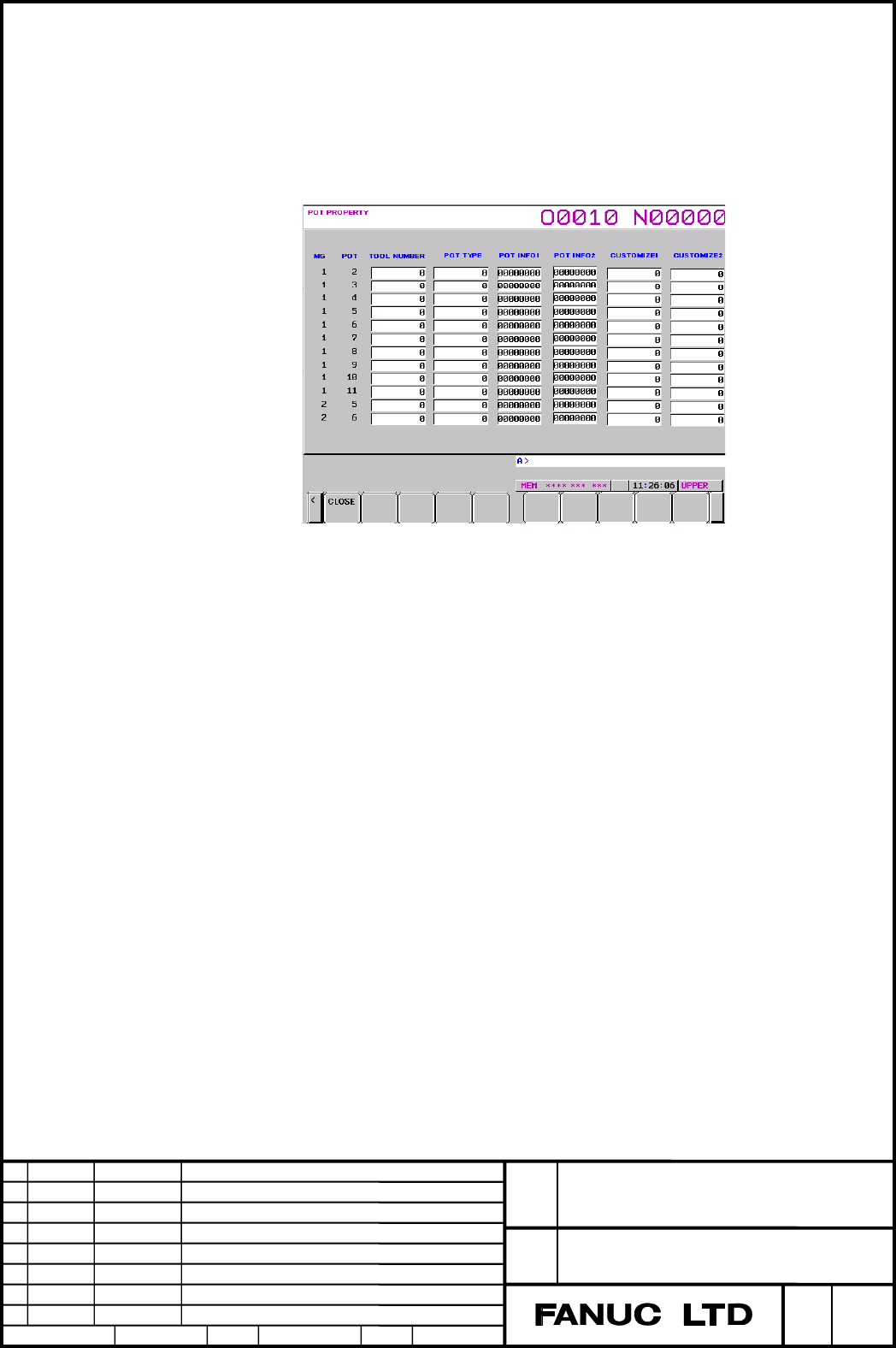
In editing, the softkey[EDIT] is pressed for switching to edit mode.
When the magazine number and the pot number are input with MDI and the
softkey[No.SRH] is pressed, the cursor is moved to the data of specified data.
For example, when 2.10 is inputted and softkey[No.SRH] is pressed, the
cursor is moved to the data of the 10
th
pot in the second magazine.
In case of returning to the magazine table screen, the below softkey[CLOSE]
is pressed.
Contents Summary of FANUC Series 30i/31i/32i-MODEL A, Tool Management Function Magazine Property/Pot Property, Specification Supplement to Manual
- Page 1FANUC Series 30i/31i/32i -MODEL A Tool management function magazine property/pot property Specification FANUC Series 30i/31i/32i -MODEL A Title Tool management function magazine property/pot property Draw A-90234E No. Ed. Date Design Description page 1/1 Date Sep.26.’05 Design. Apprv.
- Page 21.1 Tool management function magazine property/pot property Overview Property data is added to each magazine and each pot, and tool management function is executed by the property data - magazine property Information of availability of damaged, protected, etc and the number of pot in matrix type mag
- Page 3Pot property Name Description Size Attribute Magazine number Magazine number(1 to 8) 1byte Read Pot number Pot number 2bytes Read Tool management Tool management data number stored in the pot Read/ data number 2bytes Write Pot type Setting tool geometry number(0 to 20,99) Read/ 2bytes Write Pot info
- Page 4NOTE 1. Magazine that has following magazine status is excepted from Tool search and empty pot search - Bit position 0 of magazine information is 0 - Bit position 1 of magazine information is 1 - Bit position 2 of magazine information is 0 2. Magazine property except for magazine information#0 to #2
- Page 5Programable data input(G10) The following data can be input by programable data input(G10 ). - Magazine property - Pot property - The number of decimal places for customize data in magazine property - The number of decimal places for customize data in pot property - The name of customize data in mag
- Page 6
G10 L77 P10 ; N_ R_; G11; N_ : Customize data number(1 to 4) R_ : The number of decimal places(0 to 7) G10 L77 P11 ; N_ R_; G11; N_ : Customize data number(1 to 10) R_ : The number of decimal places(0 - Page 7Input/output with external device The following data can be inputted/outputted with the mentioned G10 format from/to external device. - Magazine property - pot property - the number of decimal places for customize data in magazine property - the number of decimal places for customize data in pot pro
- Page 8Setting and displaying data Magazine property screen and pot property screen are displayed by the following procedure. 10.4/15 inch LCD Move to magazine table screen. Press the softkey[operation] in magazine table screen, and the softkey in the below chart is displayed.(enclosed in red line) Press t
- Page 9Magazine property screen Magazine property data of maximum of 8 magazines is displayed. (Number of magazine is dependent on the setting parameter) However, the cursor is moved to magazine information of magazine that was selected in magazine table screen in displaying this screen. In editing, softke
- Page 10Pot property screen When this screen is displayed, the cursor is moved to pot type of pot that had been selected in the magazine table screen in displaying this screen. When the cursor is moved to the right, the following screen is displayed. FANUC Series 30i/31i/32i -MODEL A Title Tool management f
- Page 11In editing, the softkey[EDIT] is pressed for switching to edit mode. When the magazine number and the pot number are input with MDI and the softkey[No.SRH] is pressed, the cursor is moved to the data of specified data. For example, when 2.10 is inputted and softkey[No.SRH] is pressed, the cursor is
- Page 121.2 Parameter #7 #6 #5 #4 #3 #2 #1 #0 13240 MT8 MT7 MT6 MT5 NOTE When this parameter is set, the power must be turned off before operation is continued. [Input type] Parameter input [Data type] Bit type #4 MT5 The fifth magazine is 0: Chain type 1: Matrix type When this parameter is set to 1, the pa
- Page 1313501 Number of data items in the fifth magazine NOTE When this parameter is set, the power must be turned off before operation is continued. [Input type] Parameter input [Data type] Word type [Valid data range] 1 to 64(Extended to 240 or 1000 by the addition of an option) This parameter sets the nu
- Page 1413504 Start pot number of the sixth magazine NOTE When this parameter is set, the power must be turned off before operation is continued. [Input type] Parameter input [Data type] Word type [Valid data range] 1 to 9999 This parameter sets the start pot number to be used with the sixth magazine. Pot n
- Page 1513507 Number of data items in the eighth magazine NOTE When this parameter is set, the power must be turned off before operation is continued. [Input type] Parameter input [Data type] Word type [Valid data range] 1 to 64(Extended to 240 or 1000 by the addition of an option) This parameter sets the n
- Page 16Number of lines of the fifth magazine (when the magazine is of the matrix 13510 type) NOTE When this parameter is set, the power must be turned off before operation is continued. [Input type] Parameter input [Data type] Word type [Valid data range] 1 to 1000 When the fifth magazine is of the matrix
- Page 17Number of lines of the sixth magazine (when the magazine is of the matrix 13512 type) NOTE When this parameter is set, the power must be turned off before operation is continued. [Input type] Parameter input [Data type] Word type [Valid data range] 1 to 1000 When the sixth magazine is of the matrix
- Page 18Number of lines of the seventh magazine (when the magazine is of the 13514 matrix type) NOTE When this parameter is set, the power must be turned off before operation is continued. [Input type] Parameter input [Data type] Word type [Valid data range] 1 to 1000 When the seventh magazine is of the mat
- Page 19Number of lines of the eighth magazine (when the magazine is of the matrix 13516 type) NOTE When this parameter is set, the power must be turned off before operation is continued. [Input type] Parameter input [Data type] Word type [Valid data range] 1 to 1000 When the eighth magazine is of the matri