FS 16i/18i/21i - TB / MB Additional Manual Page 11
Additional Manual
02 Sep.30.’03 Modification at (2)
Edit Date Design Description
Date Apr.14.2003 Desig. T.Watanabe Apprv. T.Endo
Sheet
Title
Draw
No.
11
/
14
FANUC Series16i/18i/21i
Cs-axis Coordinate Establishment
Function
A
-78845EN
Sheet
Note
CMR
Set the same value of CMR( parameter No.1820) for all Cs axes to establish
their coordinate in composite control. If value of CMR are different, coordinate
establishment is not completed correctly.
In case that CMR is larger than 1 (parameter No.1820>2), Cs axis might move
for a little during establishing coordinate. This movement is needed in order to
adjust Cs axis machine position to the least command increment. ( In case that
CMR is 10, Cs axis might move from 1 to 9 pulse[detection unit])
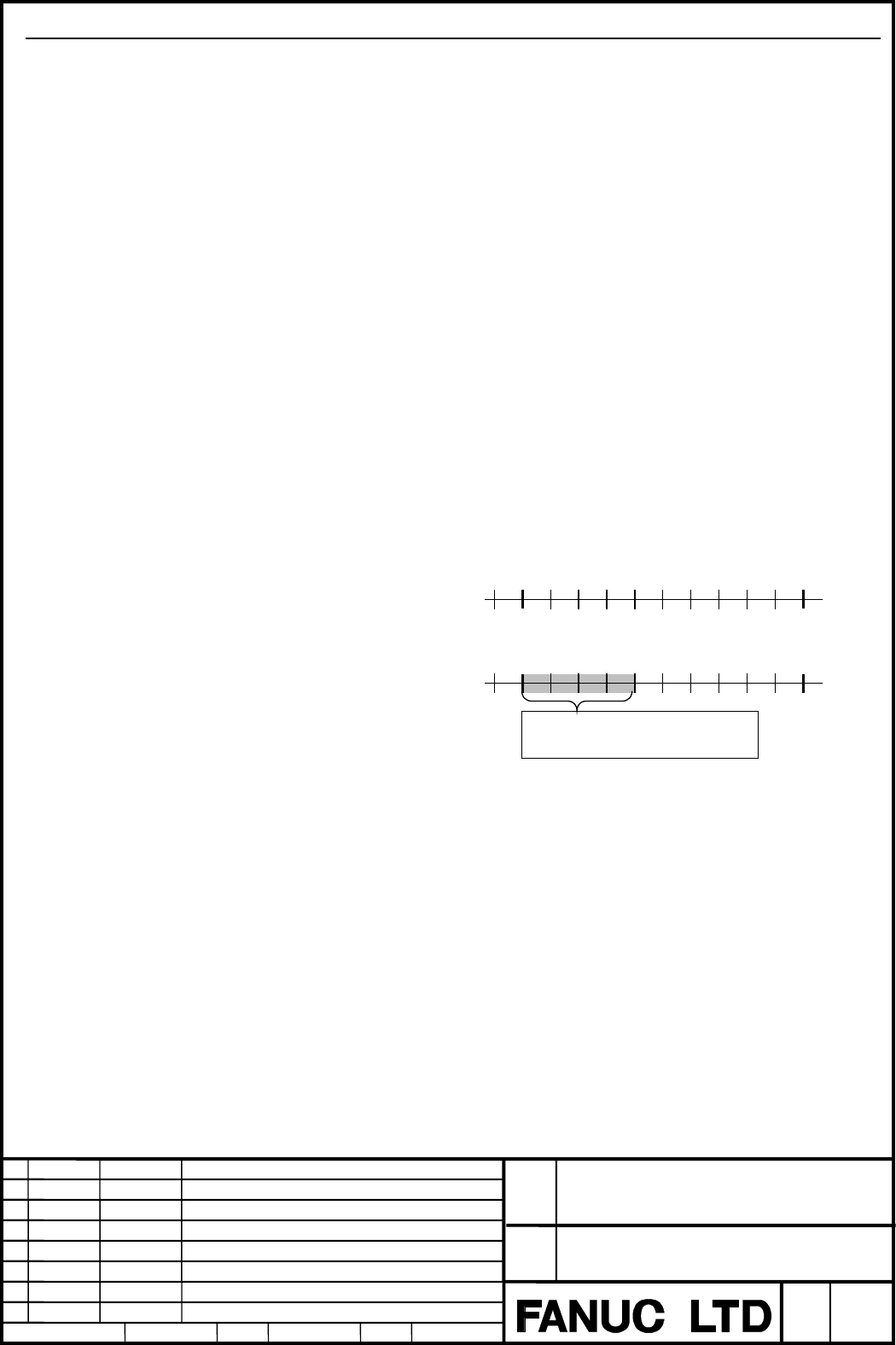
Pitch error compensation
When machine position of Cs axis is under following condition, Cs axis moves
according to pitch error compensation during establishing coordinate.
| (The nearest pitch error compensation point)-(Machine position of Cs axis) |
< (pitch error compensation)
Example)
Machine coordinate
Machine position
5.000 5.010
5.000 5.010
Pitch error compensation
- Interval between pitch error compensation point is 10.000 degree.
- +0.004 degree is compensated at machine coordinate 5.000 degree.
Under above setting, Cs axis cannot be stopped between 5.000 degree and 5.003
degree.
machine coordinate 4.999 → 5.000 → 5.001
machine position 4.999 → 5.004 → 5.005
However, Cs axis may stop between 5.000 degree and 5.003 degree after
spindle mode was changed from speed control mode to Cs contour control mode.
In this case, NC adjusts relation between machine coordinate and machine
position by moving Cs axis according to pitch error compensation.
Contents Summary of FS 16i/18i/21i - TB / MB Additional Manual
- Page 1FANUC Series 16i /18i /21i -TB FANUC Series 16i /18i /21i -MB Cs-axis Coordinate Establishment Function (Note) This specification may be modified for improvement without notice. FANUC Series16i/18i/21i Title Cs-axis Coordinate Establishment Function Draw No. A-78845EN 02 Sep.30.’03 Modification at (
- Page 2General Generally, position is lost just after changing serial spindle mode from speed control mode to Cs contour control mode. This function makes it possible to establish position without reference point return by setting Cs axis coordinate establishment request signal CSFIx
- Page 3In case of failure to establish Cs axis coordinate When Cs axis coordinate establishment is failed, P/S alarm 5346 occurs on the path that counts up absolute coordinate (work coordinate). And, Cs axis coordinate establishment alarm signal CSFOx
- Page 4Sequence(Time Chart) In case that Cs axis coordinate establishment is completed correctly. M code for Cs contour M code control
- Page 5In cast that Cs axis coordinate establishment is failed.( aborted by emergency stop, etc. ) M code for Cs contour M code control
- Page 6Example) Under composite control of Cs axis in two-path system M code for Cs contor M code control
CSFOx - Page 7Parameter #7 #6 #5 #4 #3 #2 #1 #0 1005 ZRN [Data type] Bit axis ZRNx When a command specifying the movement except for G28 is issued in automatic operation (MEM, RMT, or MDI) and when a return to the reference position has not been performed since the power was turned on 0: An alarm is generated (P/
- Page 8#7 #6 #5 #4 #3 #2 #1 #0 (2) 4353 CSPTRE [Data type] Bit axis CSPTRE The function that transfer position data of Cs axis is 0: Not used 1: Used Set parameter RFCHK3(No.4016#7) to 0 in order to use this function. #7 #6 #5 #4 #3 #2 #1 #0 8161 CZM [Data type] Bit CZM When two Cs contour axes are subject
- Page 9Cs axis coordinate establishment alarm signals CSFO1 ∼ CSFO4
- Page 10Signal Address #7 #6 #5 #4 #3 #2 #1 #0 G274 CSFI4 CSFI3 CSFI2 CSFI1 #7 #6 #5 #4 #3 #2 #1 #0 F048 CSPENA #7 #6 #5 #4 #3 #2 #1 #0 F052 CSPENB #7 #6 #5 #4 #3 #2 #1 #0 F171 CSPENC #7 #6 #5 #4 #3 #2 #1 #0 F269 CSPEND #7 #6 #5 #4 #3 #2 #1 #0 F274 CSFO4 CSFO3 CSFO2 CSFO1 Alarm and message Number Message De
- Page 11Note CMR Set the same value of CMR( parameter No.1820) for all Cs axes to establish their coordinate in composite control. If value of CMR are different, coordinate establishment is not completed correctly. In case that CMR is larger than 1 (parameter No.1820>2), Cs axis might move for a little duri
- Page 12Synchronous control If Cs axis coordinate establishment request signal CSFIx
- Page 13Apply software, hardware The following software are needed in order to use Cs axis coordinate establishment function. NC system software Series-Edition FS16i/160i/160is-TB B1HA-06 or later FS18i/180i/180is-TB BEHA-06 or later FS21i/210i/210is-TB DEHA-06 or later FS16i/160i/160is-MB B0HA-04 or later
- Page 14Reference item FANUC AC SPINDLE MOTOR αi series 2.4 Cs Contour Control PARAMETER MANUAL (B–65280EN) FANUC Series 9.9 Cs Contour Control 16i/160i/160is/18i/180i/180is/21i/210i/2 10is-MODEL B CONNECTION MANUAL (FUNCTION) (B-63523EN-1) Cs contour control by each serial spindle SPECIFICATION (A-61154E)
- Page 6Example) Under composite control of Cs axis in two-path system M code for Cs contor M code control