OPEN CNC (DNC Operation Management Package) Operators manual Page 65
Operators manual
B-63214EN/01 6. CUSTOMIZATION
- 49 -
6.1 Customizing General Settings for DNC Operation
Management Package
This section explains the basic customization of DNC Operation Management
Package.
Procedure
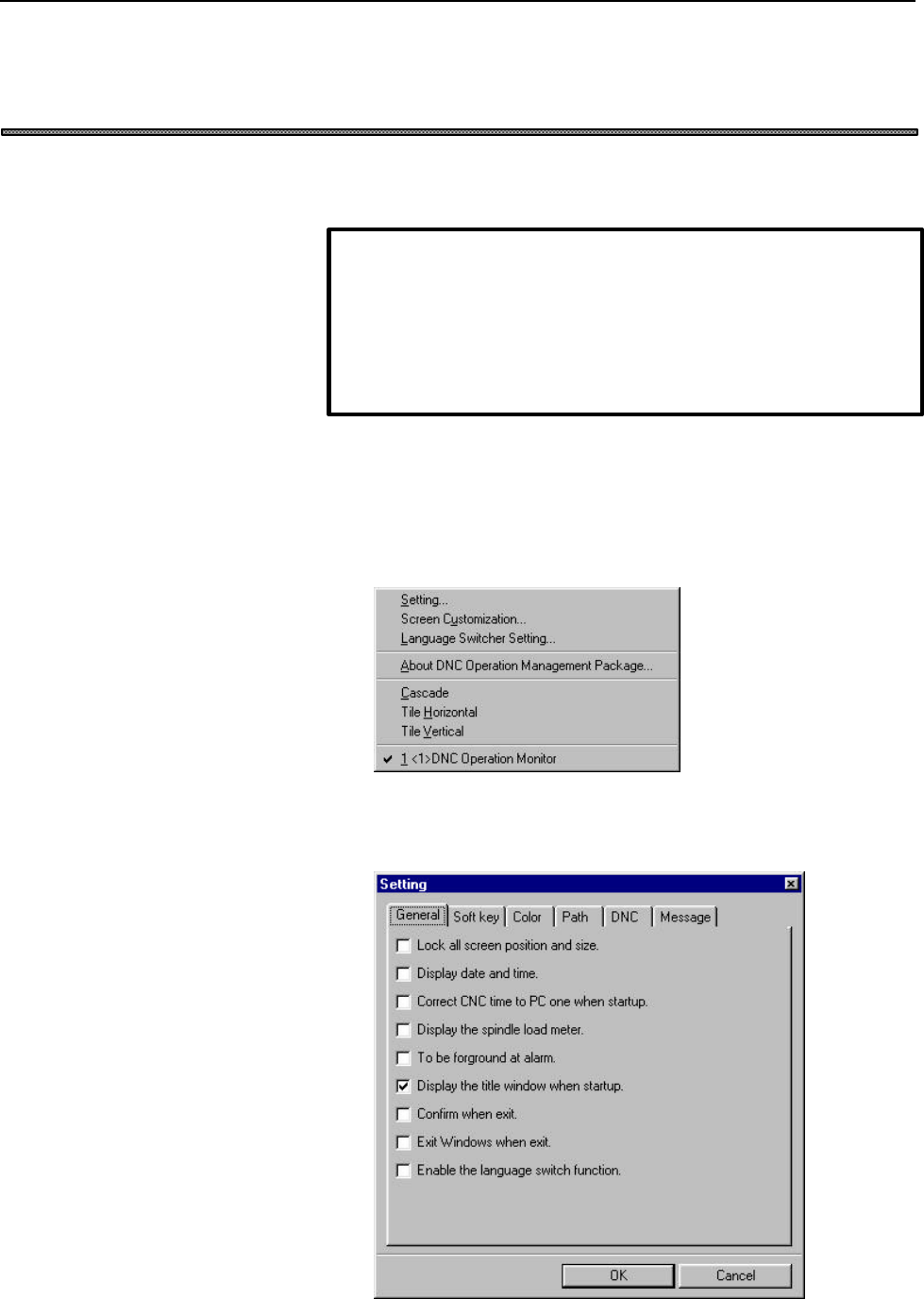
1. Right-click the soft key area. Alternatively, press the [Application]
key on the keyboard (such as the Microsoft Natural keyboard or 109
keyboard). Alternatively, press [Shift]+[F10].
The following pop-up menu appears.
2. Choose [Setting...].
The [Setting] screen appears.
NOTE
Customization results are stored in the setting file. It is recommended
that a backup of the setting file be made to guard against possible
data loss.
For details of the setting file, see Appendix 1, "BACKING UP THE
SETTING FILE."
Contents Summary of OPEN CNC (DNC Operation Management Package) Operators manual
- Page 1GE Fanuc Automation Computer Numerical Control Products Open CNC DNC Operation Management Package Operator's Manual B-63214EN/01 Febuary 1999
- Page 2Warnings and notices for GFLE-003 this publication Warning In this manual we have tried as much as possible to describe all the various matters. However, we cannot describe all the matters which must not be done, or which cannot be done, because there are so many possibilities. Therefore, matters wh
- Page 3SAFETY PRECAUTIONS This manual includes safety precautions for protecting the user and preventing damage to the machine. Precautions are classified into Warnings and Cautions according to their bearing on safety. Also, supplementary information is described as Notes. Read the Warnings, Cautions, and
- Page 4SAFETY PRECAUTIONS B-63214EN/01 General Warnings and Cautions WARNING 1. Never attempt to machine a workpiece without first checking the operation of the machine. Before starting a production run, ensure that the machine is operating correctly by performing a trial run using, for example, the single
- Page 5B-63214EN/01 SAFETY PRECAUTIONS CAUTION 1. The operator's manual for DNC Operation Management Package describes all the basic functions of the CNC, including the optional functions. The selected optional functions vary with the machine. Some functions described in this manual may not, therefore, be
- Page 6SAFETY PRECAUTIONS B-63214EN/01 Warnings and Cautions Relating to DNC Operation Management Package Warnings and cautions relating to DNC Operation Management Package are explained in this manual. Before using the function, read this manual thoroughly to become familiar with the provided Warnings, Ca
- Page 7B-63214EN/01 SAFETY PRECAUTIONS Important Notice The following summarizes the points to be noted when the DNC Operation Management Package is used. Before attempting to use the DNC Operation Management Package, read the following: CAUTION • This manual does not explain in detail those operations and
- Page 8
- Page 9B-63214EN/01 TABLE OF CONTENTS SAFETY PRECAUTIONS General Warning and Cautions Warnings and Cautions Relating to DNC Operation Management Package Important Notice PREFACE DNC Operation Management Package Features and Restrictions Contents of the Product Package Organization of This Manual Notation C
- Page 10CONTENTS B-63214EN/01 4 SUBPROGRAM CALL OPERATION................................................................................................36 4.1 Performing Subprogram Call Operation ...............................................................................................................
- Page 11B-63214EN/01 PREFACE PREFACE Thank you for purchasing the DNC Operation Management Package. DNC Operation Management Package implements DNC operation in an open CNC environment, thus allowing NC programs to be sent directly from a personal computer to the NC. DNC Operation Management Package is supp
- Page 12PREFACE B-63214EN/01 l Offers operability such that current users of FANUC CNCs can quickly become familiar with the system. l Allows customization to improve operability, such as modifying the screen settings or adding or deleting a screen. l Provides each screen as an ActiveX component, such that
- Page 13B-63214EN/01 PREFACE Contents of the Product Package This product package consists of the following: lFloppy disks DNC Operation Management Package (A02B-0207-K750#ZZ07) NOTE Read the Release Note (README.TXT), provided on the first floppy disk of the product package. It provides detailed informatio
- Page 14PREFACE B-63214EN/01 Organization of This Manual This manual is organized as follows: SAFETY PRECAUTIONS Explains the general precautions which must be observed to ensure safety when DNC Operation Management Package is used. PREFACE Briefly explains the features of DNC Operation Management Package.
- Page 15B-63214EN/01 PREFACE Notation Conventions The following explains the notation conventions used in this manual: lMenu, command, and screen notations Example Explanation [File] menu Menu names are enclosed in brackets [ ]. [Setting...] Command names are enclosed in brackets [ ]. [Program Edit] screen
- Page 16PREFACE B-63214EN/01 lSample screens The screens shown in this manual are examples of the standard system supplied by FANUC. Note that the screen layouts and displayed file names may vary with the equipment being used and according to customization. Soft keys or screens are not displayed if the equi
- Page 17B-63214EN/01 1. SETUP 1 SETUP This chapter explains how to set up the environment for operating DNC Operation Management Package and how to prepare DNC Operation Management Package for use. -1-
- Page 181. SETUP B-63214EN/01 1.1 Operating Environment The software operating environment for DNC Operation Management Package is described below. ♦ Computer A personal computer connected to High Speed Serial Bus Type 2, the FS160i/180i/210i having personal computer functions, or Intelligent Terminal Type
- Page 19B-63214EN/01 1. SETUP NOTE If the environmental requirements are not satisfied, the transfer speed of NC programs is unpredictable. In an environment less than the recommended environment, NC programs may be transferred more slowly. Before using the software, adjust the transfer thread carefully. (S
- Page 201. SETUP B-63214EN/01 1.2 Installing DNC Operation Management Package This section describes how to install DNC Operation Management Package. NOTE Before DNC Operation Management Package can be installed, operations such as driver installation and setup must be performed. For details, refer to eithe
- Page 21B-63214EN/01 1. SETUP NOTE Before installing the non-English message environment, start and terminate DNC Operation Management Package at least once. For an explanation of how to start and terminate DNC Operation Management Package, see Section 2.2, "Starting and Terminating DNC Operation Management
- Page 221. SETUP B-63214EN/01 1.3 Setting the CNC Parameters This section describes how to set the CNC parameters required to use DNC Operation Management Package. NOTE If the CNC parameters are not set, screen display and DNC operation cannot be performed normally. The CNC parameters can be set either by u
- Page 23B-63214EN/01 1. SETUP Also, set the following parameters as necessary: • For high-speed operation Description Set value 40KB buffer transfer No. 8706 bit 0 → 1 • For subprogram call operation Description Set value Number of M code digits No. 3030 → 0, or 3 or greater -7-
- Page 241. SETUP B-63214EN/01 1.4 Integration with Basic Operation Package 1 This section describes how to integrate DNC Operation Management Package with Basic Operation Package 1. When DNC Operation Management Package is integrated with Basic Operation Package 1, the DNC Operation Management Package funct
- Page 25B-63214EN/01 1. SETUP 4. Select the "General" tab and then check "Integrate with DNC Operation Management Package". 5. Exit and restart Basic Operation Package 1. NOTE When DNC Operation Management Package is integrated with Basic Operation Package 1, Basic Operation Package 1 is started by the proc
- Page 261. SETUP B-63214EN/01 1.5 Uninstalling DNC Operation Management Package This section describes how to uninstall DNC Operation Management Package. Procedure 1. Exit DNC Operation Management Package. 2. Click the [Start] button. 3. Point to [Settings...], then choose [Control Panel]. 4. Execute [Add/R
- Page 27B-63214EN/01 2. BASIC KNOWLEDGE 2 BASIC KNOWLEDGE This chapter provides basic information with which the user should be familiar before attempting to use DNC Operation Management Package. - 11 -
- Page 282. BASIC KNOWLEDGE B-63214EN/01 2.1 DNC Operation This section provides the basics of DNC operation. In ordinary DNC operation, a CNC operates directly based on NC programs loaded into it from an external device such as a reader/puncher interface, remote buffer, or data server. With DNC Operation Ma
- Page 29B-63214EN/01 2. BASIC KNOWLEDGE 2.2 Starting and Terminating DNC Operation Management Package This section describes how to start and terminate DNC Operation Management Package. 2.2.1 Starting DNC Operation Management Package This section describes how to start DNC Operation Management Package. Proc
- Page 302. BASIC KNOWLEDGE B-63214EN/01 NOTE When Basic Operation Package 1 (A02B-0207-K750#ZZ07) version 1.4 or later is used, and the function for integration with DNC Operation Management Package is enabled, Basic Operation Package 1 is started instead of DNC Operation Management Package. (See Section 1.
- Page 31B-63214EN/01 2. BASIC KNOWLEDGE 2.2.2 Terminating DNC Operation Management Package How to terminate DNC Operation Management Package is described below. Procedure 1. If the soft key is currently not displayed, press the function selection key . 2. Press the soft key. If a check mark is not placed ag
- Page 322. BASIC KNOWLEDGE B-63214EN/01 2.3 Screens This section describes the DNC Operation Management Package screens. DNC Operation Management Package has the three types of screens shown below. • [DNC Operation Monitor] screen This screen is used to monitor the progress of DNC operation. • [DNC Schedule
- Page 33B-63214EN/01 2. BASIC KNOWLEDGE • [DNC Sub Program Call Setting] screen This screen is used to select the folder containing the subprogram files that will be used to subprogram calling. - 17 -
- Page 342. BASIC KNOWLEDGE B-63214EN/01 2.4 Window Names and Functions This section describes the name and functions of each window displayed by DNC Operation Management Package. DNC Operation Management Package displays a parent window which consists of one or more child windows. Each child window has sett
- Page 35B-63214EN/01 2. BASIC KNOWLEDGE (2) Manual operation mode selection Status Meaning **** Not selected Ref REFERENCE mode Inc INCREMENTAL mode Hndl HANDLE mode Jog JOG mode AngJ ANGULAR JOG mode IHnd INCREMENTAL + HANDLE mode JHnd JOG + HANDLE mode (3) Automatic operation status Status Meaning Stop St
- Page 362. BASIC KNOWLEDGE B-63214EN/01 (6) M, S, T, and B function status Status Meaning Fin Waiting for processing (7) Emergency stop status Status Meaning Emg Emergency stop (8) Nonvolatile memory write status Status Meaning **** No write Writ Writing (9) Label skip status Status Meaning **** Label skip
- Page 37B-63214EN/01 2. BASIC KNOWLEDGE Automatic/manual mode selection (Cont'd) Status Meaning Inc INCREMENTAL mode Ref REFERENCE mode Rmot SCHEDULE mode Test TEST operation mode (2) Automatic operation mode Status Meaning **** Resetting Stop Stopped Hold Halted Strt Starting MStr Returning (tool retract a
- Page 382. BASIC KNOWLEDGE B-63214EN/01 (4) Axial movement and dwell status Status Meaning **** Others Motn Moving along an axis Dwel Dwelling (5) M, S, T, and B function status Status Meaning Fin Waiting for processing (6) Emergency stop status Status Meaning Emg Emergency stop Rset Reset (7) Alarm status
- Page 39B-63214EN/01 2. BASIC KNOWLEDGE Functions and chapters can be selected using the soft keys at the bottom of the parent window. NOTE This section describes the soft keys that are used with DNC Operation Management Package. When DNC Operation Management Package is integrated with Basic Operation Packa
- Page 402. BASIC KNOWLEDGE B-63214EN/01 • There are the following three types of soft key states: "Function selection," "chapter selection," and "operation selection." For example, the soft keys used for [Setting] are switched as follows: l Function selection state Soft key Soft key Soft key or or or [F1] k
- Page 41B-63214EN/01 2. BASIC KNOWLEDGE 2.5 Displaying Version Information This section describes how to display the version information for DNC Operation Management Package, for maintenance and other purposes. Procedure 1. Right-click the soft key area. Alternatively, press the [Application] key on the key
- Page 423. SCHEDULED OPERATION B-63214EN/01 3 SCHEDULED OPERATION This chapter describes how to set and perform scheduled operation. - 26 -
- Page 43B-63214EN/01 3. SCHEDULED OPERATION 3.1 Performing Scheduled Operation This section describes how to perform scheduled operation. Scheduled operation NC programs should be prepared on the personal computer hard disk in advance. The name, processing order, and repeat count of each NC program should b
- Page 443. SCHEDULED OPERATION B-63214EN/01 3.2 NC Programs for Scheduled Operation This section describes the format of NC programs for scheduled operation. These programs must have already been prepared on the personal computer hard disk before scheduled operation can be started. Explanation The following
- Page 45B-63214EN/01 3. SCHEDULED OPERATION 3.3 Setting Scheduled Operation This section describes how to set scheduled operation. Procedure l When Basic Operation Package 1 is not used 1. If the soft key is not currently displayed, press the function selection key . 2. Press the soft key. 3. If the [DNC Sc
- Page 463. SCHEDULED OPERATION B-63214EN/01 Explanation l [DNC Schedule Setting] screen This screen is used to list the file name, processing order, and repeat count of each NC program that will be used for scheduled operation in a schedule file. To set a schedule file, press the operation selection key . T
- Page 47B-63214EN/01 3. SCHEDULED OPERATION 3.3.1 Creating a new schedule file This section describes how to create a new schedule file that lists the file name, processing order, and repeat count of each NC program that will be used for scheduled operation. Procedure 1. If the [DNC Schedule Setting] screen
- Page 483. SCHEDULED OPERATION B-63214EN/01 3. Enter a new schedule file name in "File name:", then click the
button. The following screen appears. 4. Click the button. A new schedule file is created. 5. Press the soft key. The [DNC Schedule Setting - Add Program] screen appears. 6. Select an N - Page 49B-63214EN/01 3. SCHEDULED OPERATION 7. Click to highlight the "Order" of the NC program, then press the soft key. The [DNC Schedule Setting - Repeat Count] screen appears. 8. Enter the execution count in "Repeat Count:", then click the
button. NOTE If 0 is entered in "Repeat Count:", the NC pro - Page 503. SCHEDULED OPERATION B-63214EN/01 3.3.2 Opening an existing schedule file This section describes how to open an existing schedule file. Procedure 1. If the [DNC Schedule Setting] screen is currently not displayed, follow the procedure described in Section 3.3, "Setting Scheduled Operation" to disp
- Page 51B-63214EN/01 3. SCHEDULED OPERATION 3.3.3 Saving a schedule file under a new name This section describes how to save an existing schedule file under a new name. Procedure 1. If the [DNC Schedule Setting] screen is not currently displayed, follow the procedure described in Section 3.3, "Setting Sched
- Page 524. SUBPROGRAM CALL OPERATION B-63214EN/01 4 SUBPROGRAM CALL OPERATION This chapter describes how to set and perform subprogram call operation. - 36 -
- Page 53B-63214EN/01 4. SUBPROGRAM CALL OPERATION 4.1 Performing Subprogram Call Operation This section describes how to perform subprogram call operation. Subprogram call operation Main programs and subprograms should be stored in advance on the NC and personal computer, respectively. During NC memory oper
- Page 544. SUBPROGRAM CALL OPERATION B-63214EN/01 4.2 NC Programs for Subprogram Call Operation This section describes the format of NC programs for subprogram call operation. These programs must have already been prepared on the personal computer hard disk before subprogram call operation can be started. E
- Page 55B-63214EN/01 4. SUBPROGRAM CALL OPERATION 4.3 Setting Subprogram Call Operation This section describes how to set subprogram call operation. Procedure l When Basic Operation Package 1 is not used 1. If the soft key is not currently displayed, press the function selection key . 2. Press the soft key.
- Page 564. SUBPROGRAM CALL OPERATION B-63214EN/01 Explanation l [DNC Sub Program Call Setting] screen This screen is used to specify the folder containing the NC programs that be used for subprogram call operation, and to display a list of the NC programs within the specified folder. To set subprogram call
- Page 57B-63214EN/01 4. SUBPROGRAM CALL OPERATION 4.3.1 Specifying a folder containing subprograms Specify the folder containing the NC program files that will be used for subprogram call operation. Procedure 1. If the [DNC Sub Program Call Setting] screen is not currently displayed, follow the procedure de
- Page 584. SUBPROGRAM CALL OPERATION B-63214EN/01 3. Select a folder containing NC programs, then click the
button. A list of the files with the TXT extension in the specified folder is displayed. - 42 - - Page 59B-63214EN/01 5. MONITORING THE PROGRESS OF DNC OPERATION 5 MONITORING THE PROGRESS OF DNC OPERATION This chapter describes how to monitor the progress of DNC operation. - 43 -
- Page 605. MONITORING THE PROGRESS OF DNC OPERATION B-63214EN/01 5.1 Monitoring the Progress of DNC Operation This section describes the [DNC Operation Monitor] screen, which is used to monitor the progress of DNC operation. Once scheduled operation or subprogram call operation has started, the [DNC Operati
- Page 61B-63214EN/01 5. MONITORING THE PROGRESS OF DNC OPERATION Example of the screen during scheduled operation Example of the screen during subprogram call operation Explanation l Displayed data • Mode: The mode of automatic operation is indicated. Displayed value Meaning DNC Indicates that DNC operation
- Page 625. MONITORING THE PROGRESS OF DNC OPERATION B-63214EN/01 • Status: The status of automatic operation is indicated. Displayed value Meaning Stop Indicates that the NC has stopped. Schedule Indicates that scheduled operation is being performed. Sub program call Indicates that subprogram call operation
- Page 63B-63214EN/01 5. MONITORING THE PROGRESS OF DNC OPERATION NOTE l On the [DNC Operation Monitor] screen, the progress of NC program transfer to the NC by this software is indicated, not the progress of DNC operation of the NC. l Once all NC programs have been transferred to the buffer of the NC, "Sour
- Page 646. CUSTOMIZATION B-63214EN/01 6 CUSTOMIZATION This chapter describes how to customize DNC Operation Management Package. - 48 -
- Page 65B-63214EN/01 6. CUSTOMIZATION 6.1 Customizing General Settings for DNC Operation Management Package This section explains the basic customization of DNC Operation Management Package. NOTE Customization results are stored in the setting file. It is recommended that a backup of the setting file be mad
- Page 666. CUSTOMIZATION B-63214EN/01 Explanation Select the "General", "Soft key", "Color", "Path", "DNC", or "Message" tab to make the desired settings. l General Sets general options for DNC Operation Management Package. l Soft key Sets soft keys. l Color Sets the background color of each area within a p
- Page 67B-63214EN/01 6. CUSTOMIZATION 6.1.1 Setting general options for DNC Operation Management Package This section describes how to set the general options for DNC Operation Management Package. Procedure 1. If the [Setting] screen is currently not displayed, follow the procedure described in Section 6.1,
- Page 686. CUSTOMIZATION B-63214EN/01 l Display the spindle load meter. Selecting this item causes the spindle load meter to be displayed in the middle of a parent window. l To be foreground at alarm. Selecting this item causes the alarm message screen to appear in the foreground when an alarm condition occ
- Page 69B-63214EN/01 6. CUSTOMIZATION 6.1.2 Setting soft keys This section describes how to set the soft keys. Procedure 1. If the [Setting] screen is currently not displayed, follow the procedure described in Section 6.1, "Customizing General Settings for DNC Operation Management Package" to display the [S
- Page 706. CUSTOMIZATION B-63214EN/01 l The return soft key is always left side. Clearing this item enables the soft keys to be switched as follows: • Function soft keys Pressing the soft key or [F1] key switches to the chapter soft keys. Pressing the soft key or [F12] key switches to the operation soft key
- Page 71B-63214EN/01 6. CUSTOMIZATION l The soft key count is 10. Selecting this item sets the soft key count to 10. Use the keyboard function keys to switch between the function, chapter, and operation soft keys. Standard switching mode is as follows: • Function soft keys Pressing the [F12] key switches to
- Page 726. CUSTOMIZATION B-63214EN/01 6.1.3 Setting screen colors This section describes how to set the background color of each area within a parent window. Procedure 1. If the [Setting] screen is currently not displayed, follow the procedure described in Section 6.1, "Customizing General Settings for DNC
- Page 73B-63214EN/01 6. CUSTOMIZATION Explanation The background colors of the following areas within a parent window can be set: l Title line l Status line l Parent window base screen l Soft key area 6.1.4 Setting the path number output option This section describes how to set the path number output option
- Page 746. CUSTOMIZATION B-63214EN/01 6.1.5 Setting the NC program transfer options This section describes how to set the NC program transfer options. Procedure 1. If the [Setting] screen is not currently displayed, follow the procedure described in Section 6.1, "Customizing General Settings for DNC Operati
- Page 75B-63214EN/01 6. CUSTOMIZATION l Interval for DNC start (ms): Specify an interval between checks of DNC operation requests from the NC to the personal computer. After a DNC operation request has been checked, the thread sleeps for the time specified here (ms) until the next DNC operation request is c
- Page 766. CUSTOMIZATION B-63214EN/01 6.1.6 Setting the messaging option This section describes how to set the option for messaging during DNC operation. Procedure 1. If the [Setting] screen is not currently displayed, follow the procedure described in Section 6.1, "Customizing General Settings for DNC Oper
- Page 77B-63214EN/01 6. CUSTOMIZATION 6.2 Customizing Screens This section explains screen customization, including the creation of custom chapters. The subsequent screen customization descriptions apply to a system in which DNC Operation Management Package is integrated with Basic Operation Package 1. Scre
- Page 786. CUSTOMIZATION B-63214EN/01 Explanation The following types of screen customization can be performed: l Creating custom screens l Changing the order in which screens appear l Deleting screens l Showing or hiding chapters l Setting soft keys as empty For details, see the description below. 6.2.1 Cr
- Page 79B-63214EN/01 6. CUSTOMIZATION 2. In the screen layout tree, select the icon for an unused function. 3. In "Function name for title:", enter the text to be displayed on the title bar of a parent window. In "Function name for soft key:", enter the text to be displayed on a function soft key. 4. Click
- Page 806. CUSTOMIZATION B-63214EN/01 5. In "Chapter name for title:", enter the text to be displayed on the title bar of a child window. In "Chapter name for soft key:", enter the text to be displayed on a chapter soft key. 6. Double-click the folder icon to view the screen to be added. Then, click the + s
- Page 81B-63214EN/01 6. CUSTOMIZATION In this example, the [DNC Operation Monitor] screen is selected. 8. To add another child window, click the button. 9. From the "Screen object ID:" list, select a screen object to be displayed in the child window in the same way as in step 7. - 65 -
- Page 826. CUSTOMIZATION B-63214EN/01 10. From the "Main screen object ID:" list, select the main screen for the chapter. NOTE If the feature specified for the main screen is unavailable on the CNC side, the chapter is not displayed. 11. To set a chapter display option, select the "Event" tab. 12. Select an
- Page 83B-63214EN/01 6. CUSTOMIZATION 13. Select the newly created chapter in the screen layout tree, then select the "Icon" tab. 14. Specify an icon to be displayed on the function soft key. The resource number of a built-in icon or the name of a file containing an icon can be specified. NOTE A file that c
- Page 846. CUSTOMIZATION B-63214EN/01 6.2.2 Changing the order in which screens appear This section describes how to change the order in which the function, chapter, or child window screens appear. Procedure 1. If the [Screen Customization] screen is currently not displayed, follow the procedure described i
- Page 85B-63214EN/01 6. CUSTOMIZATION 4. Click the
button on the [Screen Customization] screen. NOTE If a chapter is selected, it cannot be moved to another function. If an object displayed in a child window is selected, it cannot be moved across chapters. 6.2.3 Deleting screens This section describes - Page 866. CUSTOMIZATION B-63214EN/01 3. Click the button. 4. Click the
button on the [Screen Customization] screen. The selected chapter or child window object is deleted. 6.2.4 Showing or hiding chapters This section describes how to show or hide chapters. Procedure 1. If the [Screen Customization] s - Page 87B-63214EN/01 6. CUSTOMIZATION The check box for showing or hiding a chapter is enabled. Explanation Whether a chapter is shown can be determined using the following item: l The chapter is visible. Clearing this item hides a specified chapter. Those screens that are not normally used, such as the mai
- Page 886. CUSTOMIZATION B-63214EN/01 3. Click the button. The selected function or chapter is set as empty. - 72 -
- Page 89B-63214EN/01 6. CUSTOMIZATION 6.3 Customizing Screen Objects This section describes how to customize screen objects. NOTE Customization results are stored in the setting file. It is recommended that a backup of the setting file be made to guard against possible data loss. For details of the setting
- Page 906. CUSTOMIZATION B-63214EN/01 3. Click the button. The [Edit Screen Object] screen appears. Explanation The following types of screen object customization can be performed: l Creating custom screen objects l Changing settings for screen objects l Deleting screen objects For details, see the descript
- Page 91B-63214EN/01 6. CUSTOMIZATION 6.3.1 Creating custom screen objects This section describes how to create custom screen objects. Procedure 1. If the [Edit Screen Object] screen is currently not displayed, follow the procedure described in Section 6.3, "Customizing Screen Objects" to display the [Edit
- Page 926. CUSTOMIZATION B-63214EN/01 One of the following object types can be specified: • CNC Screen A CNC screen is an OLE object. Normally, FANUC provides objects of this type. CNC screens are classified as follows: Screen that is executable only when it is in the foreground. Screen that is also executa
- Page 93B-63214EN/01 6. CUSTOMIZATION 5. Enter a value in "OLE ProgID or EXE file name:". When "CNC Screen" or "OLE container screen" is selected for the object type, enter OLE ProgID of the OLE object to be used. If a null string is entered as OLE ProgID, no information is displayed in the child window. Wh
- Page 946. CUSTOMIZATION B-63214EN/01 7. Select the "Icon" tab. 8. Specify an icon to be displayed on the title bar of the child window. The resource number of a built-in icon or the name of a file containing an icon can be specified. NOTE A file that can be used for an icon is referred to as an icon file (
- Page 95B-63214EN/01 6. CUSTOMIZATION 10. Select a CNC path to be processed on the screen. One of the following items can be selected: • Default path Sets the screen for the path displayed on the status line. • Path 1 Sets the screen for CNC path 1. • Path 2 Sets the screen for CNC path 2. • Path 3 Sets the
- Page 966. CUSTOMIZATION B-63214EN/01 NOTE l When "EXE file" is selected for the object type, this item need not be set. l The background color can be changed only for those screen objects that have the BackColor property. Currently, not all CNC screens have the BackColor property. (Determine whether the sp
- Page 97B-63214EN/01 6. CUSTOMIZATION 6.3.2 Changing settings for screen objects This section describes how to change the settings of screen objects. Procedure 1. If the [Edit Screen Object] screen is currently not displayed, follow the procedure described in Section 6.3, "Customizing Screen Objects" to dis
- Page 986. CUSTOMIZATION B-63214EN/01 6.3.3 Deleting screen objects This section describes how to delete screen objects. Procedure 1. If the [Edit Screen Object] screen is currently not displayed, follow the procedure described in Section 6.3, "Customizing Screen Objects" to display the [Edit Screen Object]
- Page 99B-63214EN/01 6. CUSTOMIZATION 6.4 Customizing Message Languages This section describes message language customization, including the installation of two or more message languages in DNC Operation Management Package. NOTE Before installing a new language environment, message files and subfolders must
- Page 1006. CUSTOMIZATION B-63214EN/01 Explanation The following types of message language customization can be performed: l Installing new message languages l Changing the order in which message languages are listed l Uninstalling message languages For details, see the description below. 6.4.1 Installing me
- Page 101B-63214EN/01 6. CUSTOMIZATION 3. Enter the name of a language to be installed, then click the
button. The new language is added to the message language list. 4. Specify a subfolder in which message files are to be installed, and a subfolder in which INI files are to be installed. Click the - Page 1026. CUSTOMIZATION B-63214EN/01 2. Select the "Enable the language switch function." check box. Click the
button. 3. If the soft key is currently not displayed, press the function selection key . 4. Press the soft key. The [Exit DNC Operation Management Package] screen appears. 5. Select "Switch - Page 103B-63214EN/01 6. CUSTOMIZATION 6.4.3 Changing the order in which message languages are listed This section describes how to change the order in which message languages are listed. For switching between message languages, these languages are usually listed in the order in which they were installed. If
- Page 1046. CUSTOMIZATION B-63214EN/01 6.4.4 Uninstalling message languages This section describes how to uninstall message languages from DNC Operation Management Package. NOTE When a message language is uninstalled, the language is deleted from the message language list, but its message files and INI files
- Page 105B-63214EN/01 APPENDIX 1 BACKING UP THE SETTING FILE APPENDIX 1 BACKING UP THE SETTING FILE This section describes the setting file. The settings for DNC Operation Management Package are stored at the location indicated below. A backup copy of the original information should be kept to guard against
- Page 106APPENDIX 2 SWITCHING THE MESSAGE LANGUAGE B-63214EN/01 APPENDIX 2 SWITCHING THE MESSAGE LANGUAGE This section describes the switching of the language in which messages are displayed. l Switching the language DNC Operation Management Package can be installed with multiple language environments, allow
- Page 107B-63214EN/01 APPENDIX 2 SWITCHING THE MESSAGE LANGUAGE NOTE l The message files and INI files can be placed in a single folder. l The folders containing the English message files and English INI files can neither be deleted nor renamed. • Message file This binary file stores the messages that can be
- Page 108APPENDIX 2 SWITCHING THE MESSAGE LANGUAGE B-63214EN/01 • Manually adding a language environment 1. Create the message files and INI files for the desired language. 2. Create subfolders for storing the message files and INI files within the folder of DNC Operation Management Package. 3. Copy the mess
- Page 109B-63214EN/01 APPENDIX 2 SWITCHING THE MESSAGE LANGUAGE To place the message files in the C:\Program Files\DNC Operation Management Package\Message folder included in DNC Operation Management Package folder C:\Program Files\DNC Operation Management Package, specify MsgDir = MESSAGE. • Edit the [Files
- Page 110APPENDIX 2 SWITCHING THE MESSAGE LANGUAGE B-63214EN/01 When the input value is smaller than 10000, the corresponding message ID is referenced in the ID MSG_MENU group (MSG_MENU.MSG file). When the input value is greater than or equal to 10000, the message ID of the input number minus 10000 is refere
- Page 111B-63214EN/01 APPENDIX 3 MESSAGE FILE GENERATOR APPENDIX 3 MESSAGE FILE GENERATOR This section describes how to create a message file. DNC Operation Management Package manages the messages to be displayed in a binary file. The messages are stored in message files. These message files are usually stor
- Page 112APPENDIX 3 MESSAGE FILE GENERATOR B-63214EN/01 l File format The message generator parameter file and message text file have the following formats: * Message generator parameter file (MSGPRM.DAT) In this text file, the correspondence between languages, paths, group IDs, and file names is specified.
- Page 113B-63214EN/01 APPENDIX 3 MESSAGE FILE GENERATOR Explanation <1> Message file path A language name and the path of the message file of the language are specified. The full path name must be specified. Different paths must be specified for different languages. The language name is used as a language ID
- Page 114APPENDIX 3 MESSAGE FILE GENERATOR B-63214EN/01 * Message text file (The extension is always .txt.) In this text file, message IDs and messages (in different languages) are specified. The data in this file is of the following format: ID: MSG_ORDER <1> eng: "Order" jpn: " " ger: "Reihenfolge" <2> fre:
- Page 115B-63214EN/01 APPENDIX 3 MESSAGE FILE GENERATOR • A double quotation mark (") is coded as \", \ as \\, a line feed character as \n, and a tab character as \t. "AB\"CD\"EF" → AB"CD"EF "\\10,000" → \10,000 • The messages for all the languages specified in the parameter file must be included. * Message
- Page 116APPENDIX 3 MESSAGE FILE GENERATOR B-63214EN/01 3. Execute the message generator (MSGGEN32.EXE), and create message ID header files (M_DNCOP.H, for example) and message files of different languages (M_DNCOP.MSG, for example). When executing the message generator, use the following format: msggen32 pr
- Page 117B-63214EN/01 APPENDIX 3 MESSAGE FILE GENERATOR Error No.8 : Too long path name in file_name line #### A path name is longer than 80 characters. Error No.9 : Not found group-ID The specified group ID is not found in the parameter file. Error No.10 : Illegal message in file_name line #### An illegal m
- Page 118B-63214EN/01 INDEX N B NC Programs for Scheduled Operation ...........................28, 2 BACKING UP THE SETTING FILE ............................. 89, 3 NC Programs for Subprogram Call Operation.................38, 3 BASIC KNOWLEDGE................................................... 11, 2 O C Ope
- Page 119INDEX B-63214EN/01 T Terminating DNC Operation Management Package ....... 15, 2 U Uninstalling DNC Operation Management Package ....... 10, 2 Uninstalling message languages ...................................... 88, 3 W Window Names and Functions........................................ 18, 2
- Page 120Revision Record FANUC OPEN CNC DNC Operation Management Package OPERATOR’S MANUAL (B-63214EN) 01 Feb, '99 Edition Date Contents Edition Date Contents