FANUC Series 16i/160i-LB Processing Mode Change Function Additional Manual Page 4
Additional Manual
08
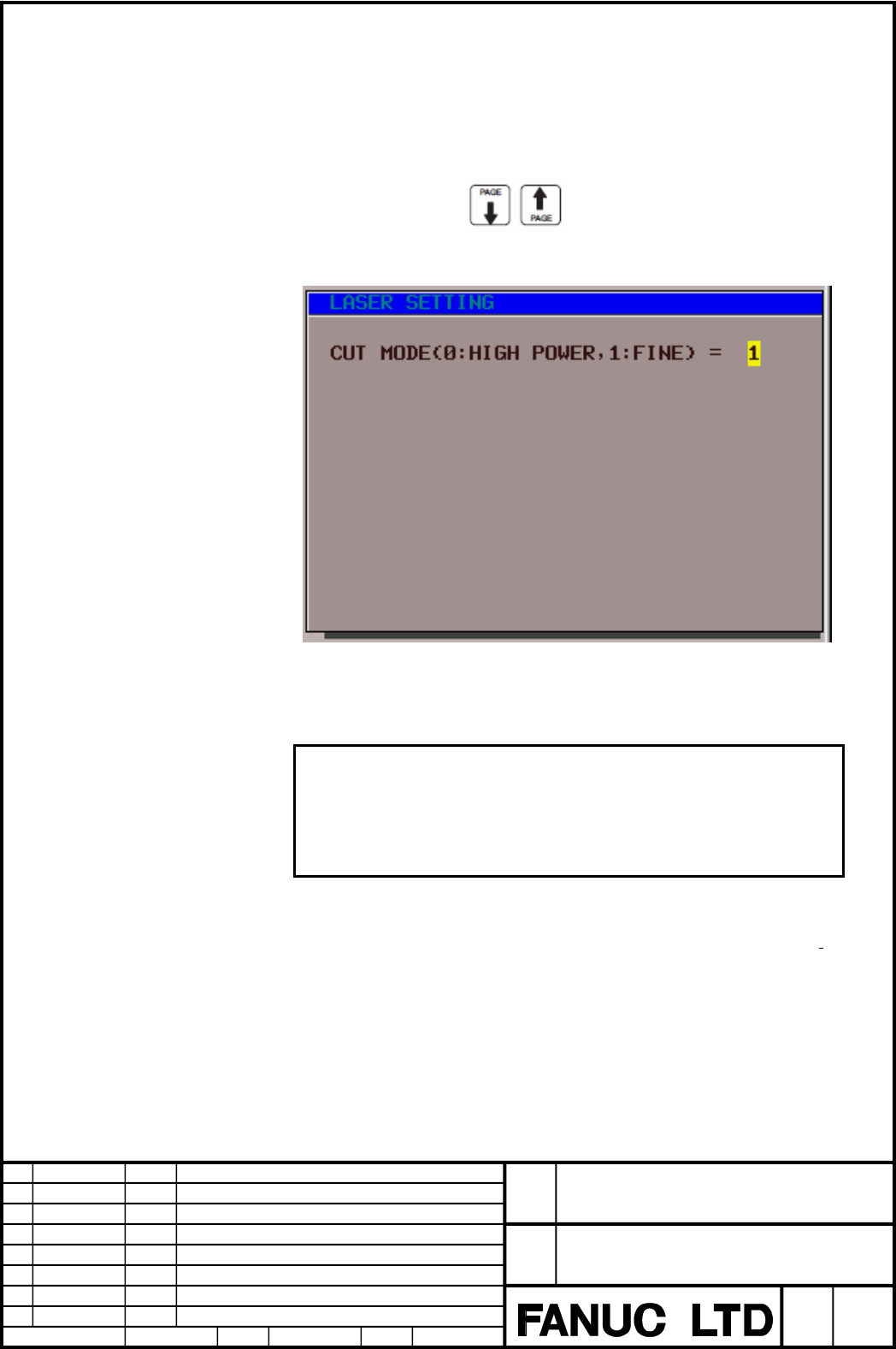
・ Change of processing mode
Setting screen for processing mode change is displayed with under mentioned
procedure.
① Push the MDI key “OFFSET” several times and select the laser setting
screen.
② Push the soft key [SET].
③ Push the page key
and select setting screen for processing
mode.
This setting item on this screen can change another parameter setting for
processing mode and corresponds to the state of parameter No.29016#0(CTA).
Note
This setting screen is displayed even if parameter No.29016#7=0. But
processing mode change function can’t be used if laser oscillator is not
available for this function. In this case, do not set the fine mode.
The screen display is not “Processing”, and “Cut”.
If you change the processing mode when laser oscillator is in purge state
, or
discharge start signal HVON (G222#7) isn’t turned on after laser oscillator is in
discharge start ready state (F221#1/ LRDY=1), set the processing mode in the
setting screen and start the laser start-up sequence. When laser oscillator
becomes laser oscillation state (F221#6/ LSTR=1), laser beam can be outputted in
the set processing mode.
Ed.
Apprv.Design
Date
Design
Descri
p
tion
Date
FANUC Series 16i /160i –LB
Processing mode change function
A
-90107E
Sep.17,2005
H.Tokito
4
/
19
Title
Draw
No.
Sheet
07
06
05
04
03
02
Contents Summary of FANUC Series 16i/160i-LB Processing Mode Change Function Additional Manual
- Page 1FANUC Series 16i/160i – LB Processing Mode Change Function Specification - Contents - 1. OUTLINE ....................................................................................................................2 2. SPECIFICATION ....................................................................
- Page 21. Outline This document shows Processing Mode Change Function in detail. Processing mode change function can change two level of laser gas pressure and various parameters corresponding to the laser gas pressure to realize a suitable processing performance of FANUC LASER C series for the processing
- Page 3The parameters for Fine mode are newly added in automatic aging function as follows. Table 2 : Setting parameters for automatic aging function of each mode Setting Parameter Parameter (High power mode) (Fine mode) Laser power in normal calibration No.15320 No.29060 Oscillation freq. in normal calibr
- Page 4・ Change of processing mode Setting screen for processing mode change is displayed with under mentioned procedure. ① Push the MDI key “OFFSET” several times and select the laser setting screen. ② Push the soft key [SET]. ③ Push the page key and select setting screen for processing mode. This setting
- Page 5If you change the processing mode when on the way of start-up sequence after laser oscillator is in discharge start ready state(F221#1/ LRDY=1) and HVON signal is turned on or when laser oscillator is in laser oscillation state(F221#6/ LSTR=1), laser sequence is restarted after returning to the stat
- Page 6・ Processing mode change during beam output In the setting screen, processing mode can be changed even if during automatic operation or laser output by manual operation. But laser beam can’t be outputted at that time because laser oscillation is stopped and restarted automatically by CNC to change l
- Page 7setting. And displayed items of aging function are also changed in the aging function setting screen. In case of parameter No.15014#4(MAG)=1, all the pages of aging setting screen are displayed. At that time, the items displayed in page 2 and page 3 are changed to those for High power mode or for Fi
- Page 829020 Power calibration coefficient(Fine mode) [Data type] Word [Unit of data] [Valid data range] 0~32767 The coefficient is used to calibrate the specified power according to the actual power. This parameter is automatically specified during power calibration. 29022 Bias value(Fine mode) [[Data typ
- Page 929026 Value 0 when half of the discharge tubes are used(Fine mode) 29027 Value 1 when half of the discharge tubes are used(Fine mode) 29028 Value 2 when half of the discharge tubes are used(Fine mode) 29029 Value 3 when half of the discharge tubes are used(Fine mode) 29030 Value 4 when half of the d
- Page 10[[Data type] Word [Unit of data] V [Valid data range] 0~32767 Specify power setting 0 to 8 at the table intervals, in the indicated order, when half of the discharge tubes are used. For the standard setting, refer to the sheet attached to the laser oscillator. 29048 Upper limit on power(Fine mode) [
- Page 11If the value obtained by multiplying the specified peak power value by the power override value is greater than the value set in this parameter, the duty ratio is clamped at 50% (fixed value), and the specified peak power value is clamped at the value set in parameter No.29049. When 0 is specified,
- Page 12pressure reaches parameter No.29046 after HVON(G222#7)=1. Alarm No.4125 can’t be monitored if this parameter value is zero ・ Settings for automatic aging function (Fine mode) 29060 Laser power in normal calibration(Fine mode) [[Data type] Word [Unit of data] W [Valid data range] 0~7000 Set the power
- Page 1329063 Calibration time of normal calibration(Fine mode) [[Data type] Word [Unit of data] sec [Valid data range] 0~32767 Set the time specified for obtaining the power calibration coefficient. Note When manually performing the aging operation by changing the setting, set the same value in parameter N
- Page 1429066 Laser pwer in aging(Fine mode) [[Data type] Word [Unit of data] W [Valid data range] 0~7000 Set the power to be specified when aging is performed by the automatic aging function. 29067 Oscillation frequency in aging(Fine mode) [[Data type] Word [Unit of data] Hz [Valid data range] 5~2000 Set t
- Page 15oscillator containing no inverter is used in an area using a supply frequency of 50Hz.) Note The gas pressure may have been changed in the field. So, input the values obtained by subtracting 100 from the settings of parameter No.29023 and No.29024 in parameters No.29070 and No.29071. 29071 Gas press
- Page 164.Signal - Oscillator start signal RUN
- Page 17- Discharge start ready signal LRDY
- Page 18- Automatic aging function execution signal AGNG
- Page 195.Alarm Number Message Meaning The composition 4125 LASER GAS SPEC/MIX (mixture) of laser gas is not correct for set processing mode. 6.Remarks z This function is a basic function. z This function is available when prm29016#7(CCM)=1 z Fine mode can’t be set for the laser oscillator that can’t use pr