30i/300i/300is-Model A Macro Compiler/Macro Executor Programming manual Page 284
Programming manual
7.DEBUGGING FUNCTION B-63943EN-2/01
- 274 -
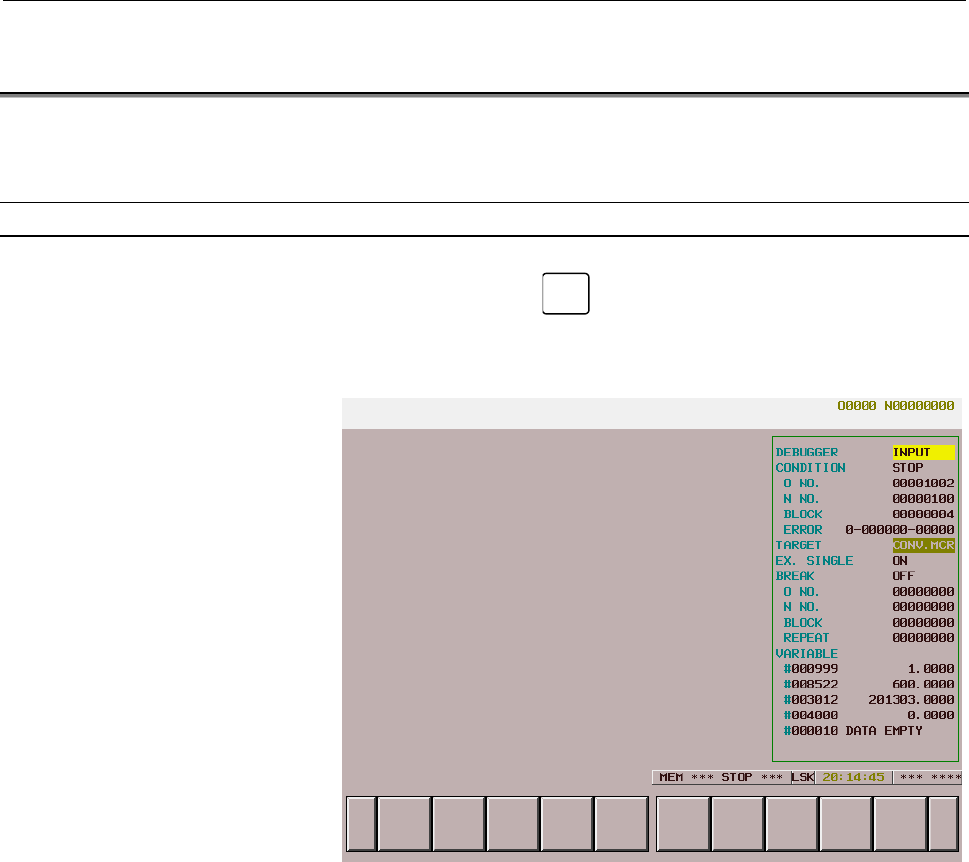
7.2 DISPLAYING AND SETTING ON THE DEBUGGER SCREEN
This section explains the procedures for displaying the debugger
screen and making settings on the screen.
Displaying the debugger screen
Press function key
CUSTOM
to execute the conversational macro
function.
Debugger screen
The following items are displayed:
(1) Whether to enable key input
When key input from the debugger is enabled, INPUT is
indicated.
(2) Operation condition
The operation condition of a target P-CODE macro is indicated
by blinking. While the P-CODE macro is being executed,
EXEC is indicated. When the macro is stopped, STOP is
indicated.
(3) Program number
The program number with which the target P-CODE macro has
been executed is indicated.
(4) Sequence number
The sequence number with which the target P-CODE macro has
been executed is indicated.
(5) Number of blocks
The number of blocks executed by the target P-CODE macro is
indicated with a value up to 99999999.
Contents Summary of 30i/300i/300is-Model A Macro Compiler/Macro Executor Programming manual
- Page 1Macro Compiler / Macro Executor PROGRAMMING MANUAL B-63943EN-2/01
- Page 2• No part of this manual may be reproduced in any form. • All specifications and designs are subject to change without notice. The export of this product is subject to the authorization of the government of the country from where the product is exported. In this manual we have tried as much as possi
- Page 3B-63943EN-2/01 DEFINITION OF WARNING, CAUTION, AND NOTE DEFINITION OF WARNING, CAUTION, AND NOTE This manual includes safety precautions for protecting the user and preventing damage to the machine. Precautions are classified into Warning and Caution according to their bearing on safety. Also, suppl
- Page 4
- Page 5B-63943EN-2/01 TABLE OF CONTENTS TABLE OF CONTENTS DEFINITION OF WARNING, CAUTION, AND NOTE ................................ s-1 1 GENERAL ..............................................................................................1 2 MACRO COMPILER AND MACRO EXECUTOR..............................
- Page 6TABLE OF CONTENTS B-63943EN-2/01 3.2.17 Subprogram Call Using Specific Code.................................................................. 58 3.2.18 Subprogram Call for User Program....................................................................... 60 3.2.19 P-CODE Workpiece Number Search ...
- Page 7B-63943EN-2/01 TABLE OF CONTENTS 5.8 CUSTOM MACRO SYSTEM VARIABLES (#1000 AND UP, #100000 AND UP, #199999 AND UP) ...........................101 5.9 DIFFERENCES FROM THE Series 16i.....................................................105 6 MACRO EXECUTOR FUNCTION .....................................
- Page 8TABLE OF CONTENTS B-63943EN-2/01 6.2.4 Consecutive Input of Cursor and Page Keys ....................................................... 169 6.2.5 MDI Key Image Reading Function (#8549)........................................................ 170 6.3 ADDRESS FUNCTIONS.................................
- Page 9B-63943EN-2/01 TABLE OF CONTENTS 6.11 TORQUE LIMIT OVERRIDE CONTROL (#8990 TO #8993 AND #8621 TO #8628) .................................................228 6.12 PMC AXIS CONTROL ...............................................................................230 6.12.1 PMC Axis Control Using G Code .
- Page 10TABLE OF CONTENTS B-63943EN-2/01 8.2 EXECUTOR PARAMETERS .....................................................................299 APPENDIX A ERROR NO. LIST...............................................................................311 B CODE TABLES ................................................
- Page 11B-63943EN-2/01 1.GENERAL 1 GENERAL Some NC programs such as programs created using custom macros need not be modified once created. Others such as machining programs differ depending on the machining target. This function can convert a custom macro program created by the machine tool builder to an e
- Page 121.GENERAL B-63943EN-2/01 This manual covers the following models. In this manual, the following abbreviations may be used for the models: Model name Abbreviation FANUC Series 30i-MODEL A 30i-A Series 30i FANUC Series 300i-MODEL A 300i-A Series 300i FANUC Series 300is-MODEL A 300is-A Series 300is Def
- Page 13B-63943EN-2/01 2.MACRO COMPILER AND MACRO EXECUTOR 2 MACRO COMPILER AND MACRO EXECUTOR -3-
- Page 142.MACRO COMPILER AND MACRO EXECUTOR B-63943EN-2/01 2.1 MACRO COMPILER The macro compiler converts (compiles) a custom macro program (P- CODE source program) to an executable macro program. Then, the macro compiler links the executable macro program with compile parameters and converts it to a MEM-fo
- Page 15B-63943EN-2/01 2.MACRO COMPILER AND MACRO EXECUTOR P-CODE file size The size of a P-CODE file is set using one of the following compile parameters: P-CODE file size Bit name Compile parameter number 4096Kbyte M4MB 9001#2 3072Kbyte M3MB 9000#6 2048Kbyte M2MB 9000#5 1024Kbyte M1MB 9000#4 512Kbyte M512
- Page 162.MACRO COMPILER AND MACRO EXECUTOR B-63943EN-2/01 2.2 MACRO EXECUTOR The macro executor has execution macro function, conversational macro function, and auxiliary macro function. Execution macro function When the user specifies a G, M, T, or specific code specified by a compile parameter from a use
- Page 17B-63943EN-2/01 2.MACRO COMPILER AND MACRO EXECUTOR 2.3 P-CODE MACRO A P-CODE macro means an executable macro program created by compiling a P-CODE source program using the macro compiler and loaded it into F-ROM. Program number The program number range is from 1 to 99999999. NOTE To use a 5-digit or
- Page 182.MACRO COMPILER AND MACRO EXECUTOR B-63943EN-2/01 2.3.1 Limitations on Commands NOTE For each macro executor function, there may be limitations other than listed below. See the explanation of each macro executor function. Custom macro Custom macro commands can be used for P-CODE macros, but some co
- Page 19B-63943EN-2/01 2.MACRO COMPILER AND MACRO EXECUTOR Optional block skip When a block with a sequence number is skipped using the optional block skip function, a block consisting of only the sequence number is created. Example Original program Command to be executed when skipped /1 N1 X100.; N1; N2 /2
- Page 202.MACRO COMPILER AND MACRO EXECUTOR B-63943EN-2/01 2.3.2 Differences from the Series 16i Function Series 16i Series 30i Program - Programs from O1 to O9999 can be - Programs from O1 to O99999999 can be created. created. - Up to 400 programs can be registered. - Up to 1000 programs can be registered.
- Page 21B-63943EN-2/01 2.MACRO COMPILER AND MACRO EXECUTOR 2.4 MULTI-PATH CONTROL FUNCTION The macro executor of the FANUC Series 30i/300i/300is-A is designed to enable independent path-by-path operation and data sharing in a multi-path system and to build an efficient system. The macro executor has three f
- Page 222.MACRO COMPILER AND MACRO EXECUTOR B-63943EN-2/01 Example of setting P-CODE variables (#10000 and up) are shared by all paths, and extended P-CODE variables (#20000 and up) are used separately by each path. Path 1 Path 2 Path 3 Executor parameter Executor parameter Executor parameter No.9051=1 No.9
- Page 23B-63943EN-2/01 2.MACRO COMPILER AND MACRO EXECUTOR Example of setting 1 - When conversational macros/auxiliary macros are shared Different execution macros are used for each path, and the conversational macros/auxiliary macros of P-CODE1 only are used. P-CODE2 and P-CODE3 include execution macros on
- Page 243.EXECUTION MACRO FUNCTION B-63943EN-2/01 3 EXECUTION MACRO FUNCTION - 14 -
- Page 25B-63943EN-2/01 3.EXECUTION MACRO FUNCTION 3.1 GENERAL Execution macro An execution macro is a loaded P-CODE macro which is operated as a machining program. A registered P-CODE macro cannot be executed singly. A registered P-CODE macro is called for execution from a user program by using a call code
- Page 263.EXECUTION MACRO FUNCTION B-63943EN-2/01 3.2 CALLING AN EXECUTION MACRO Macro call and subprogram call Execution macro calls can roughly be divided into two types: macro calls and subprogram calls. Macro calls are further divided into two types: special macro calls using a T code/axis address, and
- Page 27B-63943EN-2/01 3.EXECUTION MACRO FUNCTION Common Program number variable for Call code Parameters to be set Remarks called storing a specified code Only G codes with no Compile parameters decimal point can be Macro call using G code O9010 to O9019 None (Nos. 9013 to 9022) used. Modal calls are allow
- Page 283.EXECUTION MACRO FUNCTION B-63943EN-2/01 Common Program number variable for Call code Parameters to be set Remarks called storing a specified code Subprogram call using Compile parameter BSC second auxiliary function O9028 #146 (No. 9105#1) code Compile parameters ACL1/ACL2 (No. 9002#1 Subprogram c
- Page 29B-63943EN-2/01 3.EXECUTION MACRO FUNCTION Usable call command Call method (call source → call destination) User program Execution macro Execution macro →Execution macro →Execution macro →User program Simple call of execution macro (G65) Modal call of execution macro (G66, G66.1) Macro call using G c
- Page 303.EXECUTION MACRO FUNCTION B-63943EN-2/01 <1> When an execution macro is called from a user program No particular limitation is imposed. Even from a user program called using a G/M/S/T/second auxiliary function/ specific code, an execution macro call using each code and call using an axis address ca
- Page 31B-63943EN-2/01 3.EXECUTION MACRO FUNCTION Priority of calls If a call command is set in addition to a custom macro and another call command, the priority order indicated below is applied. Priority Call High Simple call of execution macro (G65) ↑ Modal call of execution macro (G66,G66.1) | Macro call
- Page 323.EXECUTION MACRO FUNCTION B-63943EN-2/01 Passing of arguments For a macro call, arguments can be specified. Two types of argument specification are available. Argument specification I uses letters other than G, L, O, N, and P once each. Argument specification II uses A, B, and C once each and also
- Page 33B-63943EN-2/01 3.EXECUTION MACRO FUNCTION Argument specification II • Argument specification II uses A, B, and C once each and uses I, J, and K up to ten times. • Argument specification II is used to pass values such as three- dimensional coordinates as arguments. • Subscripts of I, J, and K for ind
- Page 343.EXECUTION MACRO FUNCTION B-63943EN-2/01 Position of the decimal point The units used for argument data passed without a decimal point correspond to the least input increment of each address. NOTE The value of an argument passed without a decimal point may vary according to the system configuration
- Page 35B-63943EN-2/01 3.EXECUTION MACRO FUNCTION Example M code for calling O9001 as a subprogram is M200. User program Execution Execution (Main program) macro macro O0001 ; Subprogram O0001 ; O9001 ; Macro call call : : : #1=1.0 ; #2=2.0 ; #3=3.0 ; M200 ; M98 P1 ; : : : : M30 ; M99 ; M99 ; - When bit 3 (
- Page 363.EXECUTION MACRO FUNCTION B-63943EN-2/01 3.2.1 Simple Call (G65) An execution macro specified using address P is called as a macro. Format G65 : Call command. Must be specified before any argument. G65 P p L l
; be called l : Rep - Page 37B-63943EN-2/01 3.EXECUTION MACRO FUNCTION 3.2.2 Modal Call (G66/G66.1) A modal call is performed for the execution macro specified at address P. The functions such as move command call (G66) operation, block-by- block call (G66.1) operation, and multi-level modal calls are exactly the same as for cu
- Page 383.EXECUTION MACRO FUNCTION B-63943EN-2/01 3.2.3 Macro Call Using G Code Execution macro O9010 to O9019 is called using the G code specified for compile parameters (Nos. 9013 to 9022) as a macro. When a negative G code is set for a parameter, a modal call is performed for the corresponding execution
- Page 39B-63943EN-2/01 3.EXECUTION MACRO FUNCTION Limitation 1 If a G code exceeding 9999 is set, the macro call is invalidated. 2 Usually, when an execution macro is called from a program called using a G code, only a G65 or M98 command can be specified. When bit 2 (PCDC) of compile parameter (No. 9163) is
- Page 403.EXECUTION MACRO FUNCTION B-63943EN-2/01 3.2.4 Macro Call Using G Code (Specification of 1 Set) Execution macros to be called using a G code can be added by setting the start number of G codes to be used for macro calls, the start number of execution macros to be called, and the number of definitio
- Page 41B-63943EN-2/01 3.EXECUTION MACRO FUNCTION 3.2.5 Macro Call Using G Code (Specification of 3 Sets) Up to three sets, each consisting of a start G code number used for macro calling, start execution macro number to be called, and the number of execution macros to be defined, can be set. Besides execut
- Page 423.EXECUTION MACRO FUNCTION B-63943EN-2/01 Limitation 1 This type of macro call is invalidated in the following cases: <1> A value outside the valid range is set for a compile parameter. <2> The defined G code range exceeds 9999. <3> The defined program number range exceeds 99999999. NOTE When a 5-di
- Page 43B-63943EN-2/01 3.EXECUTION MACRO FUNCTION 3.2.5.1 Macro modal call using G code If a negative number is set in a compile parameters (Nos. 9013 to 9022), the corresponding execution macro is called in the modal mode. This capability is usable for multiple macro calls using G code. In this case, set a
- Page 443.EXECUTION MACRO FUNCTION B-63943EN-2/01 3.2.6 Macro Call Using M Code Execution macro O9020 to 9029 is called using the M code specified for compile parameters (Nos. 9023 to 9032) as a macro. Format m : Call M code. Must be specified before any Mm L l
; l (*2) : - Page 45B-63943EN-2/01 3.EXECUTION MACRO FUNCTION Limitation 1 If an M code exceeding 99999999 is set, the macro call is invalidated. (The M code is output as an ordinary M code.) 2 Usually, when an execution macro is called from a program called using an M code, only a G65 or M98 command can be specified.
- Page 463.EXECUTION MACRO FUNCTION B-63943EN-2/01 3.2.7 Macro Call Using M Code (Specification of 3 Sets) Up to three sets, each consisting of a start M code number used for macro calling, start execution macro number to be called, and the number of execution macros to be defined, can be set in compile para
- Page 47B-63943EN-2/01 3.EXECUTION MACRO FUNCTION 3.2.8 Special Macro Call Using T Code When bit 7 (TMACC) of compile parameter (No. 9005) is set to 1, execution macro O9008 is called as a macro by using a T code. Format Tt
; t: Call T code. argument : Data to be passed to the execu - Page 483.EXECUTION MACRO FUNCTION B-63943EN-2/01 NOTE 1 A value other than 0 or 1 cannot be set for this variable. 2 It may take time until the value set for the variable is reflected in bit 0 (MTC) of parameter (No. 9011), depending on the CNC operation status. Whether this type of macro call is enabled o
- Page 49B-63943EN-2/01 3.EXECUTION MACRO FUNCTION Argument 1 All addresses specifiable on the machine are treated as arguments. So, no modal change is made by a specified address. Example O0001 O9008; N1G90G00X50.0; X#24; N2 G91G01X100.0T123; M99; N3 X150.; : G91G01 of N2 are just treated as arguments, and
- Page 503.EXECUTION MACRO FUNCTION B-63943EN-2/01 NOTE The specifiable addresses and specification range conform to the specification address range of the CNC. For example, address M does not allow the decimal point to be used. So, the specification of T123 M1.23; results in alarm PS0007. Limitation • Usual
- Page 51B-63943EN-2/01 3.EXECUTION MACRO FUNCTION 3.2.9 Special Macro Call Using Axis Address When compile parameters (Nos. 9005#0 to 9005#3, 9008#0 to 9008#3, and 9164#0 to 9165#7) are set, an execution macro is called using an axis address (controlled axis move command) as a macro. Format xx
- Page 523.EXECUTION MACRO FUNCTION B-63943EN-2/01 Variables Variable #8690 can be used to set and check each axis for which this type of macro call is disabled. The value set for this variable is reflected in parameters (Nos. 9010 and 9020 to 9021). The following shows the relationships between variable set
- Page 53B-63943EN-2/01 3.EXECUTION MACRO FUNCTION Example To invalidate the call of the 1st and 3rd axes, #8690 = (1+4) = 5 can be set. To invalidate the call of the 1st, 16th, and 24th axes, the following can also be specified: #100=2 #1=1-1 #16=16-1 #24=24-1 #101=POW[#100,#1] ; 1 axis #116=POW[#100,#16] ;
- Page 543.EXECUTION MACRO FUNCTION B-63943EN-2/01 Call code 1 In contrast to a macro call using a G or M code, an axis address specified as a call code in a block is used as a call command unless another call code is specified before the axis address. 2 When multiple axis addresses for macro calls are speci
- Page 55B-63943EN-2/01 3.EXECUTION MACRO FUNCTION 3 There are the following relationships between addresses and local variables: The axis address used as a call code is passed to variable #27. The first five addresses G in ascending order of G code groups are used as arguments and passed to variables #28 to
- Page 563.EXECUTION MACRO FUNCTION B-63943EN-2/01 Limitation • Usually, when an execution macro is called from a program called using an axis address, only a G65 or M98 command can be specified. When bit 2 (PCDC) of compile parameter (No. 9163) is set to 1, G66 and G66.1 are also usable. • When bit 2 (PCDC)
- Page 57B-63943EN-2/01 3.EXECUTION MACRO FUNCTION 3.2.10 Subprogram Call (M98) The execution macro specified at address P is called as a subprogram. Format M98 : Call command P : Program number of an execution macro to be called M98 P p L l ; l : Repetition count (1 by default) 1 to 999999999 Execution macr
- Page 583.EXECUTION MACRO FUNCTION B-63943EN-2/01 3.2.11 Subprogram Call Using M Code Execution macro O9001 to O9003 is called as a subprogram using the M code specified for compile parameters (Nos. 9010 to 9012). Format Mm Ll; m : Call M code l : Repetition count (1 by default) 1 to 999999999 (*1) User pro
- Page 59B-63943EN-2/01 3.EXECUTION MACRO FUNCTION Limitation 1 If an M code exceeding 99999999 is set, the subprogram call is invalidated. (The M code is output as an ordinary M code.) 2 Usually, when an execution macro is called from a program called using an M code, only a G65 or M98 command can be specif
- Page 603.EXECUTION MACRO FUNCTION B-63943EN-2/01 3.2.12 Subprogram Call Using M Code in the Specified Range Execution macro O9009 is called as a subprogram using an M code in the range specified by compile parameters Nos. 9042 and 9043. Format m : Call M code Mm L l ; l : Repetition count (1 by default) 1
- Page 61B-63943EN-2/01 3.EXECUTION MACRO FUNCTION 3 M codes used for macro and subprogram calls are not used as call codes in this type of subprogram call even when included in the setting range. If duplicate M codes are set, the following priority order is applied: <1> Macro call using M code (compile para
- Page 623.EXECUTION MACRO FUNCTION B-63943EN-2/01 3.2.13 Subprogram Call Using M Code (Specification of 3 Sets) Up to three sets, each consisting of a start M code number used for subprogram calling, start execution macro number to be called, and the number of execution macros to be defined, can be set in c
- Page 63B-63943EN-2/01 3.EXECUTION MACRO FUNCTION Limitation 1 Usually, when an execution macro is called from a program called using an M code, only a G65 or M98 command can be specified. When bit 2 (PCDC) of compile parameter (No. 9163) is set to 1, G66 and G66.1 are also usable. Moreover, when bit 2 (PCD
- Page 643.EXECUTION MACRO FUNCTION B-63943EN-2/01 3.2.14 Subprogram Call Using S Code When bit 0 (SSC) of parameter (No. 9105) is set to 1, execution macro O9029 is called as a subprogram using an S code. Format s : Call M code Ss L l ; l : Repetition count (1 by default) 1 to 999999999 (*1) User program Ex
- Page 65B-63943EN-2/01 3.EXECUTION MACRO FUNCTION 3.2.15 Subprogram Call Using T Code When bit 0 (TMACC) of compile parameter (No. 9005) is set to 0 and bit 0 (TCAL) of compile parameter (No. 9002) is set to 1, execution macro O9000 is called as a subprogram using a T code. Format t : Call T code Tt L l ; l
- Page 663.EXECUTION MACRO FUNCTION B-63943EN-2/01 NOTE 1 A value other than 0 or 1 cannot be set for this variable. 2 It may take time until the value set for the variable is reflected in bit 0 (MTC) of parameter (No. 9011), depending on the CNC operation status. Whether this type of call is enabled or disa
- Page 67B-63943EN-2/01 3.EXECUTION MACRO FUNCTION 3.2.16 Subprogram Call Using Second Auxiliary Function Code When bit 1 (BSC) of compile parameter (No. 9105) is set to 1, execution macro O9028 is called as a subprogram using a second auxiliary function code. Format b : Call second auxiliary function code B
- Page 683.EXECUTION MACRO FUNCTION B-63943EN-2/01 3.2.17 Subprogram Call Using Specific Code When bit 1/2 (ACL1/ACL2) of compile parameter (No. 9002) is set to 1, execution macro O9004/9005 is called as a subprogram by using the NC address (ASCII code converted to a decimal character code) specified in para
- Page 69B-63943EN-2/01 3.EXECUTION MACRO FUNCTION Limitation • Usually, when an execution macro is called from a program called using a specific code, only a G65 or M98 command can be specified. When bit 2 (PCDC) of compile parameter (No. 9163) is set to 1, G66 and G66.1 are also usable. • When bit 2 (PCDC)
- Page 703.EXECUTION MACRO FUNCTION B-63943EN-2/01 3.2.18 Subprogram Call for User Program A user program is called as a subprogram using the M code specified for compile parameter (No. 9033). Format m : Call M code Mm P p L l ; P : Program number of a execution program to be called l : Repetition count (1 b
- Page 71B-63943EN-2/01 3.EXECUTION MACRO FUNCTION Compile parameter PCDC(No. 9163#2) 0 1 User macro calls using G65, M98, G66, and G66.1 only are allowed. 0 Other types of calls are disabled. - For user program calls - For user program calls and execution Calls using G65, M98, G66, and G66.1 only macro call
- Page 723.EXECUTION MACRO FUNCTION B-63943EN-2/01 Example When both of bit 6 (GMP) of parameter (No. 6008) and bit 2 (PCDC) of compile parameter (No. 9163) are set to 1 1. User program Execution macro O0001 ; O9010 ; : : G100X10.Z20.; MmmP1000; : : M02; M99; O9011 ; X O1000 ; : : G200.; MmmP1001; : : M99; M
- Page 73B-63943EN-2/01 3.EXECUTION MACRO FUNCTION 3.2.19 P-CODE Workpiece Number Search When automatic operation is started in the memory or DNC operation mode, the execution macro specified for variable #8610 is executed before the main program. Call conditions and operation (a) Bit 6 (PWSR) of compile par
- Page 743.EXECUTION MACRO FUNCTION B-63943EN-2/01 3.3 LIMITATIONS ON EXECUTION MACROS 3.3.1 Commands which cannot Use Execution Macros • Command using a comma (,) such as optional-angle chamfering/corner rounding • SETVN 3.3.2 Functions which cannot Use Execution Macros • Playback • Manual numeric command •
- Page 75B-63943EN-2/01 3.EXECUTION MACRO FUNCTION 3.4 DIFFERENCES FROM THE Series 16i Function Series 16i Series 30i Program - Programs from O1 to O9999 can be - Programs from O1 to O99999999 can created. be created. - Up to 400 programs can be registered. - Up to 1000 programs can be registered. Sequence n
- Page 763.EXECUTION MACRO FUNCTION B-63943EN-2/01 Function Series 16i Series 30i NC command specified in a - If the NC command is specified before If the NC command is specified before the block containing a macro the call code, it is ignored (with the call code, alarm PS0090 (NC call code based on a G or M
- Page 77B-63943EN-2/01 3.EXECUTION MACRO FUNCTION Function Series 16i Series 30i Subprogram call using a - The handling of a block for calling a - No empty block is generated. (The specific code/M/T code single command consisting of only a call NOPB parameter is not used.) code depends on bit 6 (NOPB) of co
- Page 783.EXECUTION MACRO FUNCTION B-63943EN-2/01 Function Series 16i Series 30i P-CODE workpiece number Equivalent to macro calling only A function equivalent to a simple call search (G65)/subprogram call (M98) can be selected. Interruption type custom An interruption type custom macros is An interruption
- Page 79B-63943EN-2/01 4.CONVERSATIONAL MACRO FUNCTION AND AUXILIARY MACRO FUNCTION 4 CONVERSATIONAL MACRO FUNCTION AND AUXILIARY MACRO FUNCTION The conversational macro function allows the machine tool builder to create original screens. The auxiliary macro function can be executed regardless of which mode
- Page 804.CONVERSATIONAL MACRO FUNCTION AND AUXILIARY MACRO FUNCTION B-63943EN-2/01 4.1 CONVERSATIONAL MACRO FUNCTION The conversational macro function independently executes a conversational macro loaded into F-ROM in parallel with ordinary part program operation. This function is executed at a level lower
- Page 81B-63943EN-2/01 4.CONVERSATIONAL MACRO FUNCTION AND AUXILIARY MACRO FUNCTION 4.1.1 Execution and Termination Execution The conversational macro function is executed by pressing the function key CUSTOM on the MDI panel. Which P-CODE is executed on each path is set in parameter (No. 9049). When the con
- Page 824.CONVERSATIONAL MACRO FUNCTION AND AUXILIARY MACRO FUNCTION B-63943EN-2/01 Termination Terminate execution of the conversational macro function using one of the following methods: (1) Press a function key (such as POS or PROG ) on the MDI panel. (2) Set the control variable for executing a conversa
- Page 83B-63943EN-2/01 4.CONVERSATIONAL MACRO FUNCTION AND AUXILIARY MACRO FUNCTION - Forced termination To recover from the hang-up state, execution of the conversational macro function can forcibly be terminated. SHIFT If the system enters the hang-up state, simultaneously press CAN and . NOTE Recovery fr
- Page 844.CONVERSATIONAL MACRO FUNCTION AND AUXILIARY MACRO FUNCTION B-63943EN-2/01 4.1.2 Command Commands that can be used Macro statements and NC statements (special G code commands) can be written in conversational macros as in the case of CNC part programs. Macro statements can contain commands similar
- Page 85B-63943EN-2/01 4.CONVERSATIONAL MACRO FUNCTION AND AUXILIARY MACRO FUNCTION 4.2 AUXILIARY MACRO FUNCTION The conversational macro function is executed using function key CUSTOM , but the auxiliary macro function does not need such an operation or command. After power-on, the auxiliary macro function
- Page 864.CONVERSATIONAL MACRO FUNCTION AND AUXILIARY MACRO FUNCTION B-63943EN-2/01 4.2.1 Execution and Termination Execution After power-on, the auxiliary macro function is always executed. Which P-CODE is executed on each path is set in parameter (No. 9050). After the auxiliary macro function enters the c
- Page 87B-63943EN-2/01 4.CONVERSATIONAL MACRO FUNCTION AND AUXILIARY MACRO FUNCTION 4.2.2 Command Commands that can be used A main difference between the conversational macro function and auxiliary macro function is that the control codes for the macro executor function that are related to key reading and s
- Page 884.CONVERSATIONAL MACRO FUNCTION AND AUXILIARY MACRO FUNCTION B-63943EN-2/01 4.2.3 Execution Cycle Whether an auxiliary macro is executed depends on whether a conversational macro is executed. When a conversational macro is executed - Sequential execution (when bit 1 (SEP) of parameter (No. 9033) is
- Page 89B-63943EN-2/01 4.CONVERSATIONAL MACRO FUNCTION AND AUXILIARY MACRO FUNCTION Note NOTE Execution of the auxiliary macro is affected by the CNC operation processing time because the auxiliary macro is executed at a level lower than that of CNC operation processing. For this reason, the specified inter
- Page 904.CONVERSATIONAL MACRO FUNCTION AND AUXILIARY MACRO FUNCTION B-63943EN-2/01 4.3 EXECUTION CONTROL CODE The following control codes are available for controlling execution. These control codes can be specified in conversational macros and auxiliary macros. G65: Macro call M98: Subprogram call M99: Pr
- Page 91B-63943EN-2/01 4.CONVERSATIONAL MACRO FUNCTION AND AUXILIARY MACRO FUNCTION - M99
command in the conversational macro main program Always specify M99 at the end of the main program. M99 in the main program is a special command unlike subprogram end. When M99 is executed in the main p - Page 924.CONVERSATIONAL MACRO FUNCTION AND AUXILIARY MACRO FUNCTION B-63943EN-2/01 4.4 EXECUTION CONTROL VARIABLES (#8500, #8550, #8551, AND #8530) Control variable for executing a conversational macro (#8500, #8550, and #8551) For conversational macro execution, three screens are available. The three scre
- Page 93B-63943EN-2/01 4.CONVERSATIONAL MACRO FUNCTION AND AUXILIARY MACRO FUNCTION Control variable for executing an auxiliary macro (#8530) This control variable sets the main program number of an auxiliary macro. The auxiliary macro execution control variable #8530 is initialized to the value set in comp
- Page 944.CONVERSATIONAL MACRO FUNCTION AND AUXILIARY MACRO FUNCTION B-63943EN-2/01 4.5 COMMON CONVERSATIONAL MACRO SCREEN By setting the same number in parameter (No. 9049) for each path, the same conversational macro screen can be displayed for each path. For example, if 1 is set in parameter (No. 9049) f
- Page 95B-63943EN-2/01 4.CONVERSATIONAL MACRO FUNCTION AND AUXILIARY MACRO FUNCTION 4.6 FATAL ERROR An error may occur and execution may not be able to be continued during execution of a conversational macro or auxiliary macro. Such an error includes the case where a P-CODE macro program is not found. In th
- Page 964.CONVERSATIONAL MACRO FUNCTION AND AUXILIARY MACRO FUNCTION B-63943EN-2/01 Clearing the error information display screen Error information display can be canceled by pressing function key POS or PROG and terminating the conversational macro function. NOTE If an error occurs during execution of an a
- Page 97B-63943EN-2/01 4.CONVERSATIONAL MACRO FUNCTION AND AUXILIARY MACRO FUNCTION 4.7 DIFFERENCES FROM THE Series 16i Function Series 16i Series 30i Conversational macro If a conversational macro that has the value If an error that prevents execution from execution of the conversational macro execution be
- Page 985.MACRO VARIABLES B-63943EN-2/01 5 MACRO VARIABLES - 88 -
- Page 99B-63943EN-2/01 5.MACRO VARIABLES 5.1 MACRO VARIABLE LIST The following variables can be used in P-CODE macros. Variable Conversational Auxiliary Execution Type Remarks number macro macro macro The local variables used in a conversational macro and those used in an auxiliary macro are independent of
- Page 1005.MACRO VARIABLES B-63943EN-2/01 Variable Conversational Auxiliary Execution Type Remarks number macro macro macro The same extended P-CODE variable can be used in any of conversational macros, auxiliary macros, and execution #20000 to Extended P- macros. The upper limit on the variable ¡ ¡ ¡ 89999
- Page 101B-63943EN-2/01 5.MACRO VARIABLES 5.2 LOCAL VARIABLES (#1 TO #33) / ARRAY VARIABLES (#1 TO #99) Local variables can be used in any of conversational macros, auxiliary macros, and execution macros. The local variables used in an execution macro, those used in a conversational macro, and those used in
- Page 1025.MACRO VARIABLES B-63943EN-2/01 5.3 COMMON VARIABLES (#100 TO #199 AND #500 TO #999) Common variables can be used in any of conversational macros, auxiliary macros, and execution macros, and the same common variable can be used in any of them. It is possible to specify whether to use common variabl
- Page 103B-63943EN-2/01 5.MACRO VARIABLES Caution CAUTION The same common variable can be used in any of conversational macros, auxiliary macros, and execution macros, but caution is necessary. If the common variable used in an execution macro and a user program is the same as the common variable used in a c
- Page 1045.MACRO VARIABLES B-63943EN-2/01 5.4 P-CODE VARIABLES (#10000 TO #19999) P-CODE variables can be used in P-CODE macros. P-CODE variables start with #10000, and the number of P-CODE variables that can be used is determined using the appropriate parameter. It is possible to specify whether to use P-CO
- Page 105B-63943EN-2/01 5.MACRO VARIABLES NOTE 1 For integer data, a value in the range of -32768 to +32767 can be set in a variable. If the value has a fractional part, it is rounded off to the nearest integer number. A
representation is not possible. If a P-CODE variable of the integer data type app - Page 1065.MACRO VARIABLES B-63943EN-2/01 5.5 EXTENDED P-CODE VARIABLES (#20000 TO #89999) Extended P-CODE variables can be used in P-CODE macros. Extended P-CODE variables start with #20000, and the number of extended P-CODE variables that can be used is determined using the appropriate parameter. It is pos
- Page 107B-63943EN-2/01 5.MACRO VARIABLES NOTE 1 For integer data, a value in the range of -32768 to +32767 can be set in a variable. If the value has a fractional part, it is rounded off to the nearest integer number. A
representation is not possible. If an extended P-CODE variable of the integer dat - Page 1085.MACRO VARIABLES B-63943EN-2/01 5.6 P-CODE VARIABLES/EXTENDED P-CODE VARIABLES IN THE PATH CONTROL SYSTEM When P-CODE programs are installed on multiple paths, whether to use the variables of each path or to use the P-CODE variables (#10000 and up) and extended P-CODE variables (#20000 and up) of a
- Page 109B-63943EN-2/01 5.MACRO VARIABLES 5.6.1 Writing and Reading P-CODE Variables/Extended P-CODE Variables between Paths The P-CODE variables (#10000 and up) and extended P-CODE variables (#20000 and up) of a specified path can be read and written. Read - Format G316 Pp Dd Ll; P : Variable number of the
- Page 1105.MACRO VARIABLES B-63943EN-2/01 5.7 CUSTOM MACRO COMMON VARIABLES (#99100 TO #99999) Using numbers #99100 to #99999, it is possible to write and read values to and from custom macro common variables (#100 to #199 and #500 to #999) from conversational macros, auxiliary macros, and execution macros.
- Page 111B-63943EN-2/01 5.MACRO VARIABLES 5.8 CUSTOM MACRO SYSTEM VARIABLES (#1000 AND UP, #100000 AND UP, #199999 AND UP) All system variables that can be used in custom macros can be used in execution macros, conversational macros, and auxiliary macros. However, #10000 and up are used as P-CODE variables,
- Page 1125.MACRO VARIABLES B-63943EN-2/01 - Caution CAUTION Specifying variable #3000 from a conversational macro or auxiliary macro causes automatic operation to stop due to an alarm. Displaying an operator message using variable #3006 Specifying variable #3006 from a conversational macro or auxiliary macro
- Page 113B-63943EN-2/01 5.MACRO VARIABLES - Input signals for P-CODE macros EUI00 to EUI15
[Classification] Input signal [Function] The control unit is not provided with any related function. These signals can be read by a P-CODE macro, as a kind of system variable, and are used as interfaces - Page 1145.MACRO VARIABLES B-63943EN-2/01 - Signal addresses #7 #6 #5 #4 #3 #2 #1 #0 G082 EUI07 EUI06 EUI05 EUI04 EUI03 EUI02 EUI01 EUI00 G083 EUI15 EUI14 EUI13 EUI12 EUI11 EUI10 EUI09 EUI08 #7 #6 #5 #4 #3 #2 #1 #0 F084 EUO07 EUO06 EUO05 EUO04 EUO03 EUO02 EUO01 EUO00 F085 EUO15 EUO14 EUO13 EUO13 EUO11 EUO10
- Page 115B-63943EN-2/01 5.MACRO VARIABLES 5.9 DIFFERENCES FROM THE Series 16i Function Series 16i Series 30i Local variables - Local variables can be used with an - If array-type variables are invalid execution macro only. (#8518=0), local variables can be used even with conversational/auxiliary macros. - Th
- Page 1166.MACRO EXECUTOR FUNCTION B-63943EN-2/01 6 MACRO EXECUTOR FUNCTION - 106 -
- Page 117B-63943EN-2/01 6.MACRO EXECUTOR FUNCTION List of macro executor functions, related G codes, and related control variables Conversational Auxiliary Execution Related control Section Function Outline of function Related G code variable G202, G240, G242, Controls conversational macro G243, G244, G250,
- Page 1186.MACRO EXECUTOR FUNCTION B-63943EN-2/01 Conversational Auxiliary Execution Related control Section Function Outline of function Related G code variable Enables alarm information, relative coordinates, run time, parts count, and system 6.15 Window Function ____ #8996 to #8999 information such as sys
- Page 119B-63943EN-2/01 6.MACRO EXECUTOR FUNCTION G code list Conversational Auxiliary Execution Modal / Reference G code Function One-shot item Screen display functions G01 Linear display Modal ¡ X X G02 Circular display (CW) Modal ¡ X X G03 Circular display (CCW) Modal ¡ X X G202 Screen clear One-shot ¡ X
- Page 1206.MACRO EXECUTOR FUNCTION B-63943EN-2/01 Conversational Auxiliary Execution Modal / Reference G code Function One-shot item G349 Command signal write command One-shot ¡ ¡ X Other functions G310 Relative coordinate presetting Modal ¡ ¡ ¡ G310 PMC data read/write Modal ¡ ¡ ¡ G315 Array-type data proce
- Page 121B-63943EN-2/01 6.MACRO EXECUTOR FUNCTION Conversational Auxiliary Execution Variable No. Function Type R/W #8503 Numeric data variable Floating R/ ¡ X X #8504 Address data variable Floating R/ ¡ X X #8508 Character string input Floating R/ ¡ X X Key input line display control #8561 Key input line di
- Page 1226.MACRO EXECUTOR FUNCTION B-63943EN-2/01 Conversational Auxiliary Execution Variable No. Function Type R/W #8518 (1 whenever used) Integer R/W ¡ ¡ X #8519 Array start variable number Integer R/W ¡ ¡ X Torque limit override control #8621 to #8628 Torque limit override values for the 1st to 8th servo
- Page 123B-63943EN-2/01 6.MACRO EXECUTOR FUNCTION NOTE The variable types are as follows: Floating : Floating-point type Integer : Integer type When an attempt is made to input a
value to a variable of the integer type, the value is changed to zero before being input. - 113 - - Page 1246.MACRO EXECUTOR FUNCTION B-63943EN-2/01 6.1 SCREEN DISPLAY FUNCTIONS In the descriptions below, the terms, type of 12 soft keys and type of 7 soft keys, represent the following indicators: Type of 12 soft keys: Type of indicator (9.5" LCD, 10.4" LCD) with (10 + 2) soft keys Type of 7 soft keys: Typ
- Page 125B-63943EN-2/01 6.MACRO EXECUTOR FUNCTION - For 7.2" or 8.4" LCD (type of 7 soft keys) Screen without background color Screen with background Compile parameter CM30(9009#2) color 1 0 The screen can display 40 The screen can display 40 The screen can display 40 characters (0 to 39) from left character
- Page 1266.MACRO EXECUTOR FUNCTION B-63943EN-2/01 - For 9.5" or 10.4" LCD (type of 12 soft keys) Screen without background color Screen with background Compile parameter CM30(9009#2) color 1 0 The screen can display 80 The screen can display 80 The screen can display 80 characters (0 to 79) from left charact
- Page 127B-63943EN-2/01 6.MACRO EXECUTOR FUNCTION Graphic coordinate One unit is one dot. The screen center (X,Y)=(0,0). Along the X-axis, display at -320 to 319 (from left to right) can be specified. Along the Y-axis, display at -232 to 247 (from bottom to top) can be specified. NOTE Be sure to set bit 2 (H
- Page 1286.MACRO EXECUTOR FUNCTION B-63943EN-2/01 6.1.2 Screen Display Identification Variables (#8681 and #8682) Display device identification (#8681) #8681 : Display device identification control variable 0 : 9” LCD 1 : 14” LCD 2 : 15” LCD Identification of display with background color (#8682) #8682 : Con
- Page 129B-63943EN-2/01 6.MACRO EXECUTOR FUNCTION 6.1.3 Screen Display Control Codes The screen display control codes are listed below. The meanings of the control codes and addresses are different from those of ordinary NC statements. The screen display control codes cannot be specified with execution macro
- Page 1306.MACRO EXECUTOR FUNCTION B-63943EN-2/01 Modal addresses and their meanings X : X coordinate in the character coordinate system, X coordinate of the drawing end point in the graphic coordinate system, speed ratio X of rapid traverse drawing Y : Y coordinate in the character coordinate system, Y coor
- Page 131B-63943EN-2/01 6.MACRO EXECUTOR FUNCTION 6.1.3.1 Screen clear (G202) This code clears either the graphic screen or character screen (or both) according to the specification of address P. The screen is not cleared partially if addresses X, Y, I, J are not specified. In this case, the entire screen is
- Page 1326.MACRO EXECUTOR FUNCTION B-63943EN-2/01 Graphic display clear - For display with background color (when bit 0 (VGAR) of compile parameter (No. 9100) is set to 1): The color of color palette 15 is used. - For display without background color (when bit 0 (VGAR) of compile parameter (No. 9100) is set
- Page 133B-63943EN-2/01 6.MACRO EXECUTOR FUNCTION 6.1.3.2 Color specification (G240) The colors of line segments and characters specified in a conversational program can be chosen from sixteen colors in character display/graphic display. As a background color for character display, one of sixteen colors can
- Page 1346.MACRO EXECUTOR FUNCTION B-63943EN-2/01 NOTE For the standard color in the case of display with background color (when bit 0 (VGAR) of compile parameter (No. 9100) is set to 1), see "Standard color palettes" in Subsection 6.1.3.4, "Command for display with background color (G250)". Example G240 P1
- Page 135B-63943EN-2/01 6.MACRO EXECUTOR FUNCTION 6.1.3.3 Drawing start point setting (G242) This code allows specification of the drawing start point in the graphic coordinate system, using addresses X and Y. The next drawing starts at that point. Format G242 Xx Yy ; X : X coordinate of the drawing start po
- Page 1366.MACRO EXECUTOR FUNCTION B-63943EN-2/01 6.1.3.4 Command for display with background color (G250) By setting bit 0 (VGAR) of compile parameter (No. 9100) to 1, display with background color is enabled with a conversational macro. For display with background color, graphic display is used. If a graph
- Page 137B-63943EN-2/01 6.MACRO EXECUTOR FUNCTION List of items Item (P_) Description Parameter 000 Clears screen display with background color. None 001 Clears the data display area only. None 002 Clears the background of screen display with None 003 Clears only the background of the data display None 010 D
- Page 1386.MACRO EXECUTOR FUNCTION B-63943EN-2/01 - P010 X_ Y_ I_ J_ - P011 X_ Y_ I_ J_ P10 displays a convex group frame, and P11 displays a concave group frame. X : Top-left point (X coordinate) of the frame Y : Top-left point (Y coordinate) of the frame I : Bottom-right point (X coordinate) of the frame J
- Page 139B-63943EN-2/01 6.MACRO EXECUTOR FUNCTION - When G250 P11 X5 Y5 I30 J10 is specified - P012 X_ Y_ C_ Displays an input frame. X : Frame start point (X coordinate) Y : Frame start point (Y coordinate) C : Frame length The points X and Y represent coordinates in character display. The length C represen
- Page 1406.MACRO EXECUTOR FUNCTION B-63943EN-2/01 - P018 X_ Y_ - P019 X_ Y_ P018 displays a selection window frame, and P019 displays a nonselection window frame. X : Frame start point (X coordinate) Y : Frame start point (Y coordinate) The points X and Y represent coordinates in character display. The size
- Page 141B-63943EN-2/01 6.MACRO EXECUTOR FUNCTION NOTE 1 These commands are valid with 9.5" and 10.4" LCD units only. 2 The commands specified in addresses X and Y must be absolute commands at all times. - P020 X_ Y_ R_ Registers a window frame mode. R : Frame number (1 to 3) X : Frame start point (X coordin
- Page 1426.MACRO EXECUTOR FUNCTION B-63943EN-2/01 - P023 R_ - P025 R_ Displays a frame registered with P020, as a nonselection window frame. P023 clears the character display in a range. R : Selection number of a frame registered with P20 NOTE 1 These commands are valid with 9.5” and 10.4” LCD units only. 2
- Page 143B-63943EN-2/01 6.MACRO EXECUTOR FUNCTION NOTE The specification of 0 for R has the effect of the specification of P30. - P040 R_ A_ B_ C_ - P041 R_ A_ B_ C_ Sets a specified color palette. P040 sets a graphic color palette. P041 sets a character color palette. R : Color palette number (0 to 15) A :
- Page 1446.MACRO EXECUTOR FUNCTION B-63943EN-2/01 Standard color palettes - Screen display with background color Graphic color R G B Color value value value Color palette 0 0 0 0 Black Color palette 1 15 0 0 Red Color palette 2 0 15 0 Green Color palette 3 15 15 0 Yellow Color palette 4 0 0 15 Blue Color pal
- Page 145B-63943EN-2/01 6.MACRO EXECUTOR FUNCTION - Screen display without background color Graphic color R G B Color value value value Color palette 0 0 0 0 Black Color palette 1 15 0 0 Red Color palette 2 0 15 0 Green Color palette 3 15 15 0 Yellow Color palette 4 0 0 15 Blue Color palette 5 15 0 15 Purple
- Page 1466.MACRO EXECUTOR FUNCTION B-63943EN-2/01 6.1.3.5 Character display (G243) This code displays characters. Format G243 Xx Yy Aa Bb Cc Kk Ff.e Dd *** Pp ( _ ) ( '_ ' ) ( *_* ) ; - Addresses X and Y Addresses X and Y are used to specify the display position of the character string in the character coord
- Page 147B-63943EN-2/01 6.MACRO EXECUTOR FUNCTION - (*_*) (* and *) are used to specify the internal codes corresponding to the character string to be displayed. The character codes must be specified in hexadecimal. The codes must be delimited by a space. Hiragana and Kanji characters each take a space twice
- Page 1486.MACRO EXECUTOR FUNCTION B-63943EN-2/01 - Address B Address B specifies blinking control. B=0 : Does not blink the character string. =1 : Blinks the character string less frequently according to the software timer (ON for about 1/2 second and OFF for about 1/4 second). =2 : Blinks the character str
- Page 149B-63943EN-2/01 6.MACRO EXECUTOR FUNCTION NOTE Use ASCII codes. - Address P Address P specifies the number of the sequence containing a character string. The character string in the single block determined with the sequence number specified for P in the program set in the character string registratio
- Page 1506.MACRO EXECUTOR FUNCTION B-63943EN-2/01 Address P executes a specified block after completion of the block. Example O9000 ; O8000 ; : : #8509=8000 ; N10 (IJK) ; G243 (ABC) P20 ; N20 (XYZ) ; : : M99 ; M99 ; O9100 ; : #8509=8000 ; G243 P20 (ABC) ; : M99 ; When O9000 is executed, the character string
- Page 151B-63943EN-2/01 6.MACRO EXECUTOR FUNCTION - Address D Address D specifies the numeric value to be displayed: D : Specification of the numeric value to be displayed The number of significant digits of the value that can be specified directly for address D is 9. The number of display significant digits
- Page 1526.MACRO EXECUTOR FUNCTION B-63943EN-2/01 - Address Z Address Z specifies whether to suppress leading zeros when a numeric value is displayed. When Z is equal to 0, the sign is not displayed. Z=0 : Does not suppress leading zeros. =1 : Suppresses leading zeros. Example 1 G243 D-123.4567 F8.3 Z1; "∆∆-
- Page 153B-63943EN-2/01 6.MACRO EXECUTOR FUNCTION 6.1.3.6 Drawing line type specification (G244) This code specifies the type of the line segment to be drawn by linear or circular drawing. Format G244 Pp ; P=0 : Solid line =1 : Broken line =2 : Alternate long and short dash line =3 : Alternate long and two s
- Page 1546.MACRO EXECUTOR FUNCTION B-63943EN-2/01 6.1.3.8 Linear drawing (G01) This code draws a straight line up to the specified X and Y coordinates, with the line type specified with G244 and the color specified with G240. Format G01 Xx Yy ; X : X coordinate of the end point of linear drawing Y : Y coordi
- Page 155B-63943EN-2/01 6.MACRO EXECUTOR FUNCTION 6.1.3.9 Circular drawing (clockwise) (G02) 6.1.3.10 Circular drawing (counterclockwise) (G03) An arc is drawn using the line type specified by G244 and the color specified by G240, ending at the point of specified X and Y coordinates. Two methods are availabl
- Page 1566.MACRO EXECUTOR FUNCTION B-63943EN-2/01 NOTE 1 This code is disabled when bit 4 (NVGA) of compile parameter (No. 9167) is set to 1. 2 The commands of addresses X, Y, I, and J are: - Absolute commands at all times when bit 3 (INCD) of compile parameter (No. 9167) is set to 0. - When bit 3 (INCD) of
- Page 157B-63943EN-2/01 6.MACRO EXECUTOR FUNCTION 6.1.3.11 Cursor display (rectangular cursor) (G230) This code displays the character cursor yellow in reverse video. Format G230 Xx Yy Ll ; Addresses X and Y specify the display position of the cursor in the character coordinate system. X : X coordinate of th
- Page 1586.MACRO EXECUTOR FUNCTION B-63943EN-2/01 6.1.3.12 Graphic cursor function (G249) Graphic cursor display can be provided with a conversational macro. Format G249 Pp Xx Yy ; P : Control command =0 : Display ON (turned on) =1 : Display ON (low-speed blink display) =2 : Display ON (high-speed blink disp
- Page 159B-63943EN-2/01 6.MACRO EXECUTOR FUNCTION 6.1.3.13 Cursor control (#8505, #8506, and #8507) By setting a value in the cursor control variable #8505, the cursor can be displayed. #8505=0: Erases the cursor. =1: Displays the cursor. When the power is turned on, the value of #8505 is 0. The cursor can b
- Page 1606.MACRO EXECUTOR FUNCTION B-63943EN-2/01 6.1.3.15 Graphic coordinate system setting (G392) This code sets the current position to a specified position in the graphic coordinate system. The subsequent drawing commands are executed in this coordinate system. Format G392 Xx Yy ; X : X coordinate Y : Y
- Page 161B-63943EN-2/01 6.MACRO EXECUTOR FUNCTION 6.1.3.16 Rapid traverse rate specification (G311) This code specifies the X- and Y-axis speed ratios assumed during rapid traverse drawing. Format G311 Xx Yy ; Specify a speed ratio when performing rapid traverse drawing. X : Rapid traverse drawing speed rati
- Page 1626.MACRO EXECUTOR FUNCTION B-63943EN-2/01 6.1.3.17 Rapid traverse drawing (G300) This code performs drawing with rapid traverse from the current position to a specified point. The path is determined with the rapid traverse rate specification. Format G300 Xx Yy ; X : X coordinate for rapid traverse dr
- Page 163B-63943EN-2/01 6.MACRO EXECUTOR FUNCTION 6.1.3.18 Graphic filling function (G206) With the graphic function, an area to be filled is to be drawn by solid lines beforehand. Then, an arbitrary point in the area and a boundary color for filling are to be specified together with G206. As the color for f
- Page 1646.MACRO EXECUTOR FUNCTION B-63943EN-2/01 2 When P0 (same as the color for filling) is specified as the boundary color: G240P1;..... Red line G244P0;..... Solid line Blue line G242X0Y0; G01X100; (110,110) Y100; Red line X0; Y0; G240P4;..... Blue line G242X50Y50; G01X150; Filled in Y150; blue X50; Y50
- Page 165B-63943EN-2/01 6.MACRO EXECUTOR FUNCTION 6.1.3.19 Rectangular display (G204) This code fills the rectangle having points (X, Y) and (I, J) as diagonal points with the color specified for P, and fills the edge of the outer frame with the color specified with G240. Format G204 Xx Yy Ii Jj [Pp] ; X : X
- Page 1666.MACRO EXECUTOR FUNCTION B-63943EN-2/01 NOTE 1 This code is disabled when bit 4 (NVGA) of compile parameter (No. 9167) is set to 1. 2 The commands of addresses X and Y are: - Absolute commands at all times when bit 3 (INCD) of compile parameter (No. 9167) is set to 0. - Switched between absolute an
- Page 167B-63943EN-2/01 6.MACRO EXECUTOR FUNCTION 6.1.3.20 Marking (G321) This code draws the mark specified for M with the color specified for P at the position specified for X and Y (graphic coordinates). Format G317 Xx Yy Mm Pp ; X : X coordinate of the position at which a mark is to be displayed Y : Y co
- Page 1686.MACRO EXECUTOR FUNCTION B-63943EN-2/01 NOTE 1 The asterisk "*" indicates the position specified for X and Y. 2 The commands of addresses X and Y are: - Absolute commands at all times when bit 3 (INCD) of compile parameter (No. 9167) is set to 0. - Switched between absolute and incremental commands
- Page 169B-63943EN-2/01 6.MACRO EXECUTOR FUNCTION 6.1.3.23 Brightness modulation mode display on the monochrome LCD On the monochrome LCD, bit 2 (MVD) of parameter (No. 9033 can be used to put the conversational macro screen in the brightness modulation mode. The brightness of the screen is specified using t
- Page 1706.MACRO EXECUTOR FUNCTION B-63943EN-2/01 Function Series 16i Series 30i Graphic filling function Absolute command only When bit 3 (INCD) of compile parameter (G206) (No. 9167) is set to 1, switching between Addresses X and Y the absolute command and incremental command is enabled with G390/G391. Rec
- Page 171B-63943EN-2/01 6.MACRO EXECUTOR FUNCTION 6.1.4 Character String Registration Program Number Specification (#8509) Variable #8509 is the control variable for specifying the program in which a character string is registered. See the explanation of address P of G243 in Section 6.1.3.5, "Character displ
- Page 1726.MACRO EXECUTOR FUNCTION B-63943EN-2/01 Value Function screen of #8510 CUSTOM : CONVERSATIONAL MACRO screen (user screen) 6 NOTE The graphic screen requires an option. 6.1.6 State Display Mask Function on the Conversational Macro Screen By setting bit 2 (STDM) of compile parameter (No. 9006) to 1,
- Page 173B-63943EN-2/01 6.MACRO EXECUTOR FUNCTION 6.2 KEY INPUT AND DATA INPUT/OUTPUT 6.2.1 Command Key Input Variable (#8501) Command key input can be read from variable #8501. If there is no command key input, the value of variable #8501 is 0. Once there is command key input, variable #8501 retains its val
- Page 1746.MACRO EXECUTOR FUNCTION B-63943EN-2/01 (0) : SOFT FUNCTION KEY LEFT (4) : SOFT FUNCTION KEY4 (1) : SOFT FUNCTION KEY1 (5) : SOFT FUNCTION KEY5 (2) : SOFT FUNCTION KEY2 (6) : SOFT FUNCTION KEY RIGHT (3) : SOFT FUNCTION KEY3 Command keys of the type of 12 soft keys Page key PAGE SOFT FUNCTION 1 20 K
- Page 175B-63943EN-2/01 6.MACRO EXECUTOR FUNCTION - When vertical soft keys are provided SOFT VERTICAL KEY 0 32 SOFT VERTICAL KEY 1 33 SOFT VERTICAL KEY 2 34 SOFT VERTICAL KEY 3 35 SOFT VERTICAL KEY 4 36 SOFT VERTICAL KEY 5 37 SOFT VERTICAL KEY 6 38 SOFT VERTICAL KEY 7 39 SOFT VERTICAL KEY 8 40 The arrangeme
- Page 1766.MACRO EXECUTOR FUNCTION B-63943EN-2/01 - Identification of decimal point input When a decimal point is input, the value of #8501 is incremented by α. The value of α is as follows: Compile parameter Compile parameter +αα value KY20(No.9003#5) KY100(No.9160#1) 0 0 0 (code itself) +20 for the type of
- Page 177B-63943EN-2/01 6.MACRO EXECUTOR FUNCTION 6.2.2 Data Input Control Variable (#8502) #8502 : Data input control variable #8503 : Numeric data variable #8504 : Address data variable #8508 : Character string variable By setting the following values in data input control variable #8502, the input of nume
- Page 1786.MACRO EXECUTOR FUNCTION B-63943EN-2/01 6.2.3 Extended Data Input Control Variable (#8552) By setting 3 in #8502 and setting a variable number in #8552, the character string input mode is set and ">" is displayed in the input line to enable address data and numeric data to be input. When a command
- Page 179B-63943EN-2/01 6.MACRO EXECUTOR FUNCTION NOTE 1 The macro variables starting with the one having the number set in variable #8552 retain their previous values until the key is pressed. It is after the key is pressed that the new values are set in these variables. 2 The values of vari
- Page 1806.MACRO EXECUTOR FUNCTION B-63943EN-2/01 6.2.5 MDI Key Image Reading Function (#8549) From control variable #8549, the MDI key images showing the current MDI key pressing states can be read. Using these variables, the states of the MDI keys currently pressed can be monitored. The pressing of the SHI
- Page 181B-63943EN-2/01 6.MACRO EXECUTOR FUNCTION • Vertical soft keys “VF0 “VF1 “VF2 “VF3 “VF4 “VF5 “VF6 “VF7 “VF8 MDI keyboard type reading variable By reading variable #8533, the type of the MDI keyboard can be determined. #8533 = 0 :Standard keyboard = 1 :Full keyboard = 2 :Small keyboard = 3 :QWERTY key
- Page 1826.MACRO EXECUTOR FUNCTION B-63943EN-2/01 (00H to 7FH) 0 1 2 3 4 5 6 7 0 Space 0 @ P 1 1 A Q 2 2 B R 3 # 3 C S 4 4 D T 5 5 E U 6 & 6 F V 7 7 G W 8 ( 8 H X 9 ) 9 I Y A ; (EOB) * J Z B + K [ C ‘ L D - = M ] E . N F / ? O (80H to FFH) 8 9 A B C D E F 0 Reset VF0 F0 1 VF1 F1 2 VF2 F2 3 VF3 F3 4 Shift Ins
- Page 183B-63943EN-2/01 6.MACRO EXECUTOR FUNCTION 6.3 ADDRESS FUNCTIONS An address function returns the contents of a PMC address or the contents of a CNC parameter as a function value. An address function cannot be used on the left side of an expression because the contents cannot be written. 6.3.1 PMC Addr
- Page 1846.MACRO EXECUTOR FUNCTION B-63943EN-2/01 Address 30i-A T 0 to 499 (0.0 to 499.7) 9000 to 9499 (9000.0 to 9499.7) K 0 to 99 (0.0 to 99.7) 900 to 999 (900.0 to 999.7) C 0 to 399 (0.0 to 399.7) 5000 to 5199 (5000.0 to 5199.7) NOTE If a value exceeding the applicable valid range is specified, the correc
- Page 185B-63943EN-2/01 6.MACRO EXECUTOR FUNCTION 6.3.2 CNC Parameter Reference Format P
or P . - Refer to "Parameter Manual" (B-63950EN) for details of parameters. - Bit position data cannot be specified. So, obtain a necessary bit positio - Page 1866.MACRO EXECUTOR FUNCTION B-63943EN-2/01 6.4 PMC ADDRESS READING/WRITING (G310) PMC address writing - Format G310 Dd Qq Ll ; G310 Rr Qq Ll ; G310 Cc Qq Ll ; G310 Kk Qq Ll ; G310 Tt Qq Ll ; D : PMC address D R : PMC address R C : PMC address C K : PMC address K T : PMC address T Q : Data to be writte
- Page 187B-63943EN-2/01 6.MACRO EXECUTOR FUNCTION NOTE 1 Data cannot be specified in bit units. 2 If the specified data exceeds the byte length specified for address L, only the specified byte length of data is written and no error handling is performed. In the example shown on the previous page, if "L1" is
- Page 1886.MACRO EXECUTOR FUNCTION B-63943EN-2/01 6.5 READER/PUNCHER INTERFACE 6.5.1 General The communication line can be controlled with the conversational macro function/auxiliary macro function when the communication line is not used for other purposes, for example, by the CNC. Line control is performed
- Page 189B-63943EN-2/01 6.MACRO EXECUTOR FUNCTION (4) File control When the FANUC Handy File, FANUC Floppy Cassette, FANUC FA Card, FANUC Program File Mate, or Memory card is used, and the line is opened in file control mode, it is possible to acquire file names and sizes, delete files, and change file names
- Page 1906.MACRO EXECUTOR FUNCTION B-63943EN-2/01 6.5.2 Function Line open G330 - Format G330 Pp Bb Ss Cc ; P : Interface number and control method of the input/output device for the foreground =1 : Hard flow control with RS-232-C1 =2 : Hard flow control with RS-232-C2 = 11 : Reception control with RS-232-C1
- Page 191B-63943EN-2/01 6.MACRO EXECUTOR FUNCTION Line close G331 - Format G331 ; - Explanation This code closes an open line. When a line is closed, the completion code is always 0 (normal termination). 1-byte reception G335 - Format G335 Pp ; P: Number of the macro variable in which the received data is to
- Page 1926.MACRO EXECUTOR FUNCTION B-63943EN-2/01 Data transmission G336 - Format G336 Cc (_) (‘_’) (*_*) Kk Ff.e Dd Pp Zz ; C : Specify a code to be directly output. (Specify one character.) Code conversion processing is not performed. Specify this address when outputting a code other than the control codes
- Page 193B-63943EN-2/01 6.MACRO EXECUTOR FUNCTION 6.5.3 Macro Variable Input/Output Functions Macro variable data input G337 - Format G337 Pp Qq R99 ; P: Read variable number (effective when variable number "N" is not specified) Q: Number of read variables (optional) R: Continuous reading specification (opti
- Page 1946.MACRO EXECUTOR FUNCTION B-63943EN-2/01 By using address Q, the number of variables to be read can be specified. When the specified number of variables have been read, a completion code (#8539) of 199 is set, notifying that continuous reading is possible. If the tape end "%" is read before the spec
- Page 195B-63943EN-2/01 6.MACRO EXECUTOR FUNCTION Macro variable data output G338 - Format G338 Pp Qq Ff.e Zz Rr; P: Specification of the number of the first output macro variable Q: Specification of the number of output macro variable data items F: Specification of the output format of macro variable data (
- Page 1966.MACRO EXECUTOR FUNCTION B-63943EN-2/01 Using bit 6 (PTCR) of compile parameter (No. 9003), it is possible to output a "CR" code to each block. It can be used to start a new line on a printing device. PTCR = 0: "CR" is not output after "LF." % LF N3000P1234 LF P5678 LF % PTCR = 1: "CR" is output tw
- Page 197B-63943EN-2/01 6.MACRO EXECUTOR FUNCTION EXAMPLE Macro variable output G330 Pp Bp ..... ; Open the line G338 P10000 Q10 F8.3 Z1 R11 ; Outputs % (EOR) at the start and outputs IF [#8539 NE 0] GOTO 999 ; 10 data items from #10000 without variable numbers. Does not output % (EOR) at the end. G338 P1100
- Page 1986.MACRO EXECUTOR FUNCTION B-63943EN-2/01 6.5.4 Data Transmission/Reception Waiting Cancellation If the system is placed in the data transmission/reception waiting state for a specified time, that block can be forcibly terminated. This is possible with the following control code: G335: 1-byte recepti
- Page 199B-63943EN-2/01 6.MACRO EXECUTOR FUNCTION 6.5.5 FANUC Cassette Control Using line open G330 and file information control G339, it is possible to read file data from FANUC Handy File, FANUC Floppy Cassette, FANUC FA Card, and FANUC PROGRAM File Mate, create and delete files, and perform other operatio
- Page 2006.MACRO EXECUTOR FUNCTION B-63943EN-2/01 Example To search for the beginning of the file "ABCD," set 65 (A), 66 (B), 67 (C), 68 (D), 32, 32, ..., and 32 (space) in 17 macro variables #100 to #116. G330 P101 B10 S12 C0 L100 ; The above command searches for the beginning of the file "ABCD." NOTE 1 The
- Page 201B-63943EN-2/01 6.MACRO EXECUTOR FUNCTION File creation G330 - Format G330 Pp Bb Ss Cc (Ll / Ff) ; - Explanation When a line is opened in transmission control mode, with either address L and F specified, it is possible to create a new file on the FANUC cassette. For an explanation of specifying addre
- Page 2026.MACRO EXECUTOR FUNCTION B-63943EN-2/01 (2) Creating a file with a file number By specifying address F, it is possible to create a new file with a specified file number. Specify the number of the file to be created (1 to 9999). Example To create a file with file number 3, enter the following: G330
- Page 203B-63943EN-2/01 6.MACRO EXECUTOR FUNCTION - Explanation G339 can be used to read file information, delete a file, and rename a file. File information reading G339 P1 File deletion G339 P2 File renaming G339 P3 To enable of the use of this function, the control mode must be file information control mo
- Page 2046.MACRO EXECUTOR FUNCTION B-63943EN-2/01 (2) File deletion G339 P2 G339 P2 deletes a specified file. G339 P2 (Ll / Ff) ; Specify the file with its file name or file number. L: Number of the first one of the consecutive 17 macro variables used to store the 17-character file name of the file to be del
- Page 205B-63943EN-2/01 6.MACRO EXECUTOR FUNCTION 6.5.6 Completion Codes (#8539) Completion codes are returned for G330 to G339 commands. If an error occurs, its description is set in a completion code. Check the completion code after issuing a command. There are three types of completion codes: #8537: Compl
- Page 2066.MACRO EXECUTOR FUNCTION B-63943EN-2/01 6.5.7 Differences from the Series 16i Function Series 16i Series 30i G330 line open The output codes specifiable with C are The output codes specifiable with C are ASCII and ISO. ASCII, ISO, and EIA. G338 macro variable data - The maximum number of digits for
- Page 207B-63943EN-2/01 6.MACRO EXECUTOR FUNCTION 6.6 MEMORY CARD CONTROL 6.6.1 General Memory card control can be exercised using the conversational/auxiliary macro function. Memory card control is enabled when bit 7 (EXT1) of compile parameter (No. 9002) is set to 1. G330: Memory card open G331: Memory car
- Page 2086.MACRO EXECUTOR FUNCTION B-63943EN-2/01 6.6.2 Functions Memory card open G330 - Format G330 Pp Ll ; P = 14 : Memory card read control (Specify a file name.) = 24 : Memory card write control (Specify a file name.) = 34 : File control based on memory card L : In the read mode, specify the start varia
- Page 209B-63943EN-2/01 6.MACRO EXECUTOR FUNCTION NOTE 1 Specify a file name + extension by using alphanumeric characters. If a file name starts with code 32 (space), however, completion code 114 is returned. 2 A file name must consist of 12 characters. If a file name is shorter than 12 characters, pad 32 (s
- Page 2106.MACRO EXECUTOR FUNCTION B-63943EN-2/01 Memory card close G331 - Format G331 ; - Explanation This code ends memory card control. Memory card close processing is terminated normally at all times. (Completion code=0) 1-byte reading G335 - Format G335 Pp ; P: Number of a macro variable to which read d
- Page 211B-63943EN-2/01 6.MACRO EXECUTOR FUNCTION Data writing G336 - Format G336 Cc (_) (‘_’) (*_*) Kk Ff.e Dd Pp Zz ; C : Specify a code to be directly output. (Specify one character.) Code conversion processing is not performed. Specify this address when outputting a code other than the ASCII codes. K : S
- Page 2126.MACRO EXECUTOR FUNCTION B-63943EN-2/01 Macro variable output G338 - Format G338 Pp Qq Ff.e Zz Rr; - Explanation In the write control mode, the data of a specified macro variable is converted to a specified format for transmission. This processing is the same as macro variable data output (G338) de
- Page 213B-63943EN-2/01 6.MACRO EXECUTOR FUNCTION 6.6.3 Completion Codes (#8539) Completion codes are returned for G330 to G339 commands. If an error occurs, its description is set in a completion code. Check the completion code after issuing a command. There are three types of completion codes: #8537: Compl
- Page 2146.MACRO EXECUTOR FUNCTION B-63943EN-2/01 6.6.4 Differences from the Series 16i Function Series 16i Series 30i Memory card If a file with the same name exists on the An error occurs, resulting in an open G330 line open memory card, the file is overwritten. failure. Memory card Added partially Complet
- Page 215B-63943EN-2/01 6.MACRO EXECUTOR FUNCTION 6.7 CNC PROGRAM REFERENCING AND WRITING, AND PROGRAM INFORMATION READING 6.7.1 General Using the conversational macro function and auxiliary macro function enables CNC part programs to be registered, deleted, and modified. Program and block numbers are used t
- Page 2166.MACRO EXECUTOR FUNCTION B-63943EN-2/01 Control variables #8520: Program number specification #8521: Block number specification #8522: Storage variable number specification #8523: Variable number for specifying the number of decimal places #8525: Program number under background editing (read-only)
- Page 217B-63943EN-2/01 6.MACRO EXECUTOR FUNCTION 6.7.2 Referencing and Writing CNC Programs Newly registering a program (G320) - Format G320; - Explanation To newly register a program, issue G320 by specifying a program number (#8520) for the program. Example To register O0002: #8520=2; G320; IF [#8529 NE 0
- Page 2186.MACRO EXECUTOR FUNCTION B-63943EN-2/01 Reading a specified block (G325/G328) (1) Reading a specified word-type block (G325) - Format G325 Pp; p : Maximum allowable number of variable data items - Explanation A block can be read into a specified variable area by specifying its program number and bl
- Page 219B-63943EN-2/01 6.MACRO EXECUTOR FUNCTION If a program does not end with an EOB, or the location of an EOR is specified with a block number, the EOR (28) is stored as an address. If a block number greater than that of the block containing the EOR is specified, a completion code of 255 occurs, resulti
- Page 2206.MACRO EXECUTOR FUNCTION B-63943EN-2/01 (2) Reading a specified character-type block (G328) - Format G328 Pp; p : Maximum allowable number of variable data items - Explanation Even if a block specified in a CNC program is not represented as a word-type block (in the format "address + number"), this
- Page 221B-63943EN-2/01 6.MACRO EXECUTOR FUNCTION Example 2 #8520 = Program number ; #8521 = Block number; #8522 = Read variable number; G325 ; (Reading a specified word-type block) IF [#8529 EQ 253] GOTO 100; : N100 G328 ; (Reading a specified character-type block) Writing a specified block (G326/G329) (1)
- Page 2226.MACRO EXECUTOR FUNCTION B-63943EN-2/01 Executing the program data shown above causes the following blocks to be inserted in the program. O0004; G92 X0. M08; G1 X20.5 F1000.; G90 G0 X10.5 M05; If a specified block number corresponds to a block that contains an EOR only or is greater than its block
- Page 223B-63943EN-2/01 6.MACRO EXECUTOR FUNCTION Example 2 #8520 = Program number ; #8521 = Block number; #8522 = ASCII code string start number G329P10; IF [#8529 NE 0] GOTO 900; (Error check) The command P for specifying the maximum number of write data items is the same as for the function for writing a
- Page 2246.MACRO EXECUTOR FUNCTION B-63943EN-2/01 Example If #8523 is 0, the least input increment at a specified address is used. Special example Usually in G325 and G326, a block consisting of a word based on a combination of address and value, and an EOB is used as a unit of processing as stated above. Th
- Page 225B-63943EN-2/01 6.MACRO EXECUTOR FUNCTION Condensing a program (G322) - Format G322; - Explanation G322 condenses program memory and sorts out free areas. Using program number specification variable (#8520) supports two program condense types (entire program memory and specified programs). The result
- Page 2266.MACRO EXECUTOR FUNCTION B-63943EN-2/01 6.7.3 Reading Background Editing State and Program Information (#8525 to #8528) Reading a program number under background editing (#8525) #8525 : 1 to 99999999 = Program number under background editing -3 = When the option for background editing is not specif
- Page 227B-63943EN-2/01 6.MACRO EXECUTOR FUNCTION 6.7.4 Completion code (#8529) After execution of each operation, check the completion code. #8529 Description 0 Normal end. 1 An attempt was made to open a program file that was already open. 2 An attempt to open a program file failed because it was being use
- Page 2286.MACRO EXECUTOR FUNCTION B-63943EN-2/01 6.7.5 Limitations Foreground operation This function basically runs in CNC background editing mode. Running a created or edited program in foreground mode requires that the program be selected. Number of address value digits that can be written The maximum nu
- Page 229B-63943EN-2/01 6.MACRO EXECUTOR FUNCTION 6.7.6 Appendix tables Address code table Address Code Address Code Address Code Address Code A 1 B 2 C 3 D 4 E 5 F 6 G 7 H 8 I 9 J 10 K 11 L 12 M 13 N 14 O 15 P 16 Q 17 R 18 S 19 T 20 U 21 V 22 W 23 X 24 Y 25 Z 26 EOB 27 EOR 28 / 29 Special code table Instruc
- Page 2306.MACRO EXECUTOR FUNCTION B-63943EN-2/01 6.8 CUTTING TIME, DISTANCE READ AND PRESET FUNCTIONS Control variables can be used to read and preset the cutting time and cutting distance. This function can be used to manage the service life of tools. Reading and presetting the cutting time (#8553) By usin
- Page 231B-63943EN-2/01 6.MACRO EXECUTOR FUNCTION Example #100 = #8554 ;→ The cutting distance is read into #100. #8554 = 0 ; → The cutting distance is preset to 0. - Cumulative cutting distance along an arbitrary axis only A cumulative calculation can be made by excluding an axis selected using bit 0 (NDTx)
- Page 2326.MACRO EXECUTOR FUNCTION B-63943EN-2/01 6.9 RELATIVE COORDINATE READ AND PRESET FUNCTIONS (#8996 TO #8999) These functions enable reading and presetting of relative coordinates. Reading relative coordinates By setting an ID number for reading relative coordinates in #8998 and setting an axis number
- Page 233B-63943EN-2/01 6.MACRO EXECUTOR FUNCTION - Caution CAUTION 1 If a value other than 1 to the maximum number of controlled axes in the path is specified in #8997, the value read from #8999 is
. 2 When the power is switched on, #8999 is reset to 0. 3 The unit of a read value is the least input in - Page 2346.MACRO EXECUTOR FUNCTION B-63943EN-2/01 Presetting relative coordinates - Format G310 Aa Qq ; a : Controlled-axis number to be subjected to presetting (1 to the number of controlled axes in the path), or axis ID No. (110 to 117) q : Coordinate to be preset Address Q specifies the coordinate to be p
- Page 235B-63943EN-2/01 6.MACRO EXECUTOR FUNCTION 6.10 ARRAY-TYPE PROCESSING AND REFERENCING OF P- CODE VARIABLES Array-type processing of P-CODE variables This function controls processing of array-type macro variables or a sequence of macro variables. 1) Clearing array-type variables and a sequence of vari
- Page 2366.MACRO EXECUTOR FUNCTION B-63943EN-2/01 Each process code consists of three digits and specifies the type of processing to be performed. Leading zeros are omissible. A difference between P2 and P3 and between P102 and P103 is whether a transfer progresses from a small variable number to a large or
- Page 237B-63943EN-2/01 6.MACRO EXECUTOR FUNCTION When the power is switched on, each array control variable is set up as follows: #8512 to #8517 = 1 and #8519 = 10000 So, when using P-CODE variables as two-dimensional arrays, you need not beware of #8513 and #8517. NOTE When using variables #1 to #99 to ref
- Page 2386.MACRO EXECUTOR FUNCTION B-63943EN-2/01 6.11 TORQUE LIMIT OVERRIDE CONTROL(#8990 TO #8993 AND #8621 TO #8628) Assigning appropriate values to #8990 to #8992 enables the torque limit override to be changed to the specified value. Assigning appropriate values to #8990 and #8991 enables a torque limit
- Page 239B-63943EN-2/01 6.MACRO EXECUTOR FUNCTION Caution CAUTION 1 When the power is switched on, the torque limit override value for each axis is set to 100%. 2 If an attempt is made to set a value other than 0 to 255 in #8992, the following results: Execution macro : Alarm PS0110 Conversational/auxiliary
- Page 2406.MACRO EXECUTOR FUNCTION B-63943EN-2/01 6.12 PMC AXIS CONTROL 6.12.1 PMC Axis Control Using G Code 6.12.1.1 General A PMC-based axis control interface can be used to control the PMC controlled axis. The following eight different control codes are available. Which PMC controlled axis to control is t
- Page 241B-63943EN-2/01 6.MACRO EXECUTOR FUNCTION Example When the following settings are made, the 1st and 2nd axes are controlled: EAX1 = 1 #8700 = 2 NOTE 1 If an integer out of a range between 0 and 20 is specified in #8700, the control command is ignored. 2 If parameter (No. 8010) does not relate the gro
- Page 2426.MACRO EXECUTOR FUNCTION B-63943EN-2/01 6.12.1.2 Details of control codes Rapid traverse command (G340) - Format G340 Xx ; x : Travel distance - Explanation This command specifies rapid traverse for the PMC controlled axis. Address X specifies a travel distance always in incremental mode. This comm
- Page 243B-63943EN-2/01 6.MACRO EXECUTOR FUNCTION Auxiliary function command (G346) - Format G346 Mm ; m : Auxiliary function code - Explanation This command specifies an auxiliary function for the PMC axis control interface. Address M specifies an auxiliary function code. This command performs the same oper
- Page 2446.MACRO EXECUTOR FUNCTION B-63943EN-2/01 Example When EDENg#p = 1, G348 P100; results in the following : #100 = 8 Command signal write command (G349) - Format G349 Pp ; P : Command value - Explanation This command writes a value specified at address P as a command signal for the corresponding PMC ax
- Page 245B-63943EN-2/01 6.MACRO EXECUTOR FUNCTION 6.12.1.3 Limitations Command buffering PMC-based axis control is implemented by issuing more than one commands sequentially. So, command blocks are buffered on the CNC side. To put another way, when the CNC is executing a block, another command can be issued
- Page 2466.MACRO EXECUTOR FUNCTION B-63943EN-2/01 6.12.2 PMC Axis Control Using Variables 6.12.2.1 General A conversational macro enables PMC control to be exercised using variables through the PMC axis control interface. Control is exercised by combining the variables below. #8700 → PMC controlled-axis sele
- Page 247B-63943EN-2/01 6.MACRO EXECUTOR FUNCTION NOTE 1 For selection of a controlled axis, #8700 (PMC controlled- axis selection variable) is to be set. 2 Group 5 to group 40 cannot be used. 3 If parameter (No. 8010) does not relate the group and axis specified by #8602 and #8700, the control command is ig
- Page 2486.MACRO EXECUTOR FUNCTION B-63943EN-2/01 6.12.2.2 Details of control variables PMC command signal variables (#8710, #8720, #8730, #8740) When a numeric value is written to a PMC command signal variable (#8710, #8720, #8730, and #8740), the corresponding command signal (G142, G154, G166, and G178) of
- Page 249B-63943EN-2/01 6.MACRO EXECUTOR FUNCTION PMC state signal read variables (#8715, #8725, #8735, and #8745) To a PMC state signal read variable (#8715, #8725, #8735, and #8745), the corresponding state signal (F130, F133, F136, and F139) of the PMC axis control interface is written. To a variable, one
- Page 2506.MACRO EXECUTOR FUNCTION B-63943EN-2/01 6.13 FILE CONTROL 6.13.1 General The following types of file control can be performed with the conversational macro and execution macro. 1. Generating a file 2. Deleting a file 3. Reading data 4. Writing data 6.13.2 Setup Procedure File control first requires
- Page 251B-63943EN-2/01 6.MACRO EXECUTOR FUNCTION 4. First, the currently set values are displayed as follows: CURRENT DATA : USER FILE AREA SIZE = xx NUMBER OF USER FILE = xx DATA AREA SIZE (BYTE) = xx SRAM FREE = xx 5. According to the displays, specify the size of the user file area and the number of file
- Page 2526.MACRO EXECUTOR FUNCTION B-63943EN-2/01 14. The IPL screen is exited, and a usual screen appears. If you only want to check the current user file setting, press the 1 and INPUT keys on the macro compiler utility screen to select "1. USER FILE INFORMATION." 6.13.3 Setting The relationships among the
- Page 253B-63943EN-2/01 6.MACRO EXECUTOR FUNCTION 6.13.4 Error Messages The following table lists the error messages that may be displayed when the user file is set up. Message Description FILE AREA TOO LARGE A specified user file size is greater than the maximum size that can be set up. FILE AREA TOO SMALL
- Page 2546.MACRO EXECUTOR FUNCTION B-63943EN-2/01 Opening a file Function This command opens a file. Format FOPEN (file-number, access-mode, status-variable-number) Explanation The
parameter specifies a file to be opened. See Table 6.13.6 (a) for the values that can be used as file numbers. The - Page 255B-63943EN-2/01 6.MACRO EXECUTOR FUNCTION Reading data from a file Function This command reads the contents of a file. Format FREAD (file-number, data-type, data-variable-number) Explanation The
parameter specifies a file to be read from. See Table 6.13.6 (a) for the values that can be - Page 2566.MACRO EXECUTOR FUNCTION B-63943EN-2/01 Setting a file pointer Function This command sets a file pointer. Format FPSET (file-number, pointer-type, pointer) Explanation The
parameter specifies the file for which a pointer is to be set up. See Table 6.13.6 (a) for the values that can be - Page 257B-63943EN-2/01 6.MACRO EXECUTOR FUNCTION Table 6.13.6 (c) Data type values Value Description 0 Sets the pointer to the start point. (8 bytes) Sets the pointer relative to the start point. 1 (Word type : 2 bytes) Sets the pointer relative to the current location. 2 (Long type : 4 bytes) Table 6.13.6
- Page 2586.MACRO EXECUTOR FUNCTION B-63943EN-2/01 6.14 AXIS-DIRECTION-BY-AXIS-DIRECTION INTERLOCK FUNCTION (#8600, #8601, #8607, AND #8608) The axis-direction-by-axis-direction interlock control variables (#8600 and #8607) can be used to apply interlock for individual axes and their movement directions. The
- Page 259B-63943EN-2/01 6.MACRO EXECUTOR FUNCTION Example 1 If #8600 and #8601 have a binary number of 1000000000000001, they indicate the positive direction of the first axis (AX1+) and the negative direction of the eighth axis (AX8-). This binary number is equivalent to 32769 in decimal. 2 If #8607 and #86
- Page 2606.MACRO EXECUTOR FUNCTION B-63943EN-2/01 Movement axis and direction variables for the rise time of the SKIP signal (#8601 and #8608) When the state of the SKIP signal (or, at a high-speed skip, the high- speed skip signal) is changed from off to on, #8601 and #8608 indicate the axis that moved most
- Page 261B-63943EN-2/01 6.MACRO EXECUTOR FUNCTION 6.15 WINDOW FUNCTION (#8996 TO #8999) 6.15.1 General The window function enables referencing of the following system information: 1. Alarm information and external alarm information 2. Relative coordinates, positional deviation value 3. Run hour and parts cou
- Page 2626.MACRO EXECUTOR FUNCTION B-63943EN-2/01 Example 1 Alarm information (1) PS alarm monitoring #8998=1 ; → The system information ID for alarms is 1. #500=#8999 ; → Acquires alarm information. #500=#500 AND 8 ; → Checks for a PS alarm condition. IF[#500EQ0]GOTO 90 ; #8998=11 ; → The system information
- Page 263B-63943EN-2/01 6.MACRO EXECUTOR FUNCTION Example 2 Parts total #8998=200 ; → The ID for the parts total is 200. #500=#8999 ; #501=#8996 ; → Sets the result of executing this function. When these steps are executed, #500 is set with the parts total. Then #501 is set with information about whether the
- Page 2646.MACRO EXECUTOR FUNCTION B-63943EN-2/01 Lists of reference systems and the related information ID Nos. ID No. Axis ID No. Information (#8998) (#8997) 1 - Alarm basic flag 5 - OH alarm flag 11 - PS alarm number 13 - MC alarm number (user alarm) 20 - OT alarm No.500 (1st to 8th axes) 21 - OT alarm No
- Page 265B-63943EN-2/01 6.MACRO EXECUTOR FUNCTION ID No. Axis ID No. Information (#8998) (#8997) 300 - Diagnosis No. 000 to 006 301 - Diagnosis No. 110 to 115 800 - Positional deviation value of the 1st axis 801 - Positional deviation value of the 2nd axis 802 - Positional deviation value of the 3rd axis 803
- Page 2666.MACRO EXECUTOR FUNCTION B-63943EN-2/01 6.15.2 Alarm Information and External Alarm Information The alarm basic flag (ID No. 1) indicate the category of an alarm (if occurs). For details, see "Detail information about each alarm." Bit information is output as 1 byte (0 to 255) or 2 byte (0 to 65535
- Page 267B-63943EN-2/01 6.MACRO EXECUTOR FUNCTION Detail information about each alarm ID numbers used to acquire detail information about each alarm are listed below. For the PS, SR, MC, and external alarms, their alarm number is output to #8999. For other alarms, numbers within the range of 0 to 128 or 0 to
- Page 2686.MACRO EXECUTOR FUNCTION B-63943EN-2/01 - Bit information Overheat alarm ID No. 5 provides details of an overheat alarm by outputting a number from 0 to 255 as one-byte bit information. OH alarm flag ID No. Bit information Alarm number (#8998) (#8999) 01h OH700 02h 04h 08h 5 10h OH701 20h 40h 80h O
- Page 269B-63943EN-2/01 6.MACRO EXECUTOR FUNCTION OT alarm flag ID No. Bit information Alarm number (#8998) (#8999) 01h OT502 (1st axis) 02h OT502 (2nd axis) 04h OT502 (3rd axis) 08h OT502 (4th axis) 22 10h OT502 (5th axis) 20h OT502 (6th axis) 40h OT502 (7th axis) 80h OT502 (8th axis) OT alarm flag ID No. B
- Page 2706.MACRO EXECUTOR FUNCTION B-63943EN-2/01 OT alarm flag ID No. Bit information Alarm number (#8998) (#8999) 01h OT506 (1st axis) 02h OT506 (2nd axis) 04h OT506 (3rd axis) 08h OT506 (4th axis) 26 10h OT506 (5th axis) 20h OT506 (6th axis) 40h OT506 (7th axis) 80h OT506 (8th axis) OT alarm flag ID No. B
- Page 271B-63943EN-2/01 6.MACRO EXECUTOR FUNCTION Servo alarm No.401, No.404 ID No. 30 provides details of servo alarm No. 401 and No. 404 by outputting a number from 0 to 255 as one-byte bit information. Use ID No. 37 to make an axis-by-axis reference. SV alarm flag ID No. Bit information Alarm number (#899
- Page 2726.MACRO EXECUTOR FUNCTION B-63943EN-2/01 Servo alarm No.411 to No.417 (1st to 24th axes) ID No. 49 provides details of servo alarm Nos. 411 to 417 by outputting a number from 0 to 255 as one-byte bit information. In #8997, be sure to specify an axis to be referenced. SV alarm flag ID No. Bit informa
- Page 273B-63943EN-2/01 6.MACRO EXECUTOR FUNCTION 6.15.3 Axis, Relative Coordinate, and Positional Deviation value Axis The number of controlled axes in a path can be referenced using ID No. 100, and the total number of controlled axes can be referenced using ID No. 102. ID No. Information (#8998) (#8999) 10
- Page 2746.MACRO EXECUTOR FUNCTION B-63943EN-2/01 6.15.4 Run Time and Parts Count The unit of information provided by ID Nos. 210, 220, 222, 224, and 226 is "minute". Example: When ID No. 220 indicates 360, it means 6 hours. When ID No. 220 indicates 369, it means 6 hours and 09 minutes. When ID No. 224 indi
- Page 275B-63943EN-2/01 6.MACRO EXECUTOR FUNCTION 6.15.5 Diagnosis Information ID Nos. 700 and 701 output a number from 0 to 255 as one-byte bit information. Diagnosis Information ID No. Bit information Meaning (#8998) (#8999) 01h 02h 04h 08h An in-position check is in progress. 700 10h The feedrate override
- Page 2766.MACRO EXECUTOR FUNCTION B-63943EN-2/01 6.15.6 System, Servo, and PMC Series Information System series information, servo series information, PMC series, and ladder series information are output using ID Nos. 8000 to 8006, ID Nos. 8020 to 8026, ID Nos. 8030 to 8036, and ID Nos. 8040 to 8046, respec
- Page 277B-63943EN-2/01 6.MACRO EXECUTOR FUNCTION Example Assume the following for a system of series NW10 and edition 01: #8998=8000 ; #500=#8999 ; → Saves system series information digit 4 #8998=8001 ; #501=#8999 ; → Saves system series information digit 3 #8998=8002 ; #502=#8999 ; → Saves system series in
- Page 2786.MACRO EXECUTOR FUNCTION B-63943EN-2/01 6.16 FUNCTION FOR SEARCHING DATA TABLES FOR CONTROL VARIABLES This function searches a data table, which contains sets of consecutive control variables, for a control variable that satisfies a specified condition. If it finds the target control variable, it r
- Page 279B-63943EN-2/01 6.MACRO EXECUTOR FUNCTION Example Data table #20000 #8650=20000 ; #8651=10 ; #8652=400 ; Set 0 #8653=10.5 ; #8654=11.5 ; #G400 ; #20010 #100=#8655 ; With the above steps, this function searches the data table shown at the left, in which the first control variable begins with #20000 an
- Page 2806.MACRO EXECUTOR FUNCTION B-63943EN-2/01 Combining with array-type references Combining this function with array-type references makes it easy to reference the data table. Example If the previous sample program is combined with array-type references: #8513=1 ; #8516=10 ; *1) #8517=1 ; #8518=1 ; *2)
- Page 281B-63943EN-2/01 6.MACRO EXECUTOR FUNCTION Caution CAUTION 1 This function is valid only with the conversational macro and auxiliary macro functions. 2 The macro variable numbers in the search target data table must be consecutive. Otherwise, a search cannot be performed correctly. In addition, be car
- Page 2827.DEBUGGING FUNCTION B-63943EN-2/01 7 DEBUGGING FUNCTION - 272 -
- Page 283B-63943EN-2/01 7.DEBUGGING FUNCTION 7.1 GENERAL The debugging function allows debugging of conversational macros and auxiliary macros. When the conversational macro function is executed, the debugger starts, displaying a debugger screen on the conversational macro screen. The debugger has the follow
- Page 2847.DEBUGGING FUNCTION B-63943EN-2/01 7.2 DISPLAYING AND SETTING ON THE DEBUGGER SCREEN This section explains the procedures for displaying the debugger screen and making settings on the screen. Displaying the debugger screen Press function key CUSTOM to execute the conversational macro function. Debu
- Page 285B-63943EN-2/01 7.DEBUGGING FUNCTION (6) Error information Error information about the execution of the target P-CODE macro is displayed. ERROR a-bbbbbb-ccccc a : 0 No error 1 An error occurred in macro statement specification. 2 An error occurred in NC statement specification. bbbbbb : • For a macro
- Page 2867.DEBUGGING FUNCTION B-63943EN-2/01 - Temporarily erasing and displaying the debugger screen The debugger screen can be erased and displayed temporarily. Press SHIFT and 3 . The debugger screen is erased and re- displayed alternately. Setting from the debugger screen When setting single-block execut
- Page 287B-63943EN-2/01 7.DEBUGGING FUNCTION Single-block execution Enable single-block execution (set to ON). Move the cursor to OFF in the single-block execution field. Press INPUT to set ON. To reset the setting to OFF, press INPUT again. When the setting is changed to ON during P-CODE macro execution, th
- Page 2887.DEBUGGING FUNCTION B-63943EN-2/01 Restarting a P-CODE macro To restart a P-CODE macro that has been stopped by single-block execution or the break function, press SHIFT and 1 . NOTE When the target is a conversational macro, an execution restart automatically causes key input to switch from the de
- Page 289B-63943EN-2/01 7.DEBUGGING FUNCTION 7.3 DIRECT SETTING BY PARAMETER AND KEY Break condition setting by parameter If a non-zero value is set in parameter (No. 9002 or 9003), break conditions are set as follows according to the parameter setting and the break function is enabled (ON) when the conversa
- Page 2907.DEBUGGING FUNCTION B-63943EN-2/01 Debugging an auxiliary macro The auxiliary macro function allows an auxiliary macro to be executed immediately after the CNC is turned on if the program number of the auxiliary macro is set in the auxiliary macro control variable (#8530). To debug an auxiliary mac
- Page 291B-63943EN-2/01 7.DEBUGGING FUNCTION 7.4 DIFFERENCES FROM THE Series 16i Function Series 16i Series 30i Break function By parameter setting, conversational The debug function enables program macro program execution can be stopped execution to be stopped by specifying a at the position of a specified
- Page 2928.PARAMETERS B-63943EN-2/01 8 PARAMETERS - 282 -
- Page 293B-63943EN-2/01 8.PARAMETERS 8.1 COMPILE PARAMERTES When the power is turned on, the compile parameters are initialized to the values set in P-CODE variables. So, these parameters cannot be modified, for example, from the MDI panel. #7 #6 #5 #4 #3 #2 #1 #0 9000 M3MB M2MB M1MB M512 M256 9001 M4MB [Dat
- Page 2948.PARAMETERS B-63943EN-2/01 #6 PWSR P-CODE workpiece number search is: 0: Disabled. 1: Enabled. #7 EXT1 The extended functions (CNC program reference/write, cutting distance accumulation/preset, and reader/puncher interface control) are: 0: Disabled. 1: Enabled. #7 #6 #5 #4 #3 #2 #1 #0 9003 PTCH KY2
- Page 295B-63943EN-2/01 8.PARAMETERS NOTE When using a system with vertical soft keys, use bit 1 (KY100) of compile parameter (No. 9160). #6 PTCH In macro variable output (G338), an EOB is output as: 0: LF. 1: LF CR CR. #7 #6 #5 #4 #3 #2 #1 #0 9004 CUTLG [Data type] Bit # 7 CUTLG Cutting distance accumulatio
- Page 2968.PARAMETERS B-63943EN-2/01 No. 9165 # 0 X17CL 17th axis # 1 X18CL 18th axis : # 7 X24CL 24th axis #7 #6 #5 #4 #3 #2 #1 #0 9005 TMACC AXCLS [Data type] Bit #4 AXCLS In macro call using an axis address: 0: O9009 is called at all times as an execution macro. 1: A different execution macro is called fo
- Page 297B-63943EN-2/01 8.PARAMETERS #7 #6 #5 #4 #3 #2 #1 #0 9008 MCARG [Data type] Bit #5 MCARG In a G/M code macro call, P, L, N, and G are: 0: Not used as arguments. 1: Used as arguments. When this parameter is set to 1, the argument correspondence is: G#10, L#12, N#14, P#16. NOTE When N is used, the numb
- Page 2988.PARAMETERS B-63943EN-2/01 9016 G code for calling program number 9013 as a macro 9017 G code for calling program number 9014 as a macro 9018 G code for calling program number 9015 as a macro 9019 G code for calling program number 9016 as a macro 9020 G code for calling program number 9017 as a mac
- Page 299B-63943EN-2/01 8.PARAMETERS 9033 M code for calling a user program as a subprogram [Data type] Integer [Valid data range] 1 to 99999999 (except 02, 30, 98, and 99) Set an M code for calling a user program as a subprogram. 9038 Conversational macro main program number (for user screen 1) 9040 Convers
- Page 3008.PARAMETERS B-63943EN-2/01 NOTE 1 If a value not within the specifiable range is set, or a specified range is such that No. 9042 > No. 9043, subprogram call using a range specification M code is disabled. 2 An M code used for macro call/subprogram call is not used as a calling code even when the M
- Page 301B-63943EN-2/01 8.PARAMETERS 9124 Count of macro call using an M code (specification of 3 sets) (2nd set) 9125 Start program number of macro call using an M code (specification of 3 sets) (2nd set) 9126 Start M code of macro call using an M code (specification of 3 sets) (3rd set) 9127 Count of macro
- Page 3028.PARAMETERS B-63943EN-2/01 NOTE 1 In the following cases, this call is disabled: <1> In a compile parameter, a value not within the range is set. <2> A defined M code range (start M code number + count) exceeds 99999999. <3> A defined program number range (start program number + count) exceeds 9999
- Page 303B-63943EN-2/01 8.PARAMETERS 9134 Start program number of macro call using an G code (specification of 3 sets) (2nd set) 9135 Start G code of macro call using an G code (specification of 3 sets) (3rd set) 9136 Count of macro call using an G code (specification of 3 sets) (3rd set) 9137 Start program
- Page 3048.PARAMETERS B-63943EN-2/01 NOTE 1 In the following cases, this call is disabled: <1> In a compile parameter, a value not within the range is set. <2> A defined G code range (start G code number + count) exceeds 99999999. <3> A defined program number range (start program number + count) exceeds 9999
- Page 305B-63943EN-2/01 8.PARAMETERS 9056 Time-out period for waiting for transmission/reception [Data type] Integer [Unit of data] sec [Valid data range] 0 to 180 Set a time-out period to be applied when the transmission/reception function (G335 to G338) for reader/puncher interface control waits for transm
- Page 3068.PARAMETERS B-63943EN-2/01 #7 #6 #5 #4 #3 #2 #1 #0 9105 BSC SSC [Data type] Bit #0 SSC Subprogram call using an S code is: 0: Disabled. 1: Enabled. #1 BSC Subprogram call using a second auxiliary function code is: 0: Disabled. 1: Enabled. #7 #6 #5 #4 #3 #2 #1 #0 9160 KY100 CUNIT [Data type] Bit #0
- Page 307B-63943EN-2/01 8.PARAMETERS #2 PCDC This parameter, combined with bit 6 (GMP) of parameter (No. 6008), has the following meaning: When an execution macro is called from another execution macro Compile parameter PCDC(No. 9163#2) 0 1 - Calls using G65, M98, G66, and G66.1 are 0 allowed. Other types of
- Page 3088.PARAMETERS B-63943EN-2/01 #3 LCLLV If an execution macro is called as a subprogram from a user program (subprogram call using an M/S/T/second auxiliary function/specific code), the local variable level: 0: Does not change. (The local variable at the calling source is used.) 1: Changes. (The local
- Page 309B-63943EN-2/01 8.PARAMETERS 8.2 EXECUTOR PARAMETERS When the power is turned on, the executor parameters are not initialized to the values set in P-CODE variables. So, these parameters can be modified, for example, from the MDI panel. #7 #6 #5 #4 #3 #2 #1 #0 9000 RSC STP [Input type] Parameter input
- Page 3108.PARAMETERS B-63943EN-2/01 9003 Conversational macro/auxiliary macro sequence number subject to breaking [Input type] Parameter input [Data type] 2-word path [Valid data range] 1 to 99999999 Set the sequence number of a conversational macro/auxiliary macro subject to breaking by the debug function.
- Page 311B-63943EN-2/01 8.PARAMETERS #7 #6 #5 #4 #3 #2 #1 #0 9011 VRM MTC [Input type] Parameter input [Data type] Bit path #0 MTC Macro call/subprogram call using a T code is: 0: Enabled. 1: Disabled. With this parameter, call using a T code enabled with bit 3 (TCAL) of compile parameter (No.9002) or bit 7
- Page 3128.PARAMETERS B-63943EN-2/01 #1 SEP An auxiliary macro and conversational macro are: 0: Executed sequentially. (An auxiliary macro and conversational macro are executed alternately. If M99 is executed in one main program, control is transferred to the other main program.) 1: Executed in parallel. (An
- Page 313B-63943EN-2/01 8.PARAMETERS #3 MV3 The common variables #550 to #599 used by a P-CODE macro are: 0: P-CODE macro common variables independent of the custom macro common variables. 1: Shared as custom macro common variables. #4 MV4 The common variables #600 to #699 used by a P-CODE macro are: 0: P-CO
- Page 3148.PARAMETERS B-63943EN-2/01 9048 P-CODE macro number of an execution macro [Input type] Parameter input [Data type] Byte path [Valid data range] 1 to 10 Select the number of the P-CODE file where an execution macro to be executed with each path is held. NOTE 1 With a path for which this parameter is
- Page 315B-63943EN-2/01 8.PARAMETERS 9051 Area number of P-CODE variables (#10000 and up) [Input type] Parameter input [Data type] Byte path [Valid data range] 1 to 10 Set the area number for the P-CODE variables (#10000 to #19999) used by the macro executor of each path. If the same area is selected for mul
- Page 3168.PARAMETERS B-63943EN-2/01 9054 Number of extended P-CODE variables (#20000 and up) [Input type] Parameter input [Data type] 2-word path [Valid data range] 0 to 70000 Set the number of extended P-CODE variables. NOTE When this parameter is set, the power must be turned off before operation is conti
- Page 317B-63943EN-2/01 8.PARAMETERS PMC internal relay (R area) address of an interlock mode signal for each axis 9069 direction [Input type] Parameter input [Data type] 2-word path [Valid data range] 0 to PMC internal relay (R area) bit position of an interlock mode signal for each 9070 axis direction [Inp
- Page 318
- Page 319APPENDI
- Page 320
- Page 321B-63943EN-2/01 APPENDIX A.ERROR NO. LIST A ERROR NO. LIST The error No. list given below explains the meanings of the error Nos. displayed as follows: • Error Nos. displayed on the debugger screen of the debugging function • Error Nos. displayed on the CONVERSATIONAL MACRO screen when a fatal error
- Page 322A.ERROR NO. LIST APPENDIX B-63943EN-2/01 Error Nos. (1 to 9999) Error Nos. that match error Nos. of PS/SR alarms Error No. Description 00003 The allowable number of digits is exceeded. 00006 Illegal use of a negative sign 00007 Illegal use of a decimal point 00009 Incorrect address 00010 Incorrect G
- Page 323B-63943EN-2/01 APPENDIX A.ERROR NO. LIST Error Nos. (10001 and up) Fatal errors that prevent execution of a conversational macro/auxiliary macro Error No. Description 10001 Program not found 10002 Sequence number not found 10003 Illegal P-CODE 10004 Too many multiplexed macros 10005 Too many multipl
- Page 324A.ERROR NO. LIST APPENDIX B-63943EN-2/01 Error Nos. (10101 and up) Errors displayed only by the debugger Error No. Description 10101 Too many arguments 10102 Too long string 10103 Illegal PMC address 10104 PMC address error 10105 PMC bit error 10106 No graphic option 10107 No string 10108 Specificat
- Page 325B-63943EN-2/01 APPENDIX A.ERROR NO. LIST Error No. Description 11041 Address O out of range 11042 Address P out of range 11043 Address Q out of range 11044 Address R out of range 11045 Address S out of range 11046 Address T out of range 11047 Address U out of range 11048 Address V out of range 11049
- Page 326A.ERROR NO. LIST APPENDIX B-63943EN-2/01 Error No. Description 11102 Being used by another user 11103 Program not found 11104 Program being edited 11110 Program not found 11111 Duplicate program number 11112 No free area 11113 Too many items registered 11115 Editing impossible (word) 11116 Editing i
- Page 327B-63943EN-2/01 APPENDIX A.ERROR NO. LIST Error No. Description 11611 Line error (CD signal off) 11655 No receive data 11807 Write protected 11830 Memory card not inserted yet 11832 Low battery voltage 11902 Insufficient free space on memory card 11914 Specified file not found The specified file is p
- Page 328B.CODE TABLES APPENDIX B-63943EN-2/01 B CODE TABLES Code table of Japanese 'Katakana' Code table of alphanumeric characters - 318 -
- Page 329B-63943EN-2/01 APPENDIX B.CODE TABLES Code table of symbols Code table of Japanese 'Kanji' and 'Hiragana' - 319 -
- Page 330B.CODE TABLES APPENDIX B-63943EN-2/01 - 320 -
- Page 331B-63943EN-2/01 APPENDIX B.CODE TABLES - 321 -
- Page 332B.CODE TABLES APPENDIX B-63943EN-2/01 - 322 -
- Page 333B-63943EN-2/01 APPENDIX B.CODE TABLES - 323 -
- Page 334B.CODE TABLES APPENDIX B-63943EN-2/01 - 324 -
- Page 335B-63943EN-2/01 APPENDIX B.CODE TABLES - 325 -
- Page 336B.CODE TABLES APPENDIX B-63943EN-2/01 Special symbol - 326 -
- Page 337B-63943EN-2/01 APPENDIX C.DIFFERENCES FROM THE Series 16i C DIFFERENCES FROM THE Series 16i - 327 -
- Page 338C.DIFFERENCES FROM THE Series 16i APPENDIX B-63943EN-2/01 C.1 OVERVIEW Function Series 16i Series 30i Before ROM creation, loading to RAM can Before ROM creation, loading to RAM be performed for an operation check. cannot be performed for an operation check. - 328 -
- Page 339B-63943EN-2/01 APPENDIX C.DIFFERENCES FROM THE Series 16i C.2 MACRO COMPILER Function Series 16i Series 30i Program - Programs from O1 to O9999 can be - Programs from O1 to O99999999 can be created. created. - Up to 400 programs can be registered. - Up to 1000 programs can be registered. Sequence nu
- Page 340C.DIFFERENCES FROM THE Series 16i APPENDIX B-63943EN-2/01 C.3 EXECUTION MACRO FUNCTIONS Function Series 16i Series 30i Program - Programs from O1 to O9999 can be - Programs from O1 to O99999999 can created. be created. - Up to 400 programs can be registered. - Up to 1000 programs can be registered.
- Page 341B-63943EN-2/01 APPENDIX C.DIFFERENCES FROM THE Series 16i Function Series 16i Series 30i NC command specified in a - If the NC command is specified before If the NC command is specified before the block containing a macro the call code, it is ignored (with the call code, alarm PS0090 (NC call code b
- Page 342C.DIFFERENCES FROM THE Series 16i APPENDIX B-63943EN-2/01 Function Series 16i Series 30i Subprogram call using a - The handling of a block for calling a - No empty block is generated. (The specific code/M/T code single command consisting of only a call NOPB parameter is not used.) code depends on bi
- Page 343B-63943EN-2/01 APPENDIX C.DIFFERENCES FROM THE Series 16i Function Series 16i Series 30i P-CODE workpiece number Equivalent to macro calling only A function equivalent to a simple call search (G65)/subprogram call (M98) can be selected. Interruption type custom An interruption type custom macros is
- Page 344C.DIFFERENCES FROM THE Series 16i APPENDIX B-63943EN-2/01 C.4 CONVERSATIONAL MACRO FUNCTIONS AND AUXILIARY MACRO FUNCTIONS Function Series 16i Series 30i Conversational macro If a conversational macro that has the value If an error that prevents execution from execution of the conversational macro e
- Page 345B-63943EN-2/01 APPENDIX C.DIFFERENCES FROM THE Series 16i C.5 MACRO VARIABLES Function Series 16i Series 30i Local variables - Local variables can be used with an - If array-type variables are invalid execution macro only. (#8518=0), local variables can be used even with conversational/auxiliary mac
- Page 346C.DIFFERENCES FROM THE Series 16i APPENDIX B-63943EN-2/01 C.6 MACRO EXECUTOR FUNCTIONS Function Series 16i Series 30i Graphic resolution For an indicator with 7 soft keys 640×480 dots as standard Bit 2 (HRGR) of compile parameter (No. Be sure to set bit 2 (HRGR) of compile 9003) = 0 parameter (No. 9
- Page 347B-63943EN-2/01 APPENDIX C.DIFFERENCES FROM THE Series 16i Function Series 16i Series 30i Graphic cursor function Absolute command only When bit 3 (INCD) of compile parameter (G249) (No. 9167) is set to 1, switching between Addresses X and Y the absolute command and incremental command is enabled wit
- Page 348C.DIFFERENCES FROM THE Series 16i APPENDIX B-63943EN-2/01 Function Series 16i Series 30i Program condensation Only the program specified with #8520 #8520=0: The entire program memory is condensed. #8520≠0: A specified program is condensed. Completion code (#8529) In addition to the completion codes
- Page 349B-63943EN-2/01 APPENDIX C.DIFFERENCES FROM THE Series 16i C.7 DEBUG FUNCTION Function Series 16i Series 30i Break function By parameter setting, conversational The debug function enables program macro program execution can be stopped execution to be stopped by specifying a at the position of a speci
- Page 350C.DIFFERENCES FROM THE Series 16i APPENDIX B-63943EN-2/01 C.8 PARAMETERS Function Series 16i Series 30i Specification of UI/UO signals for an Compile parameter (No. 9006#0) Executor parameter (No. 9035#3) execution macro/conversational macro Specification of the conversational Compile parameter (No.
- Page 351B-63943EN-2/01 APPENDIX C.DIFFERENCES FROM THE Series 16i Function Series 16i Series 30i Enabling an execution macro to be None Compile parameter (No. 9163#2) called from another execution macro with G65 and M98 only Changing the local variable level when None Compile parameter (No. 9163#3) an execu
- Page 352
- Page 353B-63943EN-2/01 INDEX INDEX Completion Codes (#8539)........................................... 203 Consecutive Input of Cursor and Page Keys................. 169 Absolute mode (G390)/incremental mode (G391) CONVERSATIONAL MACRO FUNCTION................ 70 specification...........................
- Page 354INDEX B-63943EN-2/01 EXECUTION CONTROL VARIABLES Macro Call Using M Code (Specification of 3 Sets) ...... 36 (#8500, #8550, #8551, AND #8530).............................. 82 MACRO COMPILER............................................... 4, 329 Execution Cycle.........................................
- Page 355B-63943EN-2/01 INDEX Referencing and Writing CNC Programs ..................... 207 RELATIVE COORDINATE READ AND PRESET FUNCTIONS (#8996 TO #8999)................................. 222 Run Time and Parts Count............................................ 264
Screen clear (G202) ...................- Page 356
- Page 357Revision Record FANUC Series 30i/300i/300is-MODEL A Macro Compiler/Macro Executor PROGRAMMING MANUAL (B-63943EN-2) 01 Jun., 2003 Edition Date Contents Edition Date Contents
- Page 358