Series 30i-MODEL A, Real time custom macro Additional Manual Page 5
Additional Manual
Ed. Date Design Description
Date Jan.07.’04 Design. Apprv.
page
DS0100
-
04
3版
3/64
FANUC Series 30i-MODEL A
Real time custom macro
A-79350EN
Title
Draw
No.
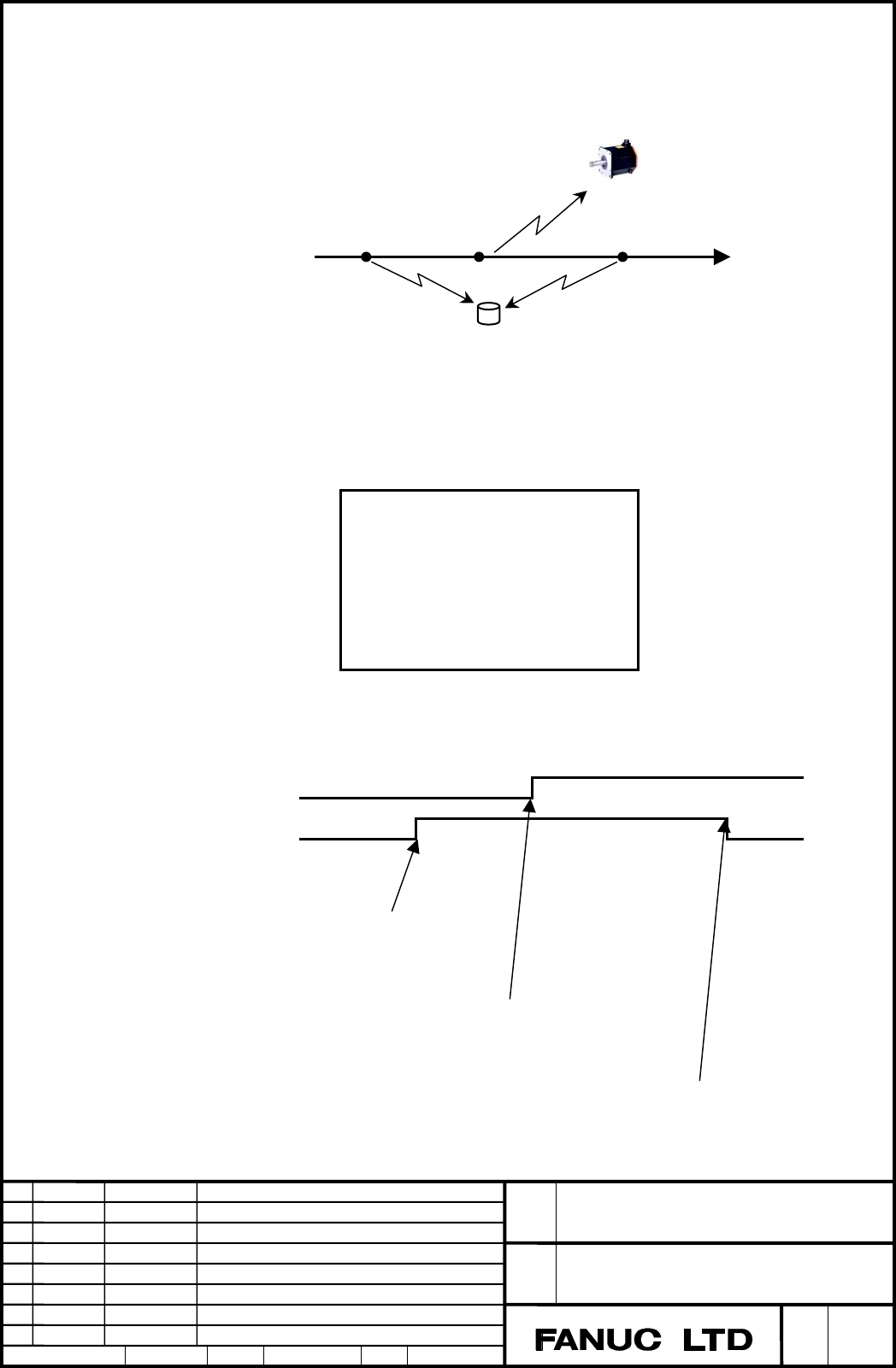
By using a real time custom macro, control on signals and peripheral axes can be
programmed.
The example below turns on and off a signal and performs operation on a peripheral
axis when machining points are passed.
The operation above is programmed using real time macro commands.
The timing is as follows. (‘**’ represents the satisfaction of the condition.)
X coordinate 30 50 80
Peripheral axis Y operation
G99.5 signal
NC statement (machining)
G90 G01 X200. F150
Real time macro command 1
//1 ZEDGE [#100101 GE 30.]
#IOG[99,5] = 1 ;
**
Real time macro command 2
//2 ZEDGE [#100101 GE 50. ]
ZDO ;
G91 G00 Y100 ;
ZEND ;
**
Real time macro command 3
//3 ZEDGE [#100101 GE 80. ]
#IOG[99,5] = 0 ;
**
Program
O0001 ;
G92 X0 ;
//1 ZEDGE [#100101 GE 30. ] #IOG[99,5] = 1 ;
//2 ZEDGE [#100101 GE 50.] ZDO ;
G91 G00 Y100 ;
ZEND ;
//3 ZEDGE [#100101GE 80. ] #IOG[99,5] = 0 ;
G90 G01 X200. F150 ;
M30 ;
During movement for machining along the X-axis in the figure above:
① When point Xa is passed, the G99.5 signal is set to 1. →Real time macro command 1
②
When point Xb is passed, positioning is started on peripheral axis Y. →Real time macro command 2
③
When point Xc is passed, the G99.5 signal is set to 0. →Real time macro command 3
Signal
ON OFF
Peripheral axis Y
X-axis machining direction
Xa=30 Xb=50 Xc=80
Contents Summary of Series 30i-MODEL A, Real time custom macro Additional Manual
- Page 1TECHNICAL REPORT NO. TMN 04/020E Date :Mar .30, 2004 General Manager of Software Laboratory FANUC Series 30i-A Newly additional functions 1. Communicate this report to: Your information only GE Fanuc-N, GE Fanuc-E FANUC Robotics MILACRON Machine tool builder Sales agency End user 2. Summary for Sale
- Page 2FANUC Series30i –A newly additional functions Drawing number Functions 1 A-79227E External Data Input 2 A-79226E One Touch Macro call 3 A-79196E Temporary absolute coordinate setting 4 A-79354E System alarm 5 A-79349E Touch Panel Control 6 A-79253E Distance coded linear scale interface 7 A-79364E Li
- Page 3FANUC Series 30i-MODEL A Real-time Custom Macro Specifications FANUC Series 30i-MODEL A Title Real time custom macro Draw No. A-79350EN Ed. Date Design Description page 1/64 Date Jan.07.’04 Design. Apprv. DS0100-04 3版
- Page 4Overview Used with an NC program, the real time custom macro function controls peripheral axes and signals. If a macro statement is used together with an NC statement, a program using the conventional custom macro function executes the macro statement immediately when the macro statement is read. So
- Page 5By using a real time custom macro, control on signals and peripheral axes can be programmed. The example below turns on and off a signal and performs operation on a peripheral axis when machining points are passed. Peripheral axis Y Xa=30 Xb=50 Xc=80 X-axis machining direction ON OFF Signal During m
- Page 6To use the real time custom macro function, a real time macro command (RTM command) is coded in an NC program. Real time macro command (RTM command) The real time macro command (RTM command) is a macro command that starts execution in phase with an NC statement in the program. After the execution of
- Page 7n: Modal ID (1 to 10) (Omissible) When a proper number is coded in n, a modal real time macro command is specified. When n is omitted, a one-shot real time macro command is specified. ZDO...ZEND is detailed later. Types of real time macro commands - Modal real time macro command - One-shot real time
- Page 8End of a real time macro command When one of the following conditions is satisfied, the RTM command is terminated. Termination conditions common to one-shot RTM and modal RTM commands ・When RTM command processing is completed ・When a reset occurs Termination condition specific to a one-shot RTM comm
- Page 93. Do not restart a program that includes an RTM command. 4. When an NC statement used as a trigger for an RTM command represents an auxiliary function, execution continues even if the FIN signal is awaited. If the following program is executed, for example, the count-up operation of #RV[0] continue
- Page 10Priority of commands If a modal RTM command and one-shot RTM command are specified at the same time, the modal RTM command is executed first. If multiple modal RTM commands are specified at the same time, the commands are executed in ascending order of ID values. No priority is applicable to one-sho
- Page 11//3 #RV[0]=3 //5 #RV[0]=5 // #RV[0]=10 So, the value of #RV[0] is 10. Example 3) Priority of one-shot RTM commands When the following program is executed, the value of #RV[0] is undefined, that is, 1, 2, or 3. O0001 ; //#RV[0]=1 ; //#RV[0]=2 ; //#RV[0]=3 ; G04P10 ; M30 ; Even if a priority is applic
- Page 12#RV[1]=1 ; #RV[2]=1 ; ZEND ; G04 P10 ; M30 ; FANUC Series 30i-MODEL A Title Real time custom macro Draw No. A-79350EN Ed. Date Design Description page 10/64 Date Jan.07.’04 Design. Apprv. DS0100-04 3版
- Page 13Number of real time macro commands A program can have multiple RTM commands coded. Up to six one-shot RTM commands can be specified. If one-shot RTM commands more than the maximum allowable number are specified, an alarm is issued. Up to ten modal RTM commands can be specified. When specifying modal
- Page 14//1 #RV[2]=#100101 ; X#100 ; 5 When a function for reading multiple blocks in advance is used, up to three blocks among the blocks read in advance can trigger an RTM command. For example, if the blocks up to the block of (2) are read in advance during execution of (1) in the program below, up to thr
- Page 15Variables With real time custom macros, the following variables can be handled: ・System variables dedicated to real time custom macros ・Variables (RTM variables) dedicated to real time custom macros ・System variables for some custom macros The RTM variables mean the variables dedicated to real time
- Page 16Variables dedicated to real time custom macros These variables are dedicated to real time custom macros. The variables are classified as system variables and RTM variables. System variables System variables dedicated to real time custom macros Signal PMC interface signals are read and written. Bit-b
- Page 17Specify an address by using m and n. Example: #IOF[1, 3] F1.3 bit type #IOG[1, 5] G1.5 bit type #IOFB[32] F32 byte type #IOGB[12] G12 byte type Read/write operations are performed in the same as for an ordinary macro statement. Example: #RV[0]=#IOFB[32] Assigns F32 to #RV[0]. #IOG[99.3] = 1 Sets G99
- Page 18PMC signal protection Whether to enable a write to a signal handled by an RTM statement can be set. This function protects against a malfunction due to incorrect coding. On the PMC signal protection screen, set whether to enable a write to a signal. If an RTM statement makes an attempt to write to a
- Page 19Input/output A value set for PMC signal protection can be input/output. Input/output format After punching PMC signal protection, one file(DIDOENBL.TXT) is created. Please execute input/output operation in EDIT mode. The output format is as follows: L Specification method 0: Byte specification Q Alp
- Page 20Real time macro variables (RTM variables) The real time macro variables (RTM variables) are variables dedicated to real time custom macros. The RTM variables are classified as volatile real time macro variables (volatile RTM variables) and nonvolatile real time macro variables (nonvolatile RTM varia
- Page 21Input/output RTM variables can be input/output in a specified format. Both nonvolatile RTM variables and volatile RTM variables can be input/output. Input/output format After punching RTM variables, one file(RTMMACRO.TXT) is created. Please execute input/output operation in EDIT mode. The output for
- Page 22Custom macro variables With real time custom macros, a part of the custom macro variables (part of the system variables) can be handled. System variables With real time custom macros, position-related information among the system variables of the custom macros can be handled. ・ Position information
- Page 23NOTE 1 The value of a variable with a number greater than the number of controlled axes is undefined. 2 The end position (ABSIO) of a skip (G31) block is the skip signal ON position if the skip signal is turned on. If the skip signal is not turned on, the block end point is undefined. 3 As block end
- Page 24・ Servo positional deviation #100251 to #100282 (Attribute: Read only) By reading the values of system variables #100251 to #100282, the servo positional deviation on each axis can be found. Variable Position information No. #100251 Servo positional deviation on 1st axis #100252 Servo positional dev
- Page 25Arithmetic and logical operation With the real time custom macros, the following arithmetic and logical operations can be specified: Table 1.3 Arithmetic and logical operation Type of Operation Description operation (1) #i=#j Definition or substitution of a variable Definition, substitution (2) #i=#
- Page 26Up to 12 decimal digits can be specified. If the maximum allowable number of digits is exceeded, P/S0012 alarm is issued. FANUC Series 30i-MODEL A Title Real time custom macro Draw No. A-79350EN Ed. Date Design Description page 24/64 Date Jan.07.’04 Design. Apprv. DS0100-04 3版
- Page 27NOTE 1. The ADP function is not available. 2. With an RTM statement, the external output commands (BPRNT, DPRNT, POPEN, and PCLOS) are unavailable. 3. The FS16i compatibility specifications are not applicable. Bit 0 (F16) of parameter No. 6008 = 1 (with the operation result precision based on the FS
- Page 28Control on real time macro commands By using a reserved word for controlling statements in an RTM command, the flow of the RTM command can be changed or multiple statements can be controlled as a set of statements. Four reserved words are used to control an RTM command as indicated below. Reserved w
- Page 29Conditional branch (ZONCE statement) After ZONCE,
and are coded. //(n) ZONCE [ ] If is true, is executed. If is false, - Page 30However, if
specifies an axis control command, be sure to use ZDO...ZEND even when a single statement is used. If the workpiece coordinate on the first axis is greater than 30 and #RV[0] matches #RV[3], a movement on the A-axis starts. //1 ZONCE [[#100101 GT 30.] AND [#RV[ - Page 31Condition transition (ZEDGE statement) After ZEDGE,
and are coded. // ZEDGE A B (If A becomes true, B is executed.) //(n) ZEDGE [ ] When makes a transition from false to t - Page 32On the falling edge of the X address signal, a movement on the B-axis is started and the Y1.0 signal is set to 1. // ZEDGE [#IOX[1,3] EQ 0] ZDO ; G91 G00 B10. ; #IOY[1,0] = 1 ; ZEND ; On the rising edge of the G address signal, a movement on the U-axis is started. // ZEDGE [#IOG[4,3] EQ 1] ZDO ; G91
- Page 33ZWHILE When condition is false [conditional-expression] ZDO ; When Real time macro condition statement is true ZEND ; : * When the real time macro statement is a single statement and is not an axis control statement, ZDO and ZEND are not required. * When “conditional-expression” is fulfilled and “Re
- Page 34If the workpiece coordinate on the first axis exceeds 30, the rapid traverse override value is changed. // ZEDGE [#100101 GT 30.] ZDO ; #IOG[14,0]=1 ; #IOG[14,1]=0 ; ZEND ; ・When an axis control command is specified On the rising edge of the X signal 7.0, a movement on the V-axis is started. // ZEDG
- Page 35Nesting ZONCE, ZEDGE, ZWHILE, and ZDO...ZEND cannot be nested and overlapped. For details, see the following: 1. ZONCE, ZEDGE, ZWHILE, and 3. ZONCE, ZEDGE, ZWHILE, and ZDO...ZEND may be used any number ZDO...ZEND must not be nested. times. // ZWHILE […] ZDO ; // ZWHILE […] ZDO ; : Processing ZONCE [
- Page 36Sample program The sample program below exercises the following three control operations at the same time. (1) A cutting operation is performed on the X-axis and Z-axis. (2) On each rising edge of the X signal 5.2, 20 is fed on the peripheral axis A. (3) When the workpiece coordinate on the X-axis (
- Page 37Real time macro call (G65) A series of RTM statements can be formed into a subprogram, which can be called from the main program. Real time custom macro call Simple call (G65) When G65 is specified in an RTM command, the real time macro specified in address P is called. G65 Pp; P : Number of real ti
- Page 38Call destination real time program In a called real time macro program, only an RTM statement can be coded. In a called real time macro program, no additional RTM command may be executed. (The RTM command symbol ‘//’ may not be coded.) For example, do not execute the following program: O0001 ; O9010
- Page 39Others If an axis control command is followed by a macro command in an RTM command, the execution of the macro command starts when the axis control command is completed or deceleration starts. If deceleration on the X-axis starts upon completion of distribution according to the axis control command
- Page 40Axis control command In an RTM statement, an M code and G code for specifying a movement can be specified. For axis control, the PMC axis control interface is used. The specifications differ from the specifications for the G and M codes used with an NC statement. Format // ZDO ; G___ IP ___F___ ; :
- Page 41NOTE 1. An axis used with an RTM statement must not be specified from PMC axis control. 2. A PMC axis control group used with an RTM statement must not be specified from PMC axis control. FANUC Series 30i-MODEL A Title Real time custom macro Draw No. A-79350EN Ed. Date Design Description page 39/64
- Page 42Explanation Operation command code The table below indicates the G codes that can be specified in an RTM statement. The mark in the table indicates modal G codes when an RTM command starts. Code Group Meaning G00 Positioning 01 G01 Feed at specified feedrate G28 Reference position return 00 G53 Mach
- Page 43NOTE 1. With an RTM command, bit 0 (G01), bit 3 (G91), and bit 4 (FPM) of parameter No. 3402 are invalid when the power is turned on or in the cleared state. Example 1) Modal information can be controlled independently in an NC statement and each RTM statement. O0001 ; G90 G01 X100. Y100. F500. ; (1
- Page 44ZEND ; X300. ; : The modal information of command (2) is G91 and G00, regardless of command (1). Single block stop If an NC statement is placed in the single block stop state, for example, by the single block stop signal SBK, the axis control command of an RTM statement also comes to a single block
- Page 45statement being executed, the RTM statement being executed does not stop immediately but stops at the time of termination of the block currently being executed. Alarm reset When the group-by-group alarm signal (EIALg) for PMC axis control corresponding to the axis specified by an RTM statement is se
- Page 46parameter No. 1601 for an NC statement is invalid. (However, the in-position signal (INPx) for an NC statement is affected by the value of NCI.) Manual absolute The manual absolute signal (*ABSM) is invalid. External deceleration By setting bit 0 (EDC) of parameter No. 8005 to 1, the external decele
- Page 47PMC interface signals used with an RTM statement The PMC interface signals used or referenced for axis control using an RTM statement are indicated below. For details of each signal, refer to the specifications for PMC axis control. PMC→CNC Reset signal ECLRg Axis control temporary stop signal ESTPg
- Page 48#7 #6 #5 #4 #3 #2 #1 #0 G200 EASIP8 EASIP7 EASIP6 EASIP5 EASIP4 EASIP3 EASIP2 EASIP1 For the axis used with an RTM statement, be sure to set this signal (EASIPn) to 0. FANUC Series 30i-MODEL A Title Real time custom macro Draw No. A-79350EN Ed. Date Design Description page 46/64 Date Jan.07.’04 Desi
- Page 49CNC→PMC Overtravel negative direction signal EOTNg Overtravel positive direction signal EOTPg Axis movement in-progress signal EGENg Alarm signal EIALg Accumulated pulse zero check in-progress signal ECKZg In-position signal EINPg (The signals above are group-by-group signals: the addresses of group
- Page 50NOTE 1. The same group as the PMC axis control group used for axis control cannot be executed with an RTM statement. 2. No NC statement can specify an axis being controlled by an RTM statement. 3. An alarm is issued if, during execution of an RTM statement, an attempt is made to execute another RTM
- Page 51Command details Rapid traverse A movement is made at a rapid traverse rate on an axis from the current position to the point separated by a specified value. Format // ZDO ; G91 G00 IP ___ ; ZEND ; G91 :G code for incremental command IP __:Travel distance NOTE 1. Only one axis can be specified in one
- Page 52Feed with a specified feedrate (feed per minute) A movement is made at a feedrate specified in F on an axis from the current position to the point separated by a specified value. Format // ZDO ; G94 G91 G01 IP ___ F___ ; ZEND ; G94 :G code for feed per minute G91 :G code for incremental command IP _
- Page 53Feedrate specification range The table below indicates the feedrate specification range. Linear axis Rotation axis Metric input Inch input (mm/min) (inch/min) (deg/min) IS-A 10. to 240000. 0.1 to 6553.5 10. to 240000. IS-B 1. to 65535. 0.01 to 655.35 1. to 65535. IS-C 0.1 to 6553.5 0.001 to 65.535 0
- Page 54NOTE 1. The error detect signal (SMZ) cannot be used. 2. With the accumulated pulse zero check signal (ELCKZg) for PMC axis control, an accumulated pulse zero check can be made between blocks specifying feed with a specified feedrate for feed on the same axis only. ・Acceleration/deceleration time co
- Page 55Feed with a specified feedrate (feed per revolution) A movement is made at a feedrate specified in F on an axis from the current position to the point separated by a specified value. Format // ZDO ; G95 G91 G01 IP ___ F___ ; ZEND ; G95 :G code for feed per revolution G91 :G code for incremental comm
- Page 56Linear axis Rotation axis Metric input Inch input (mm/rev) (inch/rev) (deg/rev) T 0.001 to 65.535 0.000001 to 0.001 to 65.535 series 0.65535 M 0.01 to 500.00 0.0001 to 6.5535 0.01 to 500.00 series ・Feedrate override With bit 2 (OVE) of parameter No. 8001, whether to use the feedrate override signal
- Page 57Reference position return A movement is made at the rapid traverse rate to the first reference position on a specified axis. Upon completion of reference position return, the return completion lamp is turned on. Format // ZDO ; G91 G28 IP 0 ; ZEND ; G91 :G code for incremental command IP 0 :Specify
- Page 58Machine coordinate system selection When a position in the machine coordinate system is specified, a movement is made to the position on the axis by rapid traverse. The G53 code for machine coordinate system selection is a one-shot G code, so that a command in the machine coordinate system is valid
- Page 59NOTES Address without the decimal point In general, an NC address without the decimal point is subject to calculator-type decimal point input when bit 0 (DPI) of parameter No. 3401 or bit 0 (AXDx) of parameter No. 3455 is set to 1. In other cases, an NC address without the decimal point is regarded
- Page 60For the axis being controlled by an RTM statement, the functions disabled for PMC axis control cannot be used. Other disabled functions For the axis being controlled by an RTM statement, the functions listed below as examples are disabled. Do not specify these functions for the axis being controlled
- Page 61Parameter #7 #6 #5 #4 #3 #2 #1 #0 8011 XRT [Input type] Parameter input [Data type] Bit axis #0 XRT With a real time custom macro , an axis for which the group specified by parameter No.8010 is used is: 0: Not controlled. 1: Controlled. NOTE 1. This parameter is invalid for an axis for which paramet
- Page 62Alarms The table below indicates the alarms used with the real time custom macro function. No. Message Description PS0387 ILLEGAL RTM DI/DO VAR There is no DI/DO variable that has a specified signal address (alphabet, number). PS0389 ILLEGAL RTM SIGNAL BIT Bits other than bits 0 to 7 cannot be speci
- Page 63PS0416 UNABLE TO USE THE AXIS The specified axis cannot be used. PS0417 AXIS IS UNABLE TO MOVE The specified axis is placed in the inoperative state. PS0418 ILLEGAL FEED SETTING An incorrect feedrate is set. PS0419 ILLEGAL DISTANCE SETTING A travel distance beyond the specifiable range is specified.
- Page 64Others Major general notes on RTM commands are provided below. Background drawing The RTM command has no effect in background drawing. Do not specify an RTM command during background drawing. Interrupt-type custom macro In an interrupt-type custom macro, no RTM command can be coded. Macro executor I
- Page 65Operation in each event If an event such as an emergency stop or alarm occurs during execution of an RTM command, the NC command and RTM command generally operate as indicated below. Event NC command RTM command consisting of a RTM command including an axis control macro command command P/S alarm is
- Page 66signal) valid. For details, see the description of the axis control command. Interlock (*IT The NC command is The RTM command operates. The RTM command can be enabled. signal) valid. For details, see the description of the axis control command. Note This function is optional. FANUC Series 30i-MODEL